

Your project report says spending is below budget. That sounds encouraging until someone asks how much work is finished, which purchase orders remain open, and whether the approved scope has changed. A useful cost review needs more than two totals. It needs a comparison that explains what those totals include.
These five project budget vs. actual Excel templates cover common cost-control questions without forcing every project into the same worksheet. Compare categories, include open commitments, track monthly spending, preserve the original budget beside approved changes, or separate quantity and rate differences. Each file has a distinct design, editable inputs, built-in formulas, and a downloadable preview below.
Jump to a template preview
Budget variance calculator
Compare spending against the approved budget. A positive variance means spending is over budget.
Worked example: Approved budget: 10,000; Actual spending: 11,250 → Spending variance: 1,250; Budget used: 112.5%.
Review committed costs separately before calling an underspend a saving.
Decide what “actual” means before comparing numbers
Choose a reporting cutoff and a cost basis. If actuals mean costs recorded in your accounts, keep unpaid recorded invoices in that basis. If you are reviewing cash paid instead, label the review accordingly. Comparing a cash-only actual figure with a full cost budget can make an unfinished project look cheaper than it really is.
Keep scope consistent too. A budget for the entire installation cannot be compared fairly with actuals for only the equipment delivery. Record the project name, review date, and scope in your working copy or filename. Ask the person responsible for each cost category to confirm what remains before drawing conclusions from the variance.
1. Project Budget by Category
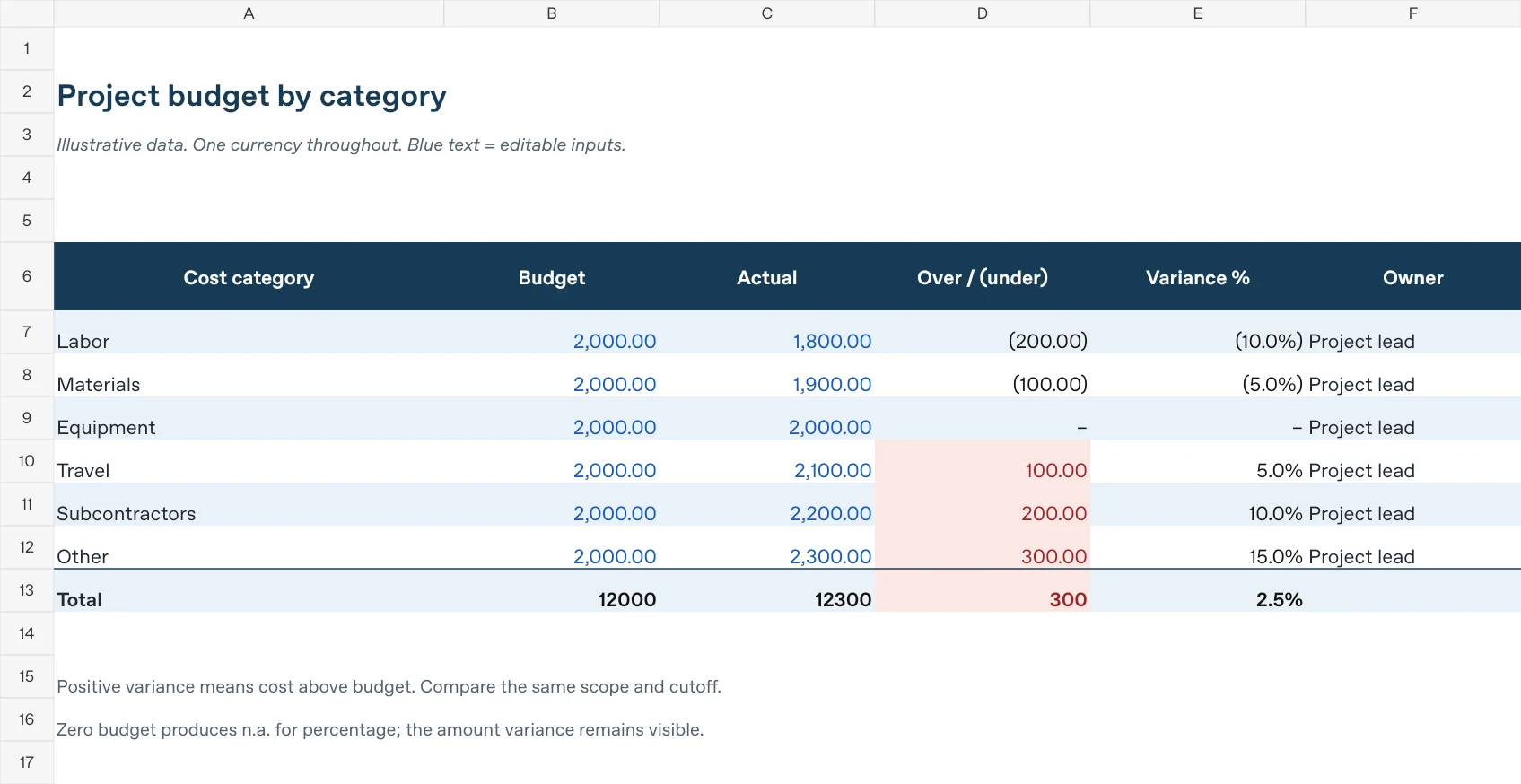
The navy category worksheet is the quickest starting point. Six cost categories show budget, actual, the monetary difference, and the percentage difference, with an owner field beside each line. Rename the sample categories for your project and assign an owner who can explain changes.
Variance is actual minus budget. A positive amount means cost above budget; a negative amount means cost below budget. The percentage divides that amount by the budget. For a 2,000 budget and 2,300 actual cost, the worksheet shows 300 over budget and 15%. If the budget is zero, the percentage displays n.a. while the monetary difference remains visible. This avoids presenting an undefined percentage as zero.
2. Phase Budget and Commitments
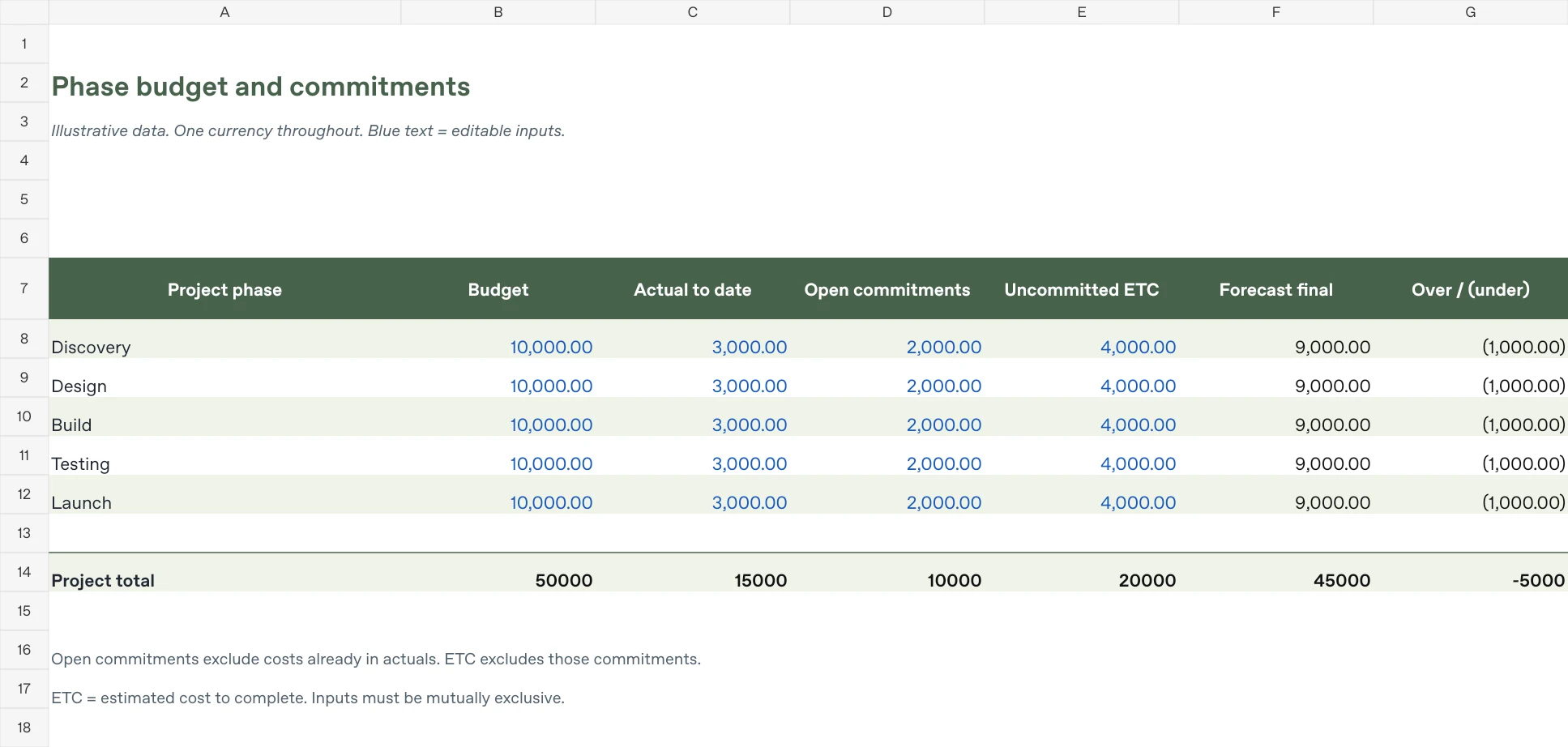
The sage worksheet organizes the project into phases such as discovery, design, build, testing, and launch. Each phase has a budget, actual cost to date, open commitments, and uncommitted estimated cost to complete. The forecast final cost adds those last three amounts and compares the result with the phase budget.
This version helps when recorded invoices tell only part of the story. A phase with 3,000 actual cost, 2,000 in open commitments, and 4,000 of other remaining work has a forecast final cost of 9,000. Do not include the same supplier amount in both commitments and the remaining estimate. Likewise, remove an amount from open commitments when it becomes actual cost. The three inputs must be mutually exclusive.
3. Monthly Project Spending Review
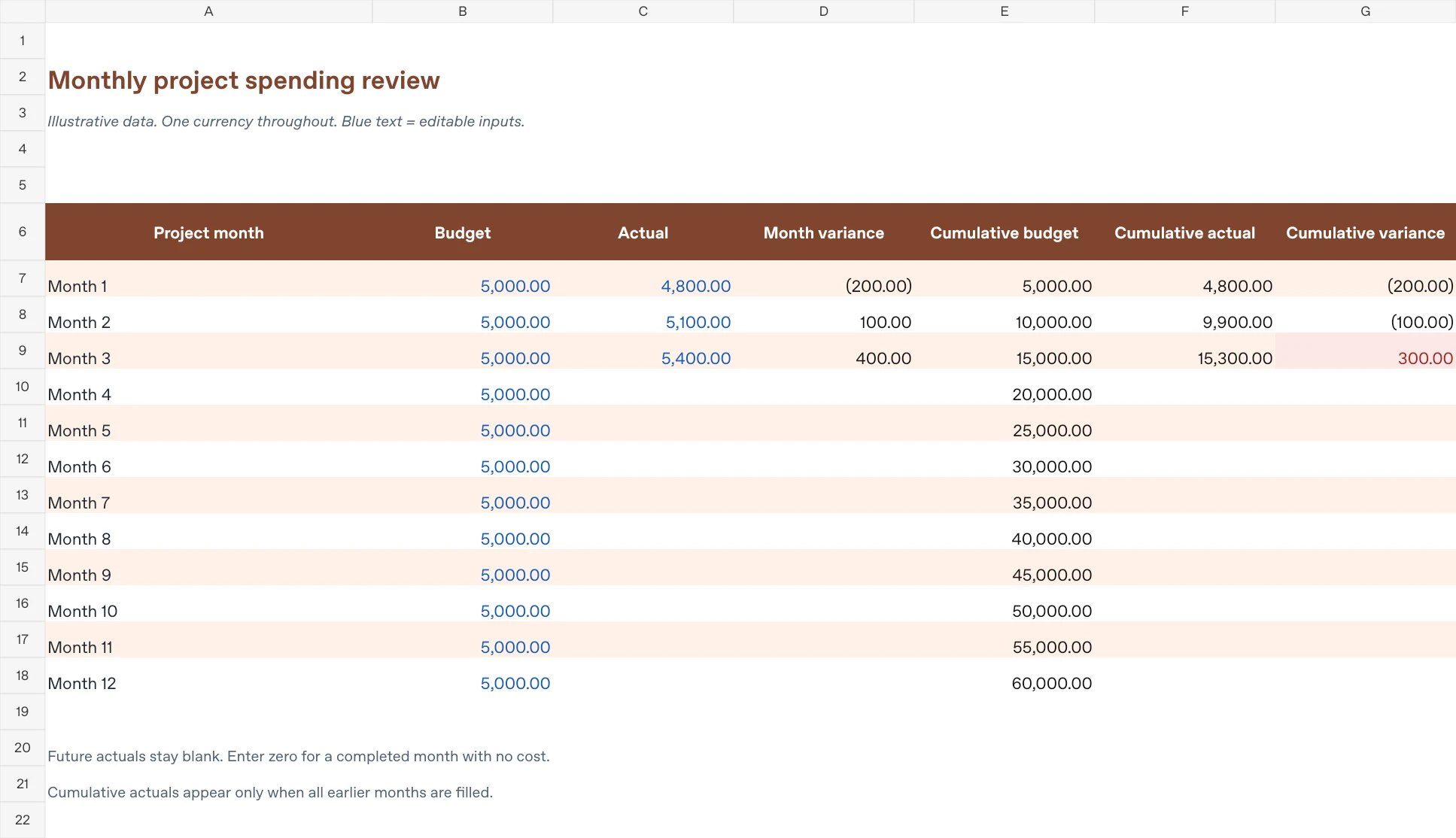
The terracotta monthly review puts twelve project months down the page. It compares each month’s budget and actual cost, then builds cumulative budget, cumulative actual cost, and cumulative variance. The arrangement works well for a project manager who needs to explain when spending began to depart from the plan.
Leave future actual months blank. Enter a numerical zero when a completed month has no cost. Cumulative actuals remain blank until every preceding month is complete, so an omitted month cannot quietly disappear from the total. The template labels periods as Month 1 through Month 12; rename them to your project’s actual calendar periods and retain the same sequence. A delay in spending may reflect delayed work rather than a permanent saving.
4. Original and Approved Project Budget
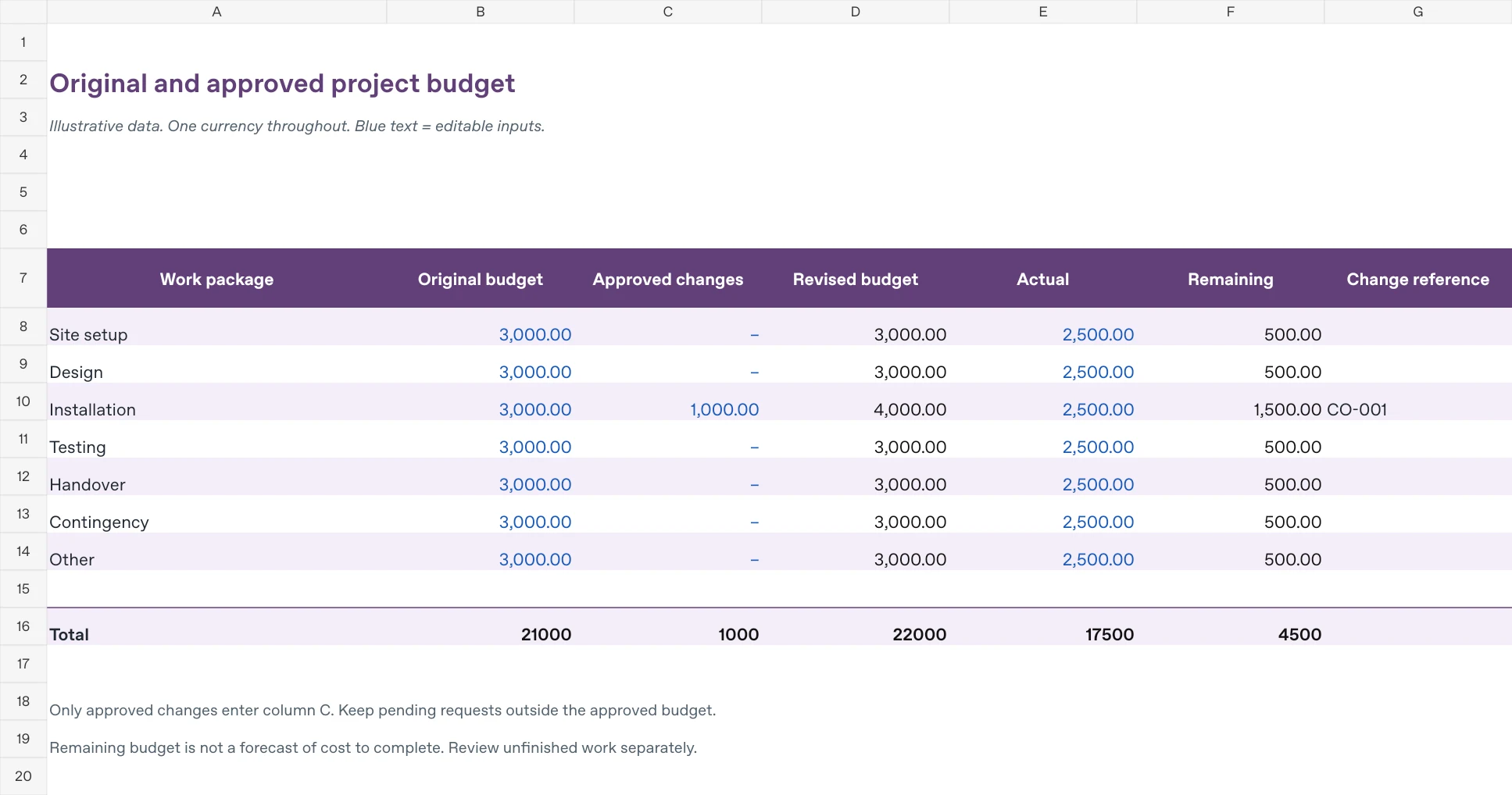
The plum change-control sheet keeps original budget, approved changes, and revised budget visible together. It compares actual cost with the revised budget and provides a reference field for the approval record. This makes it easier to explain why the current authorized total differs from the amount agreed at kickoff.
Enter only approved changes in the adjustment column. Keep pending requests in a separate decision log until they are authorized. A negative adjustment can record an approved reduction. Remaining budget is revised budget minus actual cost; it is not an estimate of the work still required. If 4,000 remains available but the unfinished work will cost 5,500, the project still needs a forecast discussion. Preserve the original column instead of rewriting history.
5. Quantity and Rate Variance Analysis
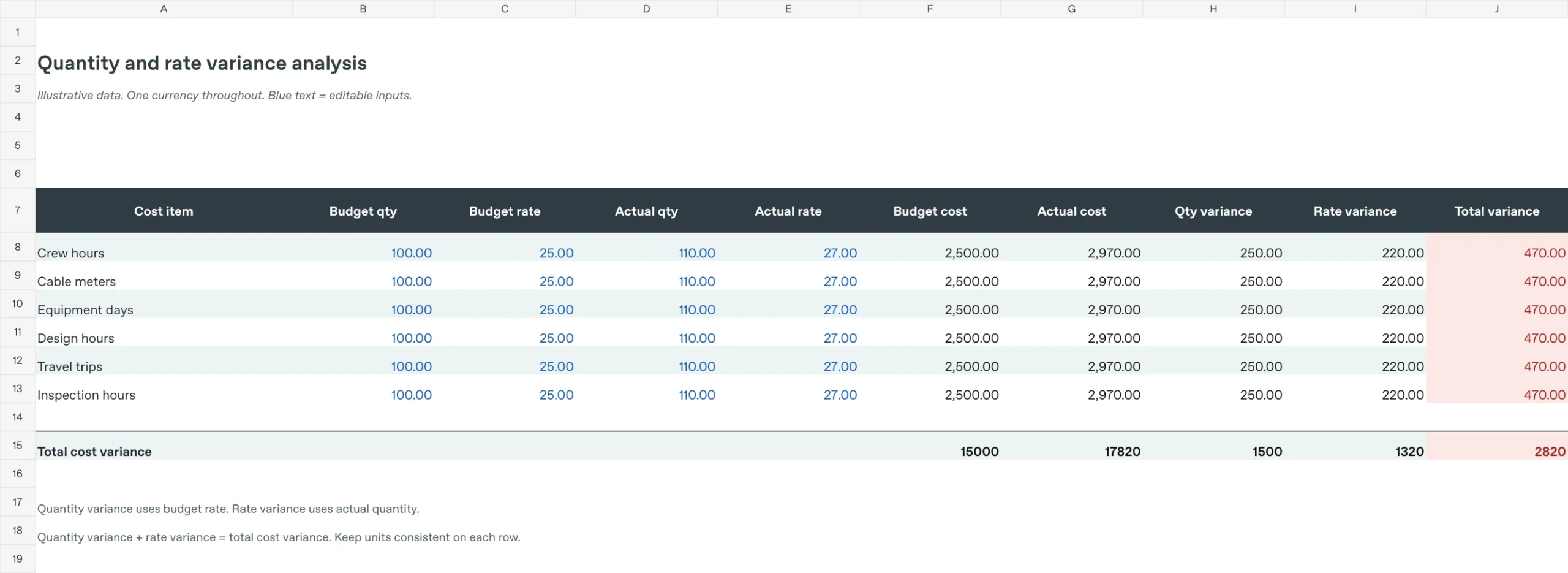
The slate analytical worksheet explains cost differences through two drivers: quantity and rate. Each row contains budget quantity, budget rate, actual quantity, and actual rate. The calculated columns show budget cost, actual cost, quantity variance, rate variance, and total variance. Use it for hours, equipment days, material quantities, or other measurable cost items.
With 100 budget hours at 25 and 110 actual hours at 27, budget cost is 2,500 and actual cost is 2,970. The quantity effect is 250, calculated using the budget rate. The rate effect is 220, calculated using actual quantity. Together they explain the 470 total increase. Keep the same unit on both sides of each row and do not add quantities with unrelated units into a grand quantity total.
Read the variance in the context of progress
A project that has spent 40% of its budget may be in a good position if it has completed most of its work. The same spending level may be a concern if very little work is complete. These workbooks compare costs and budgets. They do not calculate earned value or measure physical completion automatically.
That distinction matters because formal earned-value cost variance uses a different definition. Microsoft’s explanation of CV fields compares the budgeted cost of completed work with its actual cost. The simple variance in these downloads is actual cost minus the entered budget. Read the labels rather than assuming that every report uses the same sign convention.
Bring the project schedule into the review. The site’s project timeline templates can help you check whether an apparent underspend accompanies a delayed milestone. Keep the schedule and cost review on a shared cutoff so the discussion concerns the same point in the project.
A worked review: the budget looks fine, but the forecast does not
Imagine a build phase with an approved budget of 10,000. Recorded costs are 3,000, so the simple remaining budget is 7,000. There is also an outstanding supplier commitment of 5,000 and a further 4,000 of work that has not yet been ordered. The final-cost forecast is therefore 12,000.
The current spending position is below budget, while the expected final cost is 2,000 above it. Neither number is wrong. They answer different questions. The phase-and-commitments workbook makes the distinction explicit so a meeting can focus on the unfinished work, the scope, and any available options.
If the supplier later invoices 2,000 of the open order and that invoice enters actuals, increase actual cost and reduce the open commitment by the same amount. The forecast final cost should remain unchanged unless the underlying expectation changes. This transfer is a useful check against double counting during a monthly update.
Build a repeatable cost review
First, retain an approved baseline and identify the review cutoff. Gather actual costs using consistent category or work-package names. Check whether credits, refunds, and adjustments have been included. Keep the supporting invoice or transaction references outside the summary if they need more room than the template provides.
Second, ask owners to confirm open obligations and remaining work. A purchase order is useful evidence of a commitment, but an old order may have been cancelled or partly fulfilled. Review outstanding amounts instead of assuming that the original order value still represents future cost.
Third, explain the material differences. A price increase, extra quantity, approved scope change, and timing delay deserve different responses. Use the quantity-and-rate model when the inputs support that analysis. Use the change-control model when authorization is the main question. Record an action, owner, and review date in your project notes for each issue that needs follow-up.
Finally, connect cost risks with your project risk register. A possible supplier increase should not be hidden as an unexplained actual cost. Keep uncertainty visible, and update the forecast when the evidence changes. A concise explanation of the largest changes is more useful than a long list of tiny differences.
Adapt the spreadsheet to the project, not the other way round
The supplied workbooks contain six category lines, five phase lines, twelve monthly periods, seven change-control lines, or six quantity-and-rate lines. Rename the examples to match your work. Before adding rows, extend the relevant totals, formulas, and conditional formatting. Check both a typical line and the final total after editing.
For construction work, start the baseline from a realistic estimate. The site’s construction estimate Excel templates can help organize the original quantities and costs before you begin tracking actuals. Keep the estimate version that was approved, even if later supplier prices change.
All downloads use one currency at a time and contain fictional examples. Blue numerical text identifies editable inputs. Calculations remain editable too, so save a master copy before changing the layout. Percentage differences with a zero budget show n.a.; they do not erase the underlying monetary overrun.
Frequently Asked Questions
Which template includes costs that have not been invoiced?
Use Phase Budget and Commitments. Enter open committed amounts separately from actual costs and from uncommitted estimated cost to complete. Review those boundaries every time an invoice is recorded.
Should I replace the original budget after a change?
Keep the original baseline. The change-control workbook adds approved adjustments to calculate a revised budget while preserving the starting point. Include a reference to the approval so another reviewer can follow the change.
Why can a project be under budget and still have an overrun forecast?
Actual costs describe spending recorded so far. A final-cost forecast also includes the work still to come. The remaining obligations can exceed the unused budget even when current actual spending appears low.

