

An invitation says “the Lee family.” The reply says “we’ll be there,” but the caterer needs to know whether that means two adults, two children, and four meals. Then someone brings a guest, a table fills up, and the welcome desk needs to know who is still expected. Good planning starts by keeping those counts separate.
These five event guest list and RSVP tracker Excel templates help with invitations, household meal counts, seating capacity, reply deadlines, and check-in. They work for small receptions, community events, and dinners where people arrive in groups. Every download includes an editable example and a preview. Use only the sheets that suit your event, and keep a master count that everyone recognizes.
Jump to a template preview
RSVP and catering headcount calculator
Estimate the confirmed guest count and the maximum if every pending invitation accepts.
Worked example: Confirmed attendees: 82; Pending attendees: 16; Vendor or crew meals: 6 → Confirmed meal count: 88; Maximum meal count: 104.
Count guests rather than invitations, and reconcile vendor meals with your caterer.
A week in the life of a guest list
Early in the week, the host checks unanswered invitations. When people reply, the catering lead wants a meal count rather than a list of household names. Near the event, the venue wants to know how many seats are reserved at each table. At the entrance, a volunteer needs a short list of expected parties. These are related views, but a reply, a seat, a meal, and an arrival each answer a different question.
Agree on a cutoff and choose one person to maintain the current guest numbers. If two hosts are collecting replies, ask them to enter their updates in the same working list or send them to the person maintaining it. Keep notes about changes, especially when a household reduces its count after initially accepting. A to-do list can help track tasks such as sending reminders and confirming the final catering number.
Invitation and RSVP Register
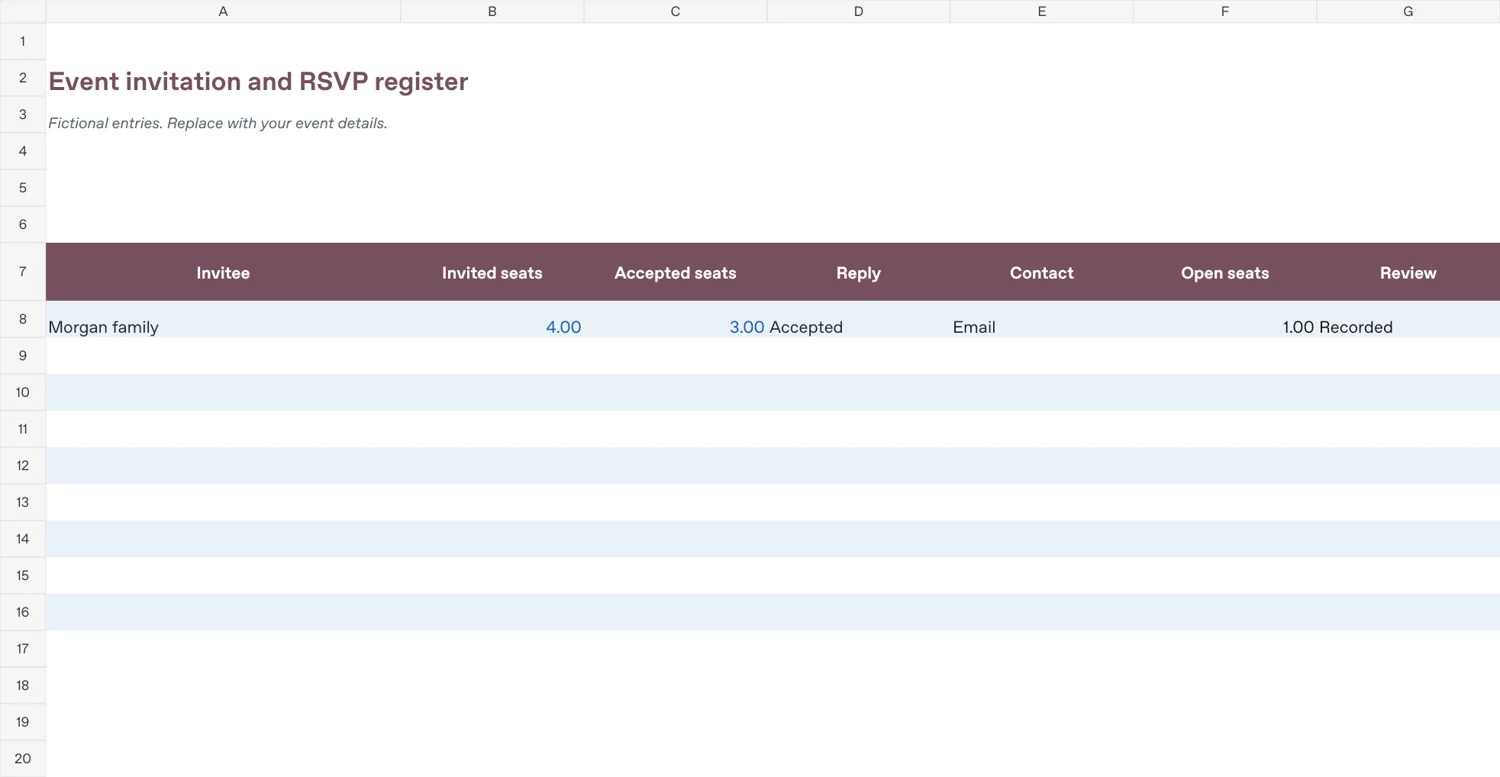
The dusty rose register tracks each invited party, invited seats, accepted seats, reply, and contact channel. It shows the difference between invited and accepted seats and highlights a count that exceeds the invitation. The example has four seats invited and three accepted. The open-seat field is the unused part of that invitation. It is separate from venue capacity.
Use one row for a household if the party usually answers together. Use one row per guest if individuals reply separately or need separate seating notes. Keep a consistent convention for pending and declined replies. If a person says they might attend, do not silently include them in the confirmed count. Record the actual reply and discuss how much flexibility the venue allows.
If you invite another guest after someone declines, create a separate entry for the new party rather than overwriting the original reply. That makes it easier to recognize a later message from the original household and prevents two people from assuming they have the same available seat. Collect only the contact details the host needs to send updates.
Household RSVP and Meal Counts
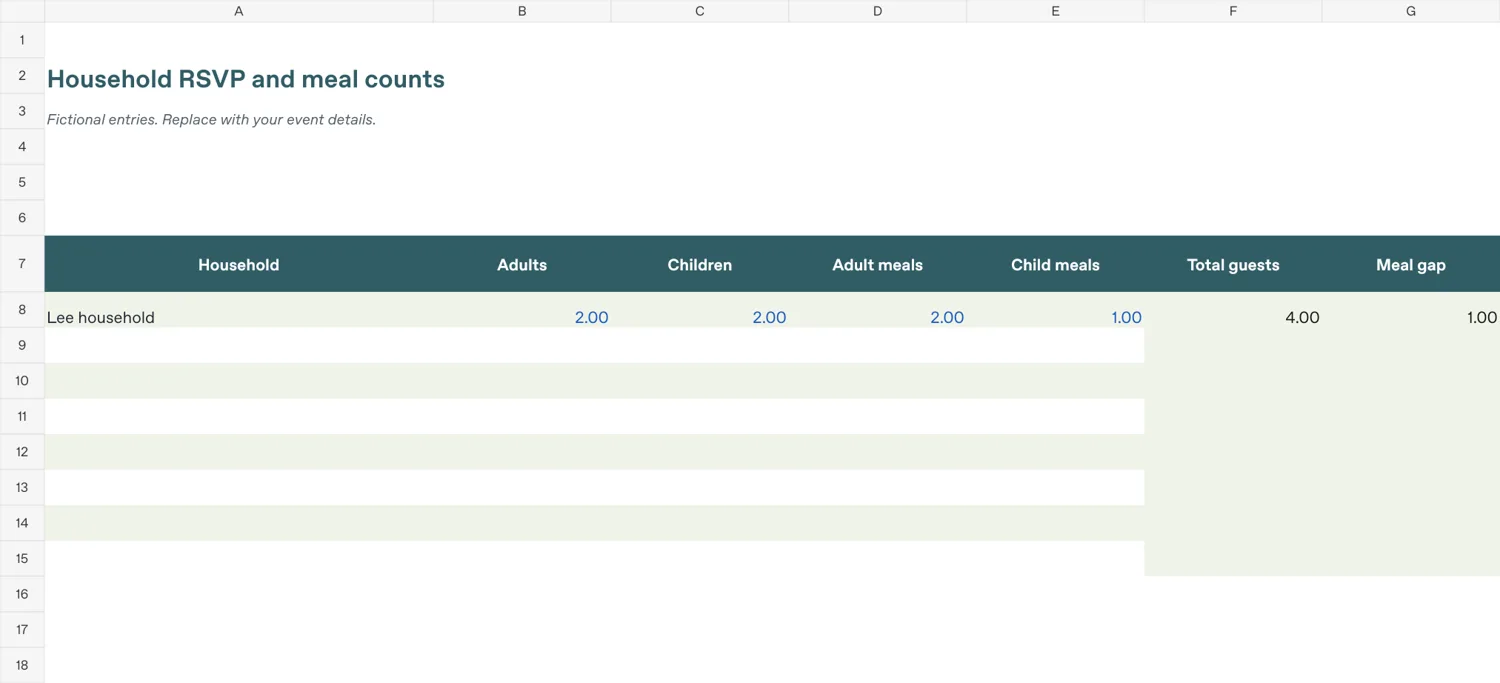
The blue-green household sheet records adult and child guest counts separately from adult and child meals. It adds the guests and compares them with the meals entered. In the sample, two adults and two children give four guests, while two adult meals and one child meal leave a difference of one. That difference prompts a question; it is not always an error.
An infant may need a place in the room but no catered meal. Another guest may request a meal type normally associated with a different age group. Use the guest count for capacity and the meal count for the catering order. Record the reason for any difference in a working note. If you need to collect dietary requirements, keep the details in a restricted record and share only what the catering team needs.
Before confirming catering, compare the total ordered with the accepted guest list. A household that updates its RSVP may have changed only one of its meals. Ask which person or meal is affected before making a blanket change to the count. Keep the date of the final numbers so later additions can be identified separately.
Table Capacity Planner
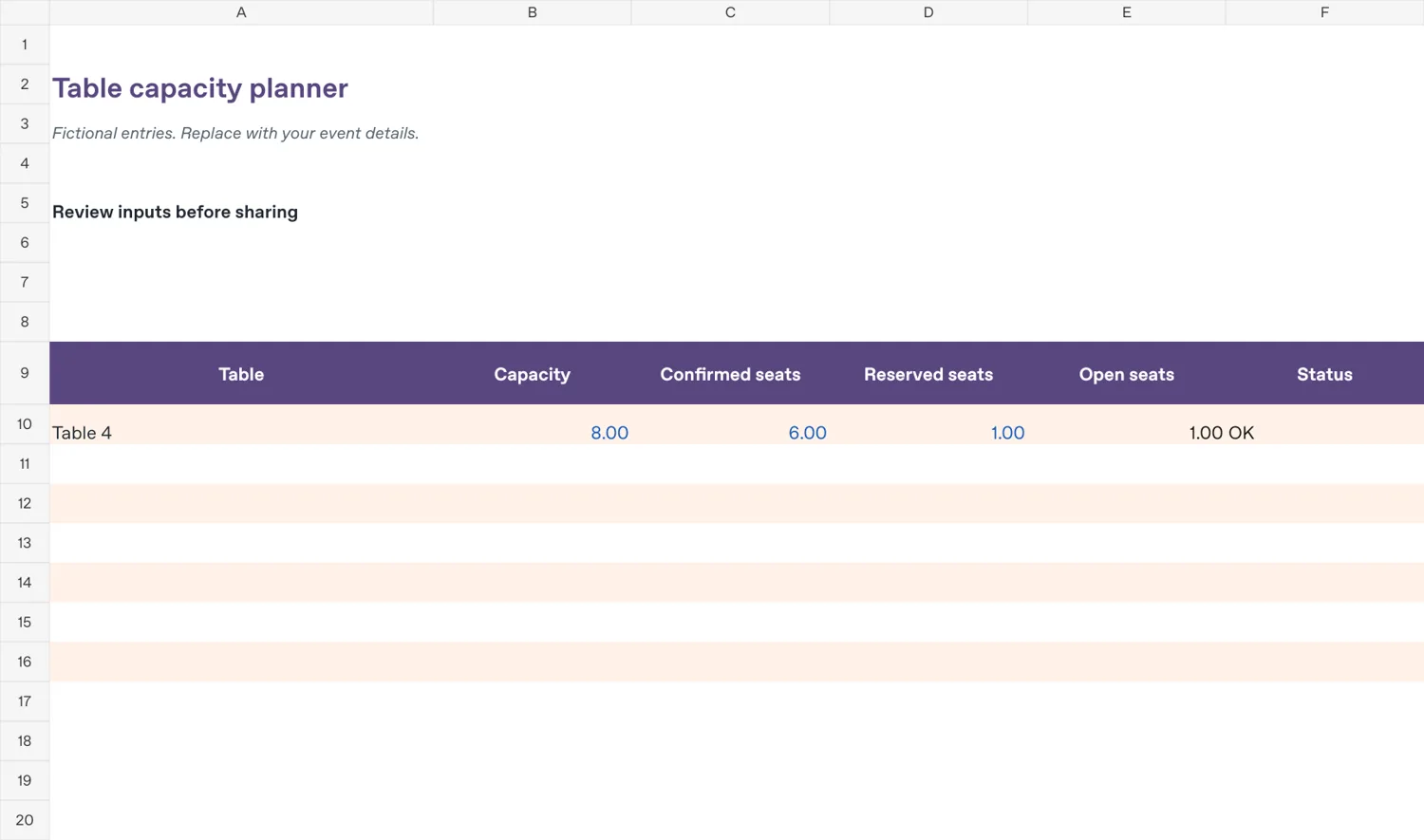
The lavender seating worksheet compares each table’s capacity with confirmed and reserved seats. With eight seats, six confirmed guests, and one additional reserve, the table has one open seat. If confirmed plus reserved seats exceed capacity, the status changes to Over capacity. A reserve is an extra held place, so do not count it again if the same guest is already included in confirmed seats.
This file is a capacity check rather than a visual seating chart. Keep a separate list of names assigned to each table if volunteers need to direct people to seats. Check the physical layout with the venue before assuming a table can take an extra chair. Room for access, service, and movement may matter more than the arithmetic capacity.
When moving a guest to another table, update both the source and destination counts. Then check the list for duplicate assignments. If a group wants to sit together, confirm its final party size before changing other tables to accommodate it. A spare seat at two different tables may not solve a request for two seats together.
RSVP Deadline Follow-up List
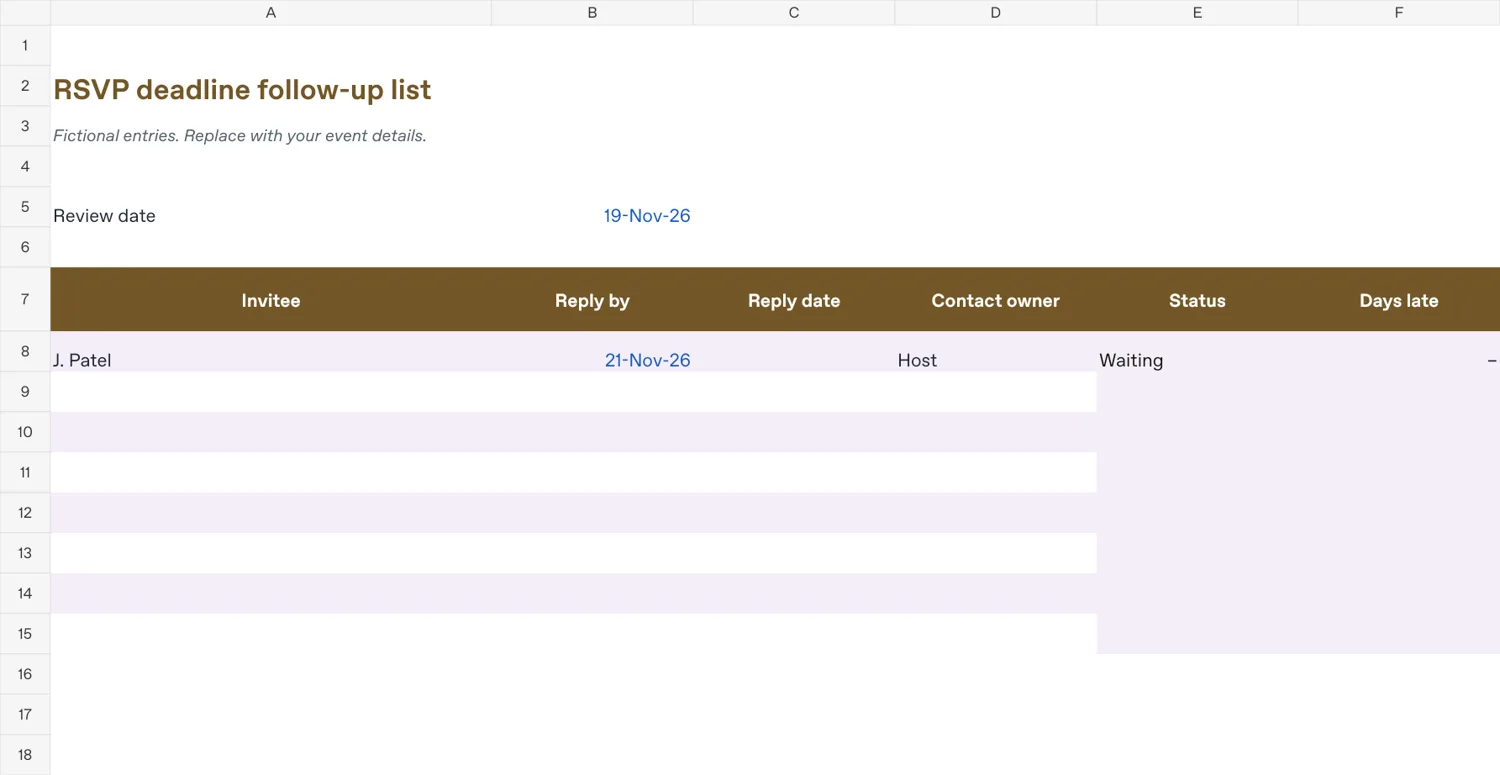
The amber worksheet compares a reply-by date with a review date and records the date a reply actually arrived. It marks an unanswered party after its deadline for follow-up. A reply received after the deadline can still show how many days late it was. A missing deadline is flagged separately so it is not confused with a valid waiting response.
Use the contact owner column when more than one host is chasing replies. Agree on a simple message and record who sent it, so guests do not receive overlapping reminders. If the final catering date is earlier than expected, update the timeline and communicate the change rather than quietly moving the spreadsheet deadline.
A late reply is a planning signal, not a reason to assume someone will attend. Keep a short list of replies that need a decision before you hand numbers to the venue. A weekly schedule can help coordinate those reminders with seating deadlines and other event tasks.
Event Day Guest Check-In
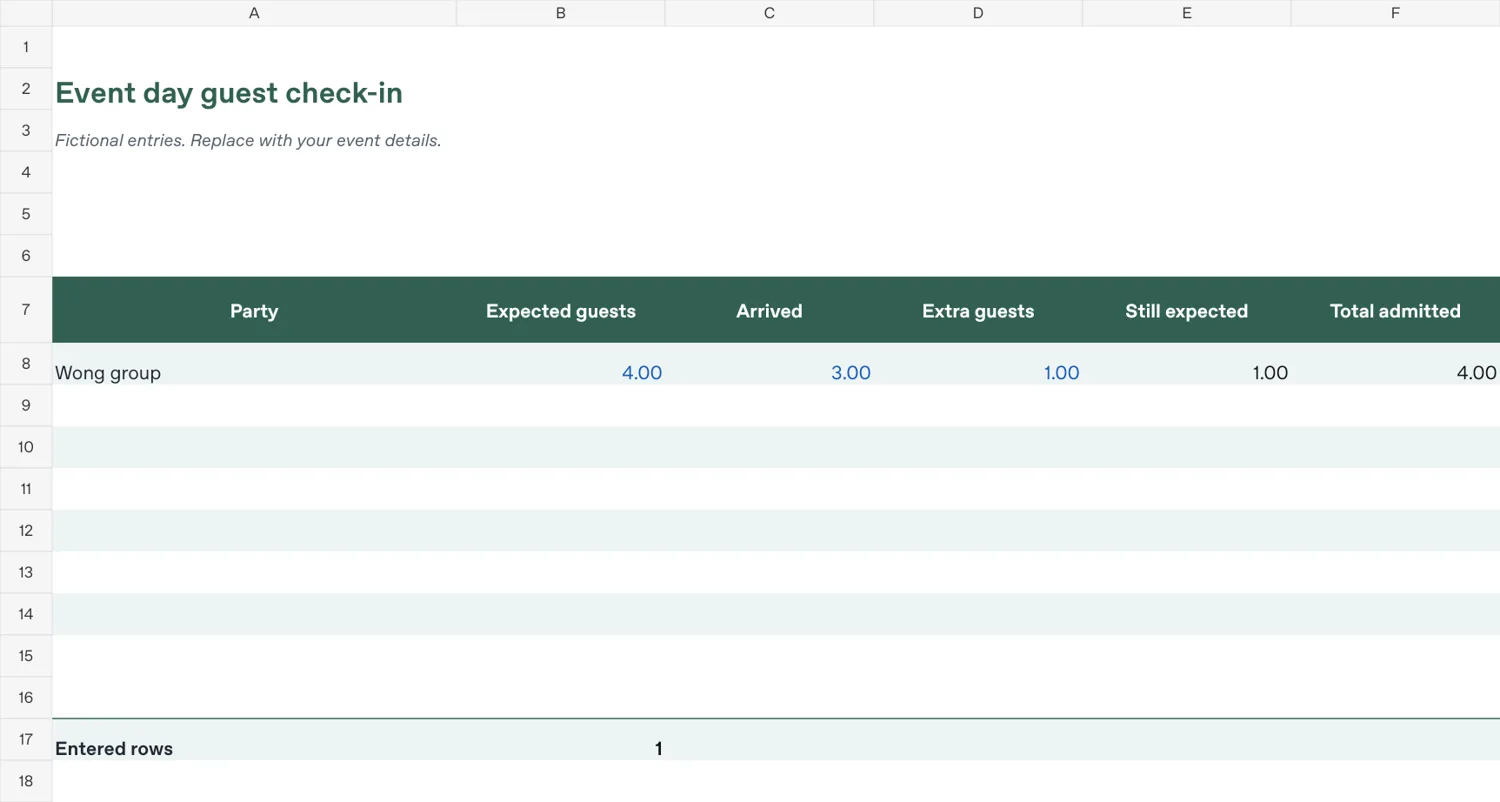
The green check-in list records the party name, expected count, arrived guests, and extra guests. It shows how many expected guests are still outstanding and the total admitted. In the sample, three of four expected guests have arrived and one extra person came with them. One expected guest remains outstanding, while four people have entered.
Use a clear rule for what counts as an extra guest. If the venue has strict capacity or a guest list policy, the worksheet should record the decision rather than making it. Designate someone who can resolve exceptions so volunteers do not have to guess at the door. If you expect staggered arrivals, update the same row as members of a party come in.
Print or share a simplified version for the welcome desk. You usually do not need private phone numbers, meal notes, or other details there. A separate sign-in sheet can be more appropriate when you need individual signatures or a record of attendees rather than party counts. Keep the live guest list with the person responsible for updating arrivals.
The final reconciliation before guests arrive
Compare confirmed attendance with the venue’s usable capacity. Check whether the catering count intentionally differs from the guest count. Then make sure the check-in list uses the same party names people are likely to give at the door. Keep one copy labeled with the date and time of the latest update so the person at the entrance can tell whether their list is current.
If plans change on the day, write down the exception and who agreed to it. Later you can update the final count without trying to remember what happened. For a small gathering, one host may manage all of this with two sheets. For a bigger event, assign the guest list, catering count, and check-in list to the people using them, while agreeing which list owns the confirmed totals.
Frequently Asked Questions
Should guests and households go in the same list?
You can use either unit, but make each row’s meaning clear. A household row is useful when the host receives one reply for several seats. Individual rows help with assigned seating and individual check-in. If you move between them, verify the total number of people before sending counts to the venue.
How do I record a plus-one who has not confirmed?
Include the invited seat in the invitation count and wait for the party to confirm the actual attendance. Do not add an unconfirmed seat to a confirmed meal or arrival count. If the host decides to hold capacity for it, use a separate reserved seat in the seating view.
Can I add more rows or columns?
Yes. Work in a copy, extend the formulas to the new rows, and verify a familiar example. If you add an additional meal type or a new seating category, include it in the relevant count once. Check the printed or shared layout before giving it to a volunteer.

