

A sales report can look healthy while the bank balance tells a different story. The gap often sits in invoices that customers have not paid. An accounts receivable aging report makes that gap easier to investigate by showing what remains outstanding and how far each balance has moved beyond its due date.
These five free accounts receivable aging Excel templates cover different parts of that review: invoice aging, customer summaries, collection promises, credit exposure, and weekly overdue trends. Each download is an editable .xlsx workbook with formulas, fictional sample data, and its own preview. Choose the view that answers your immediate question, then add another when your process needs it.
The files use five visual approaches, from a navy invoice ledger to a sage customer summary and a restrained weekly review. They are separate tools, rather than five tabs automatically connected to an accounting system. That distinction matters when you update balances: changing one file does not refresh the others.
Jump to a template preview
Invoice aging calculator
Enter the open balance and dates to identify the bucket for one unpaid invoice.
Worked example: Open invoice balance: 1,800; Due date: 2026-11-04; Reporting date: 2026-11-22 → Days overdue: 18; Aging bucket: 1–30 days.
Use payments and credits posted through the reporting cutoff when finding the open balance.
Related template: 5 Project Budget vs. Actual Excel Templates
Start with one reliable reporting date
Before sorting invoices, decide the date of the report. A balance described as overdue on Friday may have been current on Monday. Enter the same review date in every workbook used for that reporting cycle. Use invoice balances, payments, and credit notes recorded through that date so the numbers tell one consistent story.
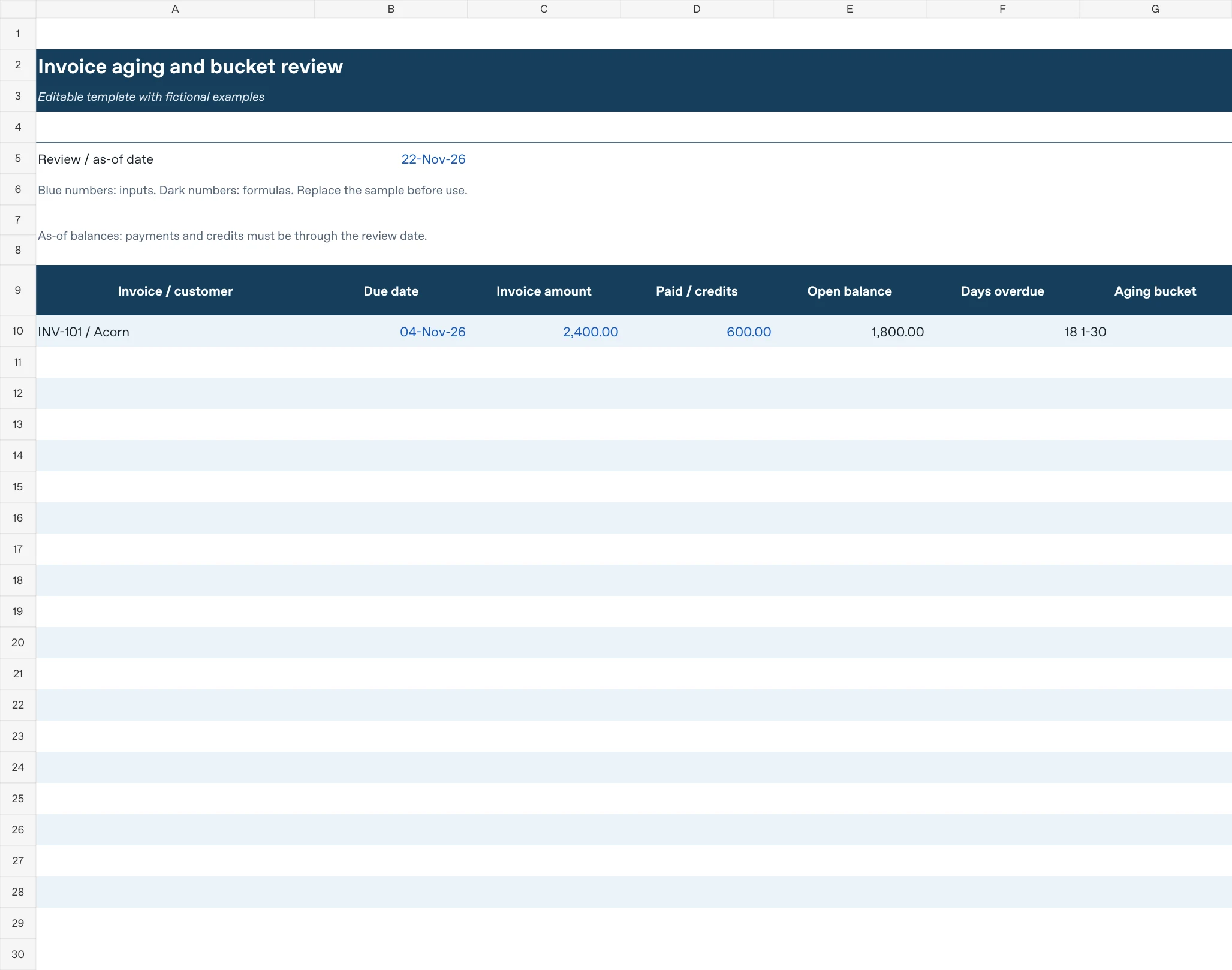
For example, an invoice for 2,400 with 600 already received has an open balance of 1,800. If its due date was eighteen days before the review date, the remaining balance belongs in the 1–30 day overdue category. The original invoice amount does not belong in that bucket after a partial payment.
Historical reporting takes extra care. If you prepare a month-end report later, exclude payments received after the month-end cutoff from the historical balance. Simply changing the date at the top of today’s ledger cannot recreate an earlier ledger automatically.
Choose your accounts receivable template
1. Invoice aging and bucket review
Download Invoice aging and bucket review (.xlsx)
Use this navy ledger when you need to see individual unpaid invoices. It includes an invoice or customer reference, due date, invoice amount, payments or credits, open balance, days overdue, and aging bucket. Alternating rows make a longer invoice list easier to scan during a collection review.
Enter one invoice per row and keep the invoice number in the reference, even when several invoices belong to the same customer. The workbook subtracts payments and credits from the invoice amount, calculates overdue days against the review date, and classifies the remaining amount. Current invoices stay separate from overdue balances, while settled balances receive their own label.
This is the best starting point for a small business with a manageable invoice list. If you also need issue dates and payment tracking, use the site’s invoice tracker templates as the supporting transaction record.
2. Customer aging summary
Download Customer aging summary (.xlsx)
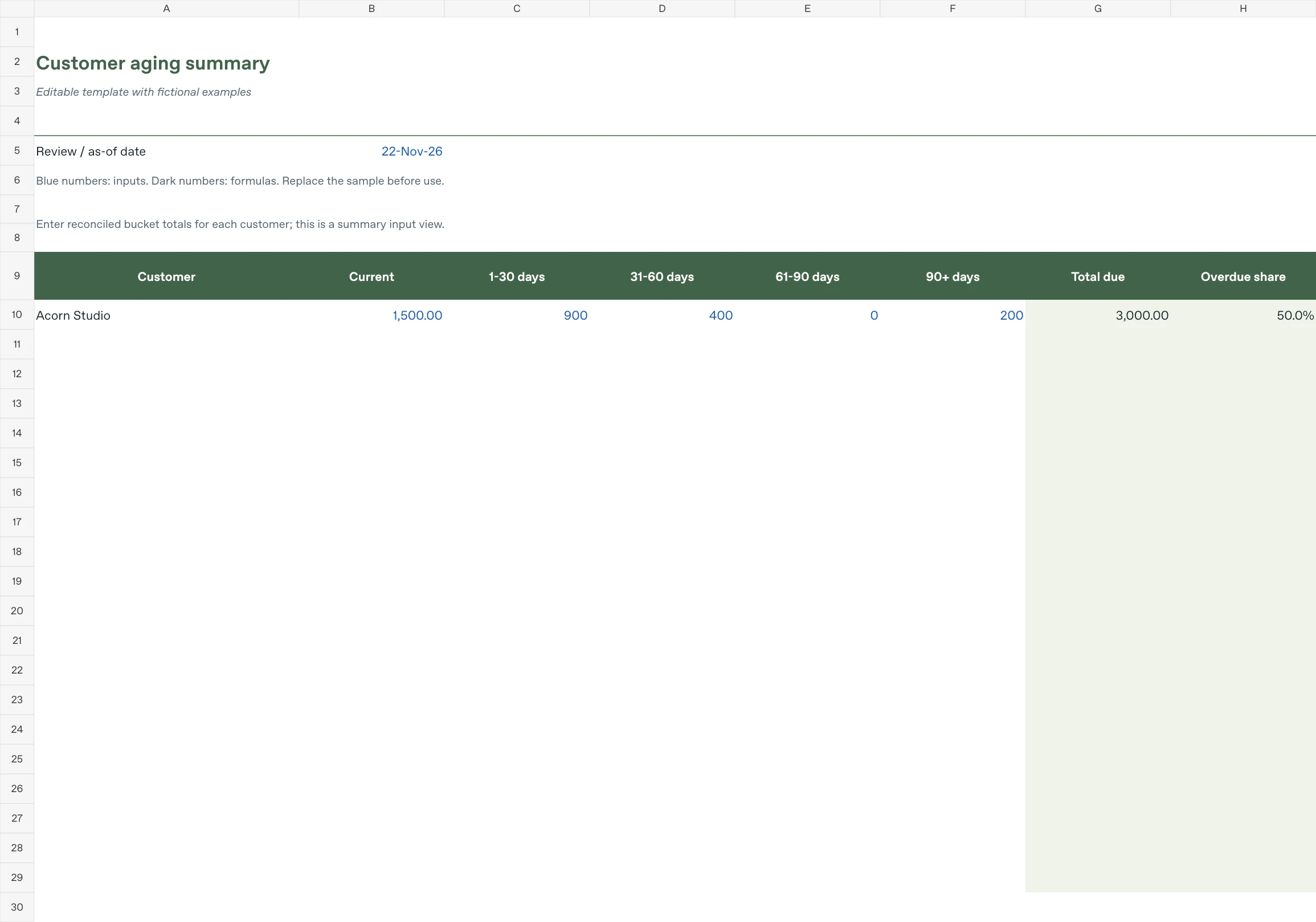
The sage summary answers a different question: which customers account for the outstanding balance? Enter each customer’s reconciled totals for current, 1–30, 31–60, 61–90, and over-90-day balances. The workbook calculates total due and the proportion already overdue, with the result columns visually separated from the inputs.
The sample customer has 3,000 outstanding, of which 1,500 is overdue. An overdue share of 50% helps explain the balance without treating a large current invoice as a collection problem. Review both the percentage and the actual overdue amount. A high percentage on a tiny account may deserve less attention than a substantial overdue balance on a larger account.
These bucket totals are manual inputs. Reconcile them to your invoice list before presenting the summary, and keep the same cutoff date in both records.
3. Collections follow-up planner
Download Collections follow-up planner (.xlsx)
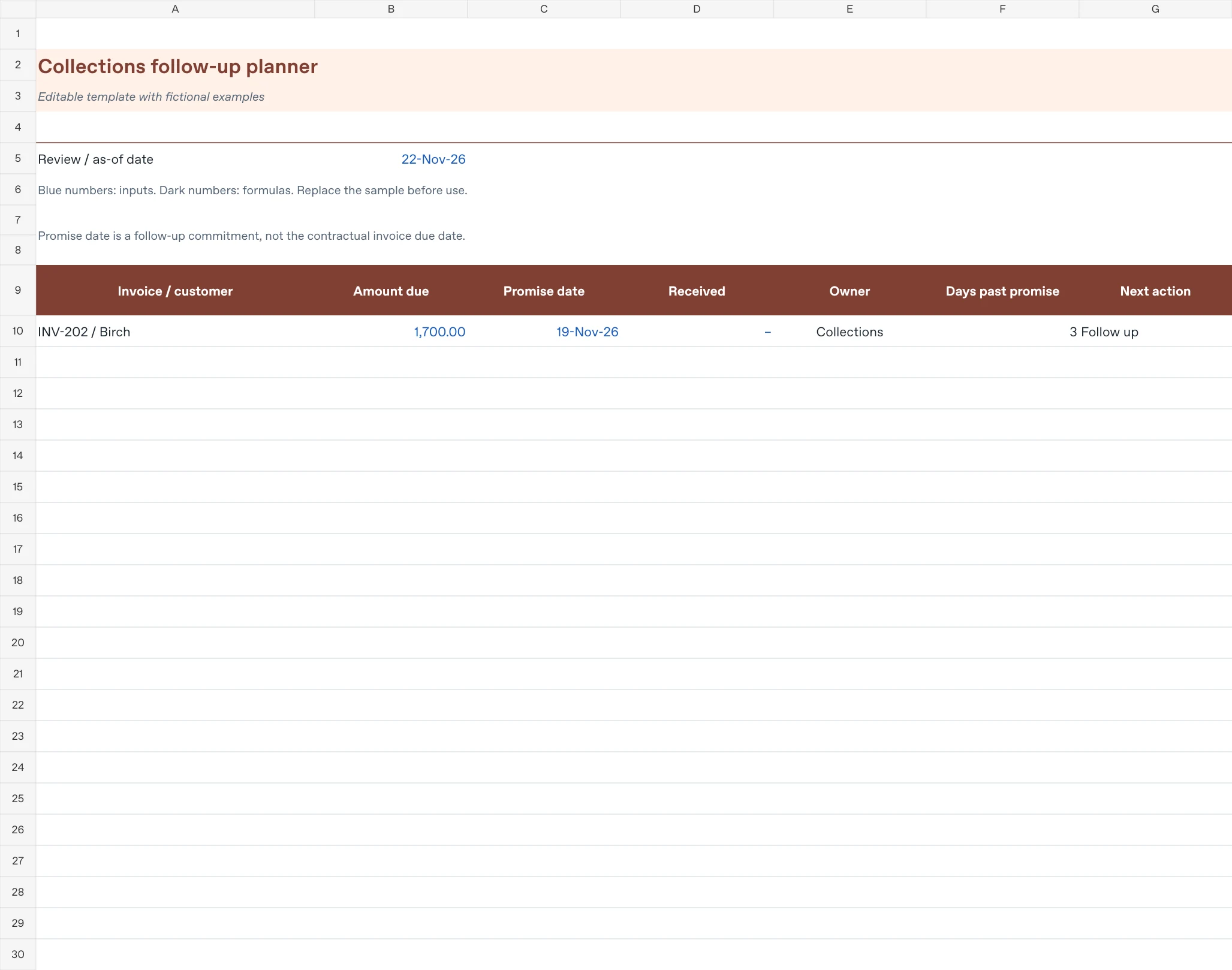
A promised payment date is easy to lose inside an email thread. This terracotta planner keeps the amount due, promise date, amount received, responsible person, days past the promise, and next action together. Its ruled layout leaves a clear line for each follow-up commitment.
The example shows a 1,700 balance with a promise that has passed and no receipt recorded. The calculated action becomes “Follow up.” Once the recorded receipt covers the amount due, the status becomes “Paid.” A partial receipt still requires attention to the remaining commitment.
Use this file for the agreed collection action, not to change the contractual due date. Keep the original invoice aging intact. If the customer disputes an amount, record the dispute and supporting correspondence in your invoice system or accompanying notes before assigning the next call.
4. Customer credit exposure review
Download Customer credit exposure review (.xlsx)
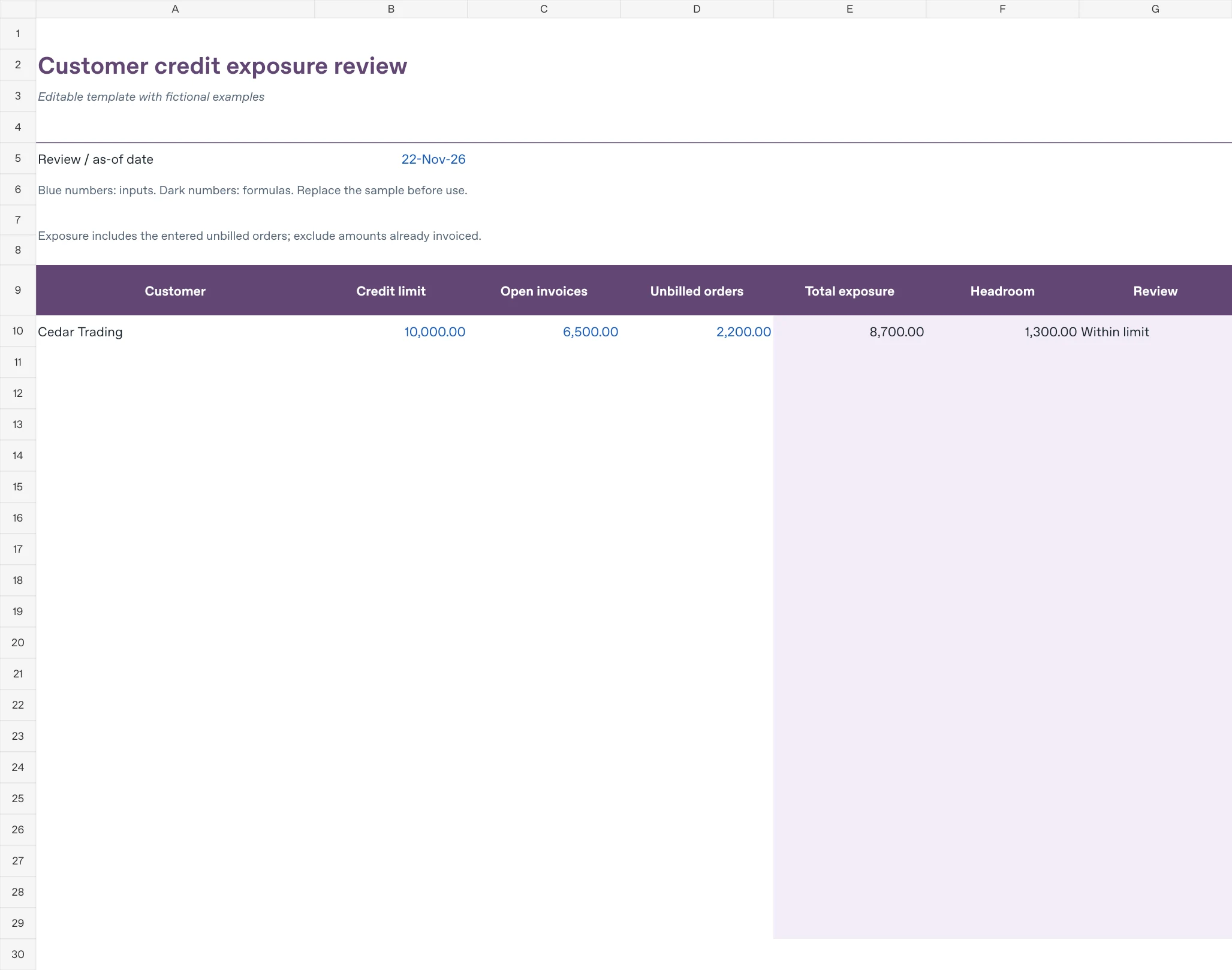
The plum review brings open invoices and unbilled orders into one exposure calculation. Enter the approved credit limit, open invoiced balance, and unbilled order value that you want included. The sheet calculates total exposure and remaining headroom, making the decision inputs visible beside the result.
In the example, 6,500 of open invoices and 2,200 of unbilled orders create exposure of 8,700 against a 10,000 limit. Remaining headroom is 1,300. That figure is a review input, not an automatic instruction to release another order.
Exclude orders already included in the invoice balance or you will count the same commitment twice. Check returns, disputed invoices, and the business’s approval policy before changing a limit. Keep evidence of approval outside the calculated status field.
5. Weekly overdue balance review
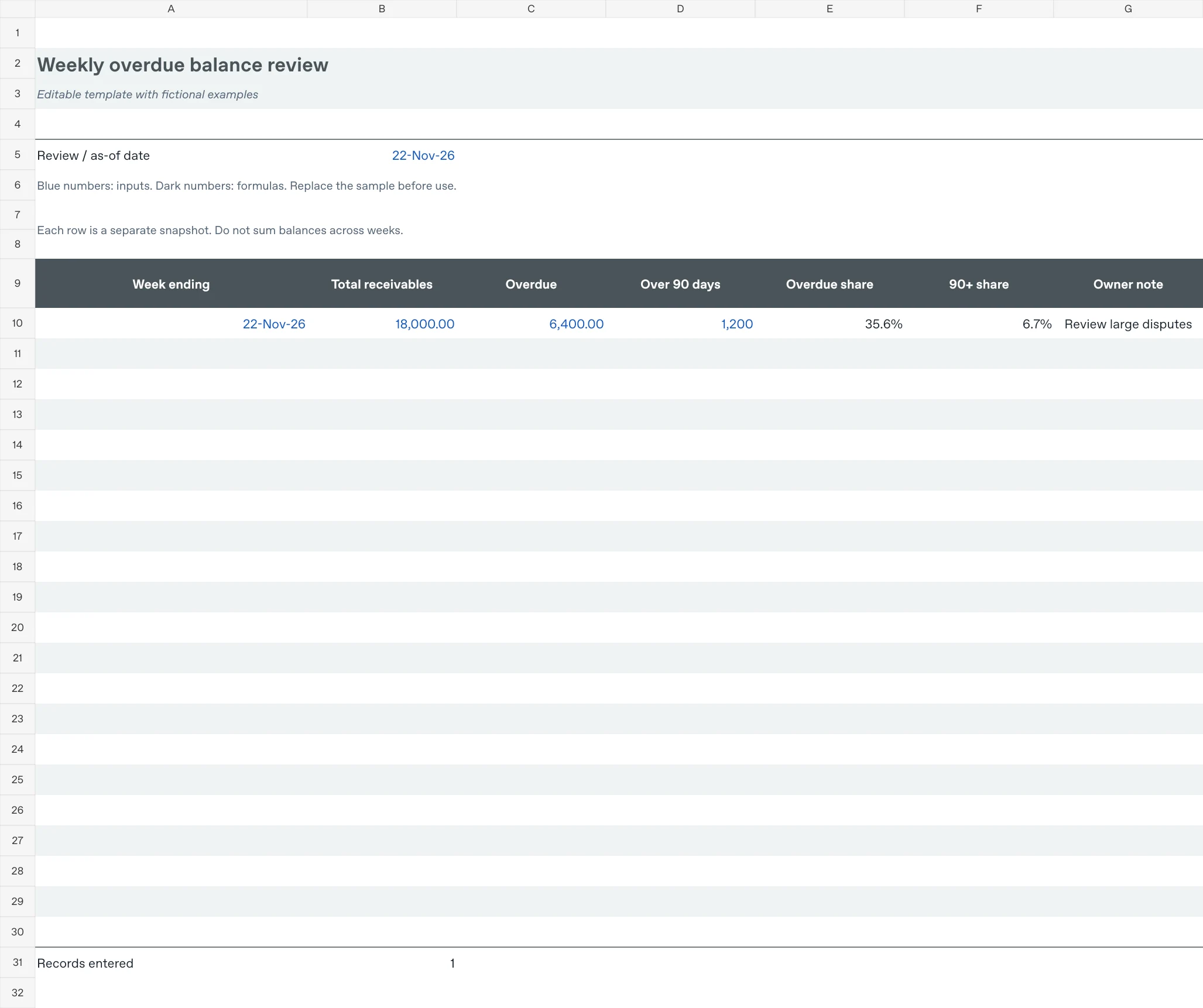
Download Weekly overdue balance review (.xlsx)
The graphite weekly sheet is designed for a brief management conversation. Record the week-ending date, total receivables, overdue amount, over-90-day amount, and an owner note. The calculated shares help show whether the overdue balance is becoming more concentrated as the overall ledger changes.
Each row is a snapshot. Do not sum several weekly receivable balances and describe the result as monthly receivables. Comparing the snapshots is useful; adding them counts the same unpaid invoices repeatedly.
Use the note to explain a material change in plain language: a large customer paid, a credit was approved, or a disputed invoice moved into an older bucket. An unexplained percentage change is less useful than a modest change with a clear cause and an assigned next step.
A practical weekly collection routine
Start by refreshing the underlying invoice list. Match receipts to the correct invoice, enter approved credits, and check that the open total agrees with the source record. Avoid using a bank deposit total as a substitute for invoice allocation when a deposit covers several customers or invoices.
Next, review the oldest material balances and any broken payment promises. Assign an owner to each follow-up. The owner should know what is being requested, which documents the customer needs, and when another update is expected. “Contact customer” is less helpful than “Send the signed delivery record and confirm the Friday transfer.”
Then look at customer-level concentration. A single overdue account can dominate the review even when most customers pay on time. Consider the actual amount, the dispute history, and the current commitment together rather than sorting only by age or only by percentage.
Finally, save a dated copy for the week. This preserves what the team knew at the time and prevents a later payment update from silently changing the evidence used in the meeting. Keep one clearly named working version for current collections.
Formulas worth understanding
Open balance is invoice amount less payments and credits entered through the cutoff. Days overdue is the review date less the due date, with current invoices kept at zero days overdue. The aging label then follows the defined day ranges.
The customer overdue share divides overdue balance by total due. When total due is zero, the template avoids a division error. That does not remove the need to investigate unusual credit balances or negative entries. Review them separately before treating the ledger as ready for reporting.
Credit exposure adds the open invoice balance and the selected unbilled orders. Headroom subtracts that exposure from the approved limit. These calculations are deliberately visible and editable. If your business uses a different exposure definition, document the change rather than silently adding unrelated amounts.
Set up the files without breaking the calculations
Save an untouched copy of each download, then replace the fictional example in a working copy. Numeric inputs appear in blue and formulas in dark text. Edit the input cells; preserve calculated columns when clearing the examples. Set the review date explicitly rather than assuming the displayed sample date is current.
The tabular files include twenty working rows. To extend them, copy a complete formula row downward, check the references, and expand any formatting or conditional-format ranges you rely on. Test the first added invoice with a balance whose result you can calculate yourself.
Use one currency per review unless you convert amounts through a documented process. Adding different currencies together produces a misleading total. Likewise, keep customer names and invoice references consistent so a filter does not split the same account into several variations.
Questions about accounts receivable aging
Should aging begin with the invoice date or due date?
These templates age overdue balances from the due date. That matches the question of how late a payment is. If your reporting policy ages from invoice date, change the labels and formulas consistently. Do not compare the two approaches as though their buckets mean the same thing.
Can I use the files for partial payments?
Yes. Enter the payments or credits against the relevant invoice. The open balance recalculates, and the remaining amount stays associated with that invoice’s due date. Retain the detailed receipt history in your transaction record when multiple payments need an audit trail.
Does an old invoice automatically become a bad debt?
No. An aging category describes elapsed time. It does not decide whether an amount should be written off or how an allowance should be recorded. Keep collection tracking separate from accounting adjustments and use your business’s established review and approval process for those decisions.
Which file should I use first?
Begin with the invoice aging ledger if your underlying list needs organizing. Add the customer summary when management needs a concise view, and the collections planner when promises need follow-up. The weekly review becomes useful once you can produce consistent balances from one reporting date to the next.

