

Who can cover the month-end report if its usual owner is away? Which required course is overdue, and which certificate needs renewal next month? Those questions need different records. These five free employee training matrix Excel templates cover skills gaps, course completion, certificate renewal, training budgets, and cross-training coverage.
The files are editable .xlsx workbooks with actual previews and direct download buttons. Each uses a different color theme and layout. Some compare ability with a required level; others track dates, costs, or coverage. Choose the record that answers your question rather than treating every training activity as a completed skill.
A useful training matrix should lead to a practical action: arrange supervised practice, assess a skill, book a renewal, or develop a second qualified person. It should also make uncertainty visible. An empty assessment is not evidence that someone has no ability, and a course booking is not proof of competence.
Decide whether you are tracking ability, attendance, or readiness
A skills matrix compares what a role needs with what a person can currently demonstrate. A completion register records whether an assigned activity has been completed. A renewal tracker checks whether dated evidence is approaching expiry. These records can support one another, but they should not be substituted for one another.
For example, an employee may attend an Excel course and still need supervised practice before preparing a report independently. Another person may already demonstrate the skill through work evidence without needing the same introductory course. Agree what evidence counts before allocating training places.
Use a course attendance sheet when you need a record of participation. Keep the attendance record linked to the course, but use the skills matrix for an assessment of the work. The CIPD’s learning needs analysis guidance offers further context for identifying development needs rather than starting with a list of courses.
Make the rating scale concrete before using it
A scale becomes useful when two managers would interpret it in roughly the same way. For a report-preparation skill, learning might mean understanding the steps but being unable to complete the task. Assisted might mean producing the report with review at each stage. Independent might mean delivering an accurate report using the agreed controls. Coach might mean explaining and checking the process for others.
Write role-specific examples before rating the team. An independent level for a routine report is not automatically equivalent to independent work on a complex analysis. Keep the scope of the competency narrow enough to assess. Avoid one heading such as administration that hides several unrelated tasks.
Record the evidence and assessment date in your supporting records. A self-rating can begin a discussion, but it should not silently replace a required practical assessment. If the role changes, review both the required level and the current evidence instead of keeping an old gap score indefinitely.
Do not use the total gap as a league table of employees. Different roles can have different requirements, and an unassessed area is not a poor performance score. Use the gap to plan the right development action and establish who will review the outcome.
Turn the review into a workable training plan
Start with tasks that matter to current operations. Identify the consequence of a gap, the people affected, and the date by which capability is needed. A rare task with no backup may deserve attention before a popular course that improves a skill already covered by the team.
Choose an intervention that fits the gap. It might be guided practice, observation, a job aid, a short internal session, or a formal course. State the evidence expected afterward. Finishing a video is a different event from completing a work task correctly without assistance.
Use a weekly schedule to reserve time for practice and assessment. Managers should account for workload rather than putting training on a plan that nobody has time to follow. If staff time is relevant to the cost, estimate it consistently and keep it distinct from the course fee.
Where training hours must be recorded, a monthly timesheet can provide that separate time record. The matrix should remain focused on capability, deadlines, and next actions. Keeping each record’s purpose clear prevents an attendance total from becoming an unsupported competence claim.
Select the matrix or tracker you actually need
1. Employee Skills Gap Matrix
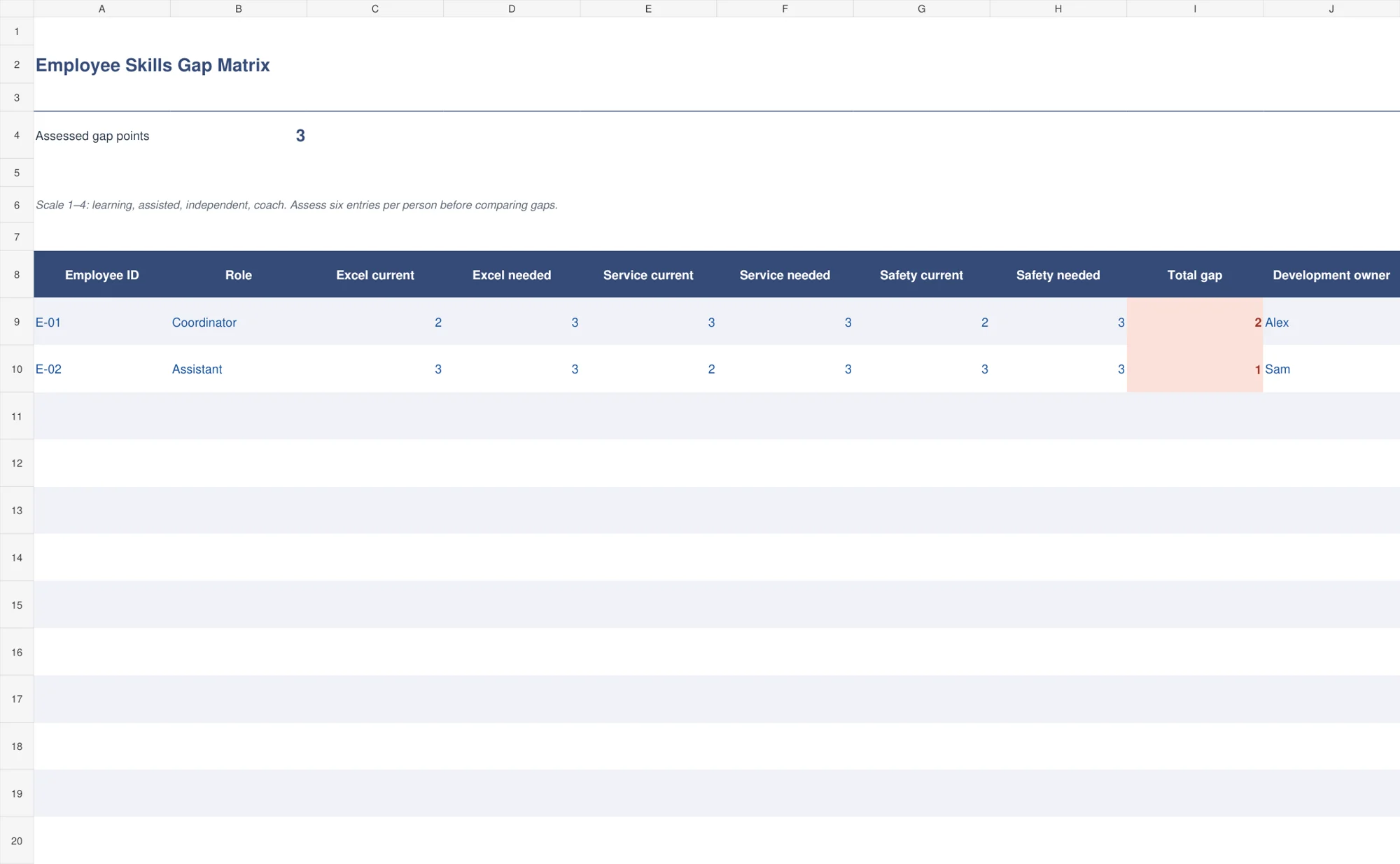
The indigo skills-gap matrix compares current and required levels for three editable competencies. The example headings are Excel, customer service, and safety. Each uses a four-point scale: learning, assisted, independent, and coach. The sheet adds the positive gaps without offsetting one skill’s shortfall against another skill’s strength.
Choose it for a small team review. Replace the competencies with ones relevant to the roles and define the scale using observable work. Every person needs six numeric ratings before the gap is calculated. Missing ratings produce an assessment prompt rather than a convincing-looking zero gap. The development owner records who will organize the next step.
2. Training Completion Register
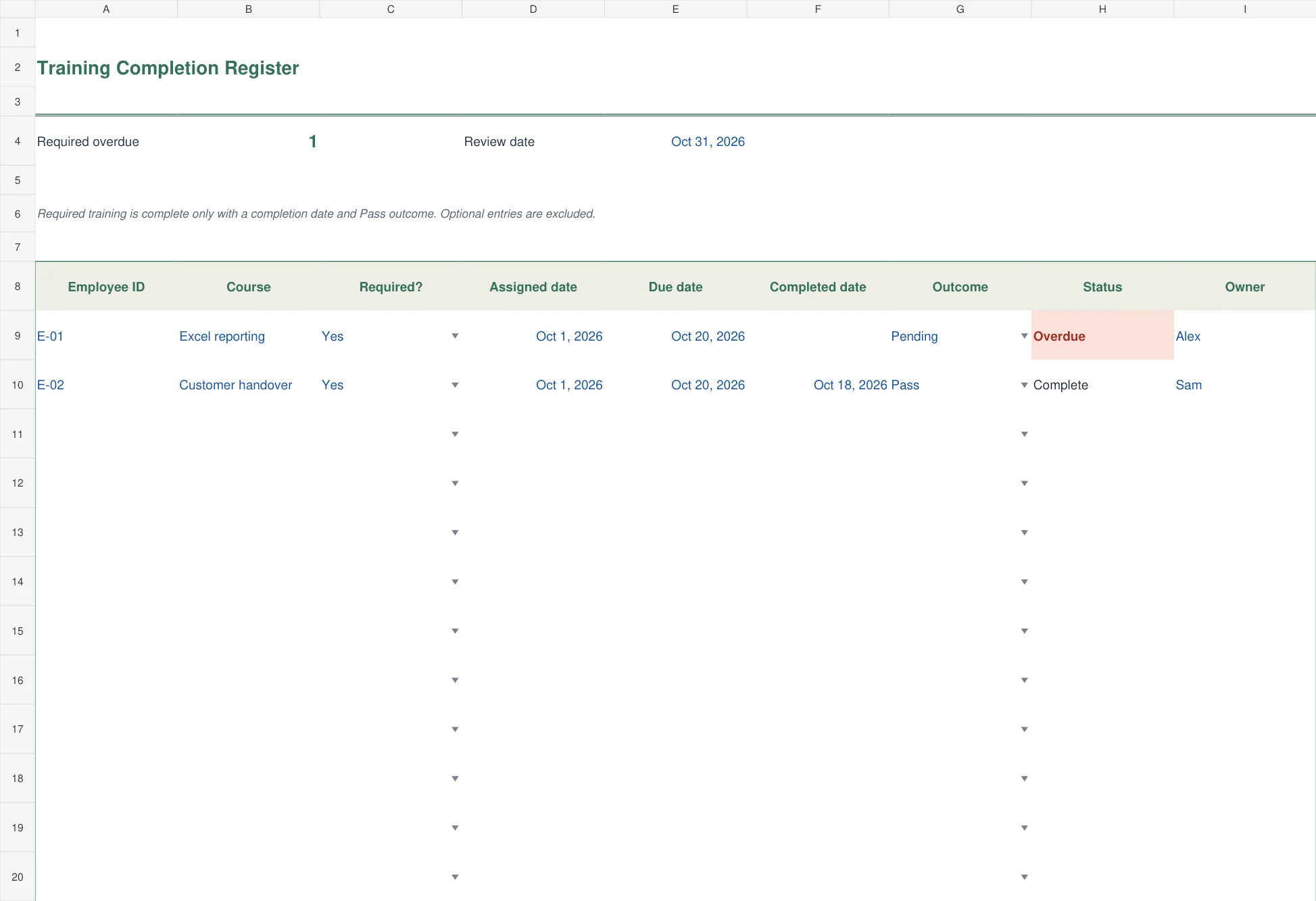
The green completion register records employee, course, required status, assignment date, due date, completion date, outcome, and owner. Required training is complete only when both a completion date and Pass outcome are present. A selected review date drives the overdue calculation.
Use this when there is a definite assignment and deadline. A course with a Retry outcome remains unfinished, even if a date has been entered. Optional activities receive a separate status and are excluded from the required-overdue count. Keep the assessment or completion evidence under a stable reference outside the spreadsheet.
3. Certificate Renewal Tracker
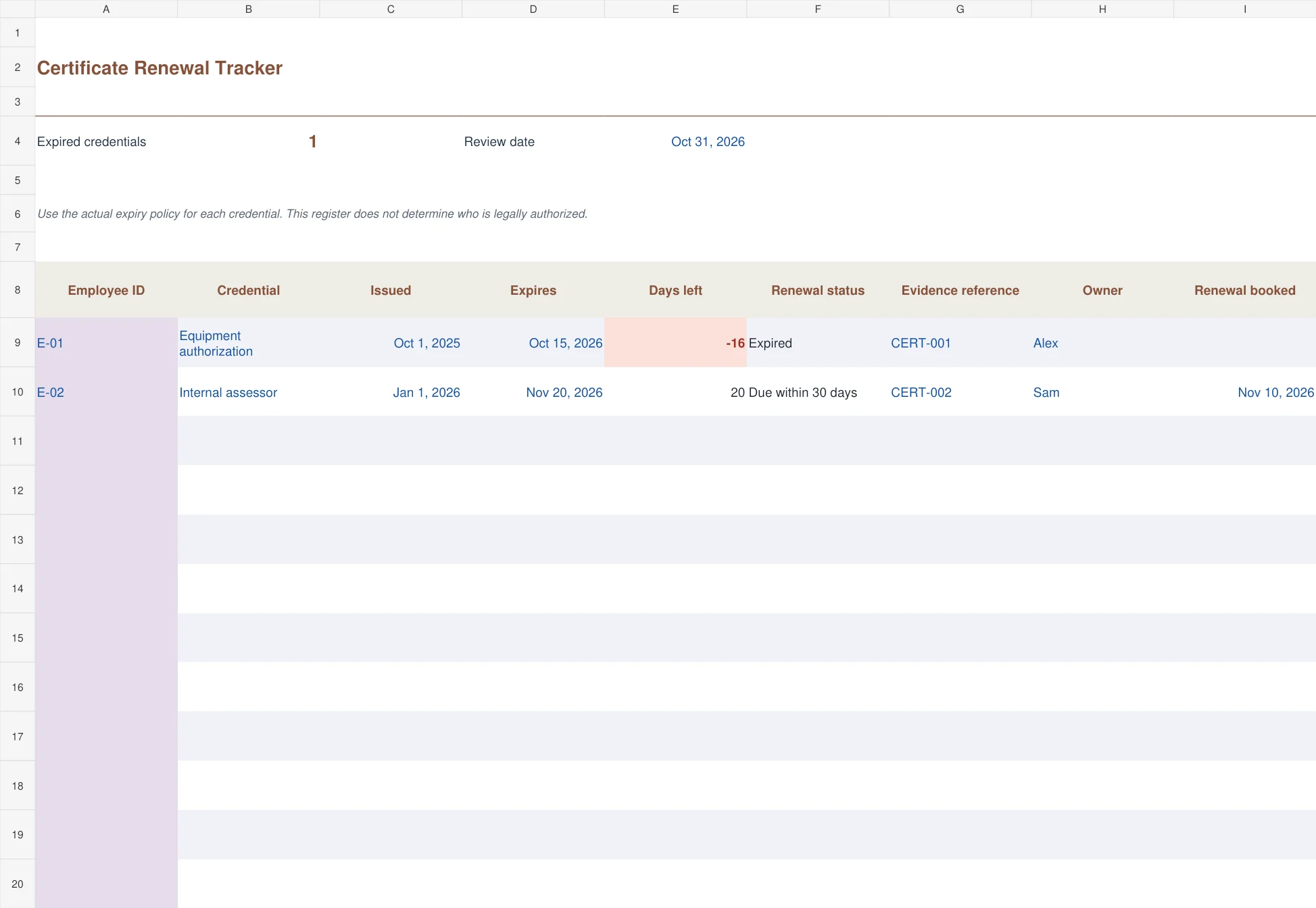
The copper certificate tracker calculates days remaining from the expiry date and review date. It identifies expired credentials, those due within thirty days, and current entries. Evidence references, renewal owners, and booking dates provide the detail needed for follow-up.
Use the actual renewal policy for the credential concerned. A booking is useful information but does not extend an expiry date. If the date is missing, the workbook asks for it rather than classifying the record as current. The tracker organizes dates and evidence; it does not decide whether someone is legally authorized to perform a regulated task.
4. Annual Training Budget Plan
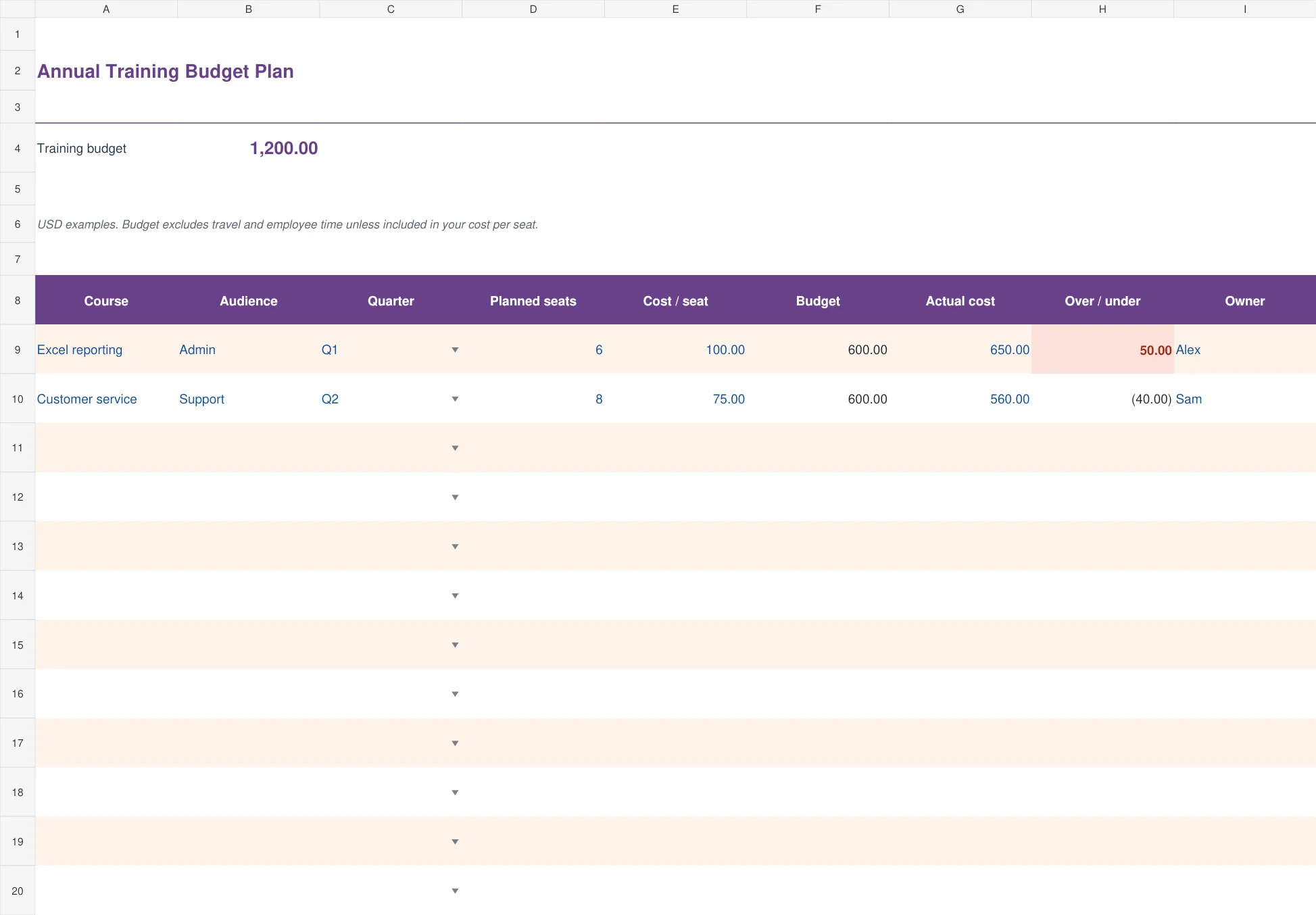
The plum annual training plan multiplies planned seats by cost per seat to produce a course budget. It groups plans by quarter and audience, then compares actual spending with the budget. Positive variance highlights spending above the planned amount.
Choose it when managers need to prioritize limited training funds. Decide whether the unit cost includes travel, materials, or employee time before comparing courses. The fictional USD examples include only the entered course cost. Keep the period and cost basis consistent so a cheap-looking course is not simply missing expenses that another row includes.
5. Cross-training Coverage Plan
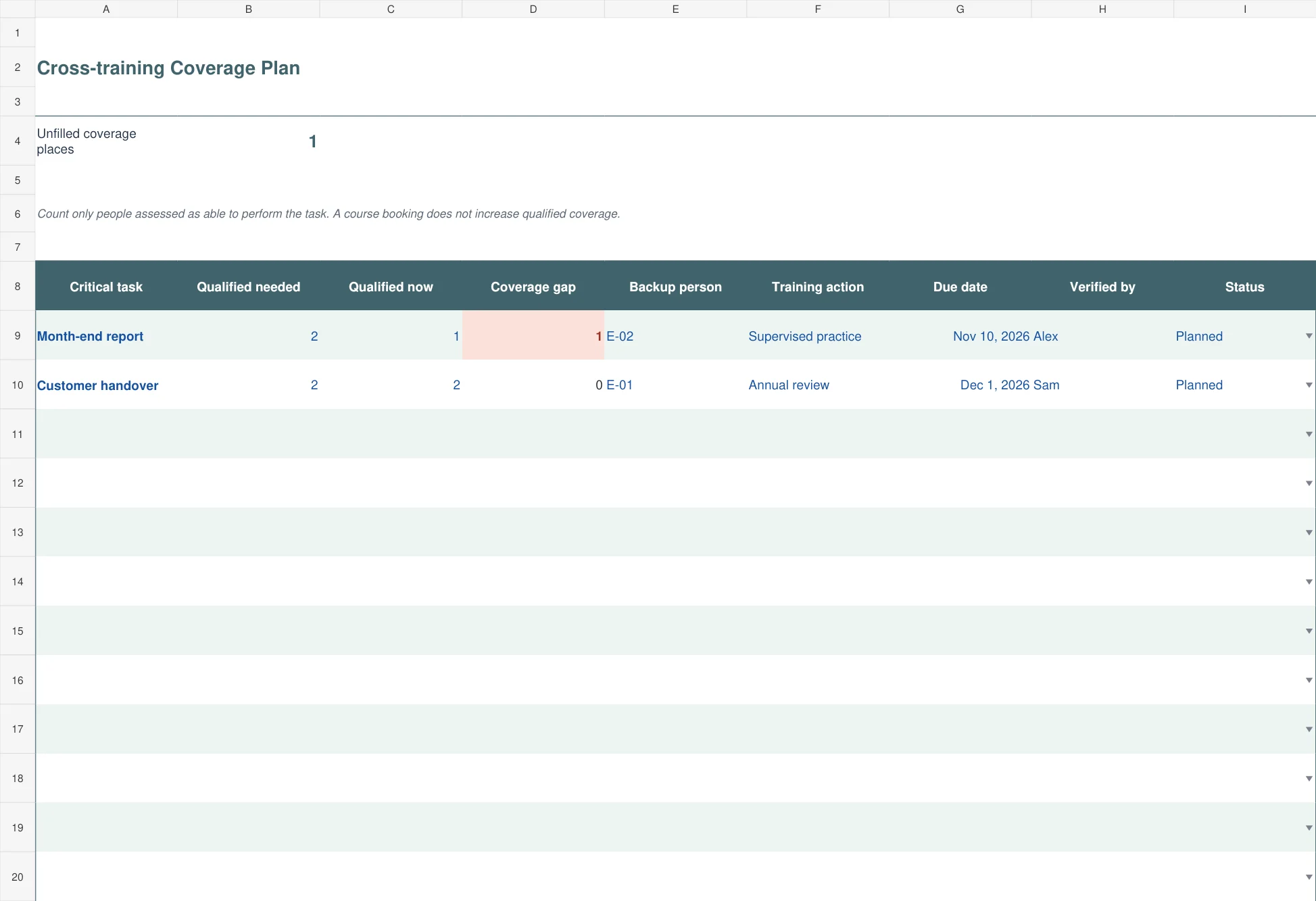
The blue-green coverage plan starts with a critical task and the number of qualified people needed. It compares that requirement with the number currently qualified, then records a backup person, development action, due date, verifier, and status.
This file is useful for work that depends on one person. A gap of one means another qualified person is needed; it is not an instruction to mark a trainee qualified immediately. Increase the qualified count only after the agreed assessment. Keep the named backup and the evidence of readiness connected so coverage remains more than a list of names.
Keep the records current without creating extra administration
Assign one owner for the master file and define when updates happen. A weekly completion review may be appropriate for active assignments, while a periodic skills review can follow a different schedule. Renewals need enough lead time to arrange a place and obtain new evidence before expiry.
Use employee IDs consistently. A name change or two people with the same name should not break the connection between training and evidence. Store certificates and assessment records in an appropriate controlled location, then use the workbook’s reference field to point to them.
The register-style files provide one hundred prepared rows. The skills matrix has three competency pairs; if you add another, extend both the completeness check and gap calculation. Simply inserting two new columns will not make them part of the existing formula automatically.
Save a dated review copy when decisions are made. That copy explains why a course was booked or a coverage action assigned at the time. Update the working file afterward, but preserve the earlier evidence rather than trying to reconstruct it from memory.
Frequently asked questions
Is a training matrix the same as a training register?
No. A matrix commonly compares people and skills, while a register records individual assignments or completions. The five files separate those purposes so attendance, competence, expiry, and cost remain understandable.
Can I change the skills in the matrix?
Yes. Rename the three example competencies and define their rating anchors. If you add more competency pairs, extend the gap formula and the completeness check to include them.
Why does a course with a completion date remain overdue?
Required training also needs a Pass outcome in the completion workbook. A date with Pending or Retry does not satisfy that completion rule.
Does booking a renewal make a certificate current?
No. The booking is a follow-up record. The status uses the actual expiry date, so enter verified renewed evidence and its new expiry when available.
Can I import the files into Google Sheets?
You can import .xlsx files, but review formulas, dropdowns, dates, formatting, and conditional highlights afterward. The downloadable versions are built as editable Excel workbooks.

