

A new employee’s first morning should not begin with a search for a working laptop, the right manager, or a password nobody has requested. These five free employee onboarding checklist Excel templates help the people involved prepare, welcome the starter, and follow through after the first day.
The set includes a first-week checklist, a 30-60-90 day plan, a remote equipment and access tracker, a manager-and-buddy action log, and a multiple-hire overview. Each file is editable, uses a different visual theme, and can be downloaded directly as .xlsx. The previews show the actual workbooks rather than decorative examples.
There is no single checklist that fits every role. A warehouse starter, remote analyst, and office coordinator need different preparation and support. Keep the shared basics, then add role-specific tasks, owners, and evidence. The purpose is to make the start workable and the expectations clear, not to turn a person’s first months into a percentage alone.
Before the start date: agree who is doing what
Confirm the actual start date and the people responsible for preparation. A task such as arrange access needs a named owner and a clear description of the systems required. A manager should be able to see whether the request has been made, whether it is approved, and whether access has actually been provisioned.
Send the practical information the new hire needs: arrival time, location or joining instructions, contact person, and what to expect on the first day. Avoid collecting sensitive documents through a shared checklist. Use the organization’s normal secure process for personal information and employment records.
Plan a first-day agenda that leaves room for questions and ordinary work needs. A full day of presentations may complete a schedule without helping the person find information later. Use a daily work schedule for the agenda and keep the onboarding tracker for responsibilities, due dates, and completion evidence.
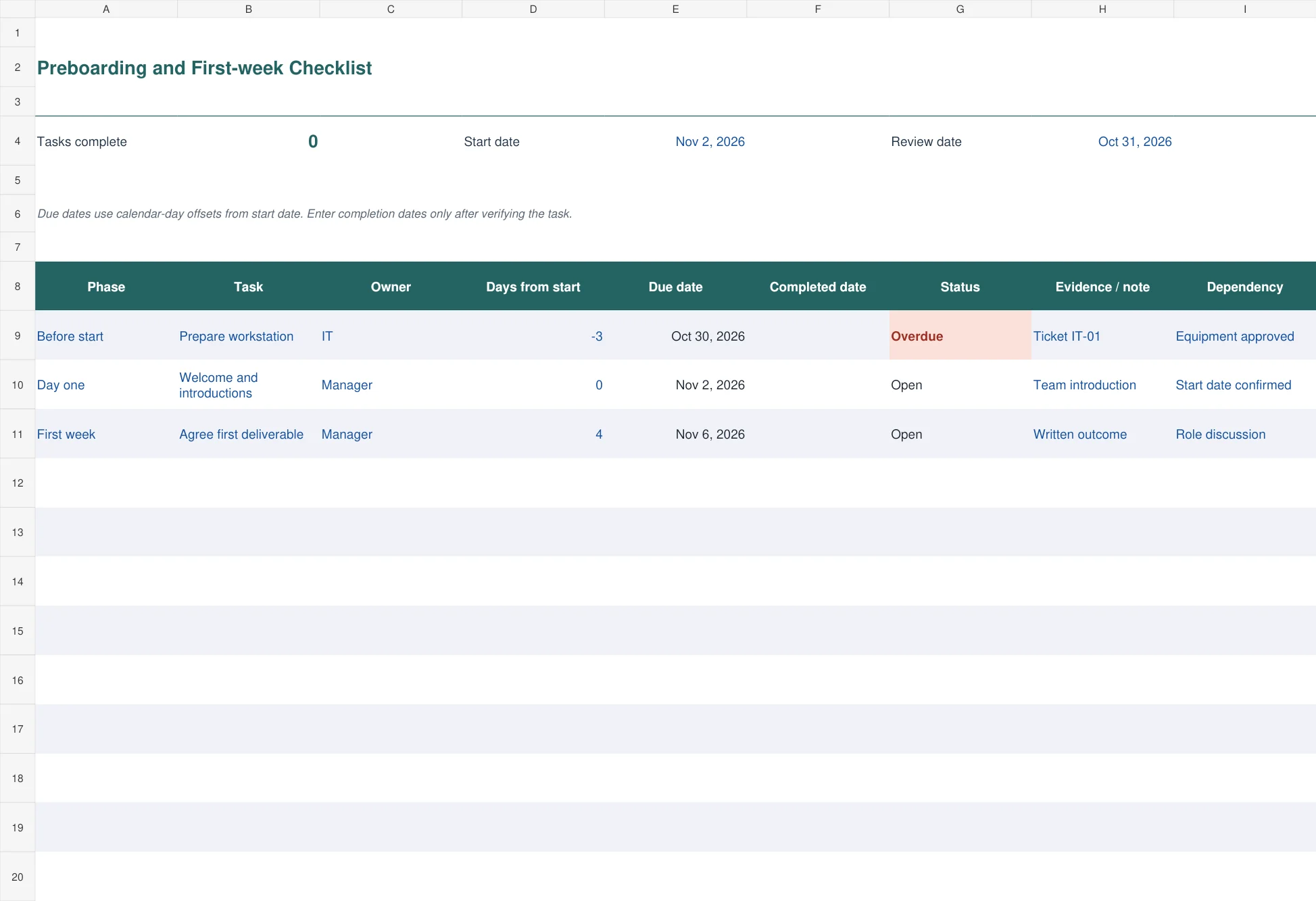
1. Preboarding and First-week Checklist
The teal first-week checklist uses the start date and a calendar-day offset to calculate task due dates. Negative offsets suit preparation before arrival, zero represents the start date, and positive offsets cover the first week. Owners, completion dates, notes, and dependencies sit beside each task.
The status becomes Complete when a completion date is recorded. Otherwise the review date identifies overdue work. Use this file for one starter’s preparation and welcome activities. Its date logic uses calendar days, so review weekends, holidays, and shift patterns before treating the suggested date as a working-day deadline.
Day one: make the person able to participate
Check that somebody is available to welcome the starter and explain the day. Introduce the people they will actually work with, show where information is kept, and give them a simple way to ask questions. Confirm the practical arrangements relevant to the role rather than assuming previous workplace habits apply.
Give equipment and access a real test. Ask the employee to sign in, open the shared resources they need, and find the relevant contact or task information. A manager can then distinguish ready-to-work access from an outstanding request that still needs attention.
Explain the first small piece of work and how it will be reviewed. A manageable task provides context for the information being introduced. It also gives the employee a reason to ask specific questions instead of trying to memorize every process during the welcome session.
The CIPD’s induction factsheet discusses the purpose of helping employees settle into a role and organization. The templates here turn that general aim into assigned tasks, dates, and review points that can be adapted to your own workplace.
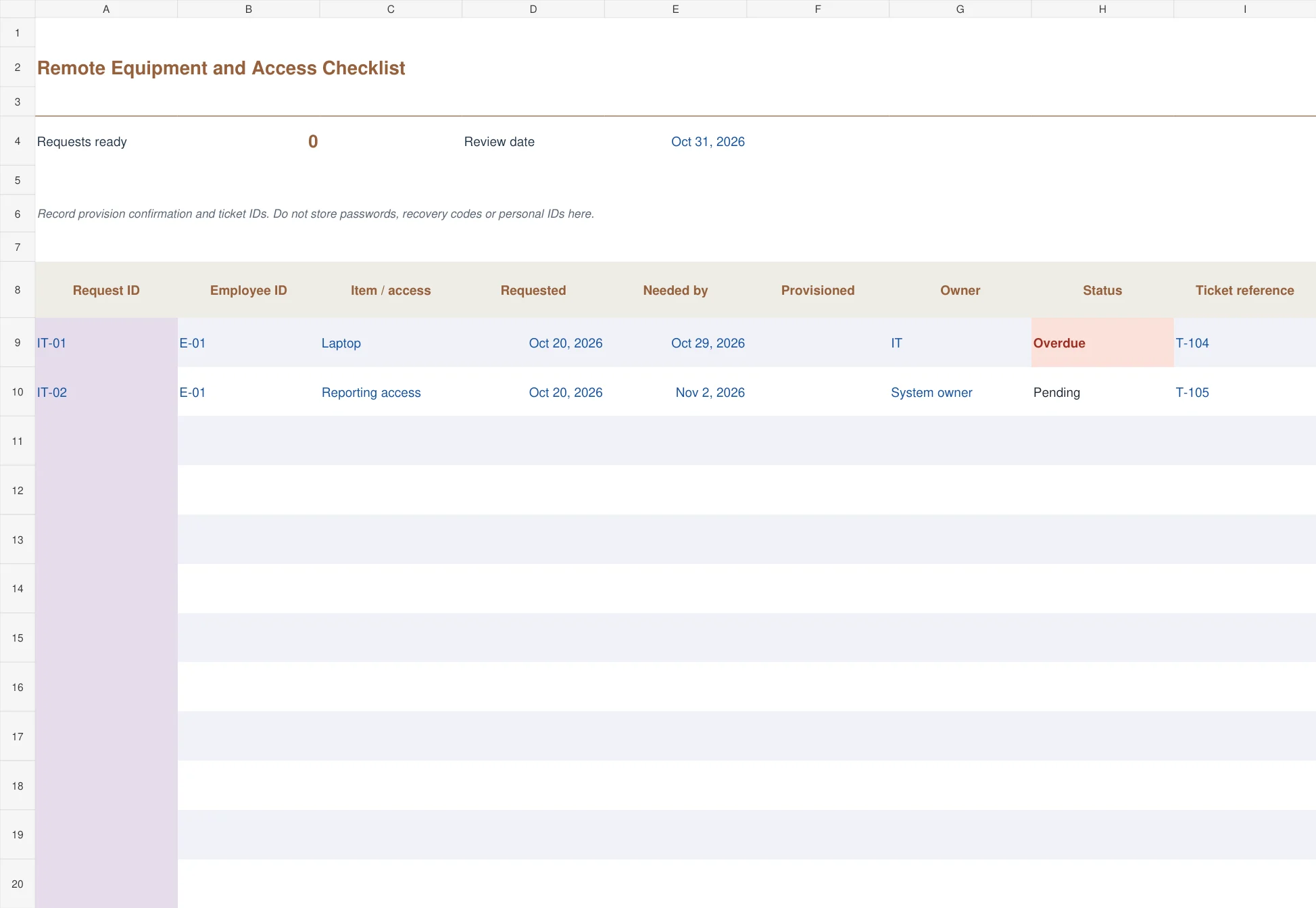
3. Remote Equipment and Access Checklist
The ochre remote-access tracker follows requests for equipment and system access. It records request ID, employee ID, requested date, needed-by date, provisioned date, owner, status, and ticket reference. Requests with a confirmed provisioned date become Ready.
This is useful when IT, a manager, and a system owner each control part of the setup. A submitted ticket is not the same as working access. Confirm that the person can use the equipment or system before recording completion. Do not put passwords, recovery codes, identity-document numbers, or other secrets in the workbook.
The first week: check understanding, not just attendance
Ask what is still unclear after the first few days. A new hire may have attended a session without knowing where the relevant guide is or when to use the process. Record a concrete follow-up and who will help, rather than simply repeating the presentation.
Agree which tasks need supervision and which the person can attempt independently. Use a daily checklist for recurring work once it is explained. Keep the onboarding plan focused on learning and support, so ordinary daily work does not bury the remaining setup tasks.
Review dependencies. If reporting access is late, the manager may need to move a training activity or change the first deliverable. Marking the learning task overdue without acknowledging the access problem gives an incomplete account of what happened.
Book manager and buddy time in a weekly schedule. Short, dependable check-ins are easier to use than a long list of meetings that repeatedly move. Leave room to discuss priorities, workload, and where the employee needs more context.
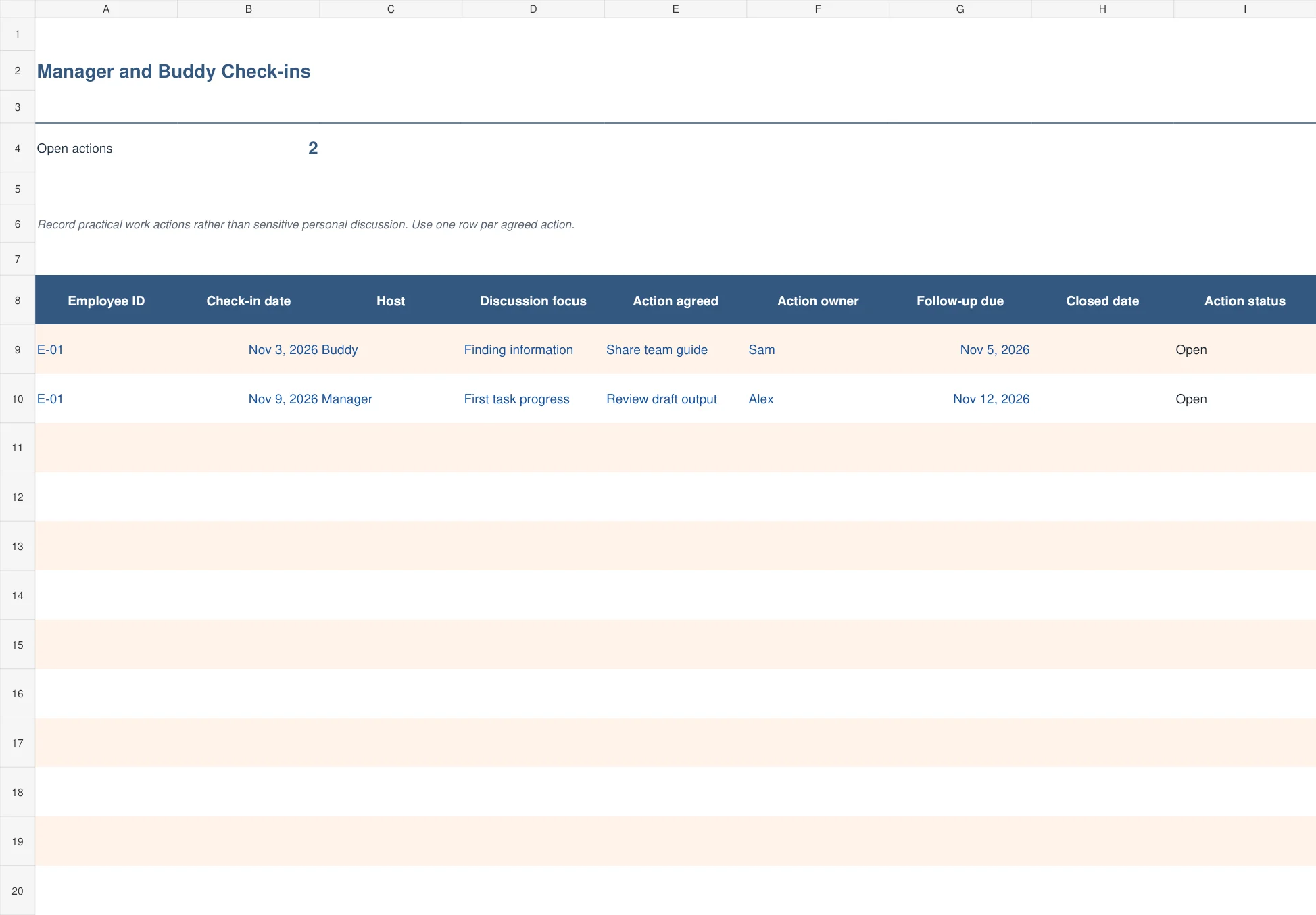
4. Manager and Buddy Check-ins
The blue check-in log records a conversation and the practical action that comes from it. It includes the employee, host, discussion focus, action owner, follow-up date, closed date, and action status. Use one row per agreed action when a meeting produces several items.
This version suits buddy conversations and manager check-ins that otherwise disappear into notes. Keep the entry useful and work-related, such as share the reporting guide or review the first draft. Sensitive personal discussion belongs in an appropriate restricted record. An action closes when its completion is confirmed, not merely because another meeting has been held.
Thirty, sixty, and ninety days: use evidence and conversation
Set outcomes that fit the job and the person’s starting point. Run a reviewed report, complete a supervised customer handover, or document a process improvement gives a clearer review basis than understand the department. Agree what good work looks like before the due date.
Review the outcome with the employee. Discuss the work produced, the support available, and any change in scope. Update the next action and evidence expected. If the role or workload has changed, adjust the plan openly rather than preserving an outdated target because it was written on day one.
Use completion dates consistently. A checklist date should mean the task or review occurred and was checked. Do not prefill future completion dates to make a cohort overview look ready. Keep a dated copy when an important review is completed so later edits do not replace the record of the discussion.
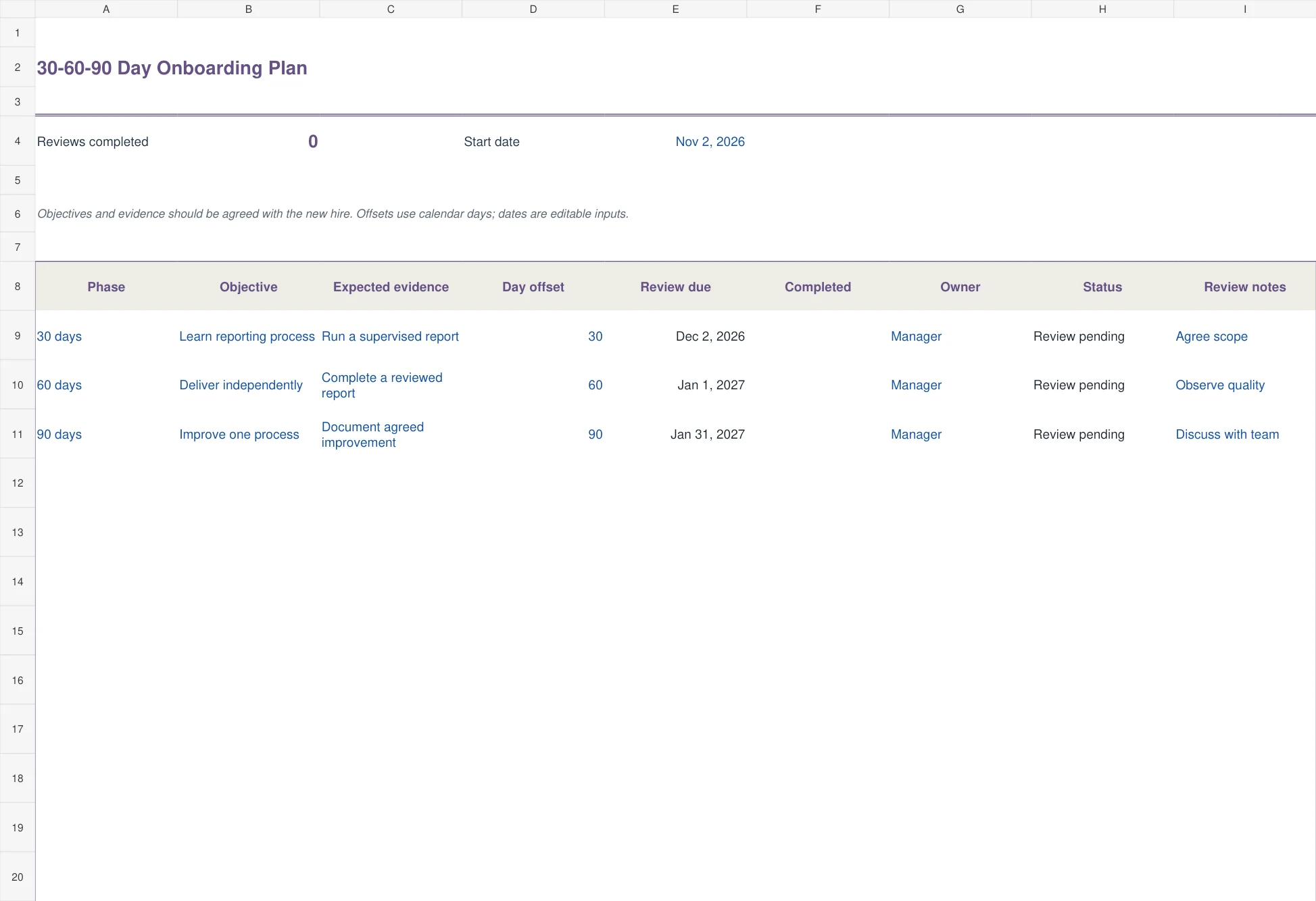
2. 30-60-90 Day Onboarding Plan
The violet 30-60-90 day plan gives each phase an objective, expected evidence, review offset, owner, completion date, status, and notes. The sample objectives progress from supervised work to independent delivery and then an agreed improvement.
Choose this version when the manager and employee need shared expectations beyond the induction week. The objective should describe an outcome the role can reasonably influence. A review marked complete records that the discussion happened; it does not automatically certify competence or determine the result of a probation review. Keep the evidence and agreed next steps with the plan.
Adapt the files without losing the useful controls
Save a clean master, then replace the fictional employee IDs, dates, owners, and tasks. Blue input fields and dark calculated fields help distinguish what you should type. The register-style files contain one hundred prepared rows; extend formulas and totals before adding more.
In the first-week and 30-60-90 files, change the start date once and review the calculated dates. Offsets use calendar days, not a working-day calendar. For a part-time starter or a shift-based role, set the offsets deliberately and confirm dates with the people responsible.
Restrict access to the people who need the operational record. Even without sensitive documents, notes about an individual can become inappropriate if shared broadly. Keep practical setup and work actions concise, and store other information in the correct system.
5. Multiple New Hire Onboarding Tracker
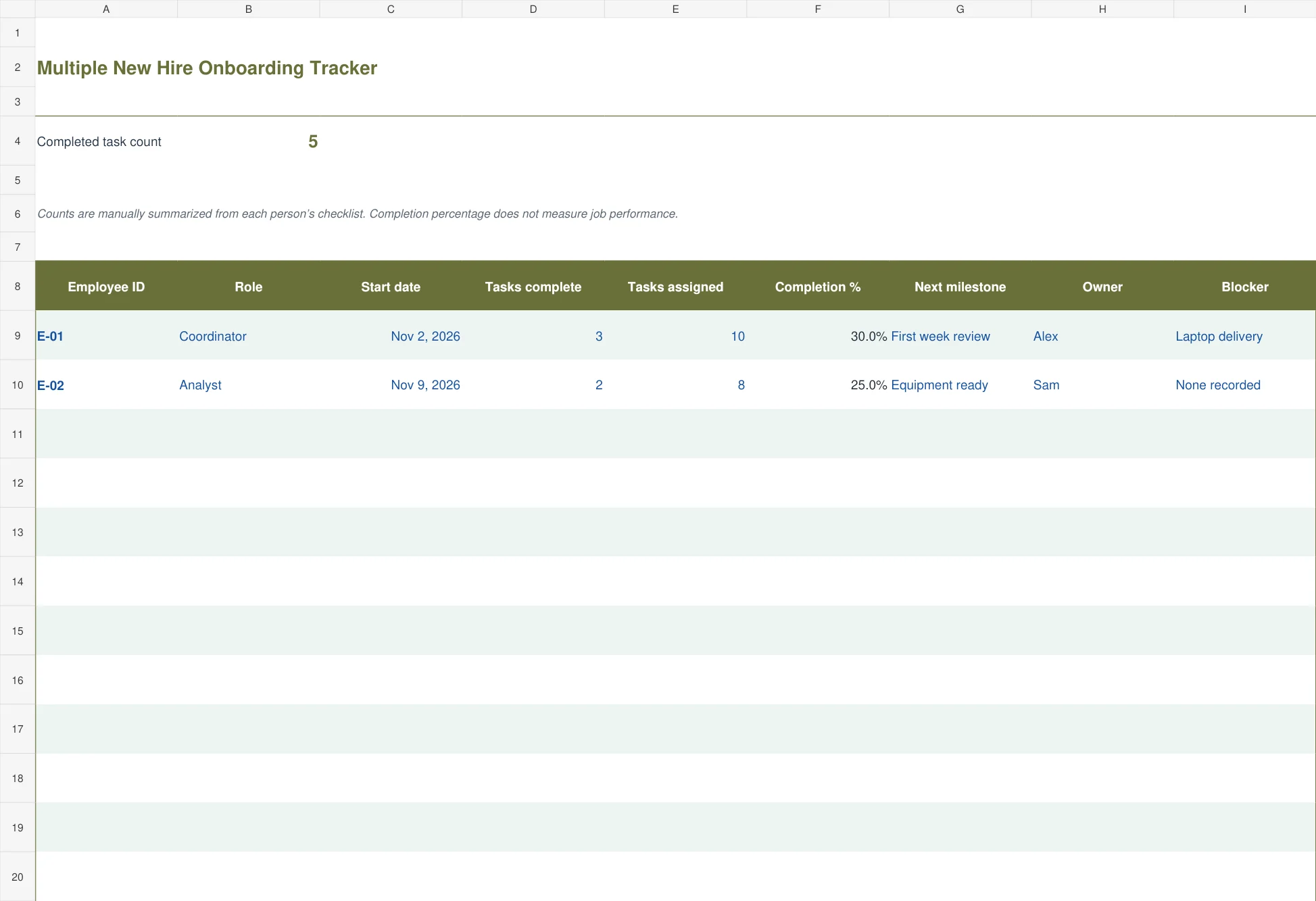
The olive multiple-hire tracker summarizes employee, role, start date, completed tasks, assigned tasks, completion percentage, next milestone, owner, and blocker. Counts are entered manually from each person’s detailed checklist. Invalid counts produce a check prompt instead of an unreliable percentage.
Use it when several people start in the same period and the coordinator needs a short overview. Three completed tasks out of ten gives thirty percent, but the remaining seven may include very different priorities. Review the named blocker and next milestone alongside the number. Completion percentage is a process summary, not a measure of an employee’s performance.
Frequently asked questions
Which onboarding template is best for one new employee?
Start with the first-week checklist for preparation and welcome tasks. Add the 30-60-90 day plan if the manager needs a longer view of outcomes and review dates.
Do the due dates skip weekends and holidays?
No. The start-date-based files use calendar-day offsets. Review and adjust the planned offsets for the employee’s schedule and your working calendar.
Can I use the remote checklist for office employees?
Yes. Its equipment, access, ownership, and provision-confirmation fields are useful for office and hybrid starters too. Replace the sample items with the actual setup needs.
Does the multiple-hire file count tasks automatically?
No. Enter completed and assigned counts from each person’s detailed checklist. It calculates the percentage and highlights invalid counts, but it does not read separate workbooks.
Is this a complete employment compliance checklist?
No. It is a practical planning set for preparation, support, access, and reviews. Add the requirements that actually apply to your organization and role through your normal HR process.

