

A customer calls about a faulty pump. The technician visits, replaces a part and spends an extra hour testing it. By Friday, nobody can remember who approved the extra work. A work order Excel template gives that job a clear reference, agreed scope and record of completion before those details disappear.
These five free work order templates cover everyday service visits, equipment repairs, field dispatch, preventive maintenance and final job costing. Each is an editable Excel download with a different layout and color theme. Choose the sheet that matches the decision you need to make, then replace the fictional examples with your own information.
A useful order does more than list tasks. It tells the person doing the work what is expected, helps the coordinator assign time and records the information needed for approval. The files below include formulas where calculations help, while leaving descriptions, ownership and evidence editable.
What belongs on a practical work order
Start with a unique work order number. Keep that reference on the request, job sheet, supporting receipts and eventual invoice so the same job can be followed from beginning to end. Add the customer or site and a date that everyone understands. A promised completion date and the date a technician plans to attend may be different, so explain which one your team uses.
The scope should name the problem and the work authorized. “Repair air conditioner” leaves too much room for disagreement. “Inspect water leak, clear drain and test operation” gives the technician and customer a shared expectation. If inspection may uncover more work, state who can approve the revised scope and how that approval will be recorded.
Separate quantities from rates and let the workbook calculate line costs. Describe labor in hours and materials in units. Keep the unit obvious in the description where necessary. The person reviewing the order should be able to explain a total without guessing whether a quantity represents hours, meters, boxes or individual replacement parts.
Choose and download your Excel template
1. Service Work Order
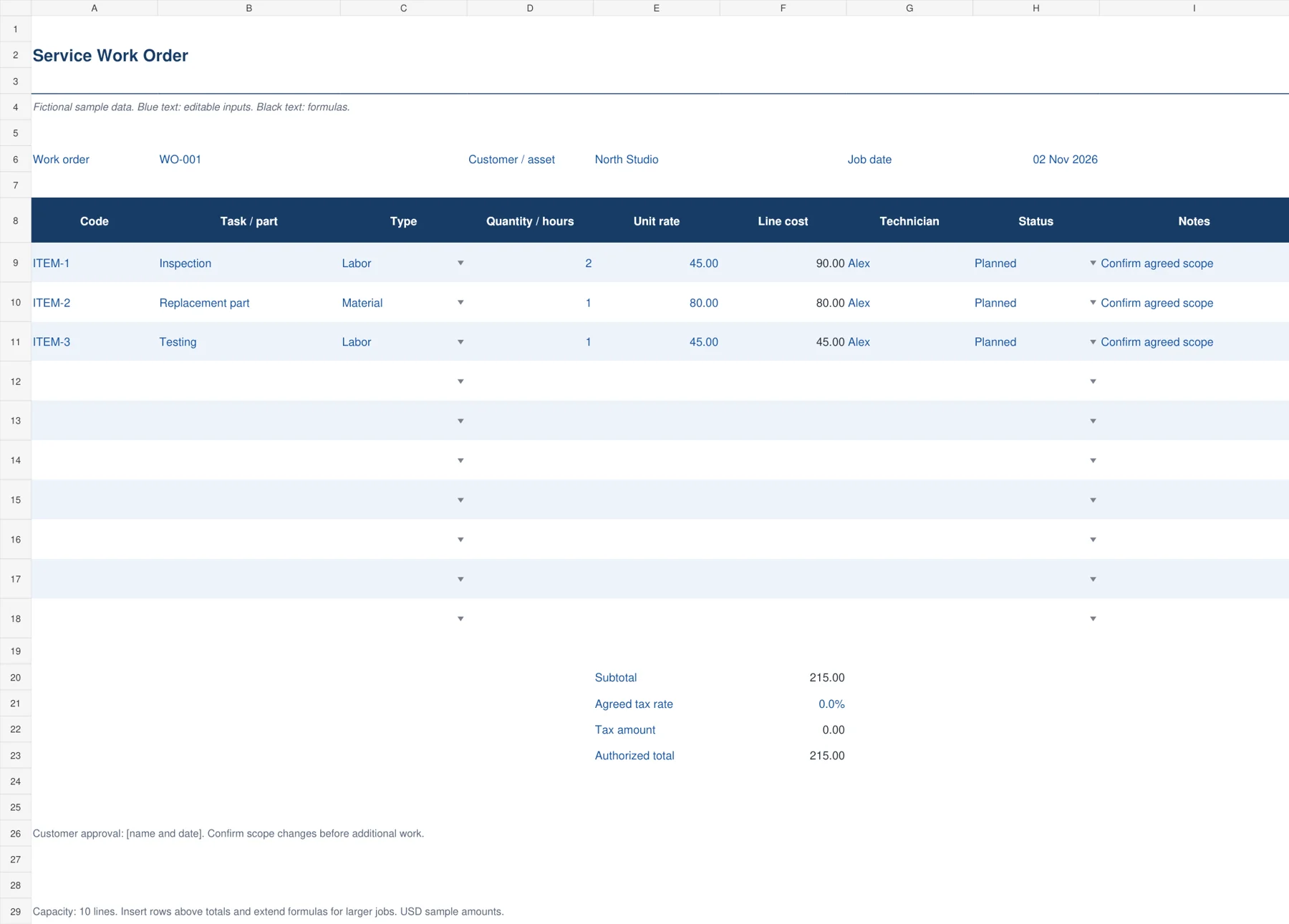
A general service work order suits a small repair business that needs a clear agreement before work begins. It brings the customer, job date, task descriptions, quantities, labor hours and rates onto one sheet. The navy striped layout separates editable fields from calculated costs, while a status column helps the technician record progress. Ten detail lines make it useful for a modest visit without turning it into a complicated job management system.
Replace the three sample items with your own scope. Select Labor, Material or Other for each line and enter the agreed rate. The workbook calculates line costs, subtotal, tax amount and authorized total. Set the example tax rate to the treatment agreed for your job. Record the customer’s approval and confirm any additional work before adding it.

2. Equipment Repair Order
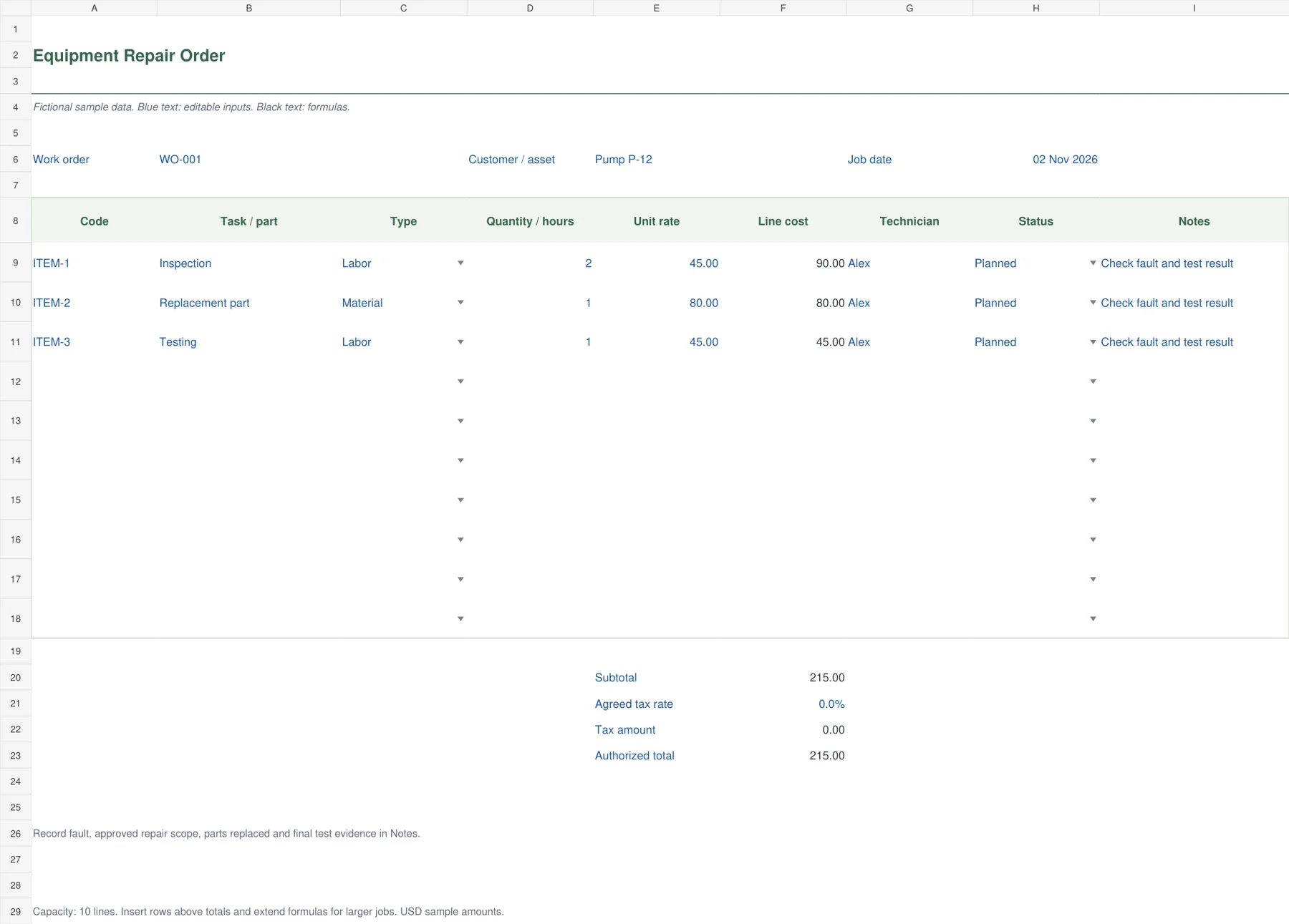
Use this green, restrained form when the job centers on a particular machine, appliance or asset. The equipment identifier stays beside the work order number, so replacement parts and inspection time remain tied to the correct item. It is especially useful when the original complaint, the repair performed and the final test all need a short written record. Its open, lightly outlined layout also prints cleanly for a workshop folder.
Enter the asset identifier and describe the reported fault in Notes. Add the inspection, parts and testing as separate cost lines. Keep the fault description specific, such as intermittent shutdown after ten minutes, rather than simply writing broken. After the repair, record what changed and the test evidence. Customer approval should cover the repair scope and any revised total.
3. Field Dispatch Board
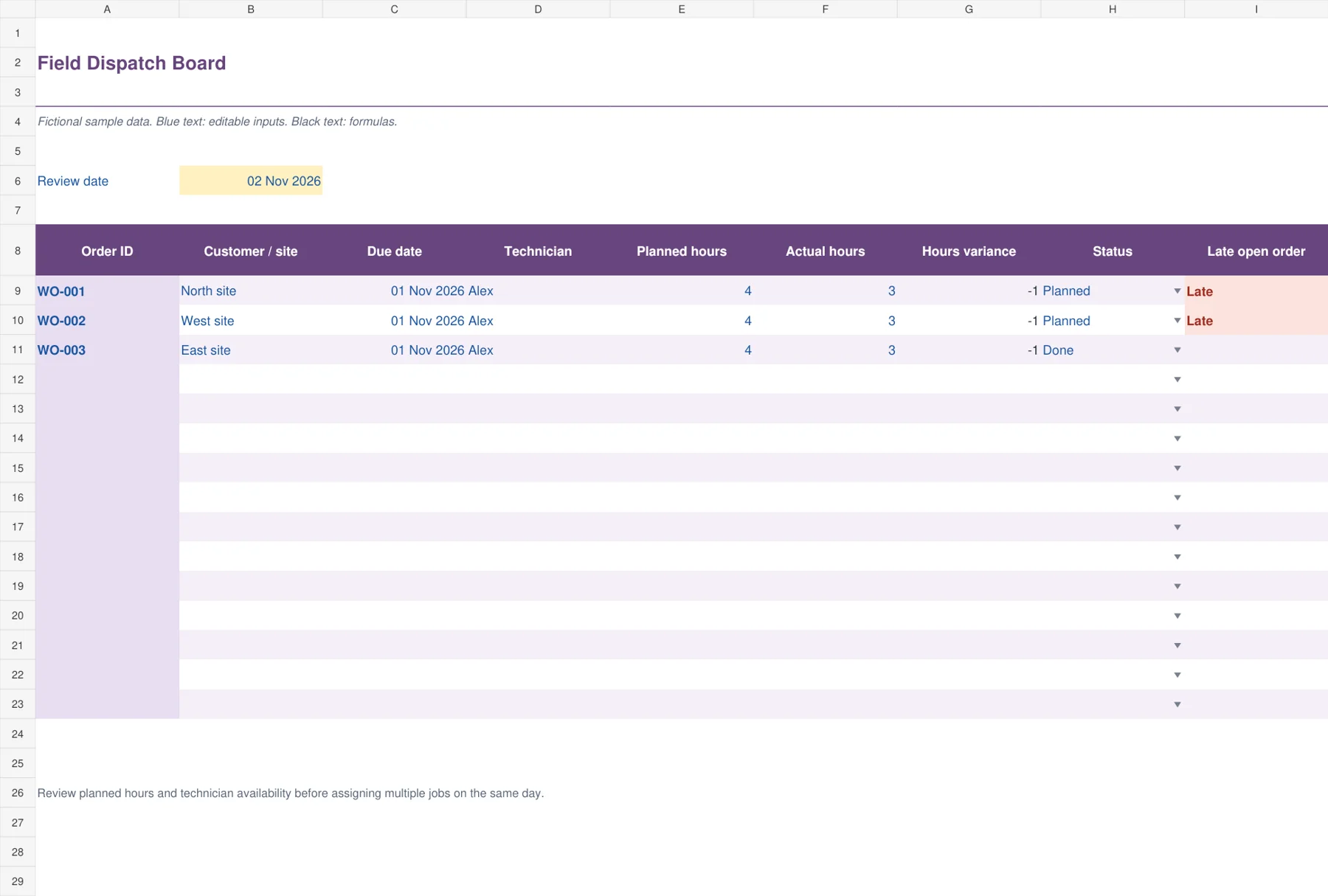
The purple dispatch board gives an office coordinator a working list of several jobs. Each row shows the customer or site, due date, assigned technician, planned hours, actual hours and current status. Calculated hours variance highlights visits that took more or less time than planned. A late flag identifies orders whose due date has passed while their status remains open. This is a coordination view rather than an itemized customer quote.
Set the review date before checking late jobs. Assign technicians only after confirming travel time and availability, then replace planned hours with a realistic estimate for each visit. Enter actual hours as work is completed. Mark finished orders Done to remove the late flag. A positive hours variance means actual time exceeded the original allowance and deserves a short explanation.

4. Preventive Maintenance Orders
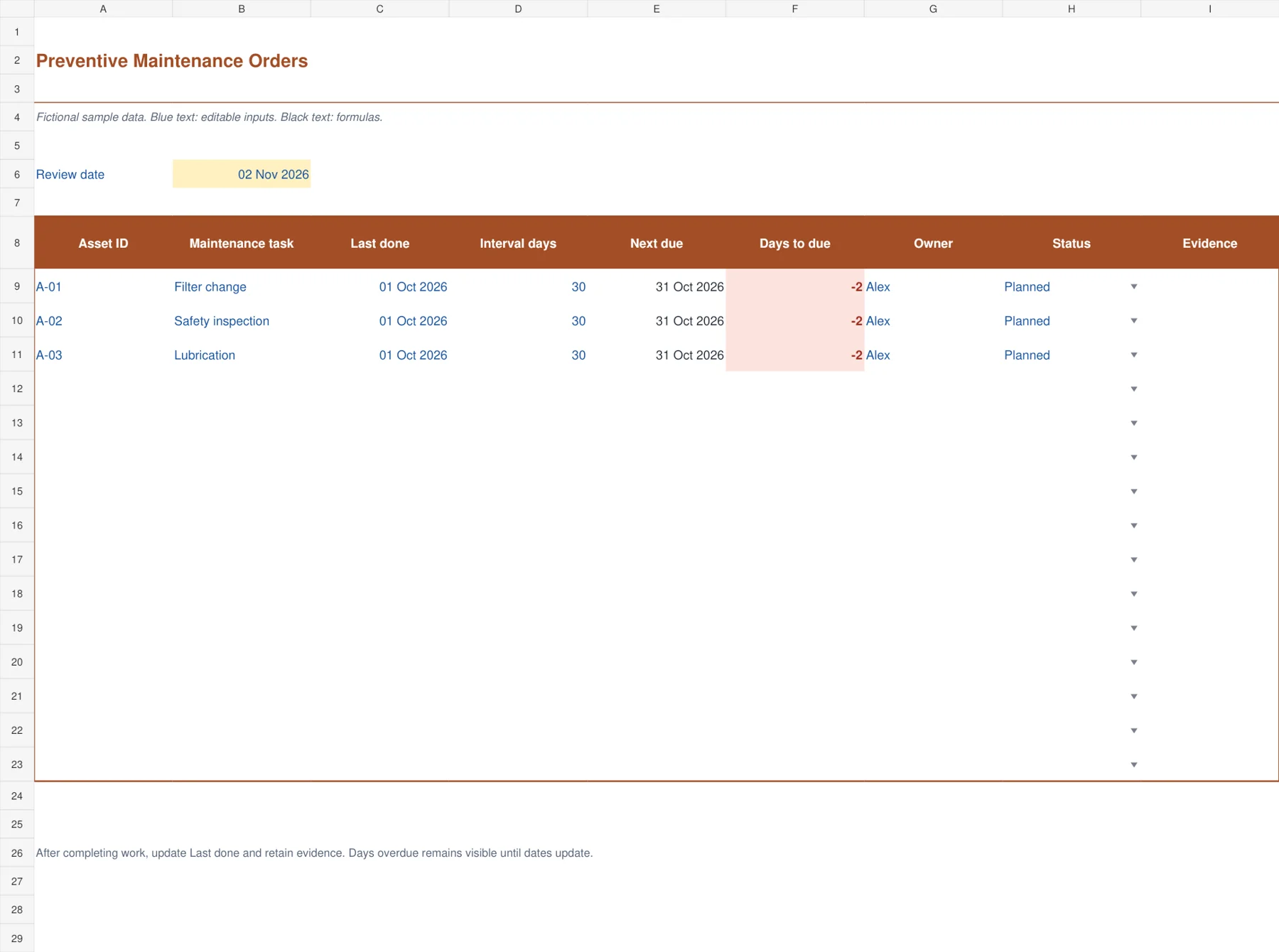
The warm orange maintenance worksheet is built around repeat work. It connects an asset, a maintenance task, the date it was last completed and an interval measured in days. The next due date and days remaining calculate automatically. An owner and evidence field keep the schedule attached to a person and an actual completion record. This arrangement suits filter changes, lubrication rounds and other work that follows a defined interval.
Use the interval required by your equipment instructions or maintenance plan. Update Last done only after the task has actually been completed, then retain a report number, photograph reference or inspection record in Evidence. A negative days-to-due figure means the calculated date has passed. The status entry alone does not reset the schedule, so update the completion date too.

5. Job Completion Cost Sheet
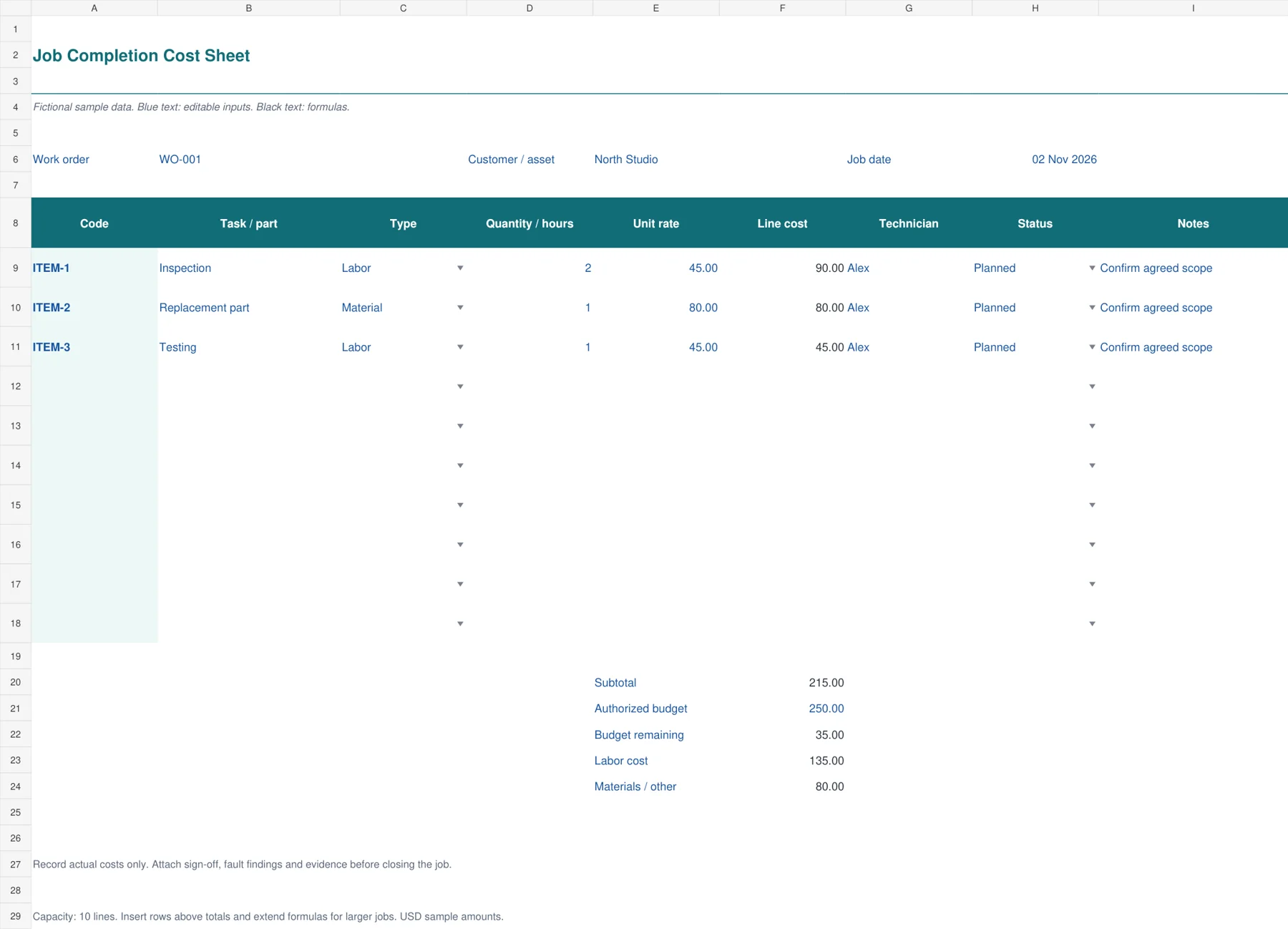
The teal completion sheet answers a different question: what did the finished job cost compared with its authorization? It calculates the total of labor, materials and other costs, separates the labor subtotal and shows the budget remaining. A negative remainder is highlighted. The compact ledger layout helps a supervisor review the job before closing it or preparing a customer invoice. Use actual cost rates consistently when evaluating internal job performance.
Enter the authorized budget and replace the sample lines with the completed work. Record actual hours and quantities, then use rates that match the purpose of your review. Do not mix internal labor costs with customer selling prices in the same comparison. Investigate an overrun before closing the order, and keep the customer’s acceptance or internal sign-off with the supporting job record.

Run a job from request to completion
When the request arrives, record the issue in the customer’s words and add any access restrictions or equipment identifiers. Then convert it into a task that a technician can act on. Confirm whether the visit is an inspection, an approved repair or a quotation stage. That distinction avoids treating a preliminary estimate as permission to perform every possible repair.
Before dispatch, check the technician’s calendar, required parts and site access. The dispatch sheet records planned hours, but travel, breaks and other visits still need to be considered. Pair the board with your weekly schedule templates when you need a fuller view of staff availability across several days.
During the visit, record actual work and changed requirements while they are fresh. If the repair needs additional parts or time, obtain approval before extending the work. After testing, record the result, mark the job complete and retain the evidence. A completed status should correspond to an actual check of the agreed scope.
For repeat equipment care, use the maintenance order alongside a facility maintenance checklist. The order records responsibility and timing, while the checklist can describe the checks that must be performed. Keep the latest approved checklist version available to the person carrying out the task.
A small costing example
Suppose inspection takes two hours at 45 per hour, a replacement part costs 80 and testing takes one hour at 45. The subtotal is 215. With an example tax rate of zero, the authorized total remains 215. Increasing inspection to three hours raises the subtotal to 260. That change is visible immediately because the quantity and rate remain separate inputs.
If the authorized internal budget was 250, the original cost leaves 35 available. The extra hour creates a cost of 260 and a remaining budget of minus 10. The completion cost sheet highlights the overrun. Record why it happened rather than changing the original approval simply to make the remainder look positive.
A work order and an invoice serve different points in the job. The order records the work request and authorization. The invoice requests payment after the agreed billing event. Keep the same reference between them and use a service log to preserve the longer history of visits to a particular customer or asset.
Customize the files without losing useful calculations
All five workbooks are macro-free .xlsx files. Editable fields use blue text and calculated cells use dark text. Save a clean master before adding your own data. The examples are fictional, and the monetary amounts use a single sample currency. Change the format to your currency while keeping the underlying quantities and prices numeric.
The itemized forms provide ten detail lines. The dispatch and preventive sheets provide fifteen records. For larger jobs, insert rows within the working area, copy the neighboring formulas and extend any total ranges. Test a new line before adopting the expanded file. Avoid typing a total directly over a formula because that result will stop responding to later edits.
For a reference example of the fields commonly used in a work order, see Vertex42’s work order form guidance. Your own approval process, customer terms and equipment requirements should determine the final fields you retain.
Frequently Asked Questions
Which work order template should a small service business start with?
Start with the Service Work Order when you need an itemized scope and total for one visit. Choose the Field Dispatch Board if your main problem is coordinating several jobs and technicians. Both can share the same work order number without repeating the entire record.
Can I use these workbooks for recurring maintenance?
Yes. Preventive Maintenance Orders calculates the next due date from the last completion date and interval in days. Update the last completion date after actual work, and retain evidence. The workbook does not automatically email reminders or create calendar appointments.
Are the Excel templates editable and free to download?
Yes. Use the download button beneath the preview to obtain each editable .xlsx workbook. Replace the sample rows, customer details and rates. Formula cells can also be edited, so keep an untouched master in case a calculation is accidentally overwritten.
How is actual time different from planned time?
Planned time is the allowance made before the job. Actual time is what the technician records afterward. On the dispatch board, hours variance equals actual hours minus planned hours. A positive result means the job used more time than expected and should be reviewed.

