

Supplier bills rarely arrive in a convenient order. One is due tomorrow, another is waiting for approval and a third has a credit that has not reached the statement. An accounts payable Excel template helps you keep those differences visible before deciding what to pay.
This collection includes five free, editable workbooks for the bill register, payable aging, weekly payment proposals, early-payment discounts and supplier statement matching. Each file has its own design and serves a separate task. Use one focused sheet or combine their references into a small-business payment routine.
Build a reliable list before preparing a payment
Accounts payable is money your business owes to suppliers. A customer invoice tracker follows money owed to you, so it should remain separate. Keeping the two lists apart makes ownership and cash direction clear. The bill reference, supplier and due date should be traceable to an actual document rather than reconstructed from a bank transaction later.
Begin by collecting the original invoice and any matching purchase or delivery records. Check the supplier name, billed quantities, prices and agreed terms. Then record the bill once. If a revised invoice arrives, determine whether it replaces the original or adds a separate charge. Entering both as new obligations can lead to an accidental duplicate payment.
Use consistent supplier names and bill identifiers. A simple convention such as supplier code plus invoice number is more reliable than a description like November bill. Keep supporting documents in a shared location and record enough information for another person to find them. Your supplier list templates can hold contact details and payment terms without repeating them on every row.
Choose and download your Excel template
1. Vendor Bill Register
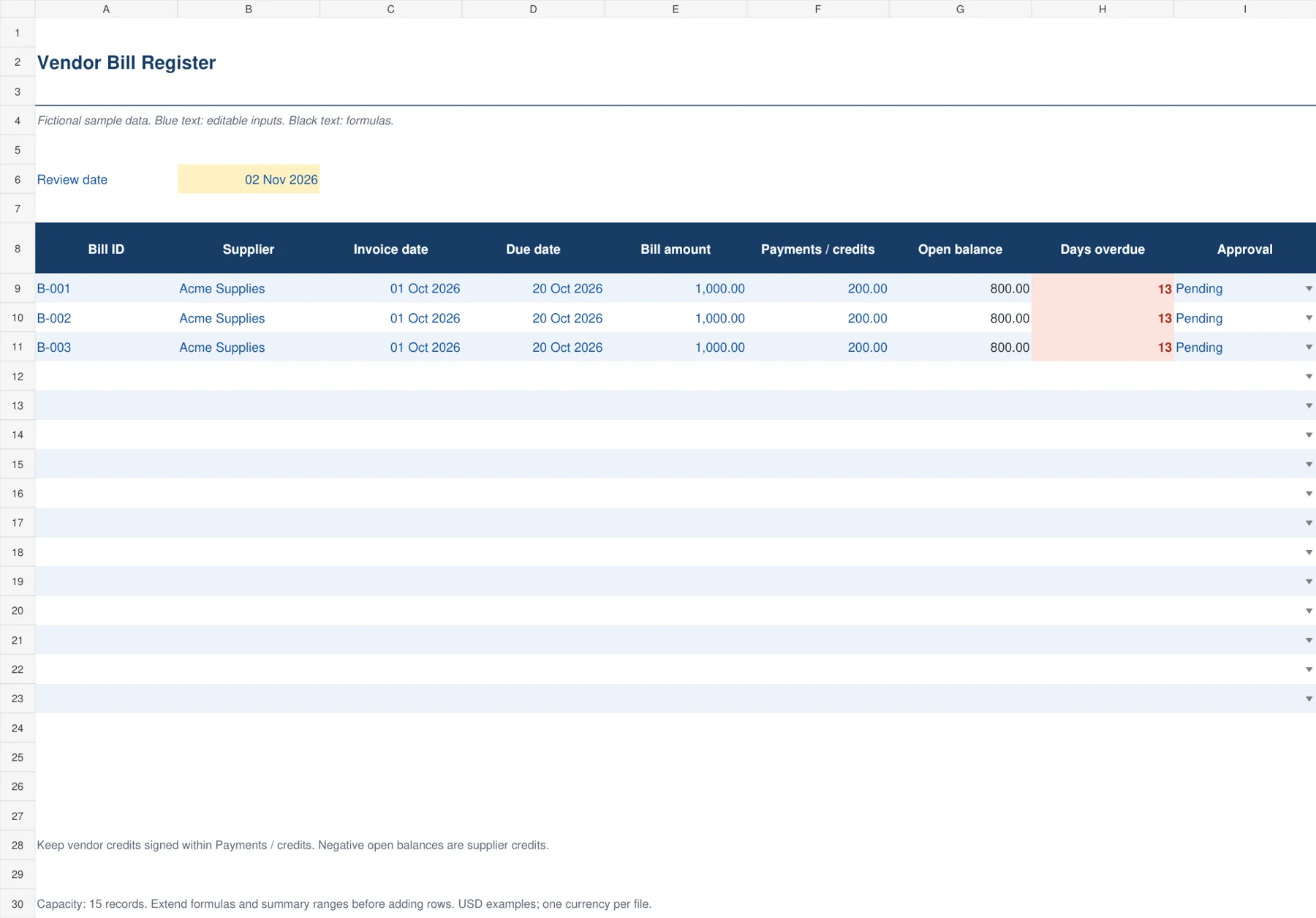
The navy bill register gives a small business one working list of supplier invoices. Record invoice and due dates, the original bill amount and payments or credits already applied. The workbook calculates the open balance and overdue days as of an editable review date. An approval field helps the person preparing payments distinguish a valid bill from one that still needs a manager’s review.
Enter each supplier bill once and retain its document reference. Payments and supplier credits both reduce the amount owed in this model. If they exceed the original bill, the open balance becomes negative rather than disappearing. Review that supplier credit separately. The overdue-days calculation returns zero when the balance is paid or in credit, keeping the follow-up list focused on unpaid bills.

2. Accounts Payable Aging
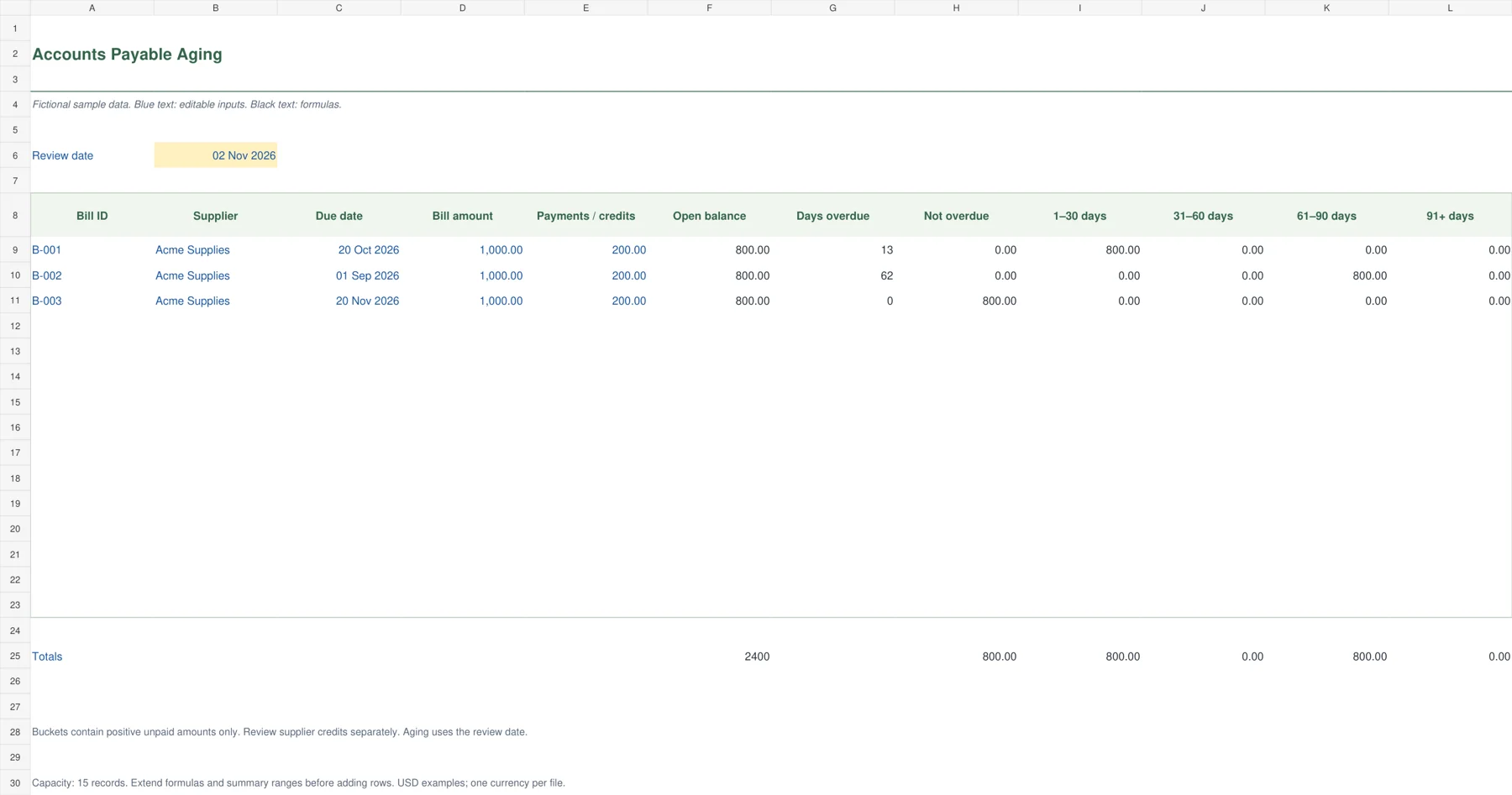
The green aging worksheet organizes unpaid vendor bills into not-overdue, 1–30, 31–60, 61–90 and 91-plus-day groups. Buckets use the bill’s due date rather than its invoice date. Their totals make it easier to see whether old obligations are accumulating. The restrained ledger styling leaves space for the twelve useful columns without adding a separate dashboard to a relatively small list.
Set the review date, enter bill amounts and payments, then review the calculated open balance. Positive unpaid balances fall into exactly one bucket. Supplier credits remain visible in the balance column but are excluded from positive aging buckets. This is an operational review at the selected date using entered payments, not an automatic reconstruction of historical accounting balances.

3. Weekly Vendor Payment Run
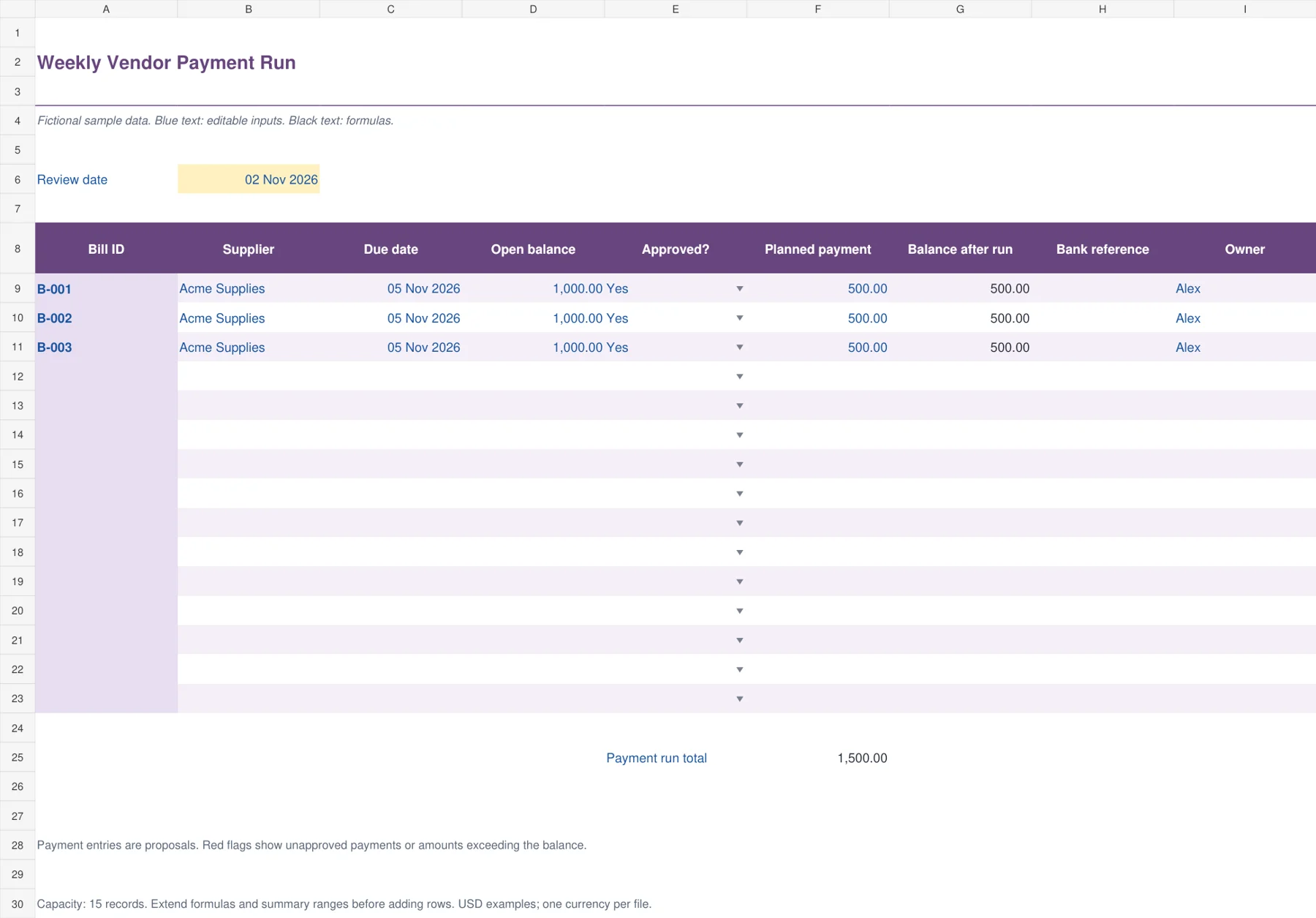
This purple payment-run planner supports the conversation before money is sent. It brings the due date, open balance, approval decision, proposed payment, reference and owner together. The remaining balance calculates after the proposed amount. Conditional formatting calls attention to payments against unapproved bills and to proposals that exceed the amount owed. It does not connect to a bank or release payments.
Enter current open balances from your reviewed bill list. Choose Yes, No or Hold under approval and enter proposed amounts for this payment run. Resolve highlighted exceptions before authorizing transfers. After payment, record the bank reference and update the underlying bill register. A proposal on this worksheet does not mean the supplier has actually received the money.
4. Early Payment Discount Planner
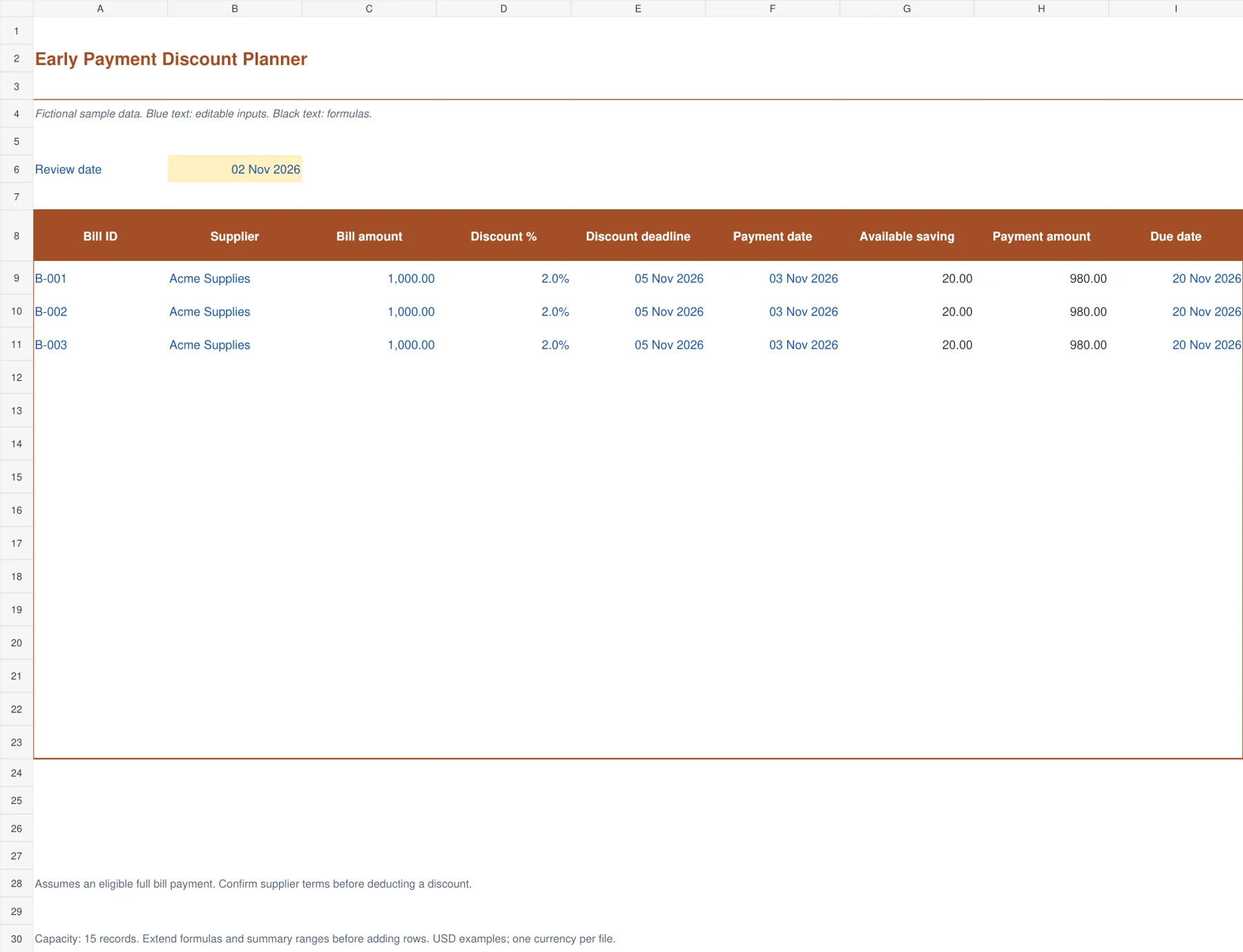
The orange discount planner helps compare an eligible early payment with the ordinary bill amount. It uses the discount rate, deadline and planned payment date to calculate the available saving and payment amount. The design makes the deadline and the resulting amount easy to review together. Use it for full-bill discount terms that your supplier has confirmed, with a clear record of the underlying invoice.
Enter the full amount, agreed percentage and final eligible date. A planned payment on or before the deadline receives the sample discount calculation. A later payment receives no discount. If the planned date is blank, the result stays blank. Check settlement timing and any exclusions in the supplier’s terms, especially where partial payments or taxes have different treatment.

5. Supplier Statement Reconciliation
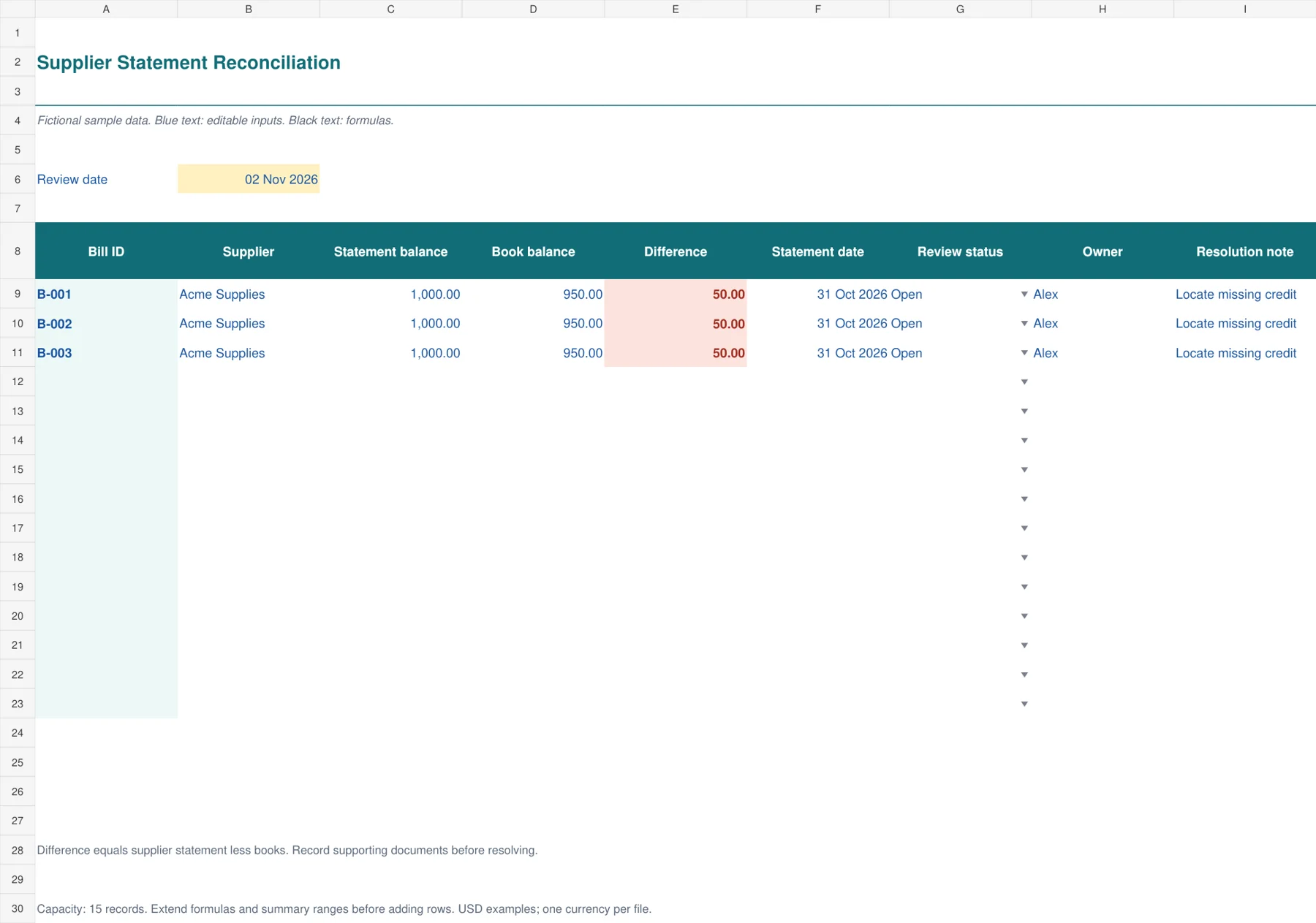
The teal reconciliation sheet compares a supplier’s statement balance with your books for the same bill. A calculated difference highlights amounts that need investigation. Statement date, review status, owner and resolution notes provide a simple trail for missing credits, unrecorded invoices or disputed amounts. The layout is deliberately focused on matching and explanation rather than suggesting a payment based on an unexplained difference.
Use the same cutoff and bill reference on both sides. A positive difference means the supplier statement is higher than the book balance. Locate the reason, such as a credit not yet reflected by the supplier, and record supporting evidence. A zero difference means the entered amounts agree. It does not establish that the invoice was approved, genuine or paid.

A weekly accounts payable routine
Choose a review day and update the bill register with new invoices, credits and payments. Compare the open items with supplier statements where available. An old statement may omit a recent payment, so check the cutoff date before treating its total as a fresh amount due. Resolve matching problems before preparing the bank instructions.
Review aging next. Old unpaid bills may represent a dispute, an overlooked approval or a real cash constraint. These require different actions. Record the owner of the next step instead of repeatedly carrying the same unexplained balance forward. Use the payment-run sheet to turn approved obligations into a dated proposal that someone can review.
Compare the planned payment total with funds available for the same period. A profitable month does not guarantee enough cash on the day bills fall due. Use your cash flow statement templates for the wider cash picture, while keeping specific supplier obligations in the payable register. Avoid subtracting a planned payment from the actual balance until it has been processed.
After the payment run, record references and update paid amounts against the correct bill. Keep partial payments separate enough to explain their total. If the business needs a complete transaction ledger and accounting reconciliation, connect this routine to its bookkeeping records. These operational templates help organize payment decisions without replacing a full accounting system.
How the balance and aging calculations work
A bill for 1,000 with 200 already paid has an open balance of 800. If its due date is October 20 and the review date is November 2, it is 13 days overdue and belongs in the 1–30-day group. Another payment of 400 reduces the open balance to 400. The remaining amount stays in the same aging group until the review date changes or the bill is settled.
The aging worksheet groups positive open balances only. Suppose a supplier credit of 150 exceeds a remaining bill balance of 100. The resulting credit balance should be reviewed separately rather than used to hide a different supplier’s overdue invoice. A total of positive aging buckets can therefore differ from a net open balance that includes credits.
For the discount example, a 1,000 bill with a confirmed 2% early-payment discount saves 20 when the planned payment qualifies. The calculated amount becomes 980. If payment is scheduled after the deadline, it becomes 1,000. Confirm how the supplier defines a qualifying payment date and whether the terms apply to the full invoiced amount before relying on the result.
Avoid the common payment-control mistakes
A due date is a deadline, while approval is permission. Neither proves the other. A bill can be overdue and still require investigation. The weekly payment-run sheet highlights a proposed amount when approval is not Yes, but the reviewer must still examine the supporting records. Review bank details through your usual supplier verification process when they change.
Do not overwrite the original bill amount simply because a payment has been made. Keep the billed amount and paid amount separate so the balance remains explainable. Apply credits to the intended bill or retain a clearly identified supplier credit. Record currency consistently because adding bills in different currencies without conversion produces a misleading total.
For further examples of bookkeeping fields, see Smartsheet’s small-business bookkeeping templates. The files here use fictional USD amounts, support fifteen records each and contain no macros. Before adding more rows, extend formulas, aging totals and the conditional-format ranges, then check one new bill from entry to result.
Frequently Asked Questions
Which template should I use first?
Start with the Vendor Bill Register to establish a reviewed list of invoices and open balances. Add the aging workbook when you need to prioritize old obligations. The payment-run planner is useful after bills and approvals are current, because it records proposed payments rather than new liabilities.
Can the payment-run workbook pay suppliers automatically?
No. It calculates proposals and remaining balances, and it flags selected approval problems. You must authorize and process payments through your normal banking process, then record the reference and update actual payments in the bill register. It sends no payment instructions.
Why do aging buckets exclude supplier credits?
The buckets show positive unpaid obligations by lateness. A supplier credit is a different item that may need allocation or refund follow-up. Keeping it visible separately prevents a credit from masking overdue bills and explains why bucket totals may differ from a net balance.
Can I use these files in another currency?
Yes. Change the number format and replace the sample data with amounts in one currency. The formulas do not perform currency conversion. If you pay suppliers in multiple currencies, maintain separate files or add a reviewed exchange-rate process before combining their totals.

