

The electricity bill is due before the next payday, internet is on autopay and the annual insurance payment is easy to forget. A household can have enough income overall and still struggle with the timing. A bill tracker helps by separating what is due, what has been reserved and what has actually been paid.
These five free bill payment tracker Excel templates cover a monthly register, annual payment history, a visual calendar, paycheck allocation and shared household costs. Each has its own layout and color theme. The downloads are editable Excel files with actual previews, formulas and fictional examples you can replace with your own bills.
Choose your household bill organizer
1. Monthly Household Bill Tracker
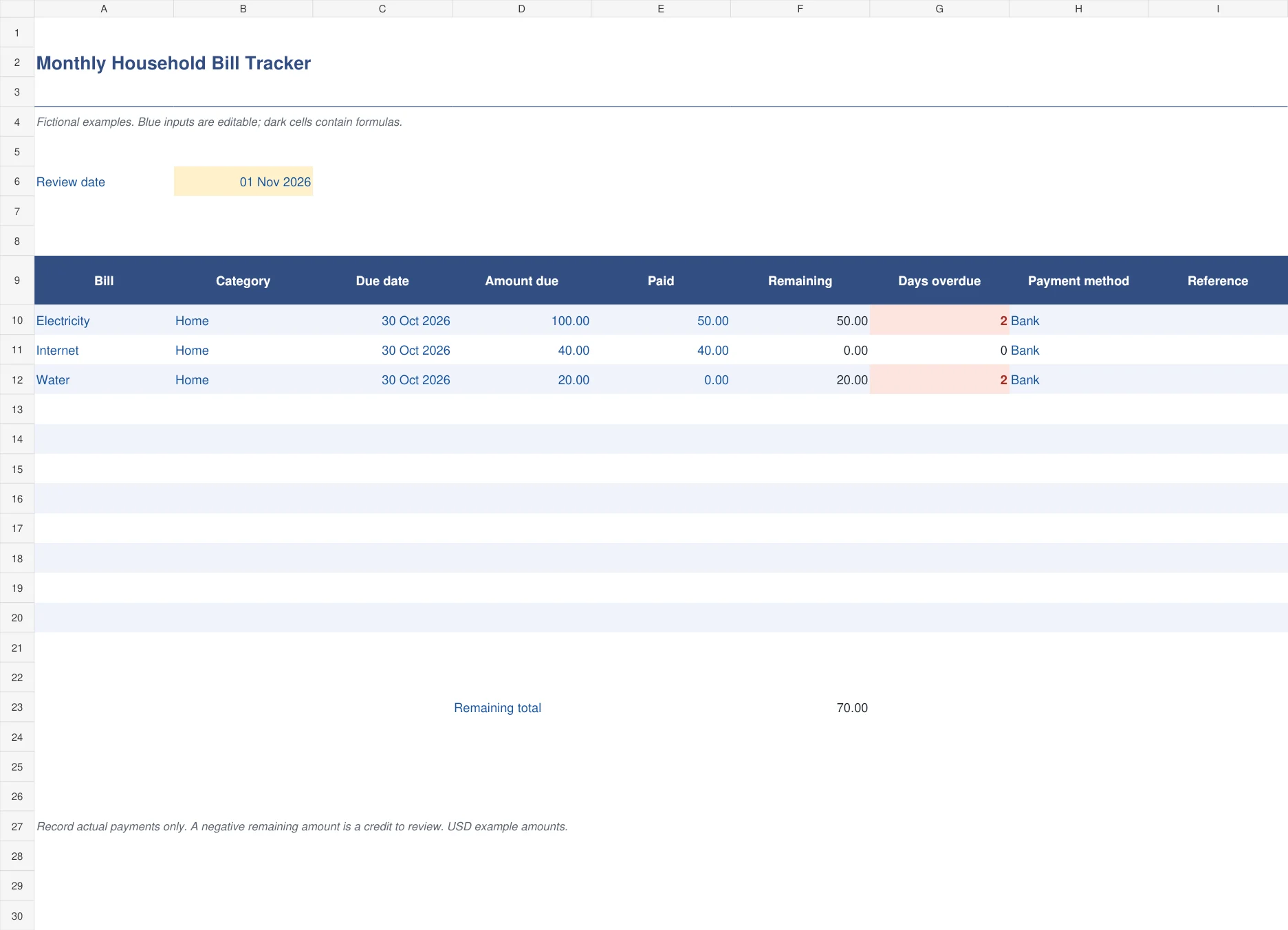
The navy monthly tracker follows the bill, due date, amount due, actual payments, remaining balance and overdue days. Category, payment method and reference provide enough context to trace the result later. It is useful when a household makes partial payments or wants to see unpaid amounts without marking an entire bill as settled too early. Overdue days are highlighted while a positive balance remains.
Set the review date and replace the fictional entries. A bill for 100 with 50 paid has 50 remaining. Recording the second 50 brings the balance to zero and removes overdue days. If payments exceed the bill, the negative remainder stays visible as a credit to review. Enter a payment only after it actually occurs, using the reference field to retain evidence.

2. Annual Bill Payment Register
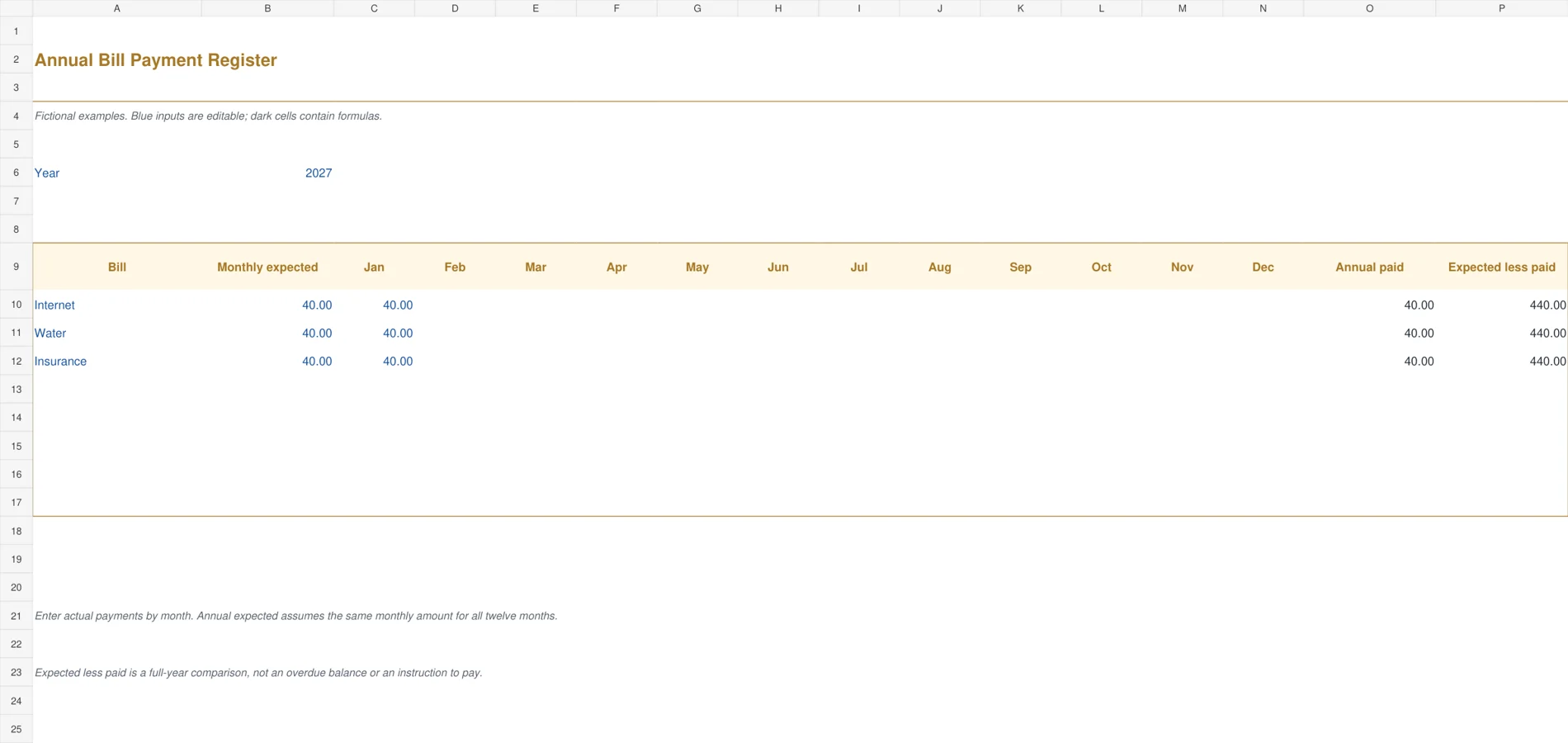
The mustard annual register puts twelve monthly payment columns on one row for each recurring bill. It calculates the annual amount paid and compares it with a constant monthly expectation multiplied by twelve. This wide layout is useful for a year-at-a-glance history of regular payments such as internet or a stable insurance installment. It is a payment record, not a day-by-day arrears calculation.
Enter actual paid amounts in the month they were paid. A monthly expectation of 40 gives a full-year expectation of 480. One payment of 40 produces an annual paid total of 40; adding another 40 raises it to 80. The final comparison includes the entire year, so a large difference early in the year is expected. Use the monthly tracker for overdue balances and variable charges.

3. Monthly Bill Payment Calendar
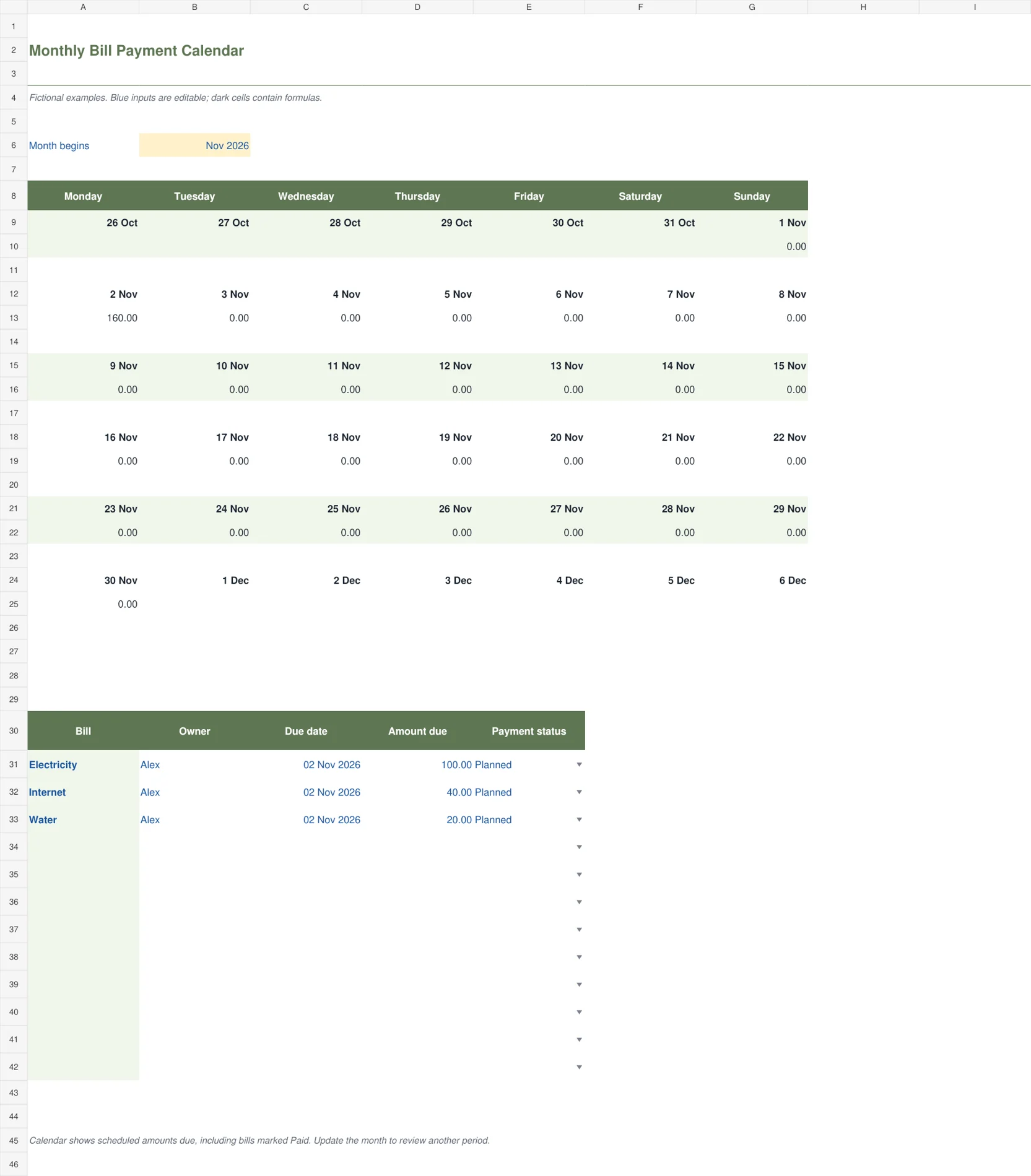
The sage calendar places scheduled bill amounts into a Monday-to-Sunday monthly grid. A source list below the calendar holds bill name, owner, due date, amount and payment status. The date formulas and daily totals update from the selected month and source records. This gives a visual view of crowded payment days while retaining the underlying details in the same workbook.
Enter the first day of the month in the control cell and use real due dates in the source list. The sample places three bills totaling 160 on November 2. Increasing the electricity amount from 100 to 150 changes that day’s total to 210. Calendar totals include scheduled amounts even when a bill is marked Paid. Use it as a timing view, not as the remaining unpaid balance.

4. Paycheck Bill Allocation
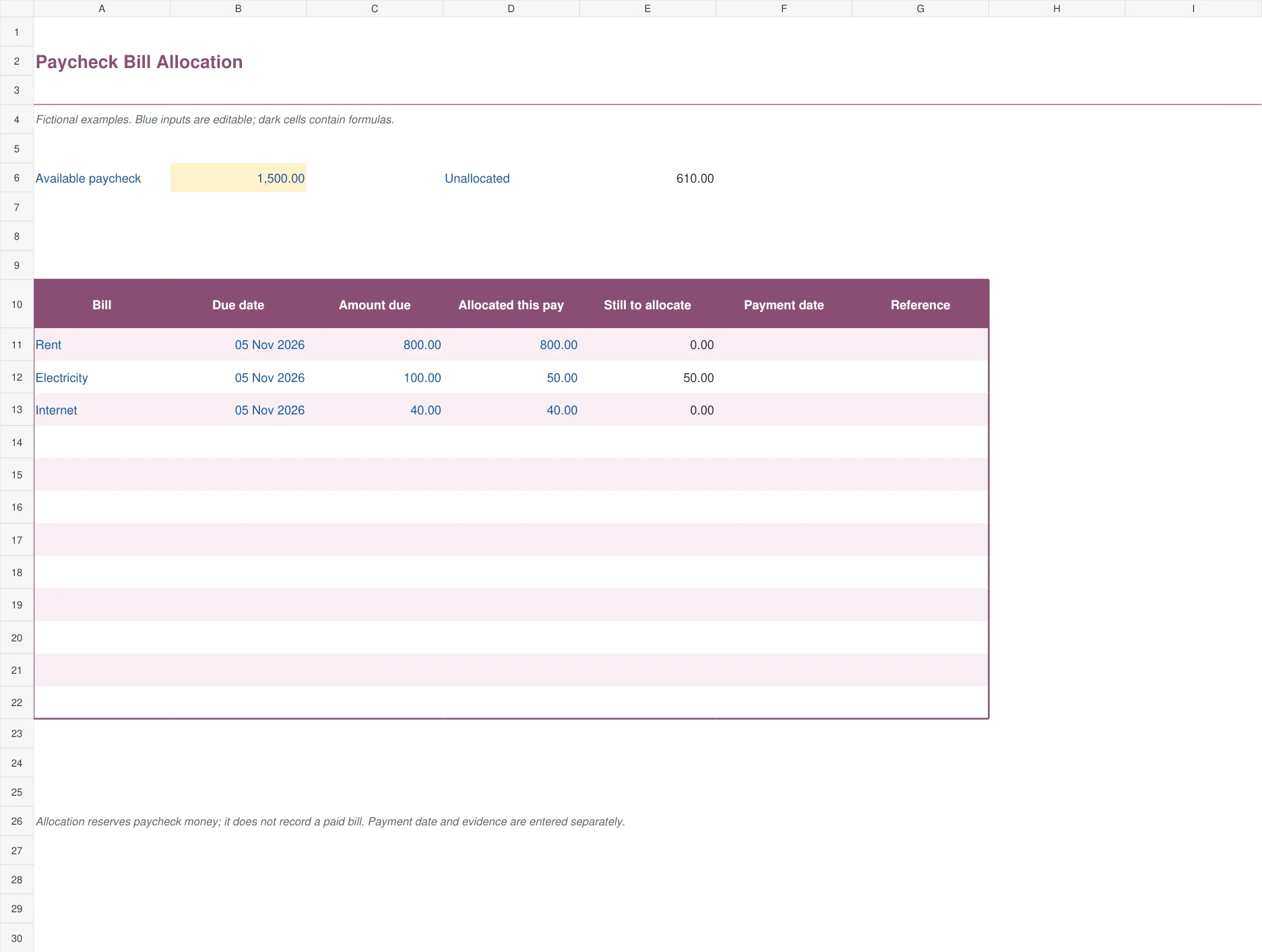
The plum allocation sheet starts with the amount available from a paycheck and reserves part of it for selected bills. It calculates unallocated money and the part of each bill still to allocate. Payment date and reference are separate fields. This helps households make a plan between paydays without confusing money set aside with money already transferred to the provider. A negative unallocated total is highlighted.
The sample paycheck is 1,500. Allocations of 800, 50 and 40 leave 610 unallocated. Increasing the second allocation to 100 leaves 560. Check other essential spending and savings needs before treating that remainder as freely available. The file focuses on the bills you enter and does not automatically include groceries, transport or every other household commitment.

5. Shared Household Bill Split
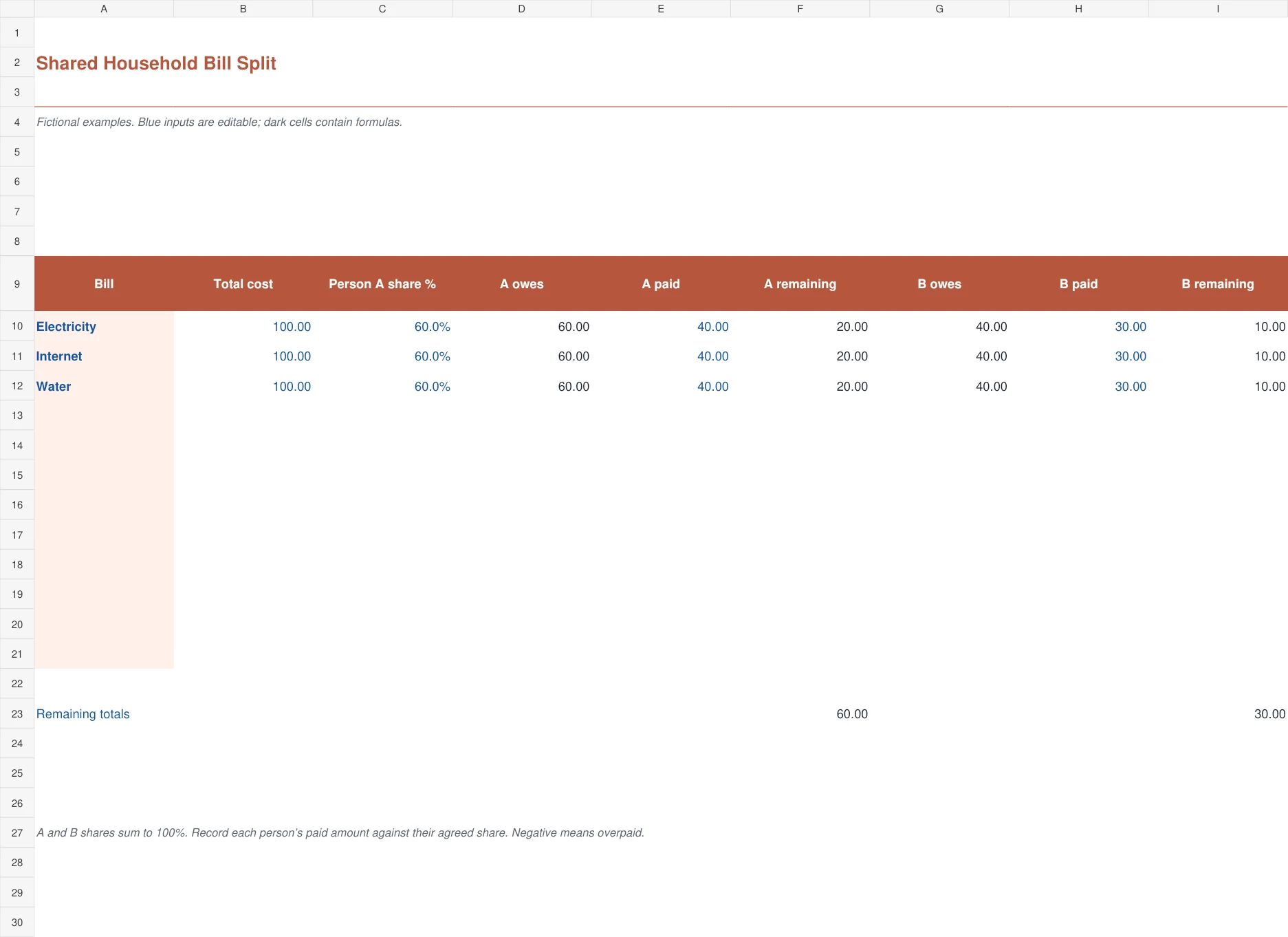
The coral split worksheet calculates two people’s agreed shares of a bill and compares each share with what that person has paid. One percentage input sets Person A’s share, with Person B receiving the remainder. This makes the total allocation equal the bill amount while allowing unequal arrangements. Remaining amounts stay separate for each person, which is useful when payments are made at different times.
For a bill of 100 with Person A assigned 60%, A owes 60 and B owes 40. If A has paid 40, A’s remaining share is 20. Changing the share to 50% reduces that remainder to 10. Enter paid amounts according to your agreed accounting convention. Negative remaining amounts indicate that someone has paid more than their assigned share and may need a reimbursement discussion.

Three amounts that should stay separate
The amount due is what the provider has billed for the relevant period. The amount allocated is money you have reserved in your plan. The amount paid is money that has actually been transferred or collected. They may be equal eventually, but keeping them separate prevents a plan from being mistaken for a completed payment.
For example, you might allocate 100 for electricity on payday but pay it three days later. The paycheck worksheet records the reservation and keeps a separate payment date. The monthly tracker records actual paid amounts against the bill. Use a consistent reference between them if you maintain both views so that updating the plan does not accidentally record the same payment twice.
Credits and overpayments also deserve their own explanation. A negative remaining balance can mean a payment exceeded the current bill or that a credit needs allocation. Do not force the result to zero simply to make the list look tidy. Check the provider’s account and retain the reason for the difference.
Set up the month in a few deliberate steps
Collect the current bills and confirm due dates, amounts and payment methods. An old standing amount can be wrong after a price change or a variable usage month. Mark which payments are collected automatically, but still check that the expected debit actually occurs and that the account has funds available.
Enter bills once in the monthly register and set the review date. Add actual payments as they happen, retaining a reference or statement note. Review positive overdue balances first, then look ahead to bills due before the next paycheck. The workbook highlights timing information; it does not know whether a provider has offered a revised arrangement.
Use the calendar when several bills cluster on a particular date. Its source list contains twelve records and the grid totals amounts scheduled for each day of the selected month. Changing the month changes the displayed date grid, but it does not generate new bill records or copy a recurring payment into the future. Enter the actual due dates you intend to review.
If you reserve money by payday, use the allocation sheet to check how much of that paycheck remains after the chosen bills. Leave room for other essentials. Your broader household budget should account for groceries, transport, savings and irregular spending that the bill allocation list does not automatically include.
Decide which view to keep as the main record
A household with only a few regular bills may need the monthly tracker alone. The calendar is helpful when timing is the main problem. The annual register is better for a quick payment history, while the split sheet is useful when more than one person contributes. You do not have to maintain five copies of the same information just because five files are available.
Choose one main payment record and use the other files for the decisions they clarify. A checkbook register can help reconcile actual bank transactions with the bill list. Check the date and reference before assuming that a similar amount on the statement belongs to the same bill.
For shared costs, agree what the entered paid amount means. It might represent money paid directly to the provider or a contribution transferred to the person who pays the bill. Mixing those conventions can make the split look settled while the provider remains unpaid. Record the household agreement and retain payment evidence.
If the unallocated paycheck amount becomes negative, revisit the plan before spending against it. Consider due dates and the rest of the household’s commitments rather than treating the spreadsheet as a complete cash forecast. A daily budget template can help with the smaller spending decisions between paydays.
A short weekly check prevents a messy month-end
Review payments made, bills approaching and any automatic debit that did not occur as expected. Update the review date deliberately and investigate an overdue flag rather than simply moving the due date forward. If the provider has confirmed a new due date, retain that information so the change is explainable.
Keep annual and irregular bills on a separate planning list if they do not fit a stable monthly expectation. The annual register assumes the monthly expected amount is the same throughout the year. Its final column compares a full-year expectation with payments entered so far, which is different from an overdue amount. A large gap in January is not evidence of eleven unpaid overdue bills.
Save a clean master before customizing. The monthly, calendar, paycheck and shared-cost sheets provide twelve records; the annual register provides eight recurring-bill rows. Copy formulas, extend totals and expand the calendar’s source ranges before adding more records. The files contain no macros, account connections or automatic payment functions.
For a simple example of a recurring-bill worksheet, see Vertex42’s bill tracker guide. Keep the final routine small enough to maintain. A brief weekly update with actual payment evidence is more useful than a detailed organizer that is never brought current.
Frequently Asked Questions
Will marking a bill Paid remove it from the calendar?
No. The calendar shows the scheduled amount due on each date, including records marked Paid. This preserves the timing picture. Use the Monthly Household Bill Tracker to calculate the remaining unpaid balance, and keep the calendar as a view of scheduled amounts.
Does allocating a bill from my paycheck mean it is paid?
No. Allocation reserves money in the plan. Payment is a separate event that should have an actual date and reference. Keep that distinction clear when using the paycheck sheet with the monthly tracker so you do not record planned transfers as completed payments.
Can I use the split worksheet for unequal contributions?
Yes. Enter Person A’s agreed percentage and Person B receives the remainder. Each person’s amount paid is compared with their own share. Agree whether paid means direct provider payment or a contribution to another household member, then apply that convention consistently.
Does the annual register show overdue amounts?
No. It compares a constant full-year expectation with the actual payments entered so far. Future months contribute to that comparison even before their bills are due. Use the monthly tracker’s due dates and remaining balances when you need to identify overdue obligations.

