

Before adding another budgeting app, try a simpler audit: list the recurring charges you already pay, identify the next decision date and write down who will act. The awkward subscriptions are often the ones with a small monthly price, an annual renewal or a cancellation request that nobody checked afterward.
These five subscription tracker Excel templates separate those jobs. One normalizes personal costs, one plans software renewals, one follows cancellations, one compares billing options and one reviews unused seats. The free editable files have different designs and actual previews, so you can choose a focused worksheet instead of maintaining every field for every service.
Find the subscriptions before organizing them
Look through card statements, bank transactions, supplier bills and app-store purchase histories. Search over a long enough period to catch annual charges. Record the service name people recognize as well as the payment method, because the statement description may use a company name that differs from the app or product name.
Check shared services before canceling them. A tool that looks unused to one person may support another team member, a family account or an important stored record. For business software, assign an owner who can confirm usage, terms and the consequences of ending access. A list with no owner tends to become a record of surprises rather than a renewal plan.
Keep currencies separate unless you have a reviewed conversion process. A monthly equivalent is useful only when the amounts being added are comparable. These files normalize billing frequency, not exchange rates. The fictional examples use one currency and do not fetch pricing, transactions or contract details automatically.
Pick the tracker for the decision you need to make
1. Personal Subscription Tracker
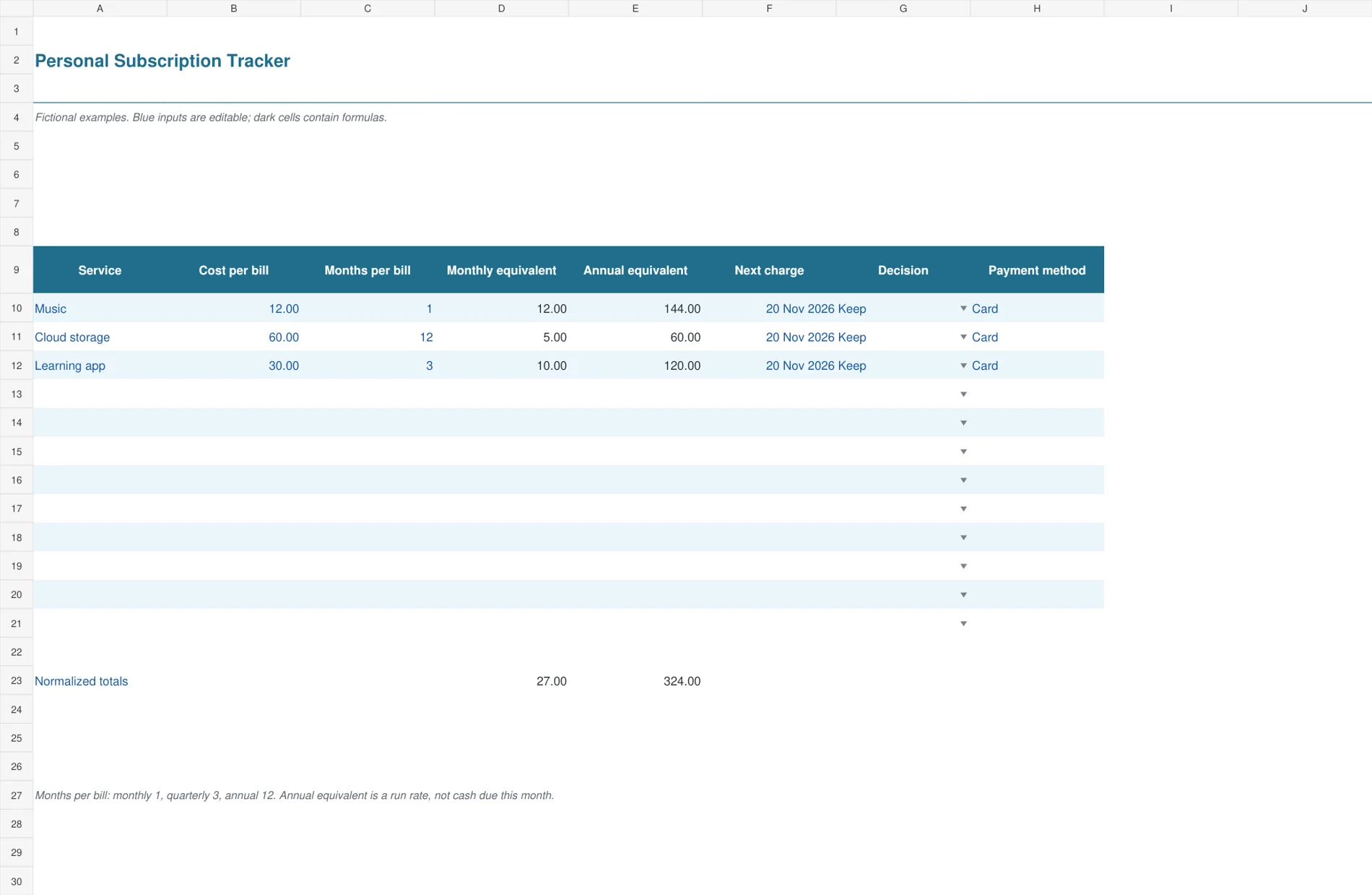
The blue personal tracker converts different billing cycles into comparable monthly and annual equivalents. Service, cost per bill, months per bill, next charge, decision and payment method stay on one row. It suits households or individuals who want to see the run-rate cost of music, storage, learning tools and other recurring services without assuming that every payment arrives monthly.
Enter one month for monthly billing, three for quarterly and twelve for annual. A service costing 60 each year has a monthly equivalent of 5. A 30 quarterly payment has a monthly equivalent of 10. The normalized totals help compare commitments, but they do not show the cash that will leave your account in a particular month. Keep the next-charge date current for that purpose.

2. Software Renewal Planner
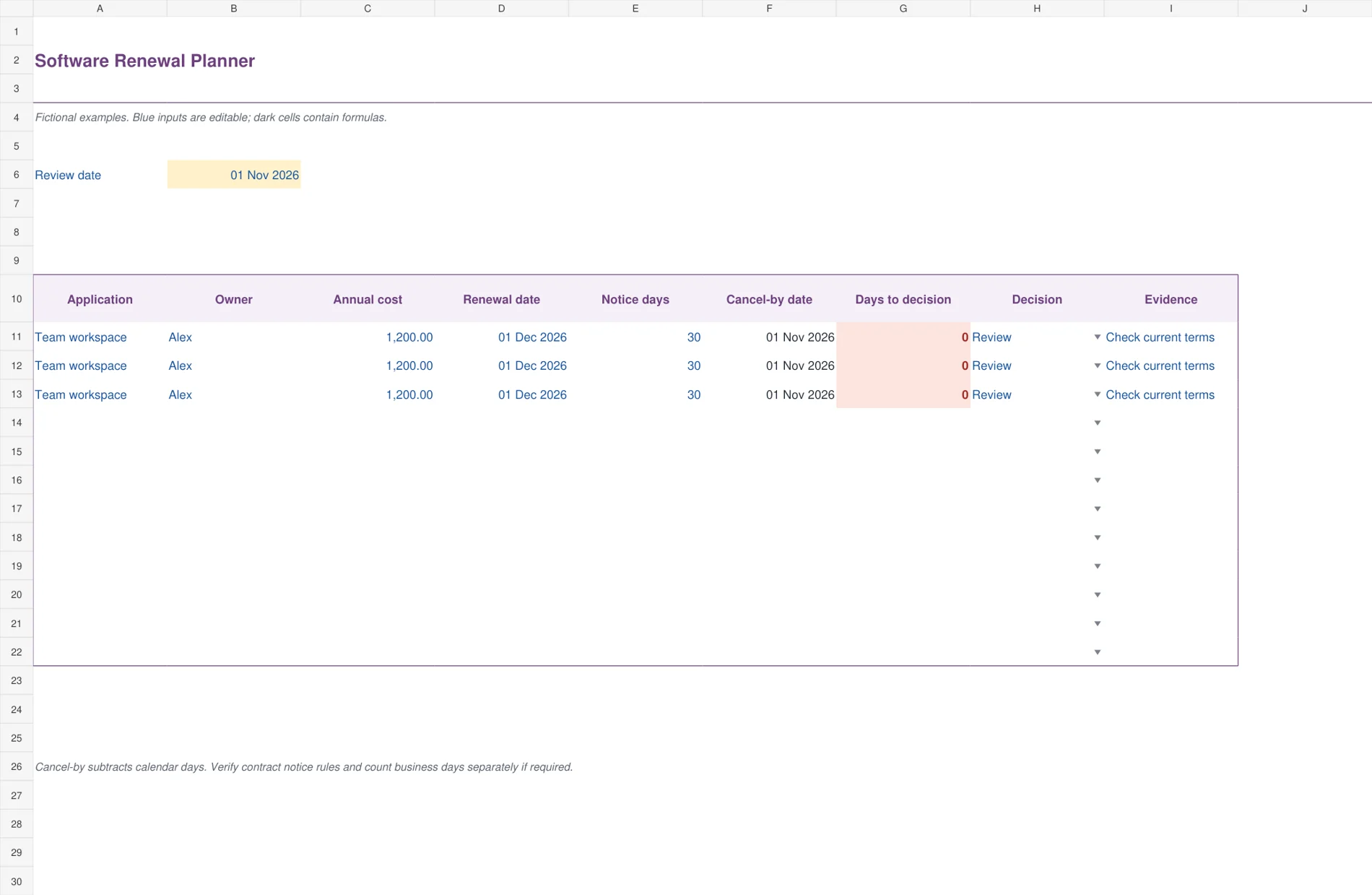
The plum business planner puts ownership and notice timing beside each application’s annual cost. Renewal date less notice days produces a cancel-by date, and days to decision calculate from an editable review date. Dates within fourteen days, including dates already passed, receive a visible flag. This gives a small team a practical renewal review list without implying that a colored cell sends a notification.
Enter the application owner and check the actual terms before entering notice days. The formula subtracts calendar days, so a contract requiring business-day notice needs a separate reviewed treatment. The sample renewal on December 1 with thirty days’ notice produces November 1 as the decision deadline. Record the final choice and supporting evidence before relying on a Keep or Cancel label.
3. Subscription Cancellation Log
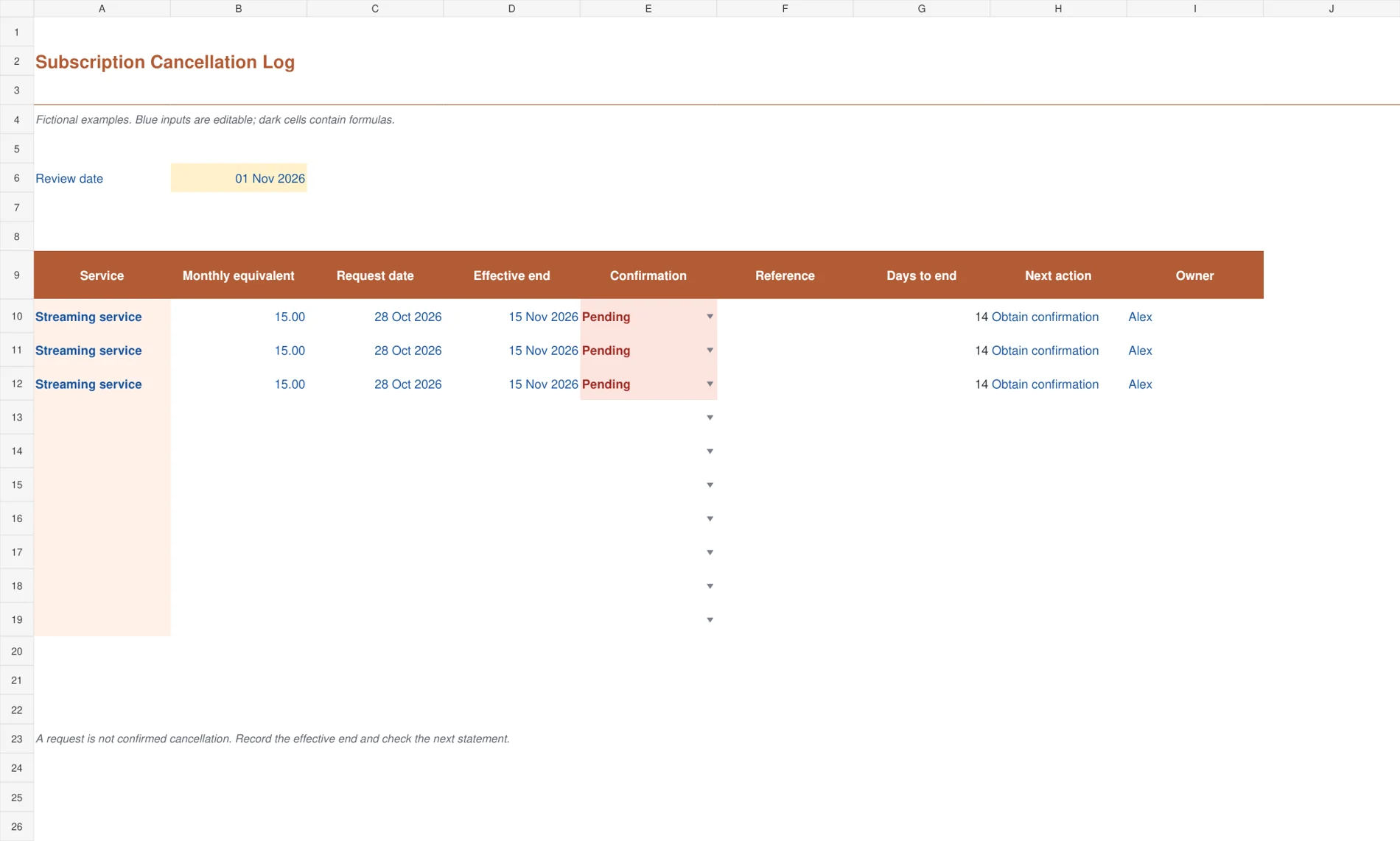
The terracotta cancellation log follows the work after someone decides to stop a service. It records request date, effective end date, confirmation status, reference, days to end, next action and owner. Pending confirmations are highlighted. This is useful when cancellation takes several steps or the service remains available until the end of a paid period. The layout makes the unresolved action more prominent than a speculative savings total.
Record the request when you submit it and retain the confirmation reference once received. Enter the effective end date separately from the request date. The days-to-end value can remain positive even after cancellation has been confirmed because access may continue until that date. Check the next billing statement and keep any refund or unexpected charge as a separate follow-up rather than assuming the request ended all payments.

4. Monthly versus Annual Plans
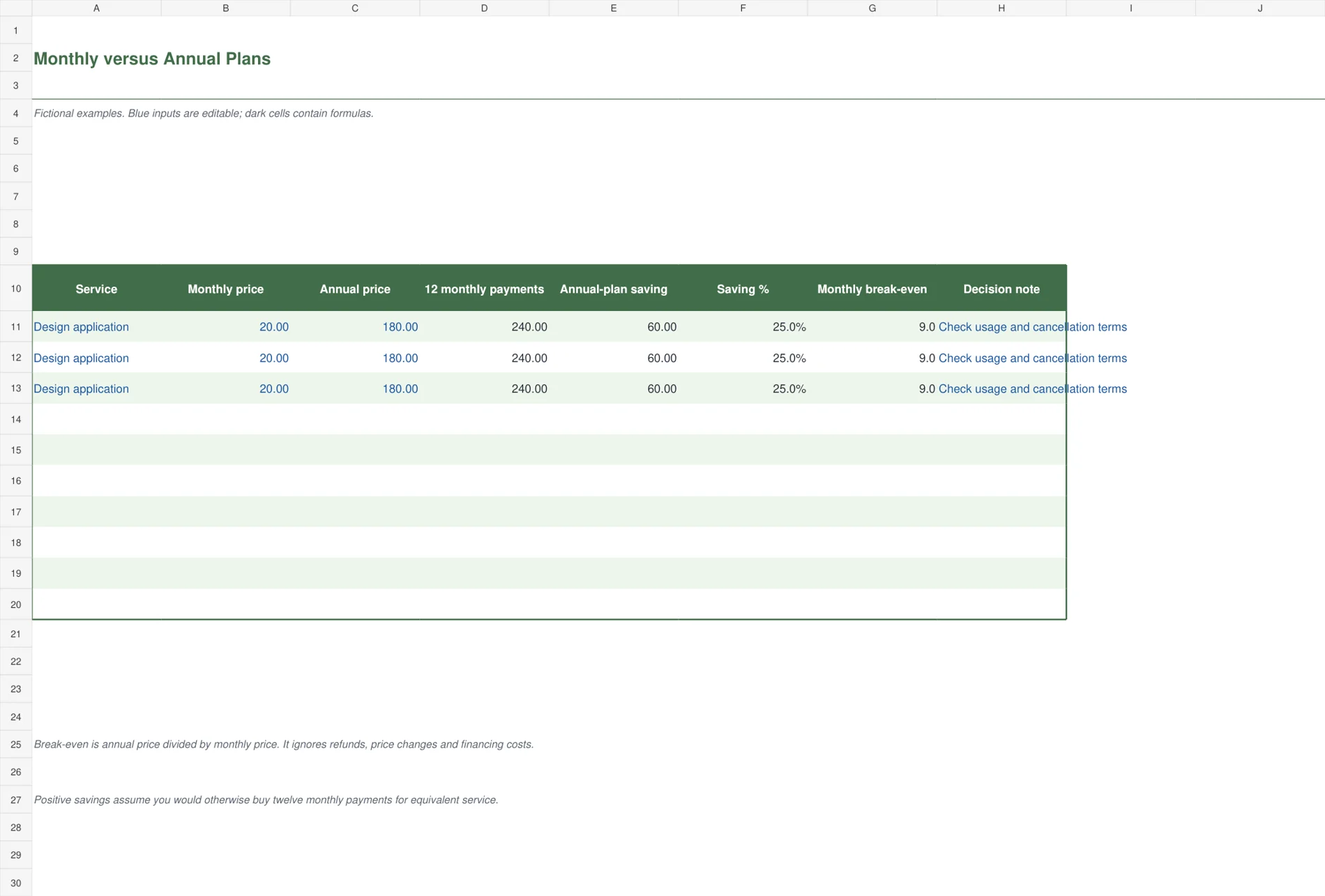
The green comparison worksheet helps evaluate an annual offer against twelve monthly payments for equivalent service. It calculates the annual-plan saving, percentage saving and the number of monthly payments that equal the annual price. This is a decision aid for a service you expect to keep, with space to record the usage and terms that affect the choice. It deliberately keeps the cash commitment visible.
At a monthly price of 20 and annual price of 180, twelve monthly payments cost 240 and the annual option saves 60 over a full year. Its simple break-even is nine monthly payments. If you expect to need the service for fewer months, or the annual payment is not refundable, the lower full-year price may still be the less suitable choice. Confirm equivalent features and seats before comparing.

5. Software Seat Utilization
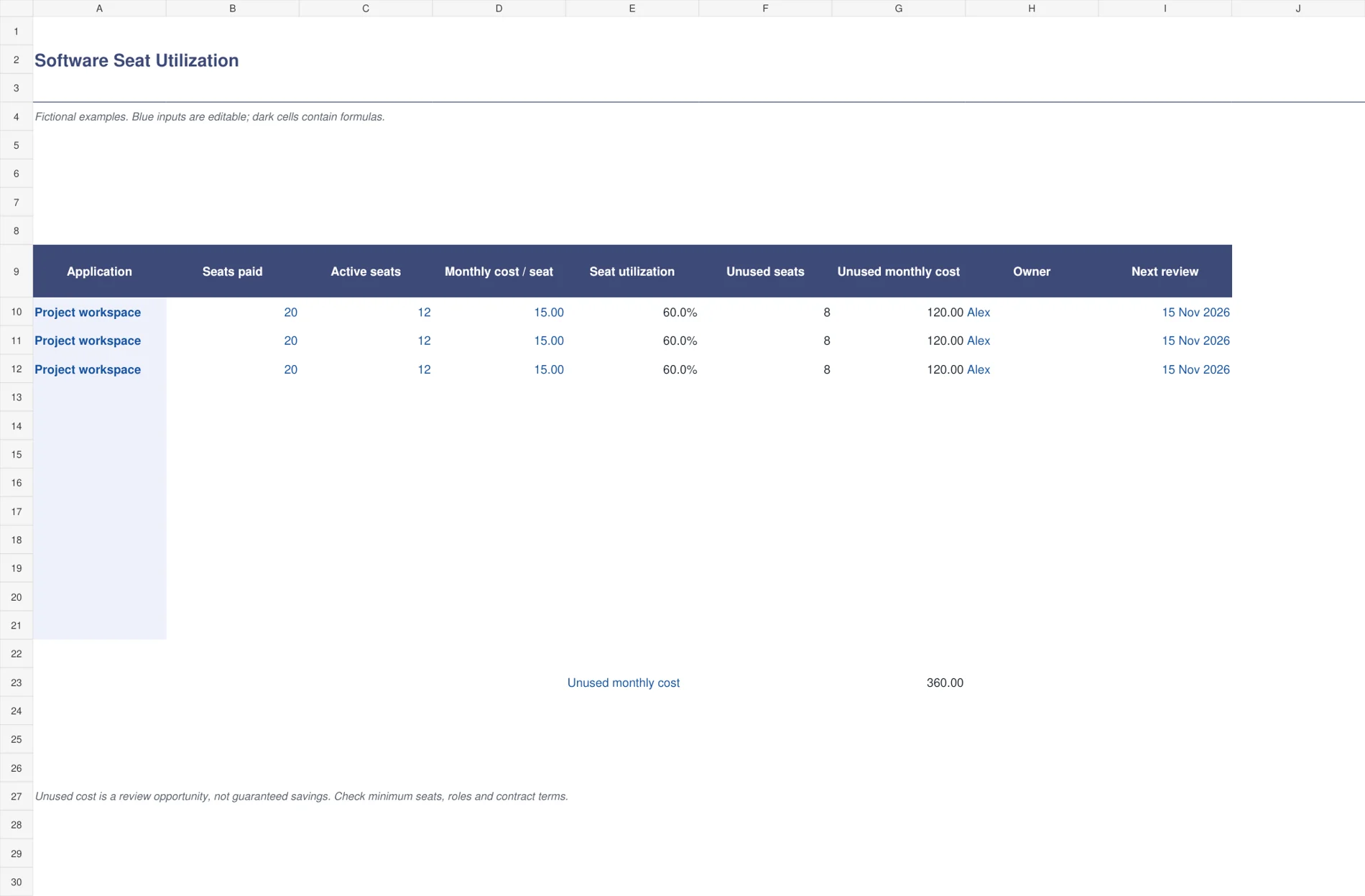
The slate-blue utilization sheet compares seats paid for with active seats and a monthly cost per seat. It calculates utilization, unused seats and the associated unused monthly cost. An owner and next-review date make the result actionable. A flag highlights active-seat counts above purchased seats, which should be reviewed as a data or entitlement issue rather than treated as negative unused capacity.
Use a clear definition of active, such as a reviewed usage period, and enter the same definition for every application being compared. Twenty paid seats with twelve active at 15 per month identify eight unused seats and 120 of unused monthly cost. That is an opportunity for review, not guaranteed savings. Minimum commitments, role requirements and contract terms may limit what can actually be reduced.

Understand the three dates that matter
The next charge date is when a payment is expected. The renewal date is when a term renews or a new commitment begins. The notice deadline is the last date for a decision under the relevant terms. They can be different dates. An annual software renewal may require notice well before the next invoice arrives.
The renewal planner calculates a calendar-day deadline from the renewal date and entered notice period. Check whether notice must be received, submitted through a particular channel or counted in business days. Record the rule in the evidence field or supporting contract reference. Do not rely on the spreadsheet to interpret terms it has not been given.
The cancellation log adds an effective end date. A request made today may end access at the next billing boundary. Retain confirmation and check the next statement before treating a charge as stopped. When a request is still pending, the next action and owner are more useful than an optimistic savings figure.
Compare costs without confusing them with cash flow
A 60 annual subscription is equivalent to 5 per month, but the provider may still collect all 60 at once. Use the normalized figure to compare the ongoing commitment and the next-charge date to prepare for the payment. Mixing those views can leave a budget looking affordable while an annual bill arrives without enough cash set aside.
An annual plan should be compared with the same service and features. At 20 monthly versus 180 annually, the full-year saving is 60. The annual price equals nine monthly payments, before refunds, changing prices or financing effects. If you may use the service for only six months, that comparison points to a different decision from a guaranteed twelve-month requirement.
For business costs, compare the tracker with your expense records. Actual charges can reveal price increases, duplicate purchases or a service that continued after a cancellation request. Keep one service identifier where possible so the list and supporting expense entry can be matched reliably.
Make a monthly review short enough to repeat
Review the next set of decision deadlines, pending cancellations and obvious unused capacity. Confirm a small number of actions with owners and dates. There is no need to reconsider every service from scratch every month, but a changed price, changed usage or approaching commitment deserves a fresh decision.
Maintain contacts and terms in your supplier list where that information already belongs. The subscription tracker can hold the working renewal decision while the supplier record preserves the wider relationship. Avoid copying the same contact details across several files that nobody updates together.
For personal subscriptions, bring the normalized totals into a broader budget worksheet. Keep irregular essential payments and one-off purchases separate so the subscription total remains meaningful. For business software, discuss unused seats with the owner before reducing access and confirm when a contractual saving can actually take effect.
All five files are macro-free Excel workbooks. The personal, renewal and utilization sheets provide twelve rows; cancellation and plan comparison provide ten. Extend formulas and totals before adding more. Blue text marks editable inputs and dark text marks calculations. Update the review date deliberately so a saved review retains its original timing.
For an example of the fields commonly used in a software subscription inventory, see Spendflo’s subscription tracking overview. Keep your own process proportionate: a current deadline and a named owner often matter more than a long list of optional columns.
Frequently Asked Questions
Does the tracker cancel services or send alerts?
No. It records decisions and highlights selected dates or pending confirmations inside Excel. It does not contact providers, access bank accounts or send reminders. Use your normal calendar or task system for notifications and complete cancellation through the provider’s required process.
Is annual equivalent the amount I will pay this year?
Not necessarily. It is a twelve-month run rate based on the entered billing amount and frequency. Actual cash payments depend on renewal dates, partial periods, price changes, cancellation timing and refunds. Keep those dated transactions in your normal payment or expense records.
Why track cancellation confirmation separately?
Submitting a request does not always establish the effective end date or prove that future charges have stopped. A separate confirmation field, reference and statement check make unfinished work visible. Keep access end dates and any refund follow-up distinct from the original request.
Does unused seat cost equal guaranteed savings?
No. It estimates the cost associated with seats entered as unused. A minimum commitment, annual contract or role requirement may prevent an immediate reduction. Confirm usage and terms with the application owner before treating the figure as a saving in a budget.

