

A useful performance review should leave both people knowing what went well, where expectations were missed and what happens next. A page full of ratings rarely achieves that on its own. The record needs room for evidence, the employee’s perspective and a small number of actions that someone will actually follow up.
These five employee performance review Excel templates support different parts of that conversation: weighted competencies, goal achievement, self-assessment, review scheduling and development actions. Each workbook is editable and free to download, with its own visual style and a preview of the actual file. The examples are fictional and should be replaced with criteria that fit the role.
Prepare the conversation before choosing a score
Begin with the review period and the responsibilities the employee was expected to fulfill. A person who changed role halfway through the year should not be assessed as though the same objectives applied throughout. Record any agreed changes to scope, resources or targets so the review reflects the work that was actually assigned.
Gather specific examples from the whole period. Recent events are easier to remember, but they may not represent the wider pattern. Use dated outcomes, quality checks, customer feedback or completed work that relates to the agreed responsibilities. A description such as improved communication is more useful when it names the behavior and the result.
Give the employee time to prepare their own view. The self-and-manager workbook can make differences easier to discuss, especially when both people use the same definitions. Ask what support or information was missing before deciding that a gap reflects effort or ability. Keep the final record accurate enough that someone can understand the assessment without having attended the meeting.
Five review formats to choose from
1. Weighted Performance Scorecard
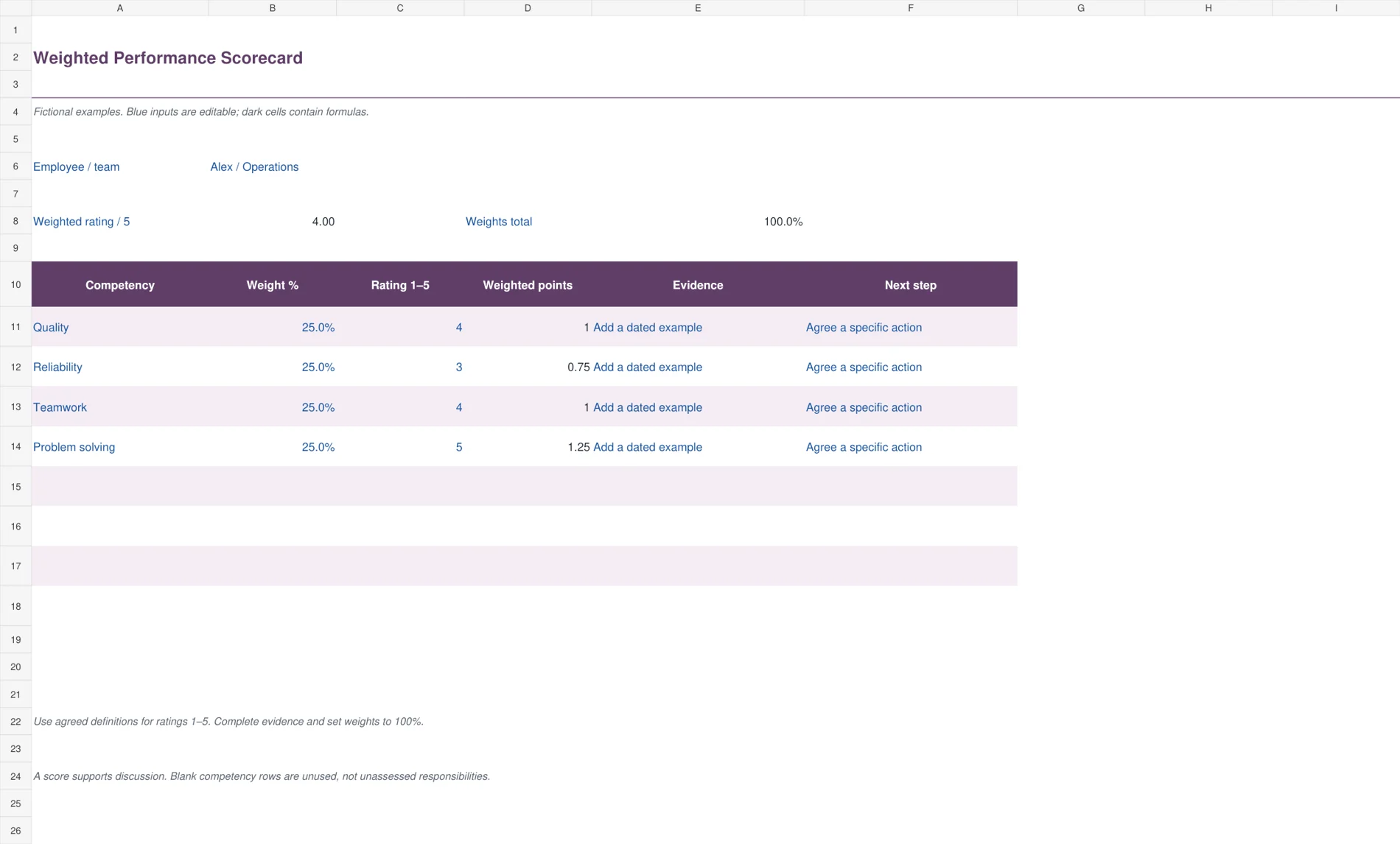
Use this plum scorecard when the review needs an agreed set of competencies, weights and ratings. It calculates weighted points and an overall rating on a five-point scale. Evidence and next-step columns sit beside each competency, keeping the discussion connected to examples. The example weights are equal, but you can change them to reflect the role. A visible weight-total check highlights a total different from 100%.
Replace the sample competencies before the review period begins. Agree what ratings one through five mean, then record evidence for each assessment. The overall result divides weighted points by the entered weights, so it remains mathematically understandable if the weights are temporarily incomplete. That does not make incomplete weights ready for approval. Resolve the highlighted total and any missing assessments before using the result.

2. Employee Goal Achievement
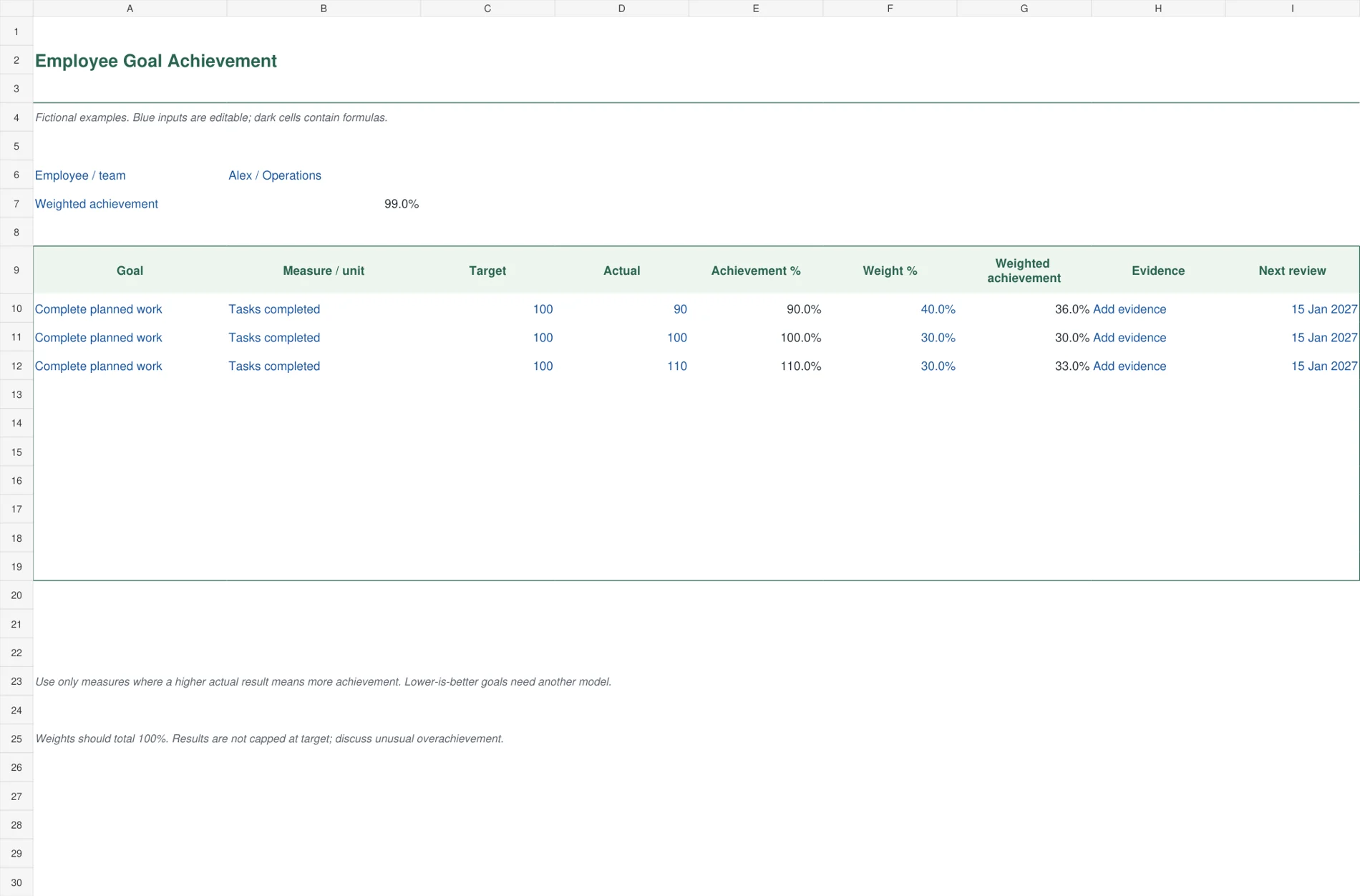
The green goal worksheet is for measurable objectives where a higher actual result means more achievement. Target, actual, achievement percentage and weight remain separate fields. Weighted achievement calculates without capping results at 100%, making overachievement visible for discussion. Each goal also has an evidence field and a next-review date. This sheet suits goals such as completed tasks or agreed output volumes with a consistent measurement basis.
Enter the target and actual using the same unit and period. A target of 100 tasks with 90 completed gives 90% achievement. Set goal weights to a total of 100% and explain any unusually high result. Do not use this formula unchanged for measures where lower is better, such as error rates or turnaround time. A zero target produces n.a. because a meaningful attainment ratio cannot be calculated.

3. Self and Manager Review
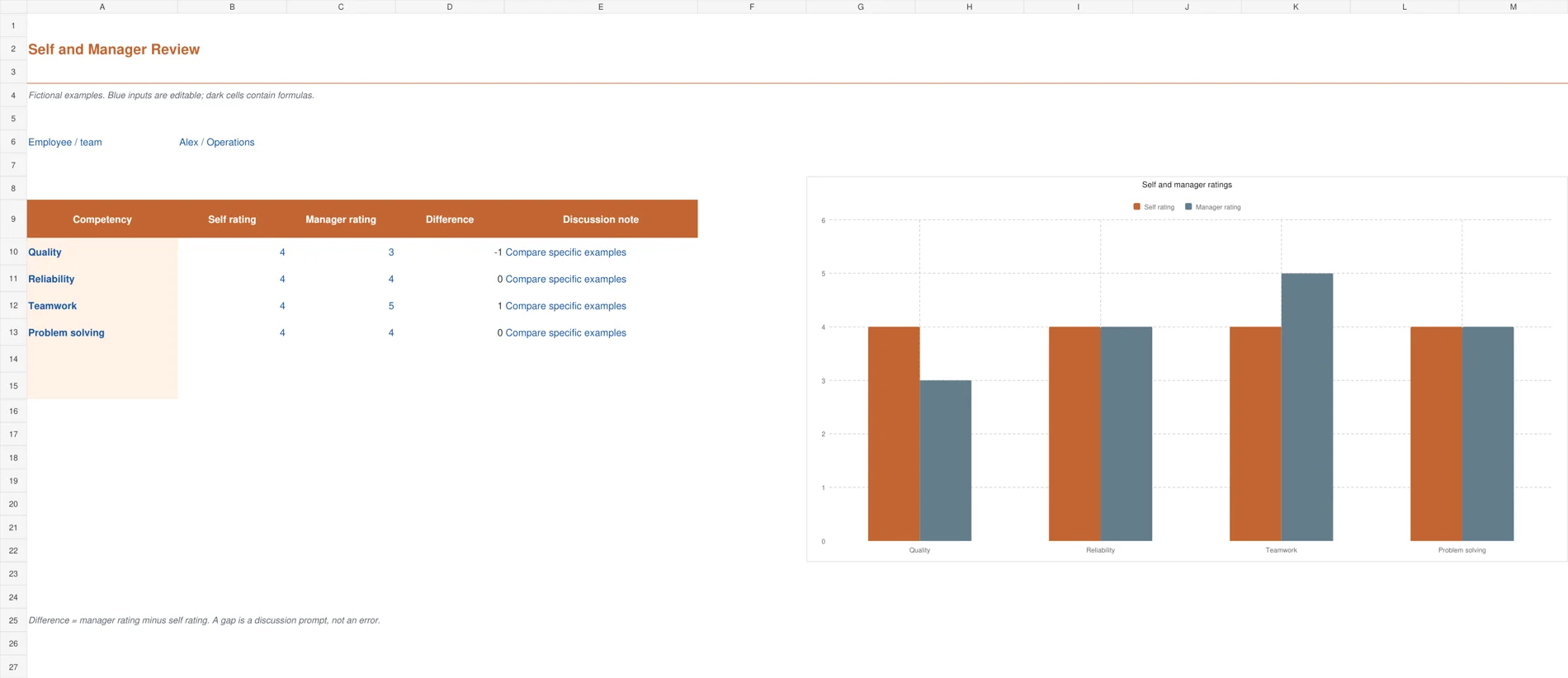
The terracotta comparison sheet puts employee and manager ratings side by side, with a calculated difference and an editable discussion note. An Excel chart shows the two perspectives across the sample competencies. This arrangement is useful before a review meeting because it identifies areas where the conversation needs more evidence. It does not combine the two assessments into an automatic final rating or assume that one perspective must be wrong.
Ask both people to use the same rating definitions and review period. A difference of minus one means the manager’s rating is one point below the employee’s rating. Discuss the examples behind the gap and record what was agreed. Replace the sample competencies in the table and keep the chart ranges aligned when adding more. The supplied chart covers the first four competency rows.

4. Quarterly Review Tracker
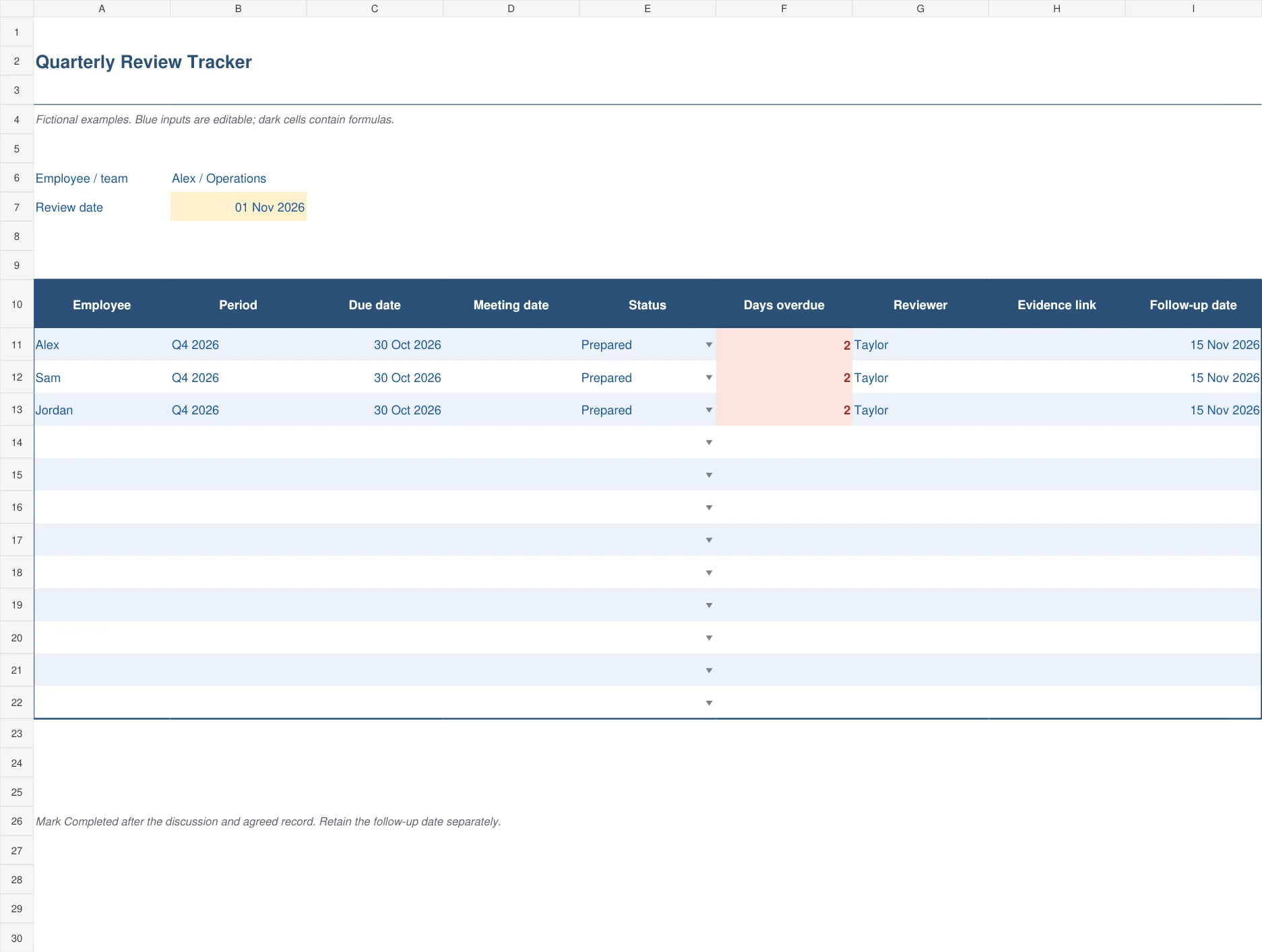
The blue quarterly tracker coordinates the review process across a small team. It records the employee, review period, due date, meeting date, status, reviewer and follow-up date. Overdue days calculate from a fixed review date and are highlighted while the review remains incomplete. This is an administrative view for arranging and following through on reviews, rather than a table for ranking employees against one another.
Set the review date and enter the deadlines for the current cycle. Use Prepared when the evidence is ready but the meeting has not yet been completed. Mark a review Completed after the discussion and agreed record are in place. Keep the next follow-up date even after completion. A zero overdue result confirms only the timing calculation, not the quality or fairness of the review.

5. Development Action Plan
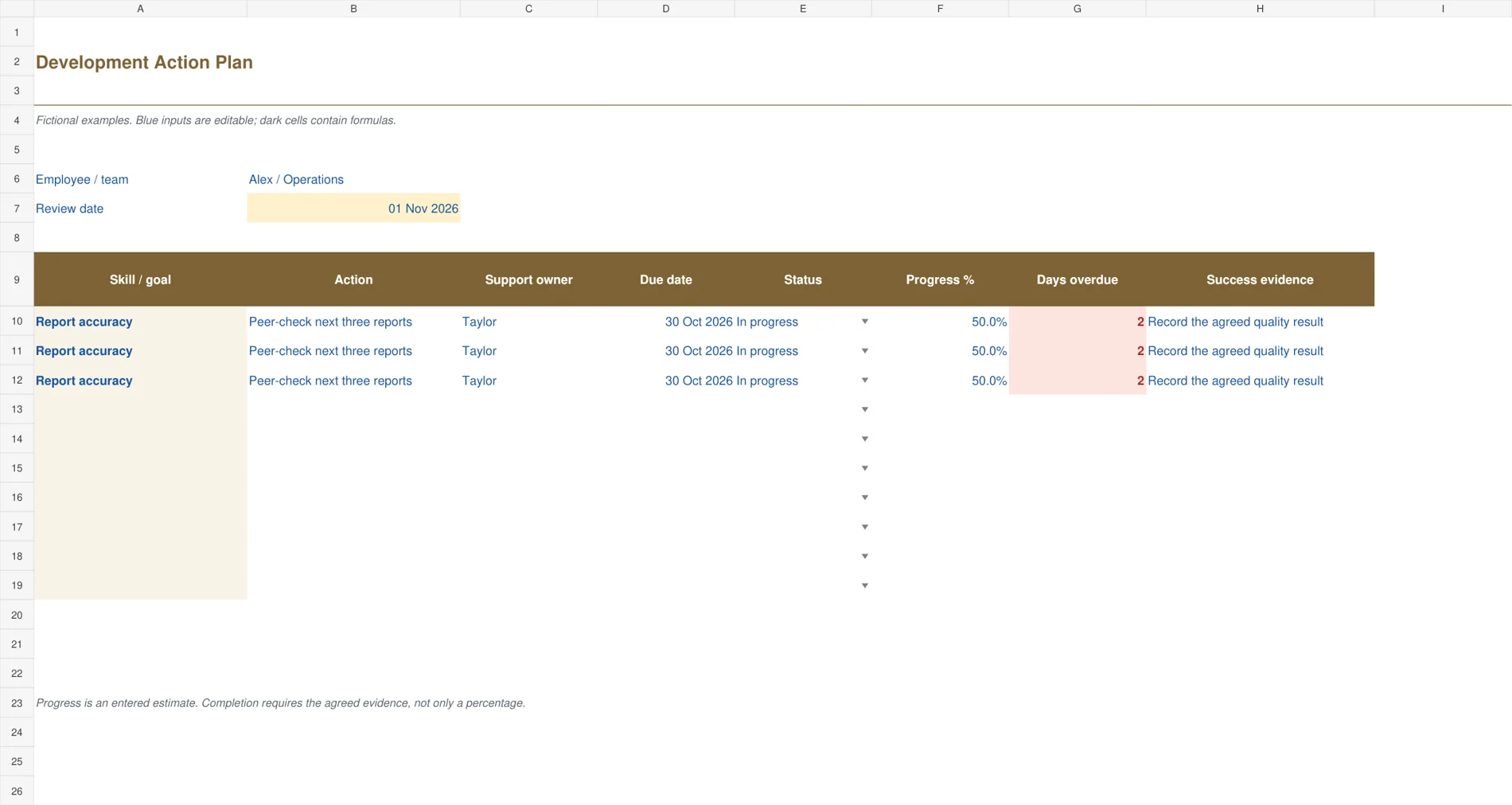
The warm olive development plan turns the conversation into work that can be followed up. Each row contains a skill or goal, action, support owner, due date, status, entered progress and success evidence. Calculated overdue days keep unfinished actions visible. The layout gives more space to the action and evidence than to the score, helping a manager and employee describe what improvement should actually look like.
Write a practical action, such as peer-checking the next three reports, and agree what outcome will demonstrate progress. Name the person providing support as well as the employee doing the work. Progress percentage is a manually entered estimate. Complete an action only when its agreed evidence exists, then discuss whether another action is needed rather than repeatedly moving the same deadline forward.

Make the rating scale understandable
The weighted scorecard uses ratings from one to five as an example. Define what each number means for the responsibility being assessed. A four for teamwork should describe observable behavior in that role, not simply mean the manager feels positive. Clear descriptions also help different reviewers apply a similar standard across a team.
In the sample, four equally weighted ratings of four, three, four and five produce an overall rating of four. Changing the first rating from four to two reduces the overall result to 3.5. The calculation is transparent, but the important work remains the explanation behind the ratings. A precise-looking number cannot repair unclear expectations or weak evidence.
The goal worksheet uses a different model. Goals with achievement of 90%, 100% and 110%, weighted at 40%, 30% and 30%, produce 99% weighted achievement. That result should not be treated as interchangeable with a competency score of four out of five. Keep the meaning of each measure clear and discuss both outcomes and how the work was carried out.
Use work records carefully
A monthly timesheet can help establish what work and time were recorded, but hours alone do not measure quality or contribution. Look at the agreed outputs and the conditions under which the work was performed. Avoid rewarding a longer workday simply because it is easy to count.
If a review concerns reliability or coverage, verify the underlying attendance records before discussing a pattern. Separate approved leave and agreed arrangements from unexplained gaps. The purpose of checking records is to make the conversation accurate, not to turn every attendance measure into a performance score.
After agreeing development actions, allow time for them in the employee’s daily work schedule. Training, practice and feedback require real capacity. A development plan is unlikely to progress if it is added to an already full workload with no support, owner or protected time.
Finish with a small, practical follow-up plan
Choose a few actions that address the most important needs. State the action, support required, evidence of success and review date. “Improve reports” leaves too much interpretation. “Use the revised checklist on the next three reports and review corrections with Taylor” gives both people a clearer starting point.
Share the agreed record and allow factual corrections. Keep the file in an appropriate restricted location because performance notes can include sensitive information. The workbooks are ordinary editable Excel files with no automatic access controls beyond the protections you apply when storing or sharing them.
The files provide six to twelve working rows depending on their purpose, with eight competency rows in the weighted scorecard. Copy formulas and update chart ranges before adding more. Save a clean master and retain the rating definitions alongside the completed review. For additional review structures, see Smartsheet’s employee review resources.
Frequently Asked Questions
Which template should I start with for one employee?
Choose the Weighted Performance Scorecard for a competency-based discussion or Employee Goal Achievement for measurable output targets. Use the Development Action Plan afterward to record support and follow-up. You can combine their references without forcing every part of the review into one numerical rating.
Do the workbooks decide the employee’s final rating?
No. They calculate the entered ratings or attainment measures using the stated formulas. Reviewers still need agreed criteria, reliable evidence and a documented discussion. The self-and-manager comparison deliberately keeps the two perspectives separate so they can be explored rather than automatically averaged.
Can I use the goal worksheet for reducing errors?
The supplied formula assumes higher actual performance means greater achievement. A lower-is-better goal, such as fewer defects, needs a different attainment rule. Do not enter an error count into the existing ratio and assume a higher percentage means a better result.
Can the review tracker send reminders?
No. It flags overdue items using the review date you enter. Update that date when conducting a new review cycle and use your normal calendar or task system for notifications. A status change does not send an email or create an appointment.

