
A busy sales week can still end with a difficult payroll Friday. The issue is often timing: a customer pays next month, a supplier needs payment this week, and the bank balance has to cover both the gap and normal operating costs. A weekly forecast makes those dates visible before they become an unpleasant surprise.
These five free 13-week cash flow forecast Excel templates offer different ways to plan the next quarter of cash receipts and payments. Choose a simple weekly planner, a detailed category forecast, an invoice collections calendar, a payroll reserve planner, or a forecast-versus-actual review. Each download is an editable, macro-free .xlsx workbook with its own preview, layout, and colour theme. The example figures are fictional and should be replaced before use.
Choose the cash planner that matches your next decision
If you only need to know whether weekly cash stays above a minimum balance, begin with the simple planner. Use the detailed version when several types of payments need separate attention. Choose the collections calendar when a handful of customer invoices account for most of your expected receipts.
The payroll version is useful when pay dates create large, uneven outflows. The review workbook serves a different purpose: it preserves a forecast beside completed actual weeks so you can see whether your assumptions were reliable. You do not need to maintain all five files. Start with the one your team can update consistently.
1. Simple 13-Week Cash Planner
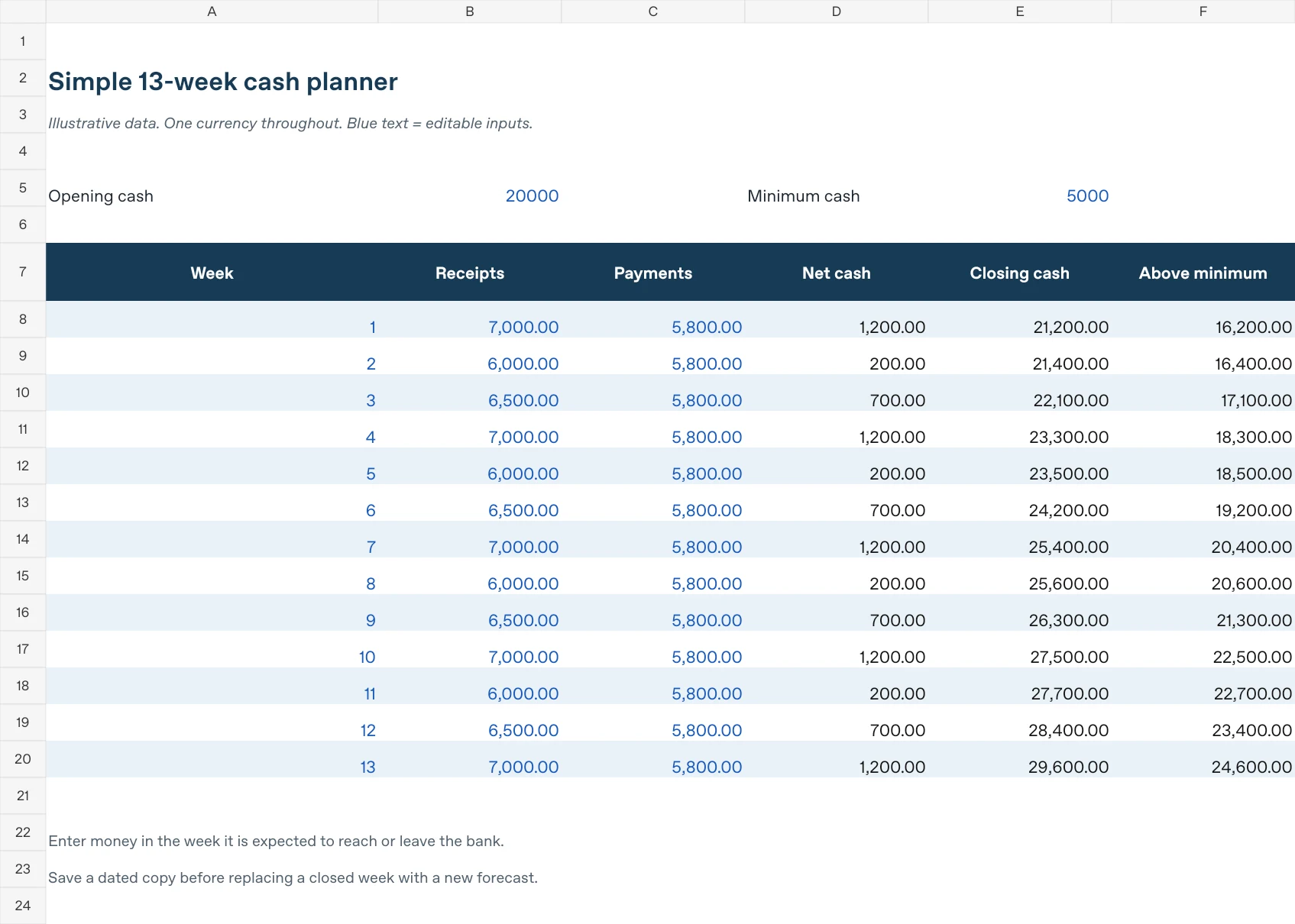
This navy worksheet keeps all thirteen weeks in a compact vertical table. Enter opening cash, a minimum cash target, expected receipts, and expected payments. Net cash, closing cash, and the amount above the minimum calculate automatically. The layout suits an owner who wants a short weekly conversation rather than a detailed finance model.
For example, opening cash of 20,000, receipts of 7,000, and payments of 5,800 produce closing cash of 21,200. With a minimum target of 5,000, the available amount above that target is 16,200. A negative amount in the final column highlights a reserve shortfall even when the bank balance itself remains positive. Change the minimum to reflect your own planning needs.
2. Detailed Receipts and Payments Forecast
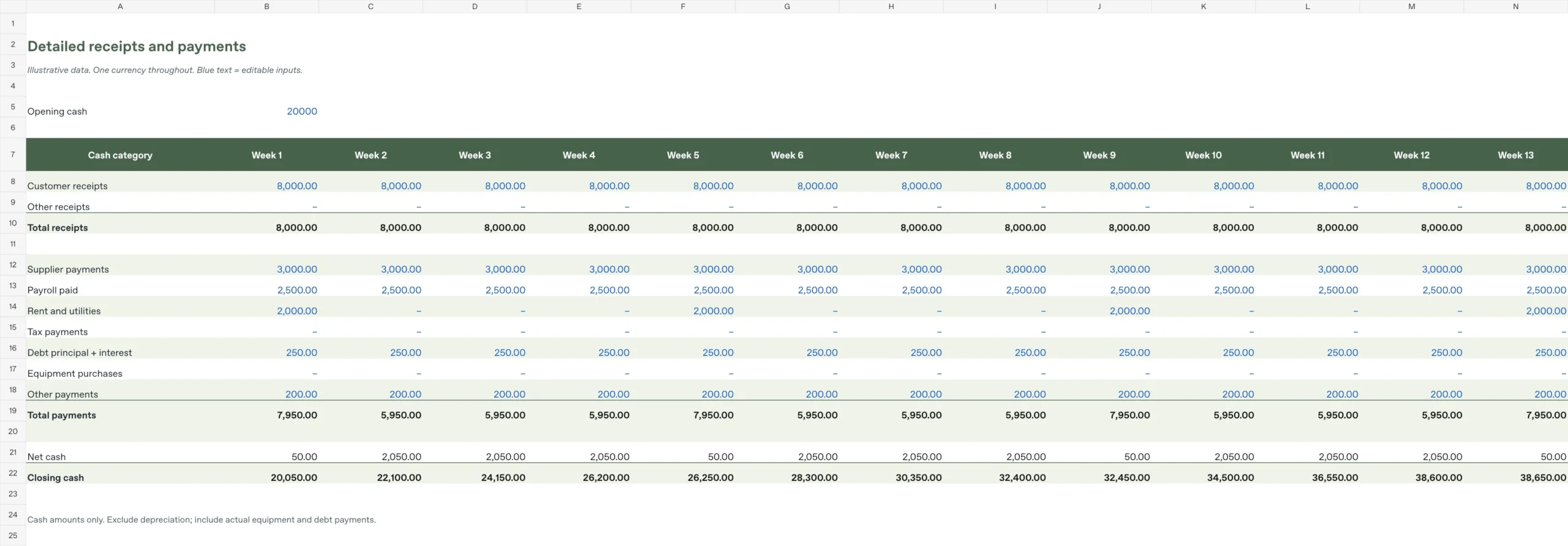
The sage ledger uses thirteen weekly columns and separate rows for customer receipts, other receipts, suppliers, payroll, rent, taxes, debt payments, equipment purchases, and other payments. This wider layout helps a bookkeeper explain which categories create a difficult week. Subtotals keep the calculation readable without hiding the underlying amounts.
Enter cash payments in positive amounts. The workbook subtracts total payments from total receipts and carries each closing balance into the next week. Include the cash paid for equipment rather than depreciation expense. Enter debt principal and interest actually paid in the labelled cash row. Split that row if you need separate reporting, then extend the total deliberately. The example assumptions are illustrations, not recommended spending levels.
3. Collections-Led Cash Forecast
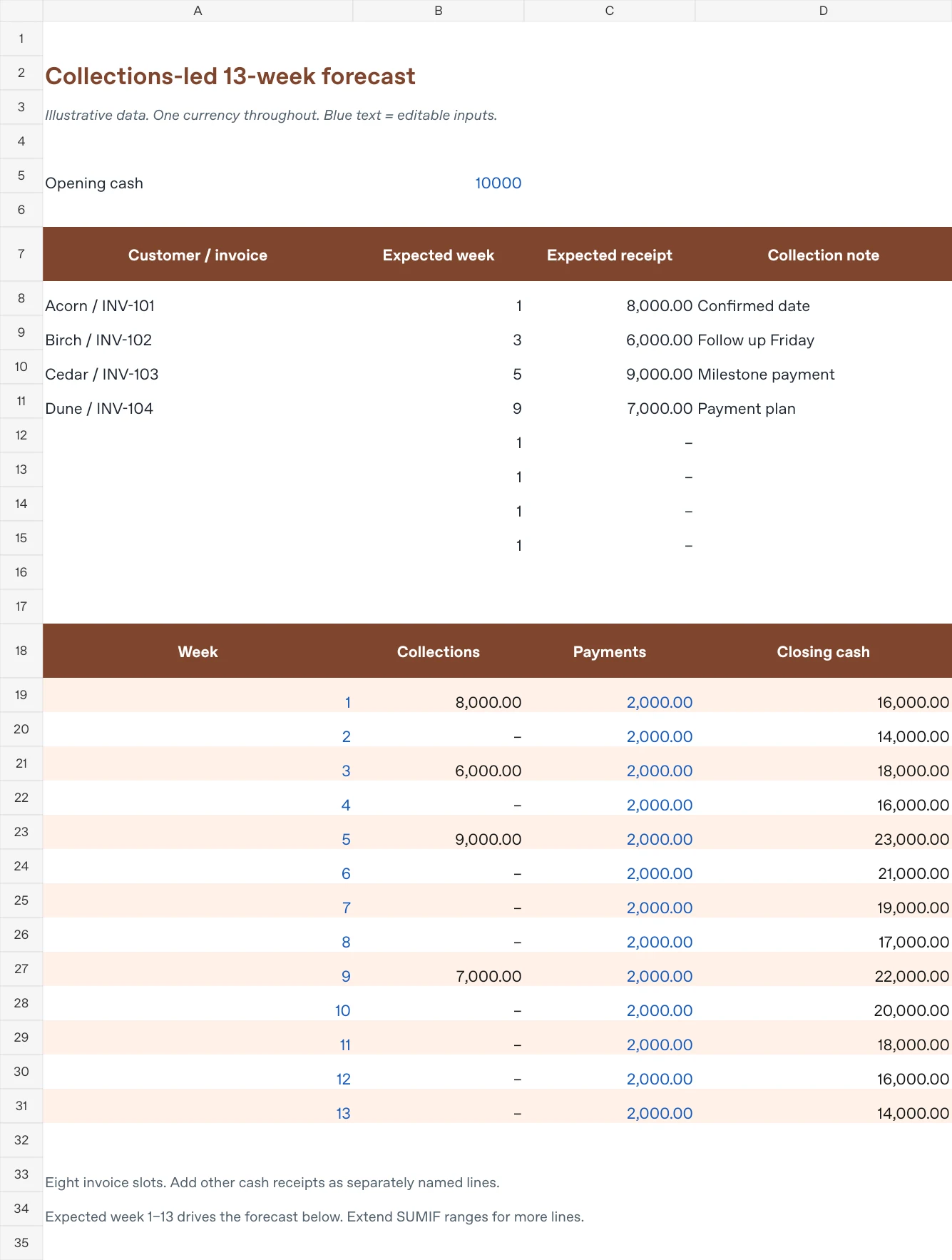
The terracotta version begins with an eight-line customer and invoice schedule. Each line has an expected collection week, expected receipt, and collection note. The thirteen-week table below adds receipts by their assigned week, subtracts entered payments, and calculates closing cash. It is helpful when one delayed invoice can change the whole outlook.
Move the sample 8,000 receipt from week one to week two and the weekly forecast changes with it. Keep the amount attached to the same invoice reference so the payment is moved rather than duplicated. For a split payment, use separate rows with the same invoice reference and distinct expected weeks. The week field accepts whole numbers from one to thirteen; extend the SUMIF ranges before adding more than eight collection lines.
4. Payroll and Reserve Cash Planner
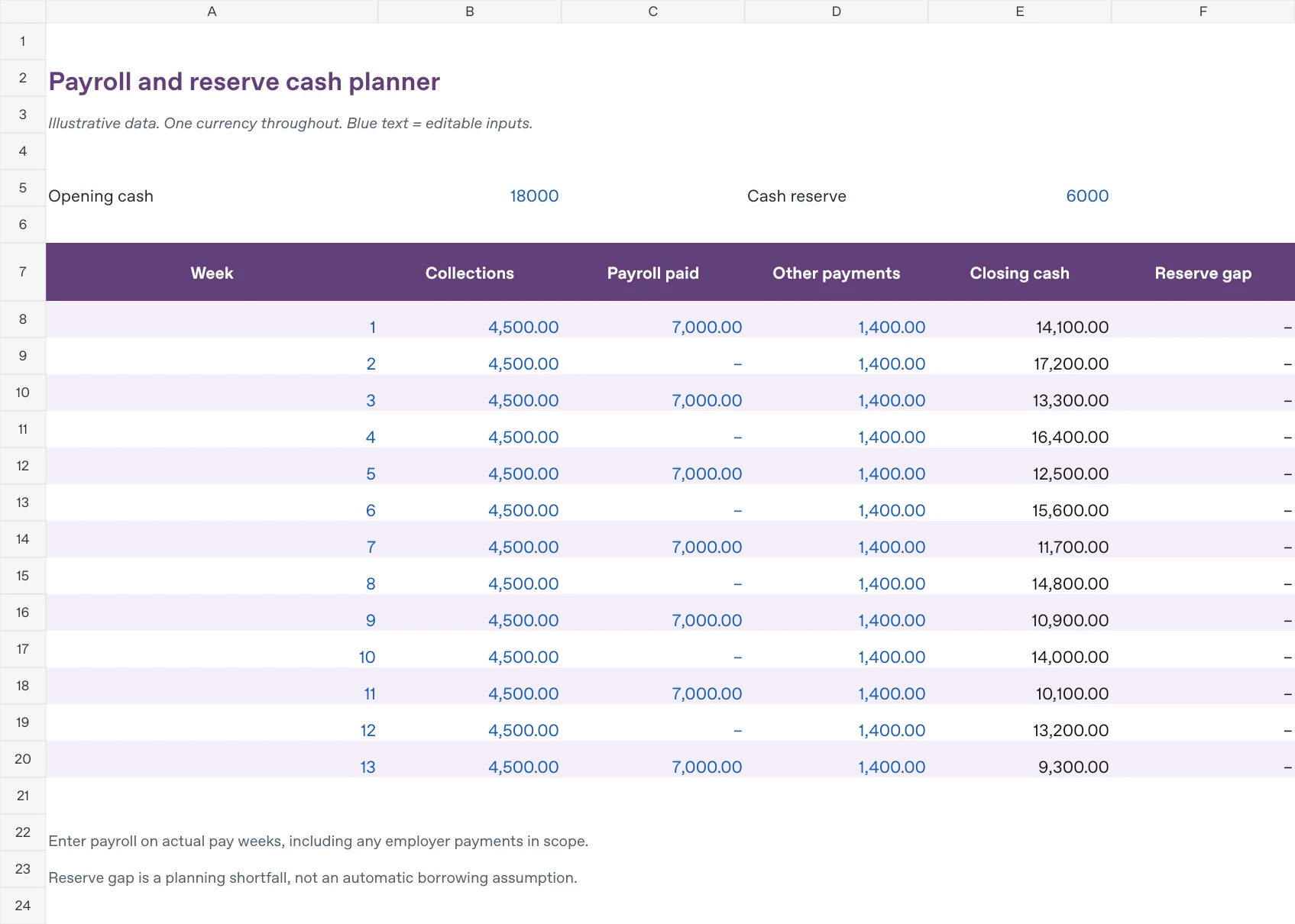
This plum worksheet separates payroll paid from other payments and places a reserve-gap calculation beside weekly closing cash. The sample uses uneven payroll weeks to show why a steady monthly average can conceal the actual cash requirement. Change those examples to your own payment dates and amounts.
Reserve gap is the amount needed to bring the projected balance up to the chosen reserve. It becomes zero when the projected balance is sufficient. The workbook does not automatically assume that borrowing is available or that suppliers can be paid late. Use a highlighted gap to investigate timing, confirm expected collections, and discuss workable actions with the relevant people. Include employer-related payments in the week they actually leave the bank.
5. Thirteen-Week Forecast Review
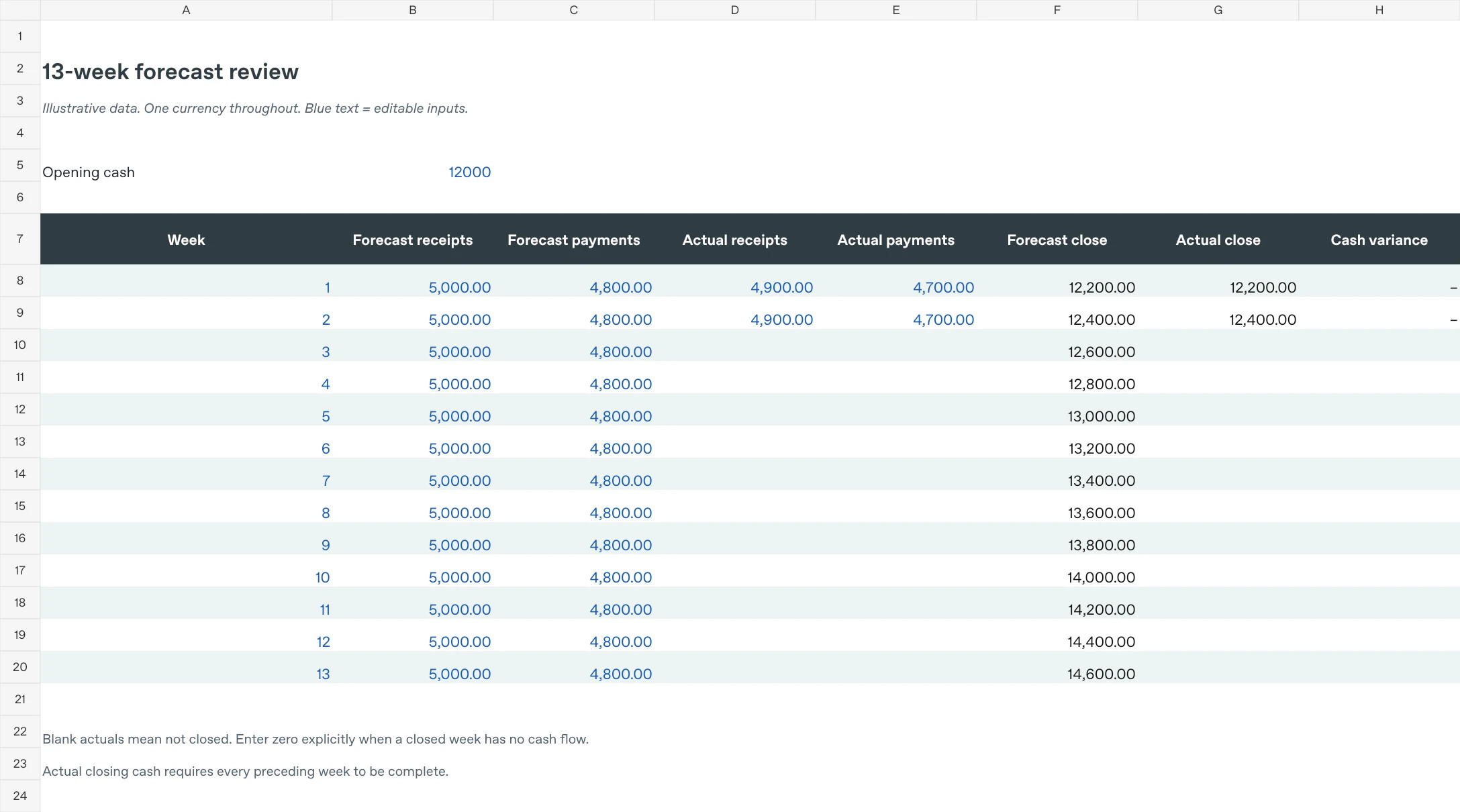
The slate review sheet places forecast receipts and payments beside actual receipts and payments. Forecast closing cash follows the original plan. Actual closing cash appears only when the current and preceding weeks contain complete numerical actuals. This prevents future empty weeks from looking like completed weeks with no activity.
Enter zero explicitly when a closed week genuinely has no receipts or payments. Leave future actuals blank. The cash variance is actual closing cash minus forecast closing cash, so a negative result means less cash than expected. This is a cumulative balance comparison. Investigate individual weekly receipts and payments as well, because two timing errors can offset each other in the final balance.
Build the first version from records you can explain
Start with the available opening cash for the accounts included in the forecast. Confirm the cutoff and avoid mixing a bank balance from Friday with payments already recorded on Monday. If several accounts are included, internal transfers between those accounts must not inflate total receipts or payments. Keep restricted balances outside available cash unless their use fits the forecast scope.
Next, review customer invoices and expected collection dates. A due date is a starting point, but a confirmed payment arrangement may be more useful. The site’s invoice tracker templates can help organize outstanding invoices before you transfer expected collections into the forecast. Avoid treating the whole sales pipeline as certain cash.
Build payments from payroll dates, supplier obligations, rent, recurring charges, planned purchases, and other known outflows. Use the accounts payable templates to organize vendor bills and due dates. Record uncertain payments with a clear assumption in your working notes. A number that nobody can explain is difficult to improve next week.
Understand what the thirteen-week total can hide
The basic relationship is opening cash plus receipts minus payments equals closing cash. That closing balance becomes the next week’s opening cash. This direct weekly approach is also described in Kruse & Crawford’s cash forecast guide. These worksheets apply that relationship to different input layouts.
Suppose the quarter ends with healthy cash, but the forecast drops below your minimum in week four. The ending balance does not remove that earlier shortfall. Review every week, especially around payroll, large supplier payments, and tax dates. A weekly model can still conceal a shortage on a particular day, so inspect daily timing when a week has little room.
Do not add thirteen closing balances together and call the result quarterly cash. Closing cash is a balance at a point in time. Receipts and payments can be added across weeks, while the final closing balance describes the end of the forecast. Keeping flows and balances separate makes the summary easier to interpret.
A practical weekly update routine
Set a regular review time and assign someone to collect changes before it. Reconcile the opening position, replace estimates for the completed week with actual information in your review copy, and explain the largest differences. The bank reconciliation templates can support the separate task of checking bank and book records.
Preserve a dated forecast before advancing the horizon. These downloads do not automatically roll transaction dates forward. In a working forecast, remove the completed week’s assumptions, shift the remaining weeks carefully, add a new final week, and confirm opening cash. In the collections version, reassess every expected week number so an invoice does not stay attached to the wrong period.
Improve the assumptions that repeatedly miss. If customers usually pay later than entered, adjust expected collection timing. If a recurring payment is consistently absent, add it to the preparation checklist. A short explanation of why a figure changed is more useful than rewriting the entire workbook every Friday.
Customizing the files without breaking the calculations
Use one currency throughout each workbook. Changing a number format does not convert currencies. Replace the blue numerical inputs, keep calculated cells intact, and rename labels to match your business. The worksheets are editable and unprotected, which allows customization but also means formulas can be overwritten accidentally.
Save a clean master, then work in a dated copy. Before inserting additional categories or collection lines, identify which totals and ranges need extending. Check the first and last forecast weeks after every structural change. All five files include example data so you can see the intended calculation before replacing it with your own records.
Frequently Asked Questions
Is this the same as a cash flow statement?
No. These files forecast upcoming receipts and payments over thirteen weeks. A cash flow statement reports cash flows for a historical reporting period. Use the forecast for timing decisions and keep your accounting reports for their separate reporting purpose.
Can I use the forecast for more than thirteen weeks?
Yes, but extend the formulas and any referenced ranges first. The supplied files are designed and checked for thirteen weeks. The collections calendar also requires an updated allowed-week range if you extend its horizon beyond thirteen.
Why are some actual closing balances blank?
The review template waits for complete numerical receipts and payments in every week up to that point. Enter zero for a completed week with no activity. This keeps missing information visibly different from an actual zero.
