
The invoice has been sent, the crew has moved to the next assignment, and the job looks finished. Then the final supplier bill arrives. A few extra labor hours and unused materials that never returned to stock can change the margin you thought you had earned. Job costing works best when those details are captured while the work is still fresh.
These five free job costing Excel templates help contractors and service businesses calculate individual job costs and compare completed work. The collection includes a single-job summary, a labor-burden calculator, a materials-usage sheet, a subcontract exposure review, and a completed-job profitability comparison. Every download is editable, includes fictional examples, and has a preview so you can choose the layout that suits your records.
Jump to a template preview
Job price calculator
Estimate the price required to reach a target gross margin. Enter all job costs in the same currency.
Worked example: Direct materials: 450; Direct labor: 600; Other job costs: 150; Target gross margin (%): 25 → Total job cost: 1,200; Price before tax: 1,600.
Margin is profit divided by selling price. Include any job overhead you expect the price to recover.
Related template: 5 Project Budget vs. Actual Excel Templates
Start with a job number that follows the work
Give each assignment a consistent identifier and use it on time records, supplier documents, materials issues, subcontract records, and the customer invoice. A small service business can lose useful cost information simply because one team calls a job by the customer name while another uses the street address.
Choose the scope of the calculation before entering numbers. Are you reviewing a completed job, estimating a new one, or monitoring costs partway through delivery? Keep estimated and recorded amounts clearly distinguished. The portfolio file is intended for completed jobs on a consistent basis; mixing unfinished jobs into that comparison can distort the margin picture.
1. Single-Job Cost and Margin
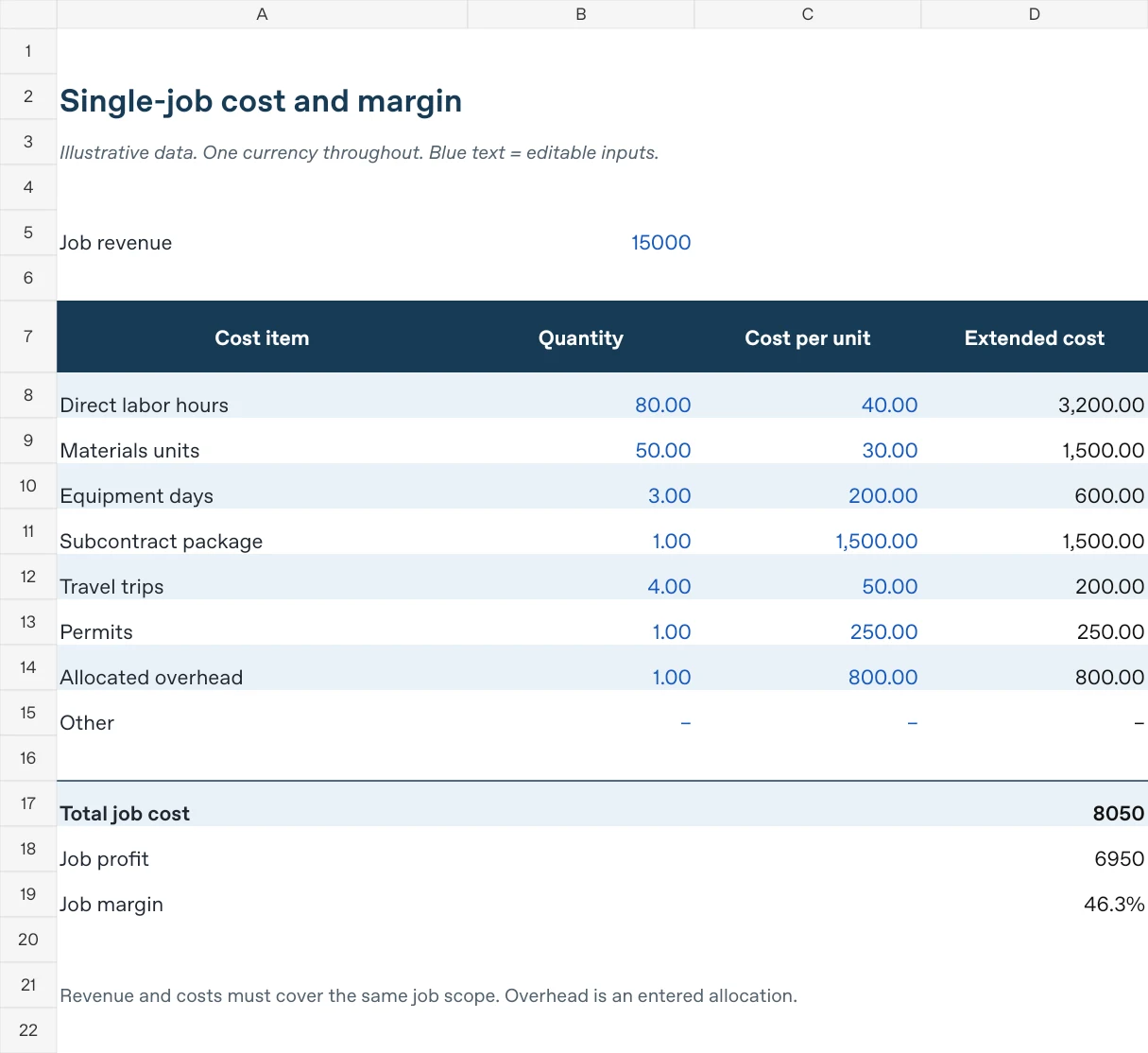
The navy summary starts with job revenue and builds cost from quantity multiplied by cost per unit. It includes lines for direct labor, materials, equipment, subcontract work, travel, permits, allocated overhead, and other costs. Total cost, job profit, and job margin calculate below the input section.
The sample job has revenue of 15,000 and total entered costs of 8,050, leaving 6,950 of job profit and a margin of about 46.3%. Those figures illustrate the formula rather than a target margin. Replace all relevant costs, including the entered overhead allocation. A quantity of one lets you enter a lump-sum cost. If revenue is zero, margin displays n.a. instead of an undefined percentage.
2. Labor Hours and Burden Cost
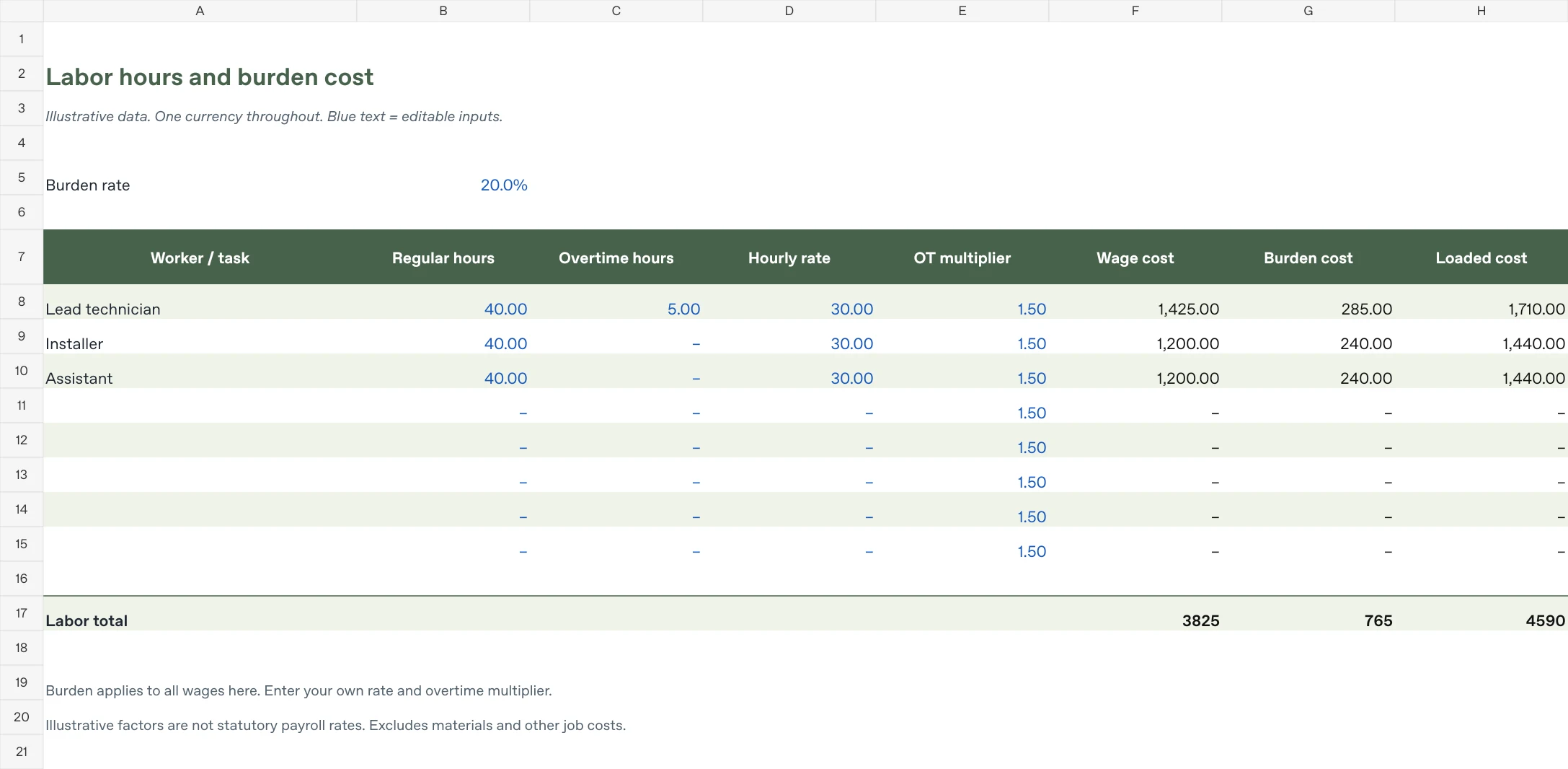
The sage labor worksheet separates regular hours, overtime hours, hourly rate, and overtime multiplier for up to eight worker or task lines. It calculates wages, applies the entered burden rate to those wages, and shows loaded labor cost. This gives labor-intensive service work a more informative starting point than hours multiplied by base pay alone.
For 40 regular hours and five overtime hours at 30 per hour with a 1.5 multiplier, wages are 1,425. A 20% illustrative burden adds 285, giving loaded labor cost of 1,710. Enter your own rates and applicable assumptions. The workbook applies one burden percentage to all calculated wages; it is not a payroll rules engine. Do not add the same employer costs again in overhead if they are already included here.
3. Materials Issued, Returned and Used
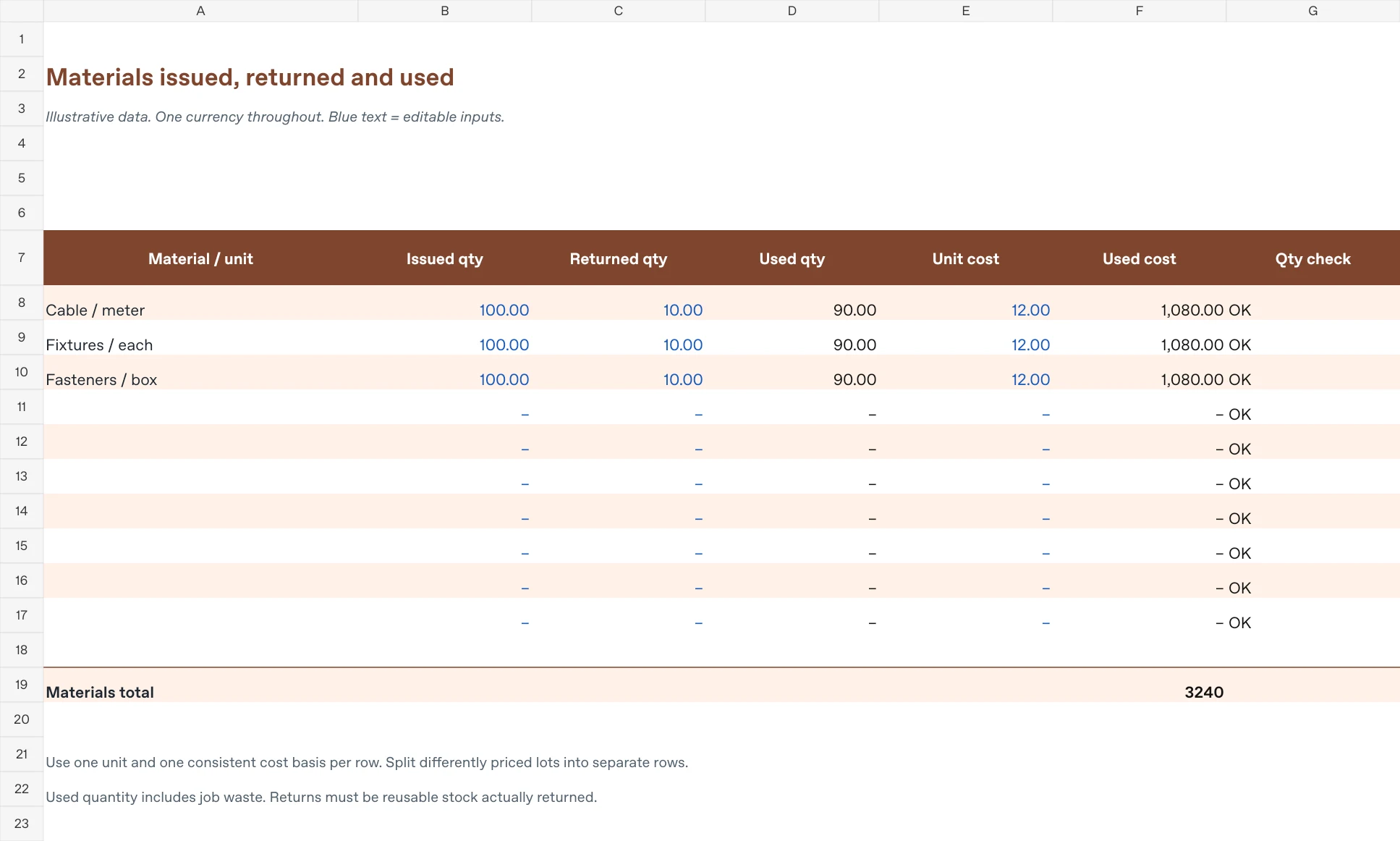
This terracotta worksheet tracks up to ten material lines through issued quantity, returned quantity, used quantity, unit cost, and used cost. It is useful when a job receives more stock than it ultimately consumes. A quantity check flags negative inputs or returns that exceed the issued quantity.
If 100 meters of cable are issued and ten usable meters are returned, the job uses 90 meters. At a unit cost of 12, the allocated material cost is 1,080. Used quantity includes waste that belongs to the job; only genuine reusable returns reduce the charge. When an invalid quantity appears, the total displays Check inputs rather than silently omitting the problem row. Split lots with different costs into separate lines.
4. Subcontract Cost Exposure
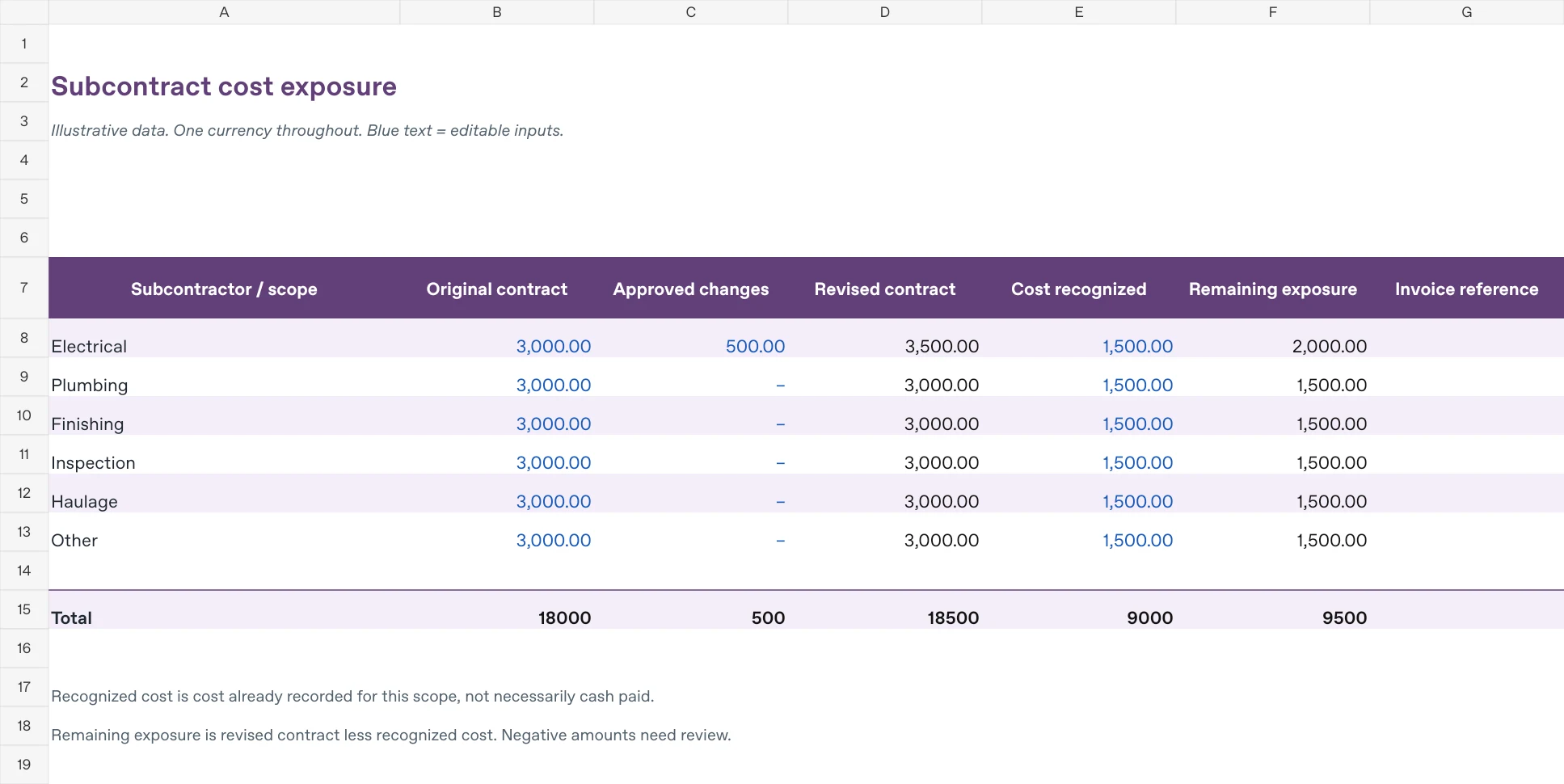
The plum subcontract worksheet keeps original contract value, approved changes, revised contract value, recognized cost, and remaining exposure together. Six scope lines provide space for the main trades or service packages. An invoice-reference field helps connect the summary to the supporting record.
Remaining exposure is revised contract value minus cost already recognized for that scope. It does not represent cash still unpaid. A recorded invoice can be part of recognized cost even when payment has not yet cleared. If recognized cost exceeds the revised contract, the negative remaining amount is highlighted for review. Check whether an approved change is missing, a cost was assigned twice, or the subcontract has actually exceeded its agreed value.
5. Completed-Job Profitability Comparison
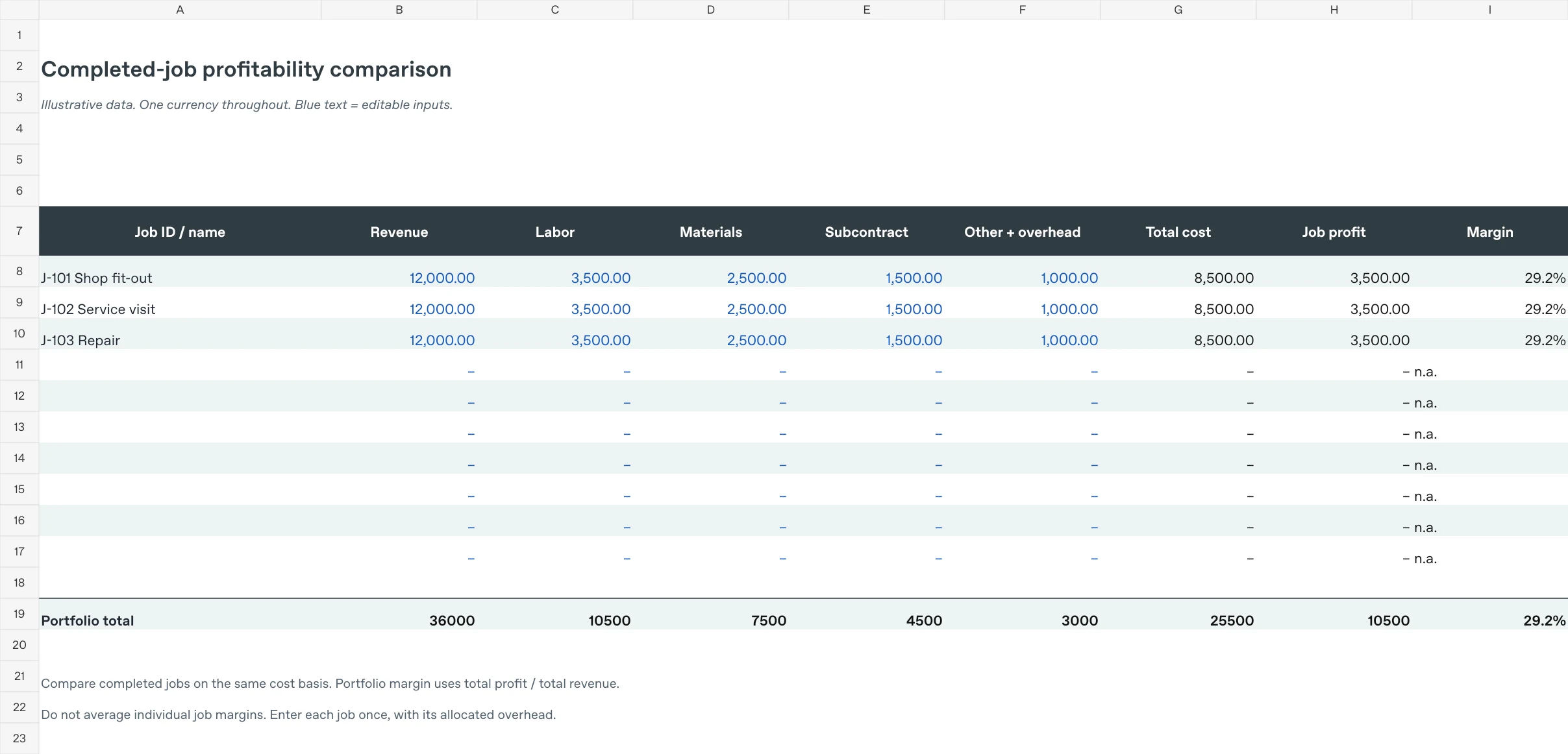
The slate portfolio review compares up to ten completed jobs. Each row includes revenue, labor, materials, subcontract costs, other costs and overhead, total cost, profit, and margin. It provides a practical meeting sheet for spotting which types of work deserve closer investigation.
The portfolio margin divides total job profit by total revenue. It does not average individual percentages, because a small job and a large job should not carry equal financial weight. Keep each job on one row and use the same cost basis across the list. A zero-revenue row shows n.a. for margin, while its entered costs still affect the monetary totals. Review losses and unusual results before using the comparison to change pricing.
What belongs in a job cost?
Direct materials and labor are costs you can trace to the assignment. A job may also use subcontractors, hired equipment, travel, permits, and a reasonable share of indirect costs. OpenStax’s job-order costing explanation describes the combination of direct materials, direct labor, and allocated overhead. Adapt the detail to the actual business rather than copying a manufacturing list without review.
Keep the allocation method consistent. You might assign a documented overhead amount to each job using an established internal basis. The single-job file accepts that amount as an input; it does not decide the allocation policy for you. Record the basis in your supporting notes so a later reviewer can understand why two jobs received different overhead amounts.
Avoid double counting. If labor burden includes an employer cost, do not add that same amount again in the overhead line. If a subcontract package includes materials, do not charge those materials separately unless they are genuinely additional. A detailed-looking spreadsheet can still overstate cost when the boundaries between lines overlap.
Move from a quote to an evidence-based job review
At the estimating stage, preserve the quantities and rates used to build the quote. The site’s construction estimate templates can help organize that original assumption set. Once the work begins, keep actual quantities and costs separately so you can compare the estimate with the result instead of overwriting the starting point.
During delivery, collect time promptly. Use monthly timesheet templates or your existing time system to capture job references before memories fade. Separate productive job time from general business time according to your costing policy. The labor calculator needs the hours and rates you have verified; it does not import or approve time records automatically.
Record materials when they leave stock and when usable items return. Match subcontract invoices to scope and approved changes. The work order templates can support the description of work performed, which helps when a cost appears to belong to a different assignment. Keep customer-requested extras visible rather than blending them into the original scope without explanation.
A short example of margin and markup
Suppose a completed service job earns 12,000 in revenue and has total included cost of 8,500. Job profit is 3,500. Margin is 3,500 divided by 12,000, or about 29.2%. Markup on cost is 3,500 divided by 8,500, or about 41.2%. The two percentages use different denominators.
The supplied summary and portfolio files report margin on revenue. They do not calculate a suggested selling price or guarantee a particular profit. When using the result to review a future quote, consider whether the earlier job had unusual travel, rework, materials waste, or scope changes. A single exceptional job should not automatically become the standard cost assumption for every future assignment.
Also check what the reported profit includes. If you omit overhead, the amount remaining is before that overhead. If the job is unfinished, unrecorded work may still reduce the eventual profit. Label the review clearly and wait for the missing information before treating a partial result as a completed-job margin.
Close the job before comparing it with others
Use a short closeout check: confirm all time is submitted, review final supplier and subcontract records, account for materials returns, and verify the revenue figure for the same scope. Ask whether any pending credit or unresolved extra work could materially change the result. Keep the closeout date with your working copy.
Then look for patterns across similar work. Higher labor cost may come from more hours, a different crew mix, overtime, or a higher rate. A materials increase may reflect quantity, price, or waste. The templates help organize the amounts, but the explanation usually comes from the supporting records and the people who performed the work.
Keep the comparison useful by grouping jobs that are reasonably comparable. A one-hour emergency visit and a multiweek installation have different cost structures. Review both if needed, but avoid assuming that the same percentage target or overhead pattern should apply to each without further thought.
Editing and extending the downloads
All five files are macro-free .xlsx workbooks with editable formulas. Blue numerical text identifies inputs, while calculated cells use dark text. Use a single currency per file and keep units consistent within each material or quantity line. Formatting an amount with another currency symbol does not convert it.
Save a clean master before customization. Extend formulas, totals, and any checking ranges when adding rows beyond the supplied capacity. In the materials workbook, extend both the cost total and the quantity-check range. Review a known example after changes so the revised worksheet still produces the expected result.
Frequently Asked Questions
Can a service business use these files without material costs?
Yes. Use the labor calculator and single-job summary, leaving genuinely unused cost lines at zero. Include any relevant travel, subcontract, equipment, or allocated overhead costs so the review matches the service actually delivered.
Does the subcontract sheet track payments due?
No. It compares contract value with recognized cost for that scope. Payment timing is a separate question. Use your accounts payable records to track what has been paid and what remains due.
Why does the materials total say Check inputs?
At least one row has an invalid quantity or cost, such as returned quantity exceeding issued quantity. Correct the source row before relying on the total. The warning prevents an invalid row from being silently excluded.
