
The electrician has already marked the wall, but the client wants the outlets moved before the drywall goes up. It sounds like a small request. Then the crew discovers that the new location needs more cable, another trade must patch the original openings, and the inspection may move. At that point a short email saying “please proceed” leaves several questions unanswered. What work changed? Who agreed to the price? Does the finish date change?
These free construction change order Excel templates give you five ways to document the answers. There is a field form for an individual change, a pricing breakdown for supporting figures, a register for tracking approvals, a schedule impact worksheet, and a reconciliation for the revised contract value. Each is an editable .xlsx file with sample entries and a preview. Pick the sheet that solves the problem in front of you, or use several together on a larger project.
Jump to a template preview
Change order impact calculator
Calculate the change to the contract value before tax. Enter credits as positive amounts.
Worked example: Current approved contract value: 50,000; Added work: 3,200; Deleted work credit: 850 → Net change: 2,350; Revised contract value: 52,350.
Use the latest approved value and keep pending changes separate until approval.
Related template: 5 Project Budget vs. Actual Excel Templates
Start with the record your team is missing
If a supervisor needs to describe one change and obtain a decision, start with the field form. If the client wants to see why the price changed, attach the pricing breakdown. If your team keeps asking which items are approved, maintain a register. A proposed time extension belongs in the schedule worksheet, while a disagreement about the latest contract total is easier to resolve with the reconciliation.
Use a consistent change ID across all of them. A workbook named “extra electrical” can easily get detached from the email or sketch that explains it. A reference such as CO-014 is easier to match to a drawing revision, site photo, subcontractor quote, and payment record. The examples are fictional; replace them in a working copy and retain a clean master for the next job.
1. Field Change Order Form
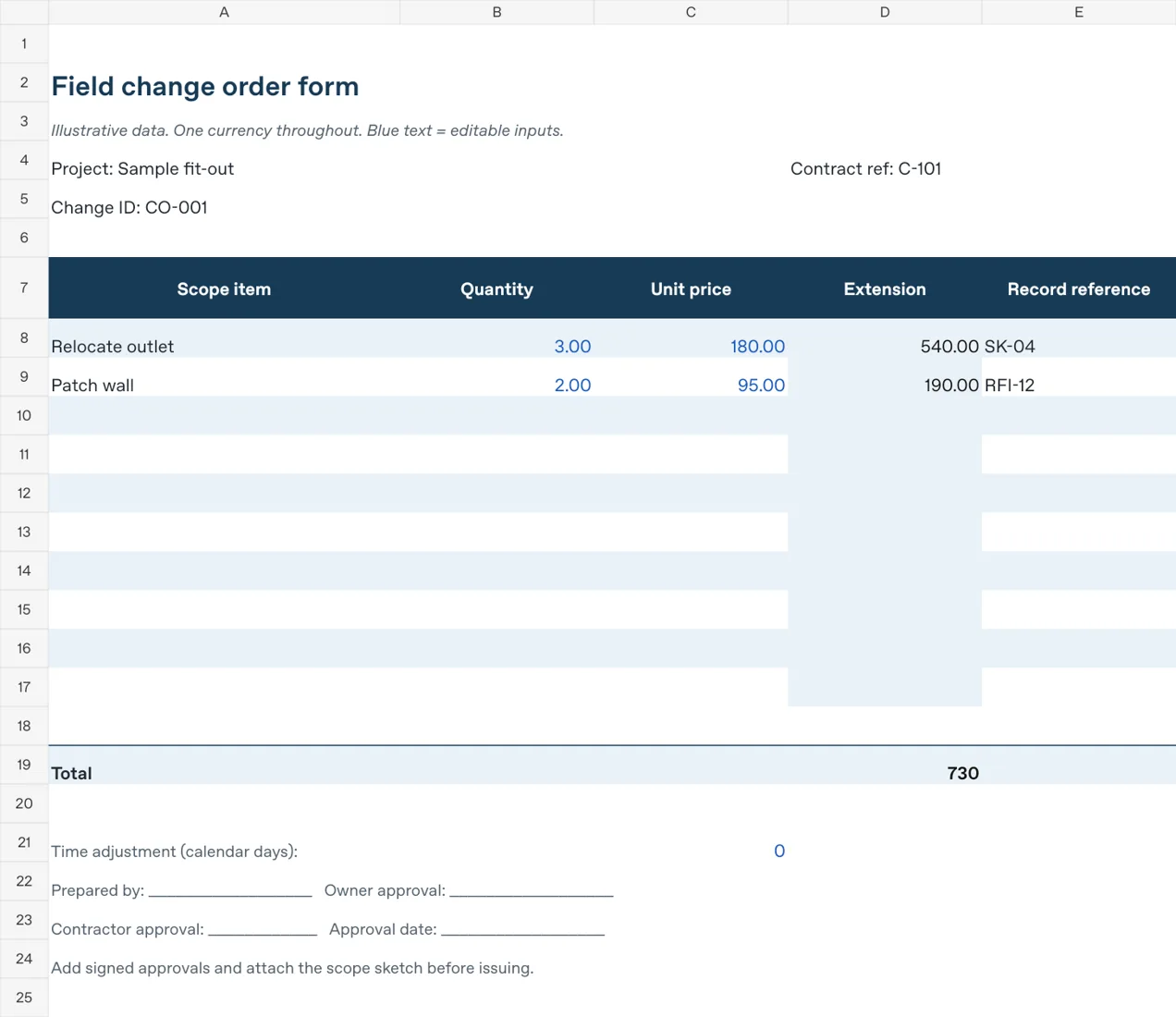
The navy form puts the scope, quantity, unit price, and supporting reference on the same row. The sample distinguishes relocating outlets from patching the original openings. That separation matters because a reviewer can approve the first line, question the second, or ask whether patching is already covered elsewhere. Add a sketch or drawing reference where a short scope label would otherwise be ambiguous.
Below the pricing lines, record the time adjustment and approval details. If there is no agreed time adjustment, distinguish that from a decision still being reviewed. The printed signature prompts are there to help organize the record. Follow the signing process and required forms in your project documents, including any additional approvals. This spreadsheet is an administrative aid and does not reproduce a branded contract form.
2. Change Order Pricing Breakdown
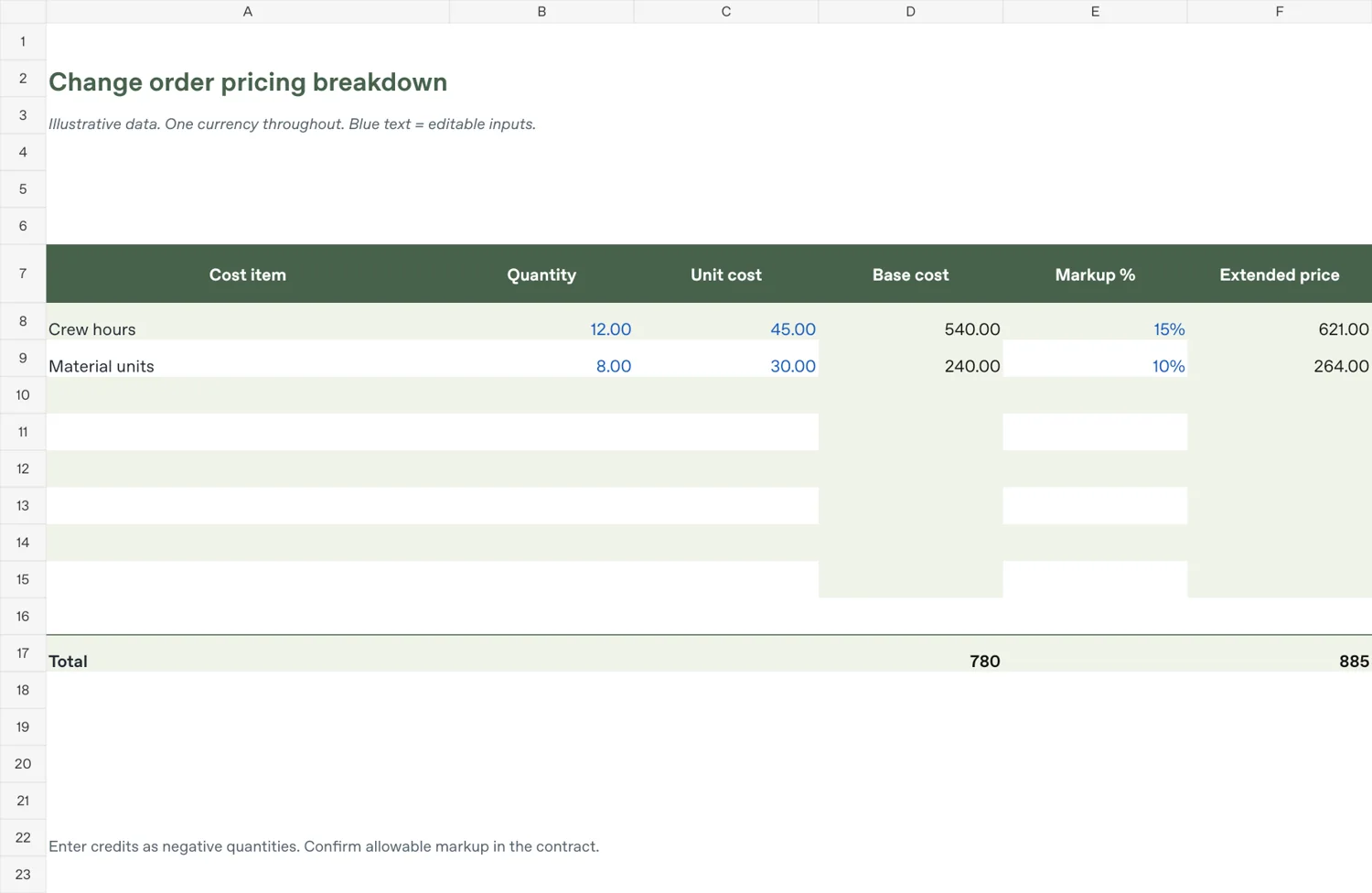
The sage pricing worksheet multiplies quantity by unit cost, then applies the entered markup to each line. Break the work into pieces that someone else can check. For example, separate crew hours, materials, equipment, and a trade quotation when each has a different basis. A lump sum can still be entered with a quantity of one and a unit cost equal to the quoted amount.
If twelve hours cost 45 each, the base labor cost is 540. A 15% markup makes the extended price 621. That rate is an example, not a recommendation. Check which costs your contract allows you to mark up and whether any costs must be shown separately. If a deleted item produces a credit, enter a negative quantity and review the sign and markup treatment before issuing the price.
3. Change Order Approval Register
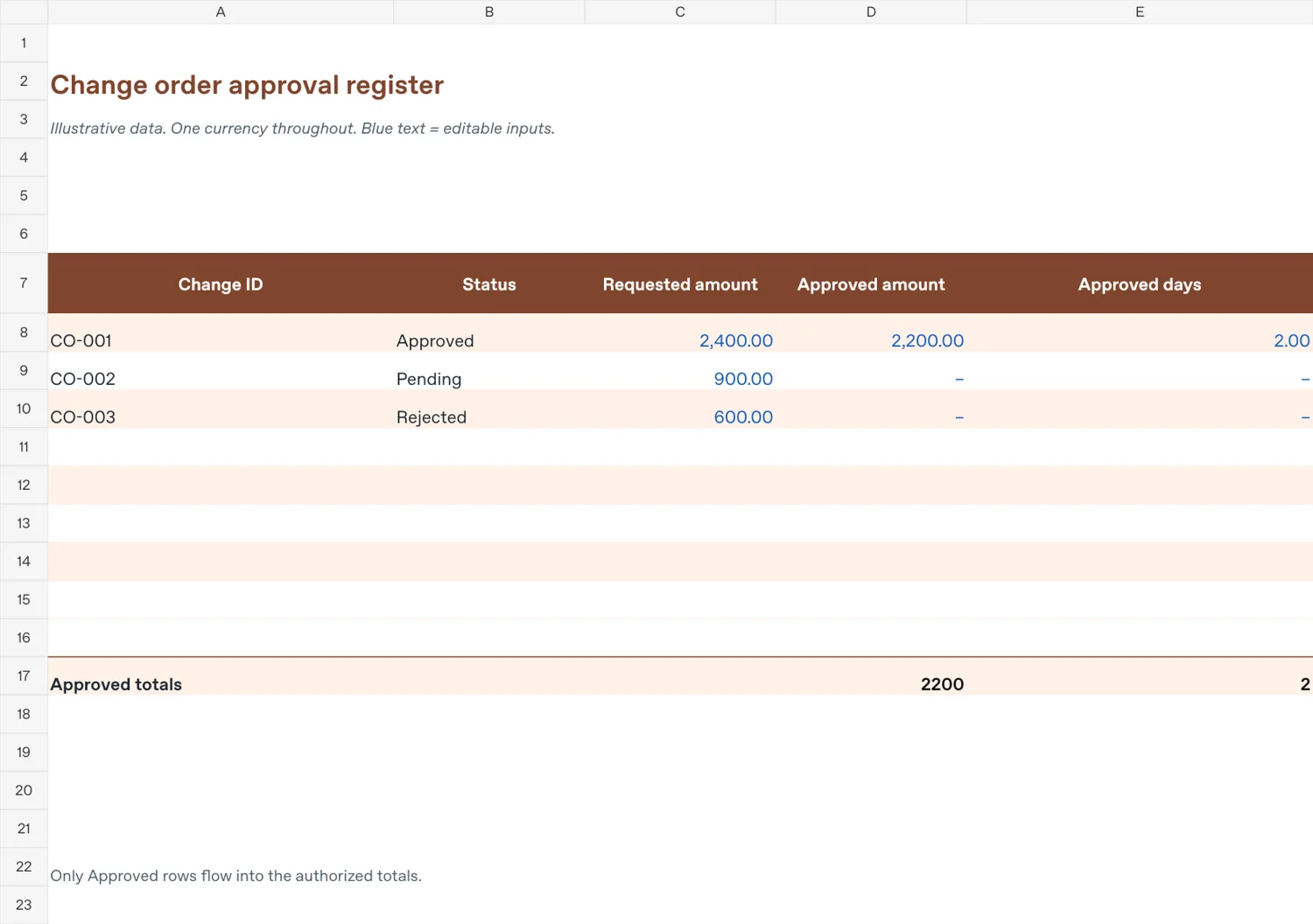
The terracotta register is for a meeting where someone asks what is waiting on a decision. It shows each ID, status, requested amount, approved amount, and approved days. Only rows marked Approved are added to the authorized totals. A request can remain visible without inflating the contract value or making it appear that a proposed extension has been accepted.
The requested amount and the approved amount may differ. Keep both if the initial proposal was negotiated. For example, a 2,400 request approved for 2,200 belongs in both columns at its respective values. Use a separate dated note for the reason if it matters for later review. The approved days total is an arithmetic record of entered adjustments; confirm how overlapping extensions are treated before relying on the total as a revised completion date.
4. Change Order Schedule Impact Worksheet
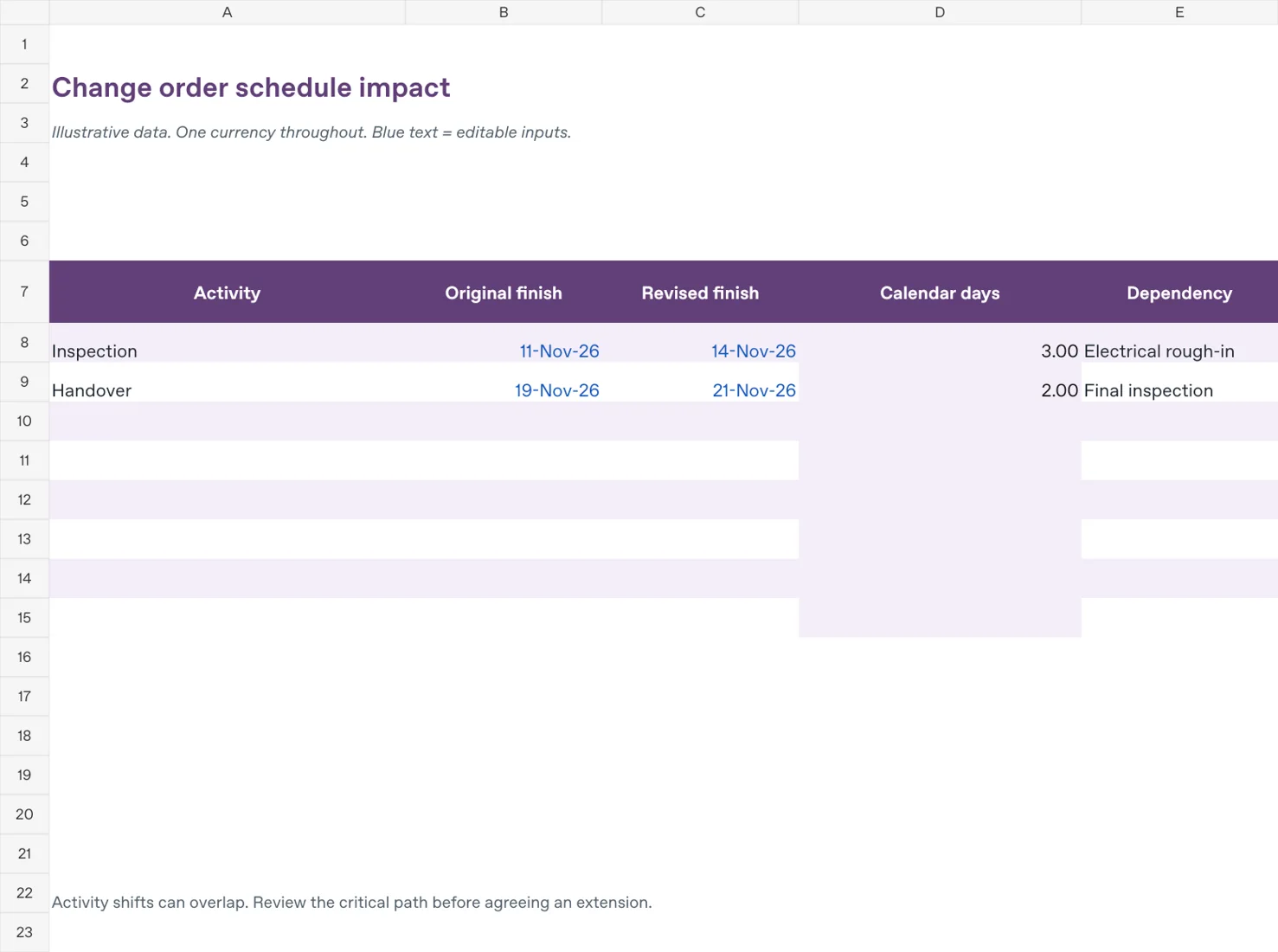
The plum schedule worksheet compares the original and revised finish date for each affected activity and calculates the difference in calendar days. The dependency field provides a place to state which preceding work or decision drives the change. A site manager can use it to prepare a discussion with the scheduler or to communicate which downstream dates require review.
An activity that moves from Tuesday to Friday has shifted by three calendar days. Another activity moving by two days does not automatically make the contract extension five days. Both may depend on the same late delivery and overlap. Use your project timeline to check sequencing, available float, and the completion milestone. The worksheet documents date changes and dependencies; it does not calculate a critical path or apply a working-day calendar.
5. Contract Change Reconciliation
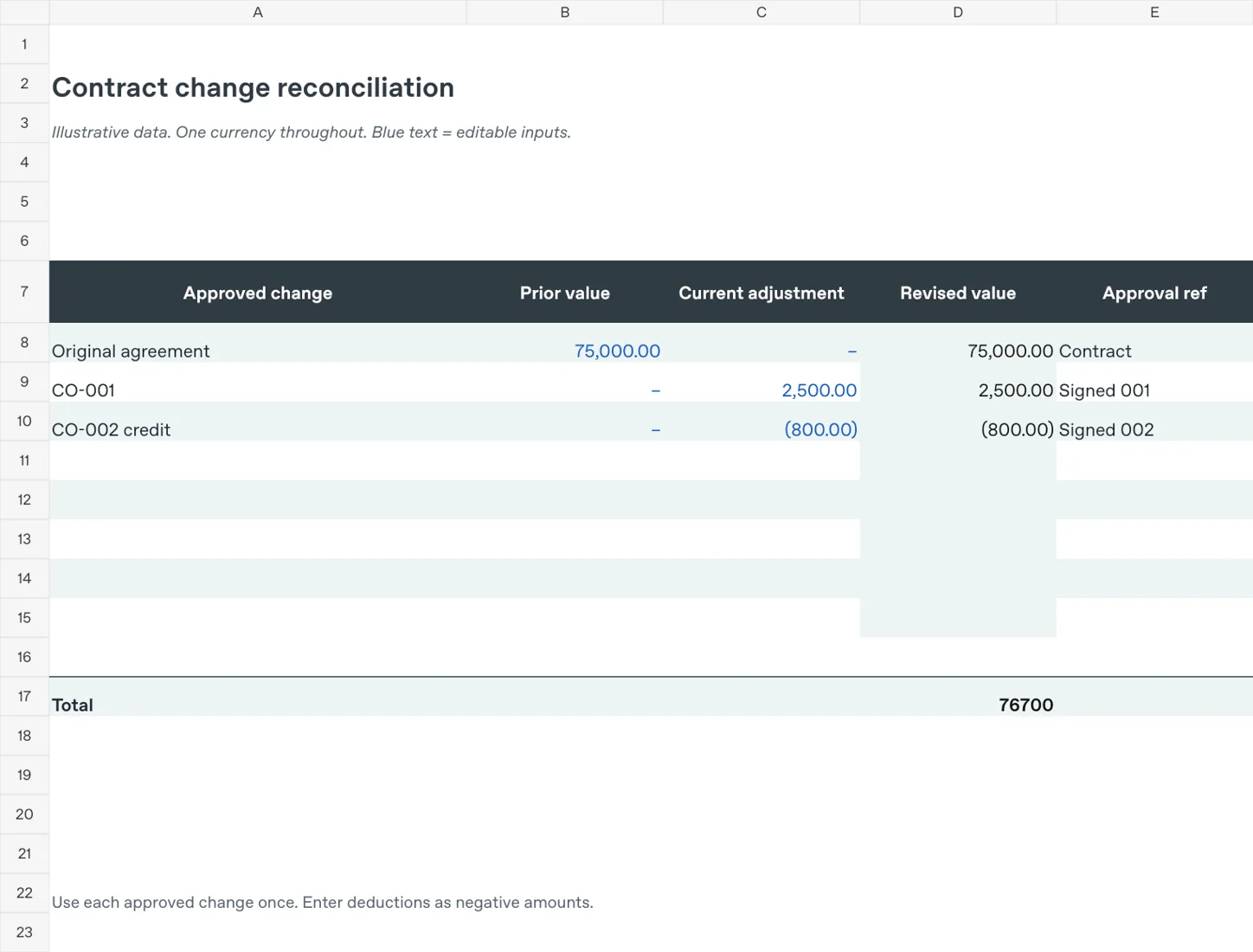
The slate reconciliation starts with the original agreement and lists approved additions and credits separately. It combines each row’s prior value and current adjustment, then totals the revised values. For example, an original value of 75,000 plus a 2,500 addition and an 800 credit becomes 76,700. Keep the signed reference beside each adjustment so the total can be traced back to the decision.
Use one row per approved adjustment, and enter the original agreement only once. If a previous summary already includes a change in its starting balance, do not add that same change again. Pending proposals can stay in the register while the reconciliation shows authorized amounts. Before updating a project cost report, compare the revised total with the most recent signed records and explain any differences.
Walk one change through the process
Imagine that the owner requests a different wall finish after the original material has been ordered. First, identify the location and the relevant drawing. Describe what will be removed from the original scope, what will replace it, and whether the new work requires extra preparation. Attach the supplier quotation and check whether the original order can be returned or used elsewhere.
Next, price the substitution. A useful proposal explains both the additional work and the credit for work no longer required. Check whether the material prices include freight and whether return charges belong in the calculation. If you used a construction estimate spreadsheet for the original bid, retrieve the approved version so you can compare the same scope and units.
Then check the schedule. Ask the supplier for a realistic delivery date, and ask the site team what can proceed while waiting. Write down the difference between the expected impact on the activity and any proposed change to the contract completion date. If the parties agree to change both price and time, record both in the approved paperwork.
Finally, update the register and contract reconciliation from the approval, using the same change ID. Give accounting the approved value and reference for its records. Tell the field team which drawing or instruction applies. This step is easy to miss when approval is handled in an email thread and the people installing the work are using a printed drawing from the previous week.
Keep requests, approvals, and billing separate
A request describes something someone wants changed. A priced proposal sets out the scope and commercial assumptions for a decision. An approval records the agreement through the process your project requires. A bill is a separate record of amounts charged. Tracking those stages separately helps a reader understand whether a figure is still under review, has been authorized, or has already been billed.
The AIA instructions for its G701 change order illustrate why scope, contract amount, and time are tracked together. These downloads use their own layouts. Check your project’s requirements for formal notices and authorization rather than assuming that a spreadsheet entry authorizes work. A linked work order can help communicate the approved field tasks while the change order records the commercial agreement.
At the end of the month, review the register before reporting. Look for pending requests that were accidentally counted as approved, credits with the wrong sign, and changes without a dated reference. Reconcile the total against the signed records. If you need more rows, extend the relevant formulas and verify a known example before relying on the expanded worksheet.
Frequently Asked Questions
What should I attach to a construction change order?
Use the documents that explain the change and support the price or time adjustment. Those may include a sketch, drawing revision, site photos, material quote, or schedule extract. Refer to the exact version and keep the attachment with the approval record so a later reviewer can identify what was agreed.
Can I use the pricing sheet for a deductive change?
Yes. Enter the deduction as a negative amount through the quantity and check how any markup or credit should be treated under your project terms. Review the resulting total before copying it to the field form or reconciliation. A negative change should reduce the revised value.
Should I add up all the activity delays?
No. An activity shift is not necessarily an extension to the overall completion date. Delays can overlap, affect work with spare time in the schedule, or be offset by resequencing. Use the schedule worksheet to document the facts, then review the project schedule before entering an agreed extension.
