
A construction estimate can look precise and still leave out half a day of labor, equipment hire, or the extra material needed for cuts and breakage. These five free construction estimate Excel templates help you build the number from quantities and rates instead of relying on a single unexplained allowance.
The set covers trade costs, room renovations, crew labor, material takeoff, and a contractor’s bid build-up. Each workbook has a different visual treatment and calculation structure. Download the editable .xlsx file below its preview, replace the fictional examples, and keep a clean master for the next job. The files have no macros and require no registration.
These are estimating tools for organizing the scope and agreed rates. They do not supply current local construction prices, engineering quantities, or a complete contract. A useful estimate should make its assumptions visible so you can update it when a measurement, supplier quote, or work sequence changes.
Build the cost before you choose the selling price
Start by writing what the job includes. A room name is not a scope. Specify the surface, material, finish, quantity basis, and work required. Separate removal, disposal, preparation, installation, and finishing when they use different people or costs. Record exclusions before a customer interprets an estimate as covering them.
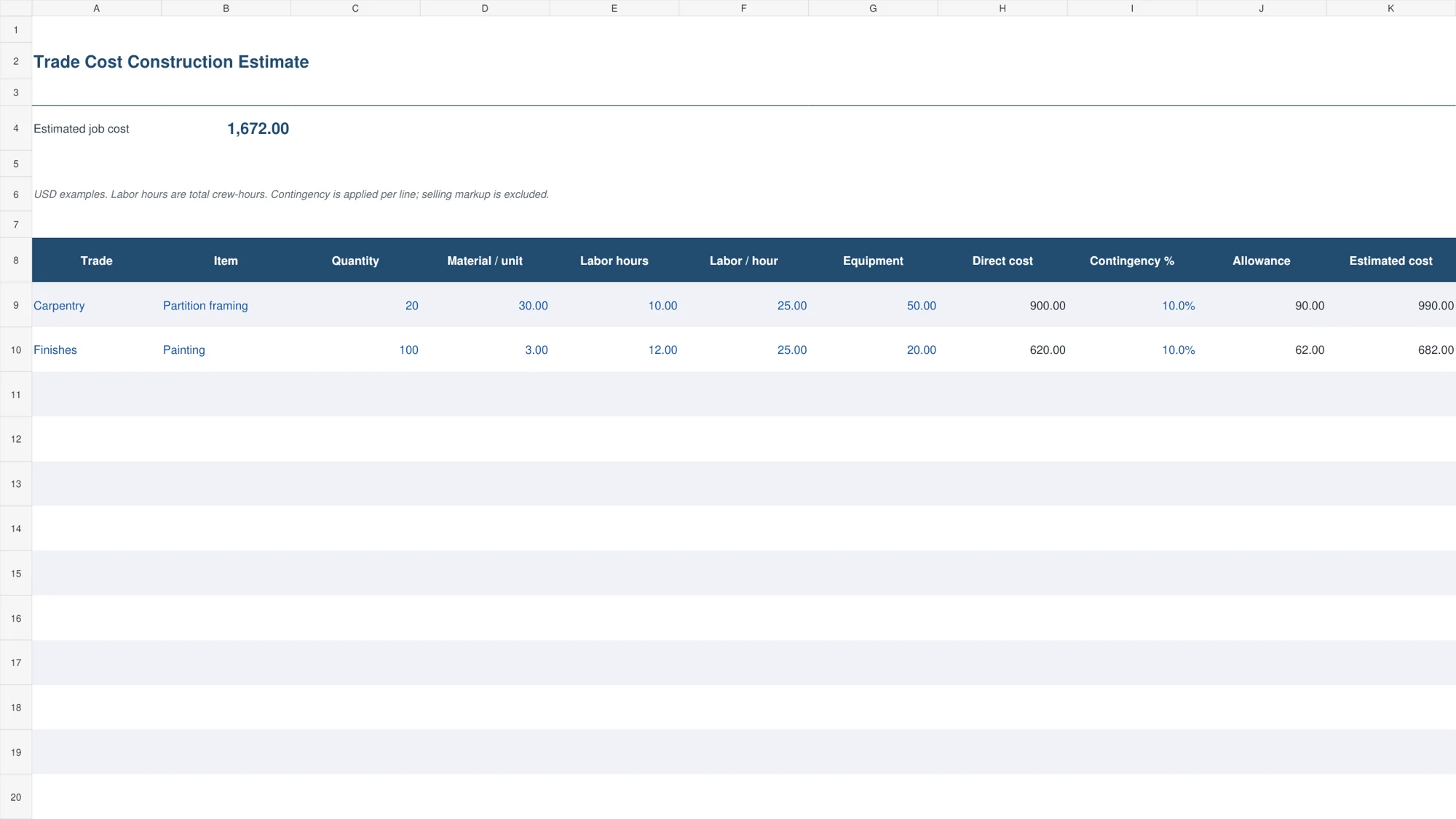
Then calculate direct costs using the appropriate units. Twenty material units at 30 cost 600. Ten total labor hours at 25 add 250, and equipment adds 50. The direct cost is 900. A ten percent contingency allowance adds 90, giving an estimated cost of 990 before selling markup or tax.
That example is the first line in the trade-cost workbook. It shows why quantity, rate, and hours should remain visible. If labor rises to fourteen hours, you can explain the change without replacing an entire lump-sum estimate. A separate pricing worksheet can help review the selling approach once the job cost has been established.
Choose an estimating worksheet for the job
1. Trade Cost Construction Estimate
The steel-blue trade estimate calculates material cost from quantity and unit price, adds total labor hours at the stated hourly rate, and includes equipment. Contingency is calculated per line. The summary totals the estimated job cost across the prepared trades.
Choose this format for a scope that can be divided into measurable work packages. Labor hours are total crew-hours, so do not enter a per-person duration without multiplying it by the number of workers. The result is an estimated cost. It does not include a selling markup unless you add that separately in an appropriate pricing calculation.
2. Room Renovation Budget and Actual
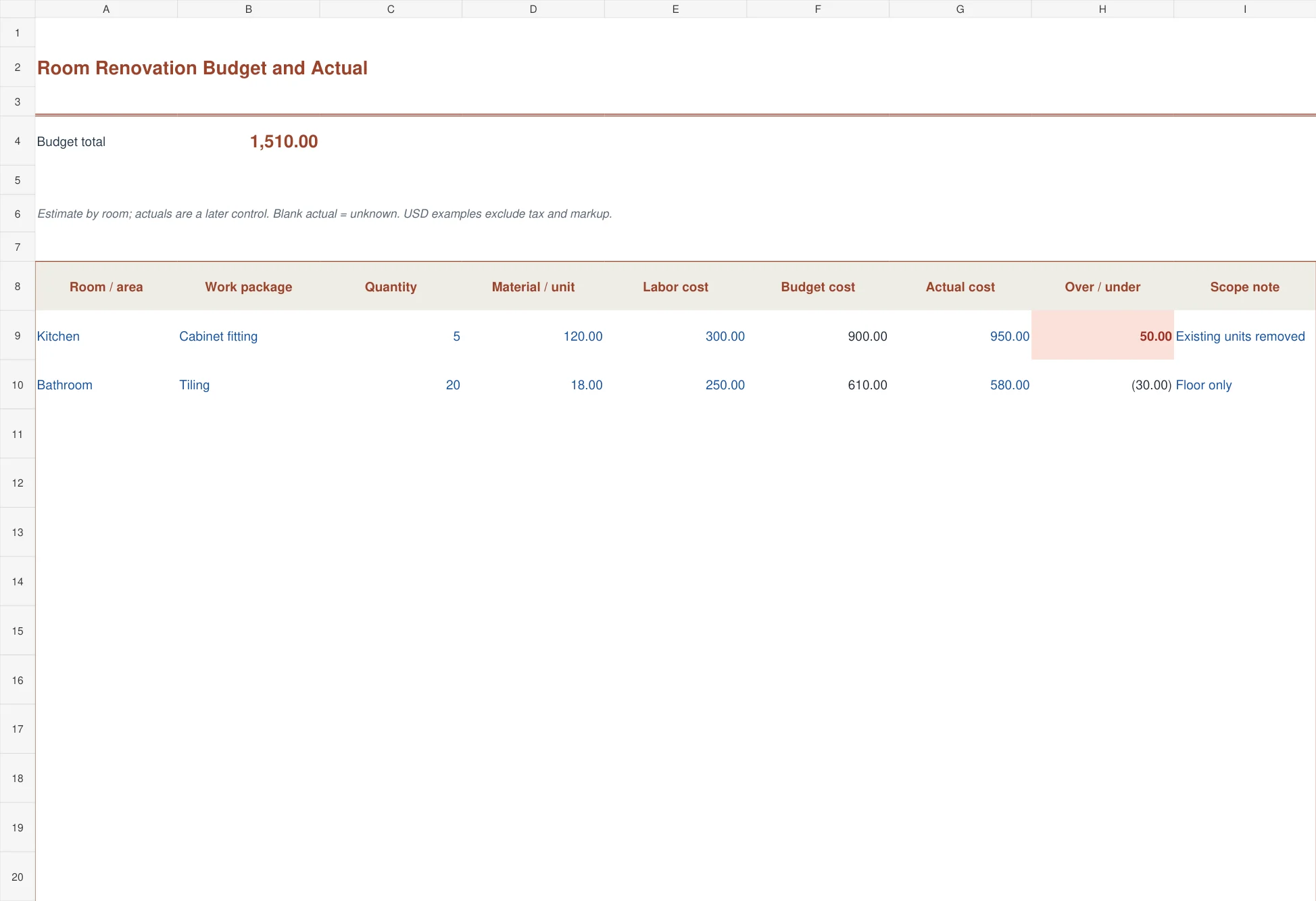
The rust-colored renovation worksheet organizes work by room or area. Each line combines a material quantity and rate with a separate labor amount. It calculates the budget cost and later compares an entered actual cost with that budget.
This version is useful for a kitchen, bathroom, office fit-out, or a small refurbishment with several distinct spaces. Keep the scope note specific: floor only, wall preparation included, or existing units removed. A blank actual cost remains unreported, while an entered zero has its own meaning. Positive variance shows spending above the estimated line cost.
3. Construction Crew Labor Estimate
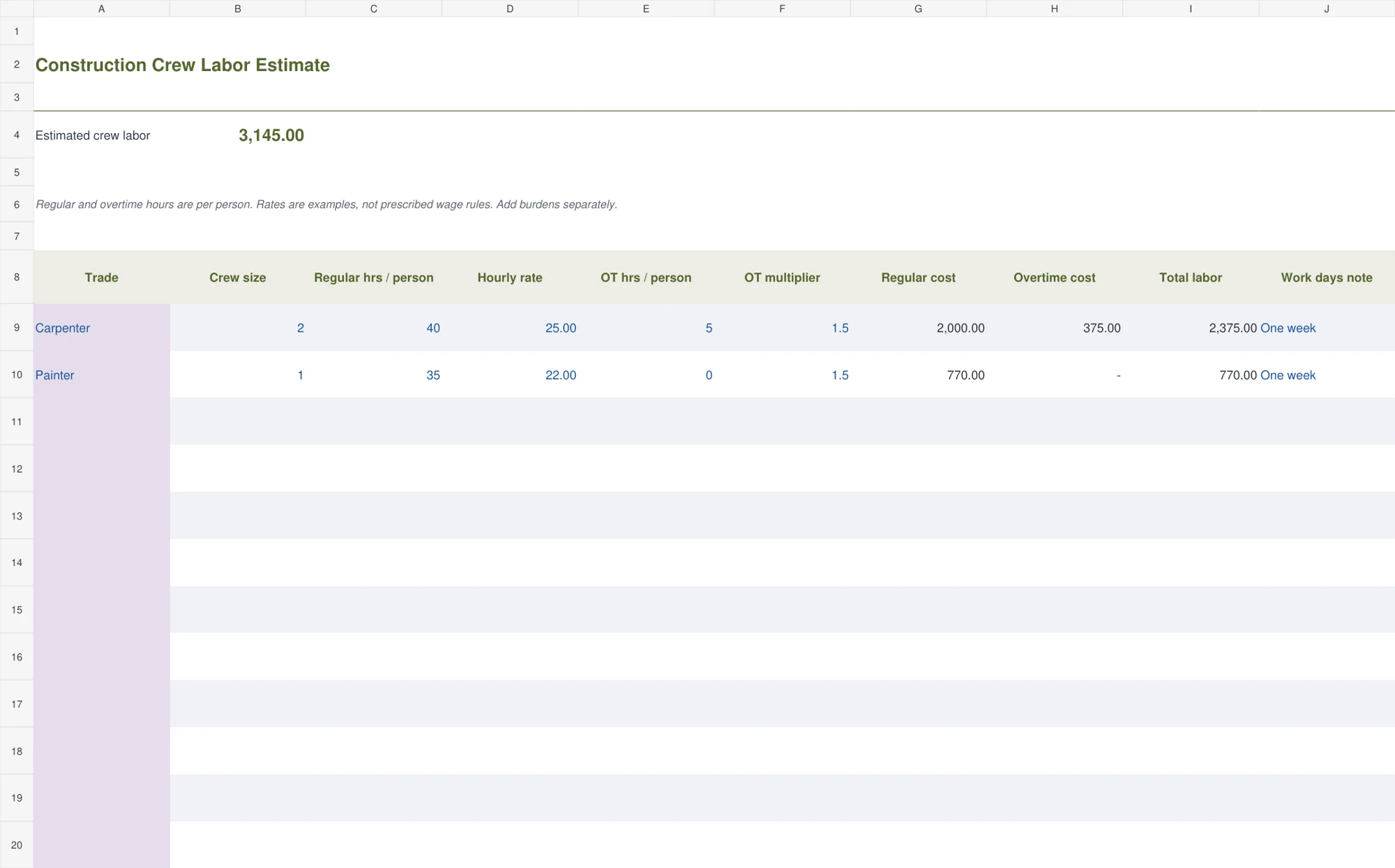
The olive crew worksheet separates regular and overtime labor. Enter crew size, regular hours per person, hourly rate, overtime hours per person, and the agreed overtime multiplier. It calculates regular cost, overtime cost, and the total labor estimate.
For two workers doing forty regular hours each at 25, regular labor is 2,000. Five overtime hours per person at a 1.5 multiplier adds 375. Enter rates based on your actual arrangement. The sample multiplier is illustrative, and the sheet does not add employment burdens, travel, accommodation, or equipment unless those costs are explicitly included elsewhere.
4. Materials Takeoff with Waste
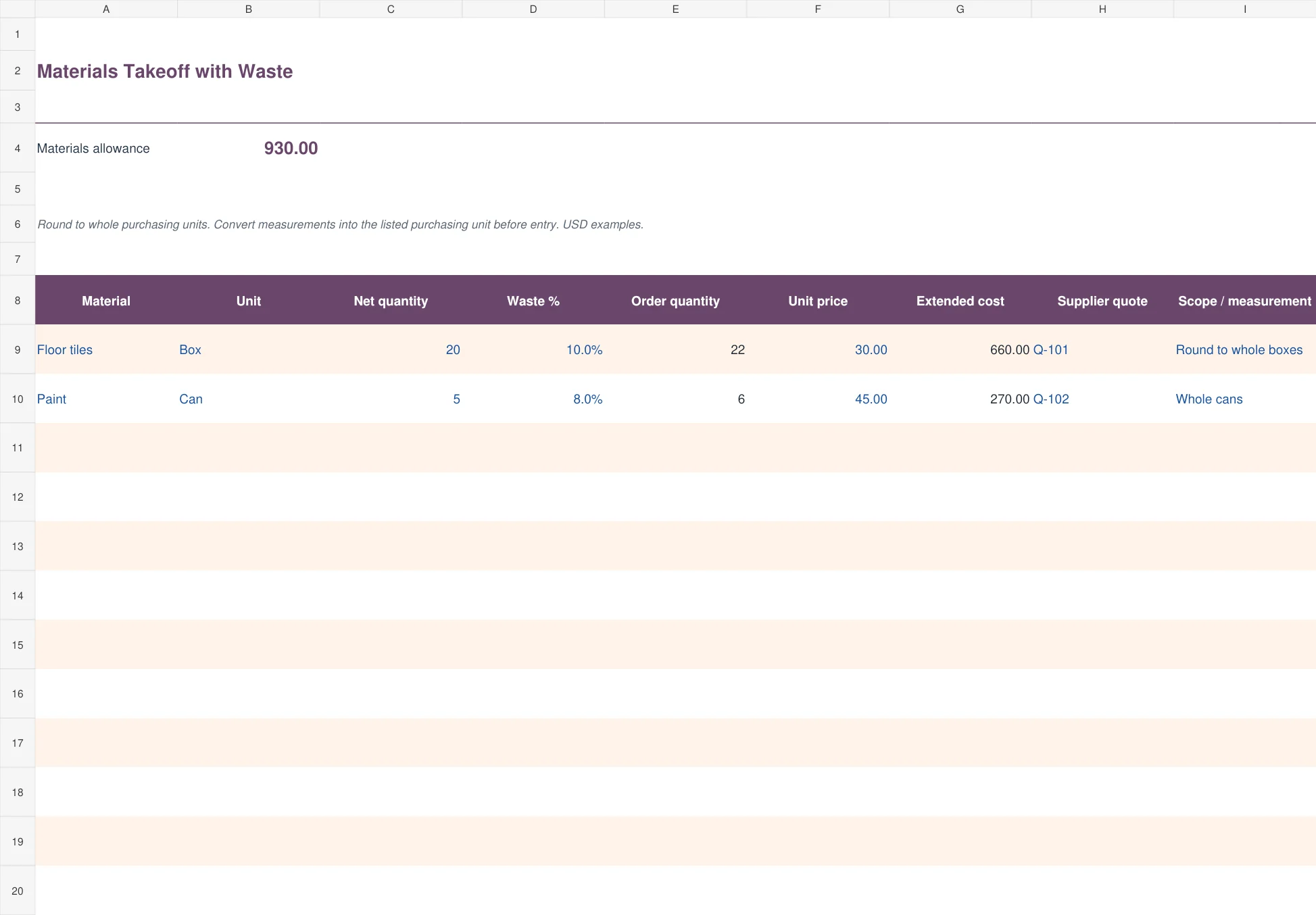
The plum materials sheet adds an editable waste percentage to the net requirement and rounds up to a whole purchasing unit. It then multiplies order quantity by the supplier’s unit price. Quote-reference and measurement fields keep the basis of the quantity visible.
Use it for boxes, bags, cans, or other products purchased in whole units. Twenty boxes with ten percent extra become twenty-two boxes. Convert measured area, length, or volume into the purchasing unit before entry. Do not apply a whole-box price directly to a square-meter quantity unless the conversion has already been made.
5. Contractor Bid Build-up
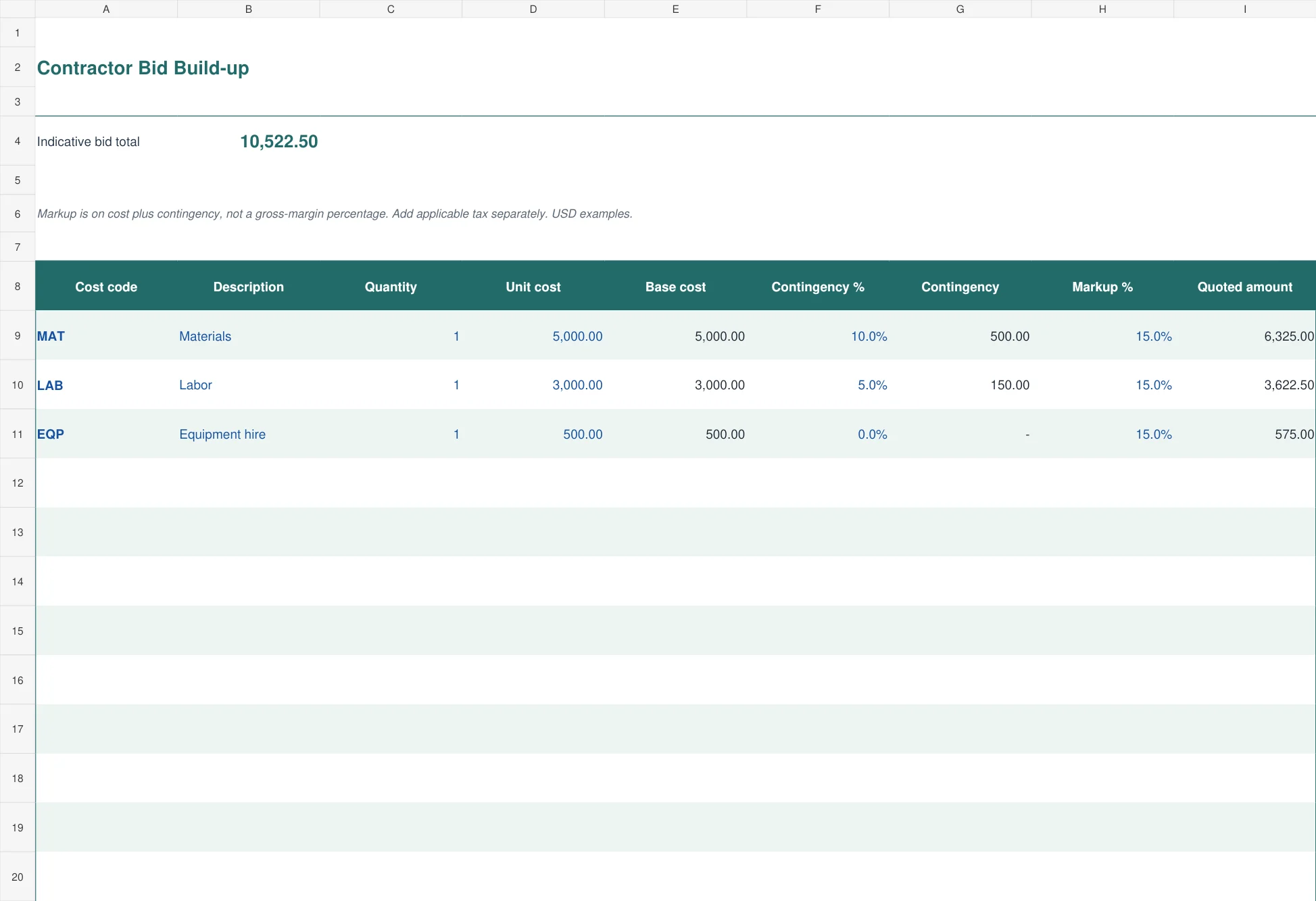
The teal bid worksheet builds a quoted amount from cost codes, quantities, unit rates, contingency, and markup. Contingency is added to the base cost before the selling markup is applied. Each category remains visible rather than disappearing into a final price.
Use it after checking the underlying material, labor, and subcontract allowances. A fifteen percent markup on cost is not the same as a fifteen percent gross margin on revenue. Applicable tax is not calculated in this file. Keep the tax basis, payment terms, validity period, and exclusions clear in the issued estimate or supporting quotation.
From site notes to a checked estimate
Take quantities from the actual scope and identify where they came from: a drawing revision, site measurement, supplier specification, or customer instruction. Keep a measurement note beside the item. When a drawing changes, the reference helps you find which estimate lines need to be updated.
Ask suppliers to quote the same product specification and purchasing unit. Confirm whether delivery, unloading, minimum order charges, or return costs are included. Use your supplier list to keep the right contact and quotation reference available. A historical price is a useful starting point only when its date and conditions are known.
Estimate labor from the work, access, and sequence rather than the floor area alone. Preparation, waiting, protection of occupied areas, and repeated mobilization can affect time. Keep these assumptions visible. A standard rate applied to an incomplete quantity still produces an incomplete estimate.
Review the job’s order of work with a project timeline template. The timeline and estimate answer different questions, but they should agree on the scope. A task that appears on the schedule but has no allowance in the estimate deserves a second look.
Contingency, markup, and tax need separate labels
Contingency allows for uncertainty within a defined scope. Markup contributes toward overhead and profit in the selling price. Tax is applied according to the transaction’s correct treatment. Combining all three in an unexplained percentage makes the estimate harder to defend and harder to update.
In the bid workbook, 5,000 of base cost with ten percent contingency becomes 5,500. A fifteen percent markup on that amount produces 6,325. The sequence matters. Applying markup only to base cost produces a different result, so use the method you have actually agreed to use.
Do not add a second contingency if a supplier or subcontract allowance already includes the same risk. Equally, do not assume a contingency covers a new room, a revised specification, or additional work outside the original scope. Record a scope change and its approval separately.
For examples of how construction estimates are commonly organized, see the Smartsheet construction estimate collection. Compare the scope and cost categories with your job before deciding how much detail to include in an issued estimate.
Issue a version that someone else can understand
Before sending an estimate, check descriptions, quantities, units, rates, and totals against the source notes. Recalculate one material line and one labor line manually. Confirm that a whole crew’s hours have not been counted again in another work package. Review blank lines for omitted items rather than treating a tidy total as proof of completeness.
Give the estimate a project reference, date, and revision. State the location, scope, exclusions, validity period, and whether the price includes tax. If the customer asks for a different specification, save a revised copy and explain what changed. Preserve the old issued version so later comparisons have a reliable basis.
The register-style files provide one hundred prepared rows. Copy the formulas and expand totals before adding more. If exporting to PDF, set the print area and review every page for clipped descriptions or missing totals. The editable workbook is the working record; the issued copy should show exactly what the recipient was asked to review.
Frequently asked questions
Which construction estimate template is best for a small renovation?
Use the room renovation worksheet when the work is easiest to understand by area. Use the trade-cost sheet when material quantities, labor hours, and equipment need separate calculation.
Do these templates contain current construction prices?
No. All example rates are fictional. Enter current supplier quotes and your own labor and equipment assumptions for the specific location and scope.
Does the materials sheet calculate measurements from drawings?
No. It starts with a net quantity you have already measured and converted into the purchasing unit. It adds the selected waste allowance and rounds the purchase quantity upward.
Is markup the same as profit margin?
No. Markup is calculated on cost, while gross margin is measured against selling revenue. The bid workbook uses markup on base cost plus contingency.
Can I track actual costs after the job starts?
Yes, the room renovation version includes actual cost and variance fields. Keep the original estimate and source evidence, and use a consistent scope when comparing actual spending with the budget.

You must be logged in to post a comment.