
Rent may arrive on time while the property still uses more cash than expected. A repair, a loan payment, and a replacement appliance can make the month look very different from the rent figure alone. These five free rental property income and expense spreadsheet templates help you separate those amounts and see what actually happened.
The collection includes a transaction ledger, a monthly cash-flow sheet, a rent collection register, a multiple-property summary, and a maintenance cost tracker. Each editable Excel workbook has a different layout and color theme. The previews show the actual files, and the download buttons provide .xlsx workbooks without registration or macros.
Choose one main record rather than entering the same payment in several disconnected files. The other sheets can support a particular question, such as which tenant still owes rent or which property needs a closer review. Fictional USD examples demonstrate the calculations. Keep a separate file for each currency unless you establish an explicit conversion process.
Start with one month, one property, and real receipts
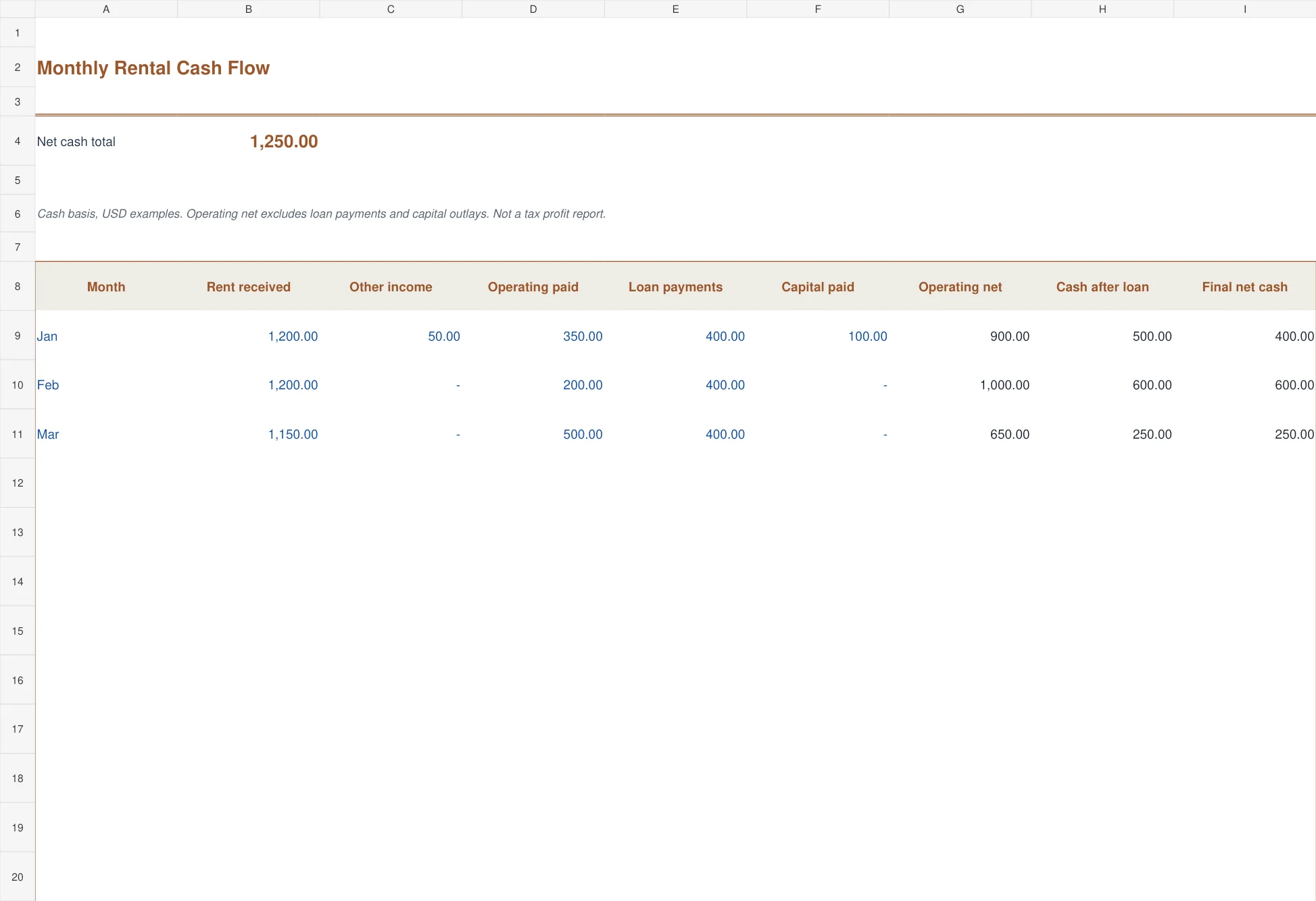
Imagine a property collecting 1,200 in rent plus 50 of other income. Operating bills paid during the month total 350. The loan payment is 400 and a capital purchase uses another 100. The operating cash result is 900, but cash remaining after the loan payment and capital purchase is 400. Those are different measures, both useful when labeled clearly.
Begin with the bank statement and supporting receipts for a completed month. Give the property a stable ID, such as P-01. Record cash received when it arrives and payments when they leave the account. If you also need rent billed but not yet collected, maintain that in the collection register rather than pretending it is available cash.
A small portfolio benefits from consistency more than elaborate formatting. Use the same property ID, reporting period, and category names each month. Your business expense tracker can support general business spending, while these rental workbooks keep the property-specific records together. Do not copy a general business total into a property report without checking which transactions it includes.
Five workbooks for different landlord questions
1. Rental Income and Expense Ledger
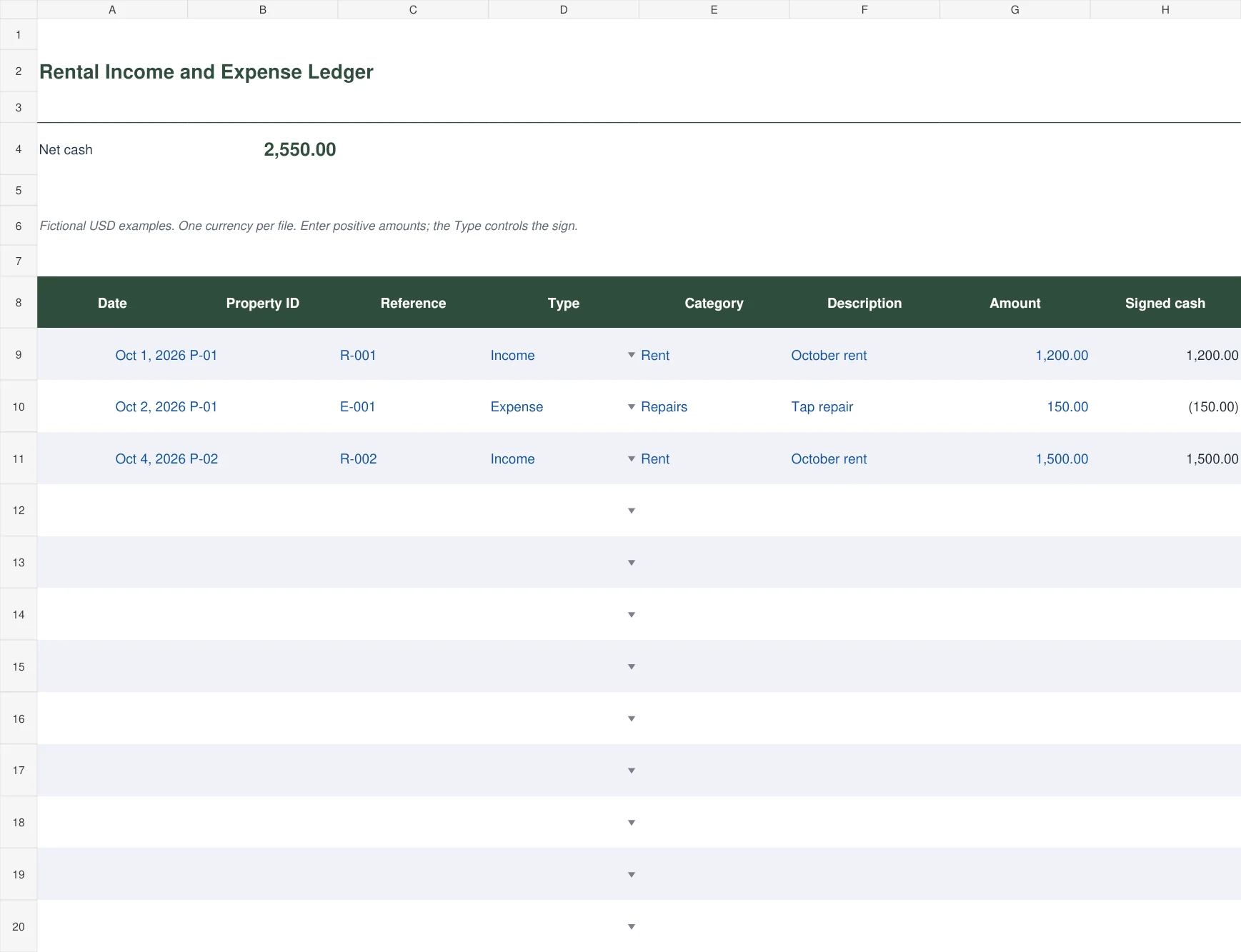
The forest-green rental ledger records date, property ID, reference, transaction type, category, description, and amount. Enter positive amounts and select Income or Expense. The signed-cash formula applies the direction and the summary calculates net cash across the prepared rows.
Use it when you want a traceable list behind the monthly result. A rent receipt and a repair bill each get their own reference. Keep the original receipt or invoice under that reference so you can move from a total back to its evidence. This ledger records entered cash transactions; it does not import bank activity or automatically classify spending.
2. Monthly Rental Cash Flow
The warm clay monthly sheet separates rent, other income, operating payments, loan payments, and capital outlays. Its three calculated columns show operating net, cash after loan payments, and final net cash. This layout suits a single property reviewed month by month.
The distinction matters because a whole loan payment is a cash outflow but is not necessarily an operating expense. A capital replacement can also consume cash without belonging in routine operating costs. The sheet is a cash-management view, not a tax profit calculation. Include the same categories consistently when comparing one month with another.
3. Rent Collection and Arrears
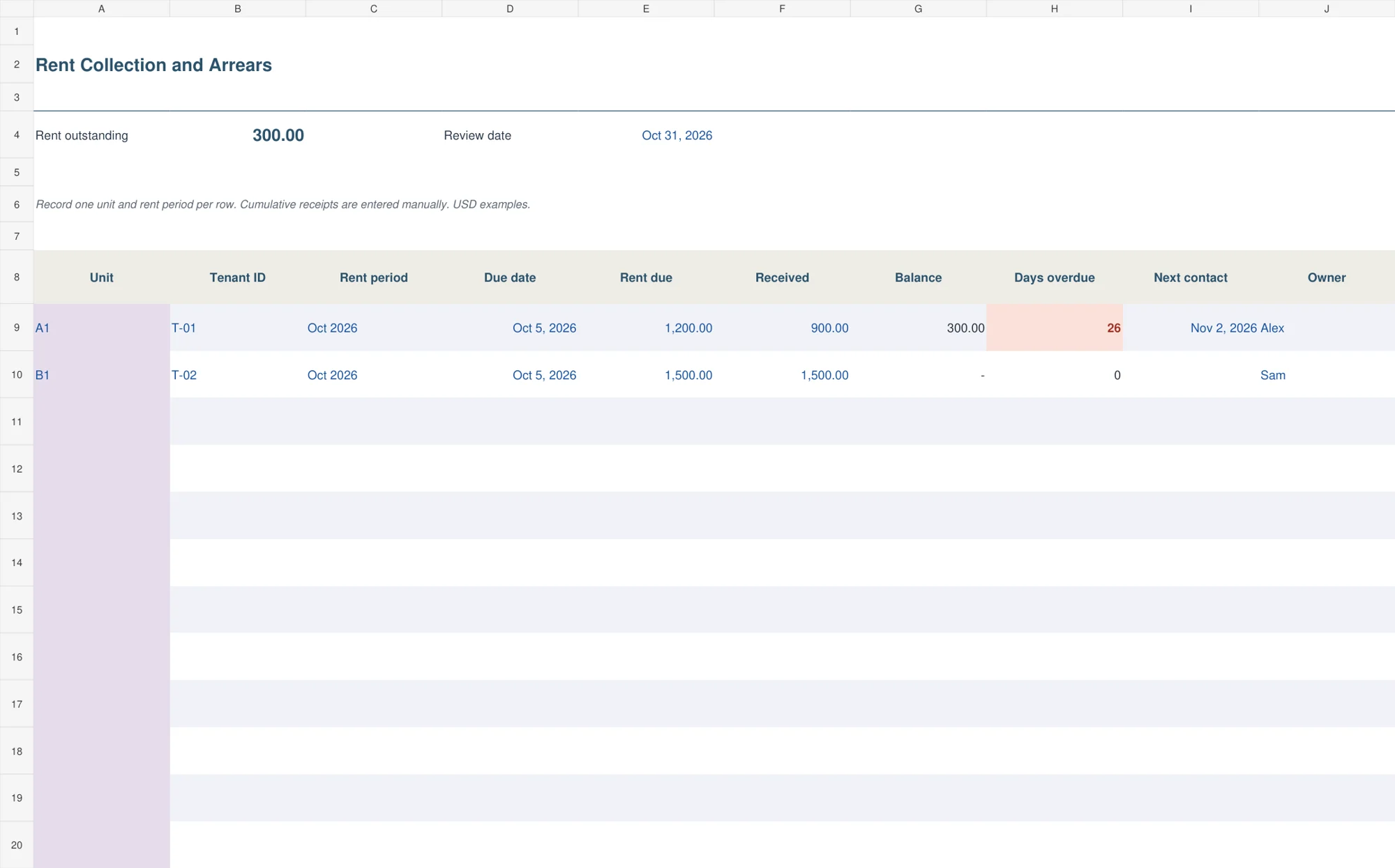
The blue rent collection register uses one row per unit and rent period. It holds the due date, rent due, cumulative receipts, remaining balance, days overdue, next contact date, and owner. Change the review date at the top when preparing a collection review.
If 1,200 is due and 900 has been received, the balance is 300. Enter additional receipts against that same unit-period record rather than adding the rent charge again. Keep any credit balance visible for investigation. The file records a contact plan; it does not send tenant reminders or decide what collection action is appropriate.
4. Multiple Property Cash Summary
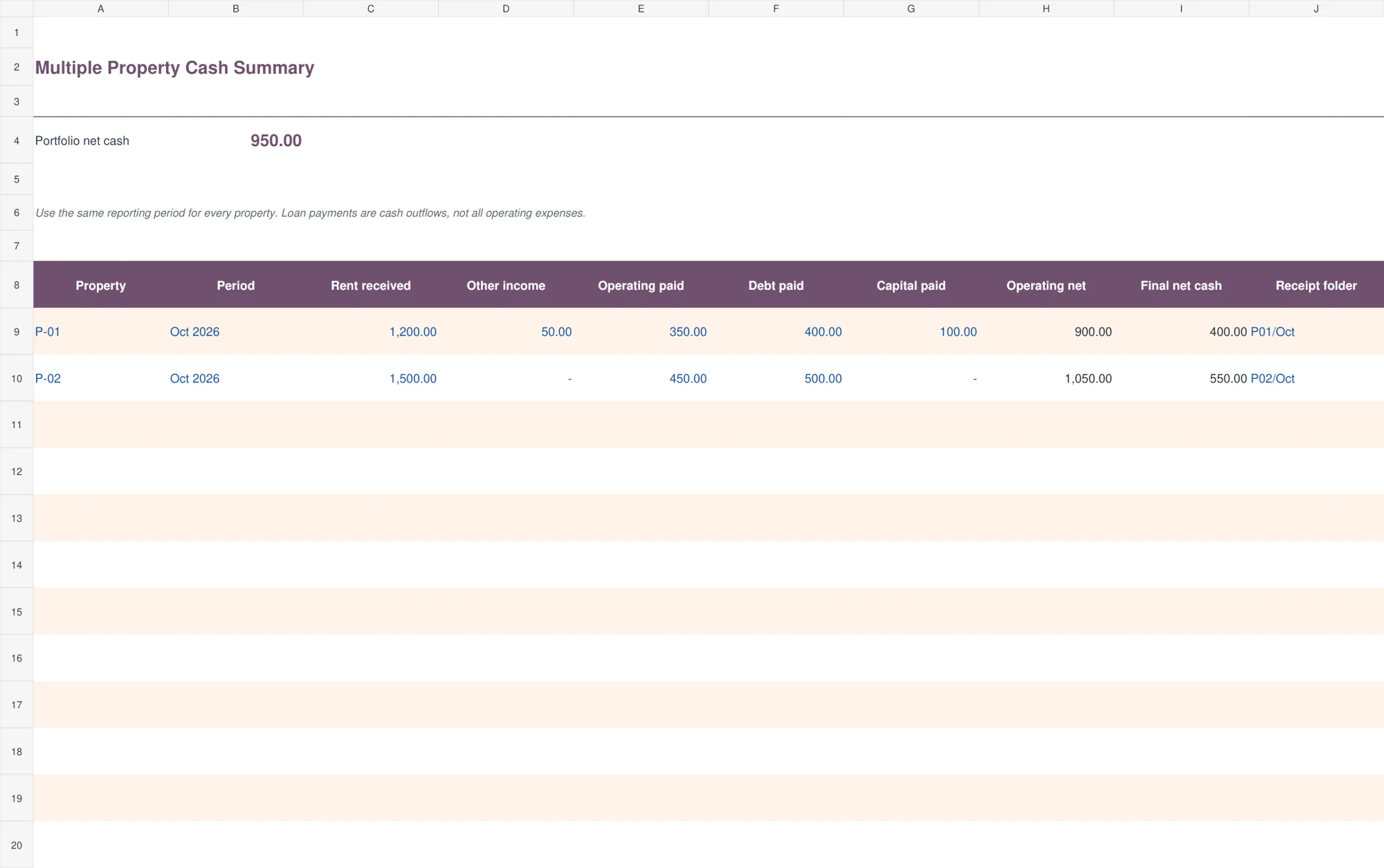
The plum property summary compares several properties using the same reporting period. Each row separates operating net from final cash after debt and capital payments. A receipt-folder field points to the supporting records for that property and period.
Use this workbook after you have reliable detail, rather than entering a guessed monthly total. It helps explain why one building generates rent yet contributes less available cash. A large repair or capital purchase may explain the difference. Keep property improvements, operating bills, and financing cash flows distinguishable so the comparison does not become misleading.
5. Rental Maintenance Cost Tracker
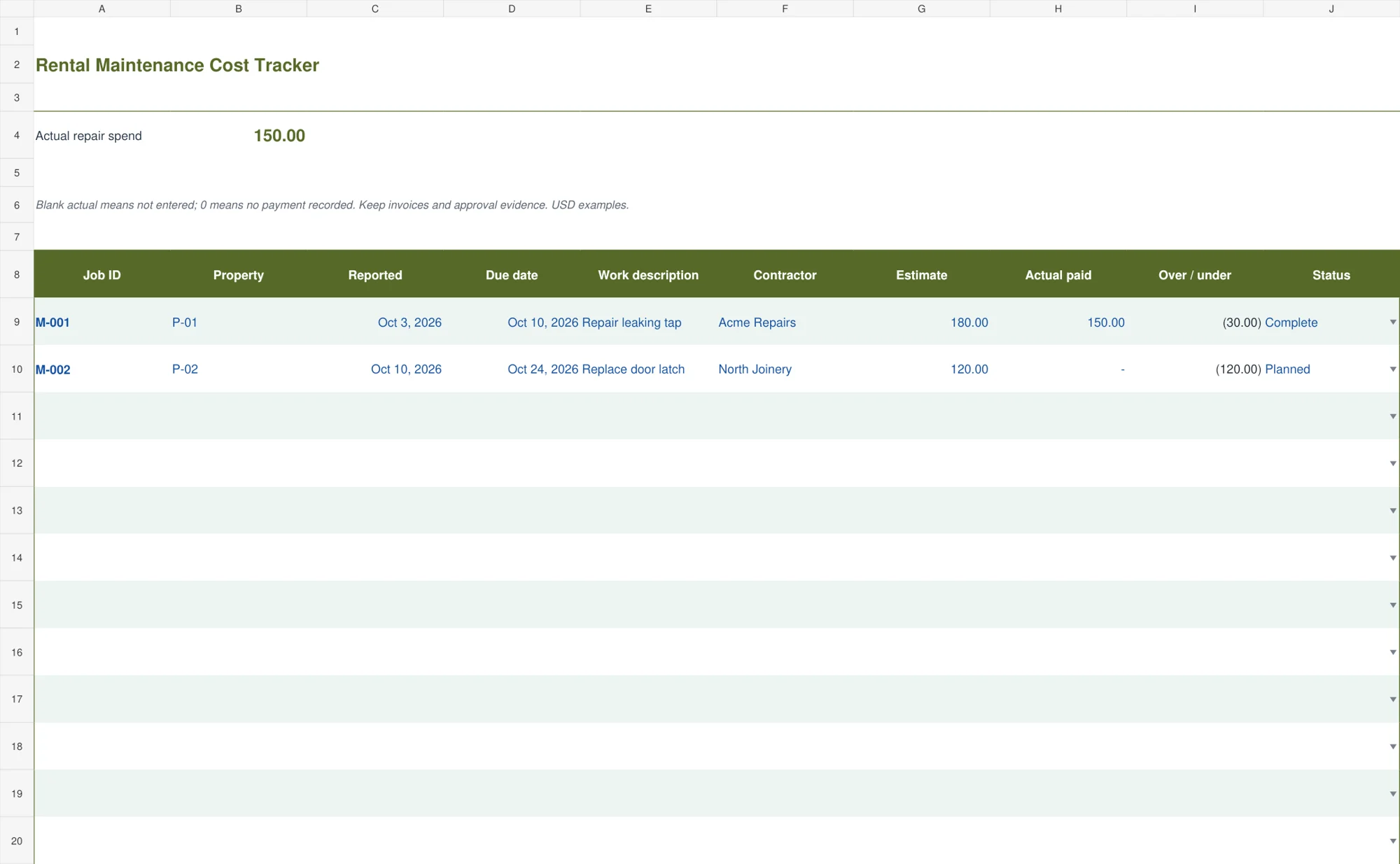
The olive maintenance tracker records the reported date, due date, work description, contractor, estimate, actual amount paid, variance, and status. It calculates spending above or below the estimate, with an alert when actual payment exceeds the estimate.
This is useful for following a repair from request to completion. A blank actual amount means it has not been entered; zero means no payment has been recorded. Keep approval evidence, supplier bills, and payment references separately. The tracker helps control cash spent on repairs, but it does not determine the accounting or tax classification of the work.
Keep the categories understandable
Start with a short list that you can apply consistently: rent, other receipts, repairs, insurance, management fees, utilities paid by the owner, and other operating payments. Add detail only when it helps you review the property. Changing the name of a category every month makes comparisons harder without adding information.
Keep tenant deposits separate from ordinary rental income in your underlying records. A refundable deposit is not simply another month’s rent available to spend. The rental cash ledger can record cash movement, but its net-cash figure is not a statement of taxable income or unrestricted funds. Add the appropriate supporting categories before using it for deposits.
Use the original document date, payment date, and rental period deliberately. A repair invoiced in September but paid in October belongs to October in this cash view. The invoice date can remain in the description or source document. Mixing accrual and cash timing within one total creates avoidable confusion.
For a U.S. property, the IRS rental income and expenses overview is a starting reference for tax-specific questions. These workbooks use simple operational categories and do not apply a jurisdiction’s tax rules. Keep the cash report useful on its own, then prepare any required accounting or tax report from the supported records.
A monthly closing routine that takes the guesswork out
First, match the property’s bank receipts with the rent collection register. Check that partial payments have been applied to the correct unit and period. A tenant’s promise to pay should remain a follow-up note, not an entered bank receipt.
Next, gather repair invoices, management statements, insurance payments, and loan information. Enter each cash transaction once. If a property manager remits a net amount after deducting fees, preserve the statement that explains gross rent, deductions, and the amount transferred. Do not enter the net transfer as gross rent and deduct the same fee again.
Then compare the ledger’s totals with the monthly summary. Review unusually high costs and missing documents before accepting the result. Use a dated copy of the completed workbook so a later change does not silently rewrite last month’s report. If several people update records, assign one person to own the final monthly version.
Finally, use the result to update your cash-flow planning worksheet. Expected rent and actual receipts serve different purposes. Keep next month’s forecast separate from cash already received. The historical report is evidence of a completed period; a forecast is an assumption about a future one.
Before you add your own records
Save an untouched master and create a working copy. Replace the sample property IDs, dates, amounts, and descriptions. Blue inputs and dark formulas distinguish entry fields from calculations. Keep dates as real Excel dates and amounts as numbers rather than typing a currency symbol into a text value.
The register-style workbooks provide one hundred prepared rows. Copy formulas and expand summary ranges before going beyond that capacity. Check the first added row at the bottom, not only an example near the top. In the monthly sheet, label periods unambiguously, such as Jan 2027, if more than one year is included.
Keep the property cash record connected to your bookkeeping records using stable references. A spreadsheet is most useful when a reader can trace the result to the bank, invoice, or management statement without having to ask the person who entered it.
Frequently asked questions
Which spreadsheet should I start with for one rental property?
Start with the cash ledger if you need transaction detail, then use the monthly cash-flow sheet for a period summary. Use the rent register when you also need to track amounts billed but not yet collected.
Can I record several properties in one file?
Yes. The cash ledger includes property IDs, and the multiple-property workbook provides a separate property-period comparison. Use a common currency and consistent reporting periods.
Does the net cash figure equal rental profit?
Not necessarily. Cash reports include payment timing, loan cash flows, and capital outlays differently from an accounting or tax profit report. Read the labels before using a total.
Can I change the currency?
You can change the number format when all values are already in that currency. Formatting does not convert amounts between currencies. Keep separate records or use a documented conversion process.
Do the templates calculate rental taxes?
No. They organize operational income, costs, collections, and cash flow. Tax treatment and reporting depend on the applicable rules and the underlying transactions.

You must be logged in to post a comment.