
An amortization schedule template shows how loan payments are allocated between interest and principal and how the balance changes over time. It is useful for understanding repayment assumptions.
Choose a layout that matches the loan’s rate, term, payment frequency, and treatment of extra payments. A simple fixed-rate monthly schedule may not suit variable-rate or irregular-payment borrowing.
Template previews and downloads
Amortization Schedule Printable Template
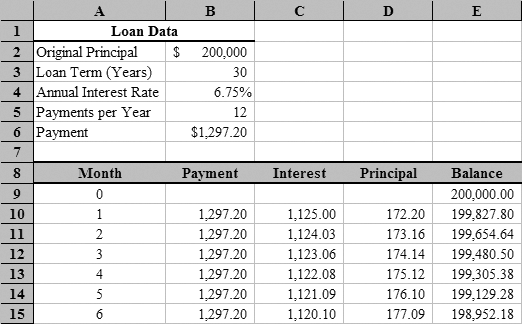

Amortization Schedule Excel
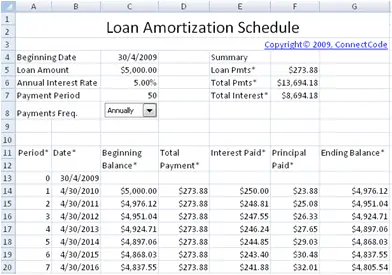
Loan Amortization Schedule Template
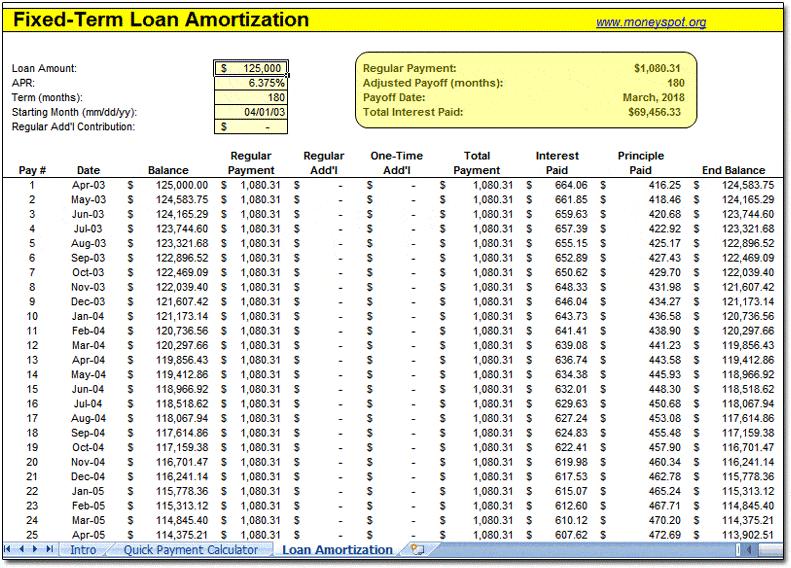
Amortization Schedule For Personal Loan
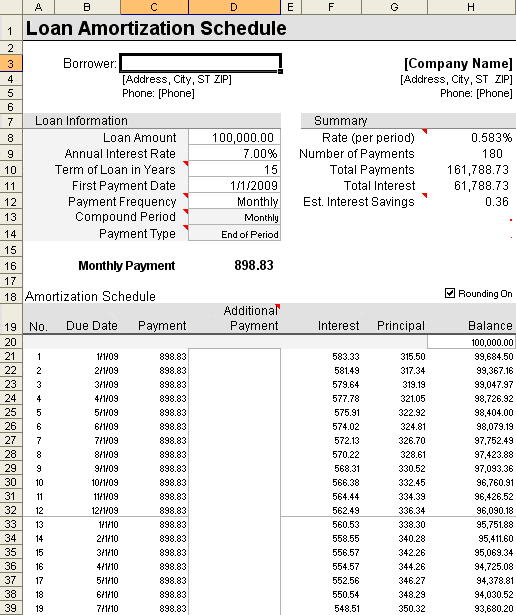
Amortization Schedule Sample
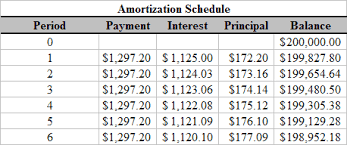
MS Excel Amortization Schedule
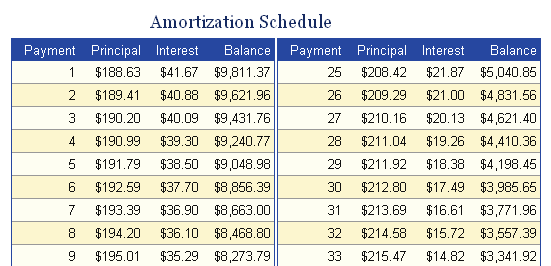
Amortization Schedule Example
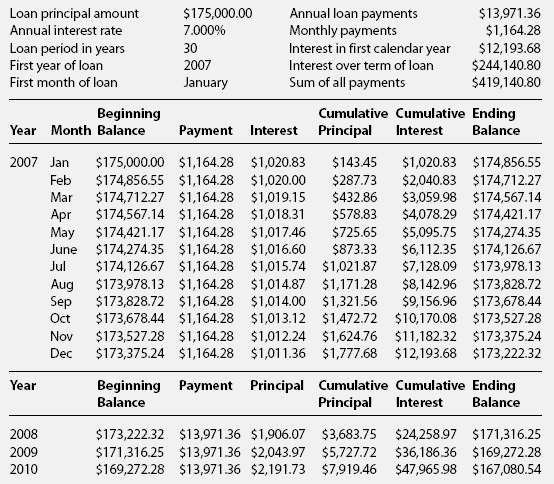
Loan Amortization Schedule
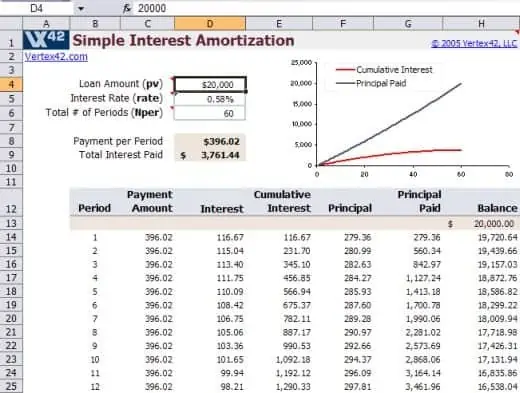
How to use the amortization schedule template
Step 1. Enter the principal, interest assumptions, payment timing, and term. Compare repayment scenarios using debt calculators.
Step 2. Check the first payment’s interest and principal against a known calculation. Plan several debts with debt snowball spreadsheets.
Step 3. Review the final balance and compare actual payments with the projection.
Check whether the displayed interest rate is annual or per payment period. A monthly fixed-rate model commonly uses an annual rate divided by twelve, but that is not universal for every lending arrangement. Payment timing and compounding assumptions should be clear.
Test the schedule’s final period and any extra-payment logic. A final payment may need adjustment rather than continuing the same amount into a negative balance. If the spreadsheet includes extra payments, check whether they reduce principal at the intended date.
Example and checks
For an illustrative monthly model, a 12,000 balance at 6% annual interest produces 60 of first-month interest when the monthly rate is 0.5%. A payment of 300 would then reduce principal by 240.
Actual lender calculations may use different timing or interest conventions. Fees and irregular payments can change the result. Include repayment commitments in financial plans.
Check the loan assumptions before using a schedule
An amortization schedule is a model of payments under stated assumptions. Before entering figures, identify the amount being financed, the relevant interest rate, payment frequency, term, and payment timing. Check whether the selected file assumes a constant rate and equal payments. Some borrowing arrangements include variable rates, fees, irregular dates, or other features that a simple schedule does not capture. The template should make its assumptions visible rather than displaying a precise repayment table without explaining how it was produced.
Keep the purpose of the schedule clear. An illustrative comparison can help explain how a change in term or payment affects a model. A working repayment record also needs actual payments and lender information. A printout generated from estimates is not the same as an official lender statement. Use the loan documents and appropriate provider information to check the terms that apply. If the model differs from those terms, label the difference and avoid presenting the result as a guaranteed final payment or payoff date.
Understand the columns in a repayment table
A typical table includes a payment period or date, opening balance, payment amount, interest, principal reduction, and closing balance. The principal reduction is the portion of the modeled payment applied to reducing the loan balance after the modeled interest. The closing balance then becomes the next period’s opening balance. These relationships provide useful checks. If the next opening balance does not match the previous closing balance, the schedule may contain a broken link, an adjustment, or an unexplained change.
Use separate columns for items that have a different purpose. An extra payment, fee, or other adjustment should not be hidden in the ordinary principal figure without explanation. Keep totals for payments, interest, and principal distinct so the reader can understand what each measures. A total payment figure is not the same as the original amount borrowed. A useful table also identifies its currency and rate basis. Those labels are especially important when a workbook is reused from an example created for a different loan or payment pattern.
Use consistent rate and period inputs in Excel
For a simple constant-rate loan model, Excel’s PMT function can calculate a periodic payment using the relevant rate, number of periods, and principal. The rate and period count must use compatible units. In an illustrative monthly model with an annual nominal rate in B2, a term in years in B3, and principal in B1, a formula can be written as =-PMT(B2/12,B3*12,B1). This assumes the model’s monthly rate basis and default end-of-period payments are appropriate. It is not a universal formula for every loan.
The minus sign in that example displays the modeled payment as positive when the principal input is positive, reflecting Excel’s cash-flow sign convention. Check the selected workbook’s own sign choices before changing formulas. The basic payment calculation covers principal and interest under its assumptions; other charges may need separate treatment. Use a small test case and check the result independently. Do not paste a formula into an unfamiliar layout and assume that its references point to the intended cells.
Review the first period and the final period
The first period is a useful place to test the logic. Under a simple monthly model, a balance of 10,000 at a monthly rate of 0.5% produces 50 of interest for that period. If the modeled payment is 300, the principal reduction is 250 and the closing balance is 9,750, before any separate adjustments. These figures illustrate the relationships in the table rather than the terms of a particular loan. If the workbook gives a different result, investigate the assumptions and references before relying on later rows.
Check the final period as well. Rounding or a changed payment may require an adjusted last payment rather than continuing into a negative balance. A row beyond full repayment should not imply that more ordinary payments remain due. If the file handles a balloon amount or residual balance, identify that feature clearly. A schedule that looks reasonable in the first few rows can still have an incorrect ending. Reviewing both ends of the table is a practical way to detect errors that a single total may hide.
Model extra payments and changes deliberately
An extra payment can affect the modeled balance and later interest, but the outcome depends on its timing and how it is applied. A template needs explicit logic for that feature. Entering a larger number in an ordinary payment cell may not update every linked calculation correctly. Check whether the file reduces the term, recalculates future payments, or uses another method. The actual loan may also have provisions affecting extra payments, so confirm those through the relevant documents or provider.
When comparing scenarios, keep the original model and change the intended assumption in a separate view. Record the extra amount, start period, and any pauses or changes. Compare the resulting interest and repayment path using the same basis. Do not interpret the most favorable spreadsheet scenario as automatically affordable or suitable. A payment plan also needs to fit the person’s or business’s other commitments. The schedule can make assumptions and arithmetic clearer without deciding how all available money should be allocated.
Maintain a record that can be reconciled
If the schedule is used to monitor an actual loan, keep planned and actual payments distinct. Record the date and amount posted, then compare relevant balances with lender statements. Differences can arise from timing, interest conventions, fees, rate changes, or errors in the model. Investigate rather than forcing the closing balance to match through an unexplained adjustment. Where an adjustment is needed, label its reason and source. A readable history is more useful than a perfect-looking table whose changes cannot be traced.
Before printing or sharing, check the borrower or reference details, assumptions, dates, and page layout. Repeat column headings on continuation pages where practical. Keep a clean master and retain dated working versions when they support a decision. The existing amortization templates provide a starting structure, but a dependable schedule requires appropriate inputs, tested formulas, clear treatment of changes, and comparison with actual records. That process makes the table useful for understanding repayment rather than treating its precision as evidence that every assumption is correct.
Frequently asked questions
1. What is an amortization schedule template?
An amortization schedule template is a ready-made format used to organize loan payments, including principal, interest, payment amounts, and the remaining balance over time.
2. What does an amortization schedule show?
It can show the payment date or period, payment amount, interest portion, principal portion, and remaining loan balance for each scheduled payment.
3. What is a printable amortization schedule?
A printable amortization schedule is a loan repayment table that can be printed and used as a physical record for tracking payments and the outstanding balance.
4. Can I use an Excel amortization schedule template?
Yes. An amortization schedule Excel template can be used to enter and organize loan information electronically and can be printed when needed.
5. What is a loan amortization schedule template used for?
It is used to organize the repayment of an amortizing loan and show how individual payments reduce the principal while covering interest.
6. Can I use an amortization schedule for a personal loan?
Yes. A personal loan amortization schedule can help track repayment periods, principal, interest, payment amounts, and the remaining balance.
7. Can I print an Excel amortization schedule?
Yes. After entering the required loan information, an Excel amortization schedule can be formatted and printed for recordkeeping.
8. Why should I use an amortization schedule?
An amortization schedule makes it easier to understand loan repayment progress, review individual payments, track the remaining balance, and organize financial records.
Does every payment reduce principal equally?
Not necessarily. In many fixed-payment amortizing loans, the interest share changes as the balance falls.
Can I model extra payments?
Only if the schedule handles their timing and allocation correctly.

You must be logged in to post a comment.