
Suppose monthly fixed costs are 3,000, the selling price is 50, and variable cost is 20 per unit. Each sale contributes 30 toward fixed costs. You need one hundred units to cover those fixed costs. At one hundred and fifty units, the example operating profit is 1,500 before costs outside the model.
These five free break-even analysis Excel templates let you test that kind of calculation for a single product, service hours, a product mix, different prices, or a target profit. Every workbook is editable and has a different color theme and layout. Preview the actual file and download the .xlsx version directly without registration or macros.
A break-even result is a planning threshold, not a sales forecast. It tells you how much volume the entered economics require. You still need to ask whether that volume can be sold, produced, and collected within the period. Keeping those questions separate makes the calculator more useful.
Check three inputs before trusting the answer
Fixed costs should relate to the period you are modeling. If the analysis is monthly, use monthly rent, recurring software, and other costs that do not vary directly with the modeled units within the relevant operating range. Do not divide annual sales by monthly fixed costs or combine a one-time setup cost with recurring costs without labeling the choice.
Variable cost should use the same unit as selling price. A product sold per box needs its cost per box. A service billed by the hour needs the variable cost of that hour. Include the costs that actually change with the unit, and avoid counting the same cost in both the fixed and variable inputs.
Contribution per unit equals price less variable cost. If contribution is zero or negative, increasing volume does not cover positive fixed costs under those assumptions. The single-product calculator therefore gives no feasible break-even result rather than dividing by zero or showing an impossible negative sales target.
The U.S. Small Business Administration’s business-planning guidance includes the basic fixed-cost and contribution approach. The workbooks below apply that familiar relationship to several practical planning questions, using fictional monthly USD examples.
Five ways to explore your break-even point
1. Single Product Break-even Calculator
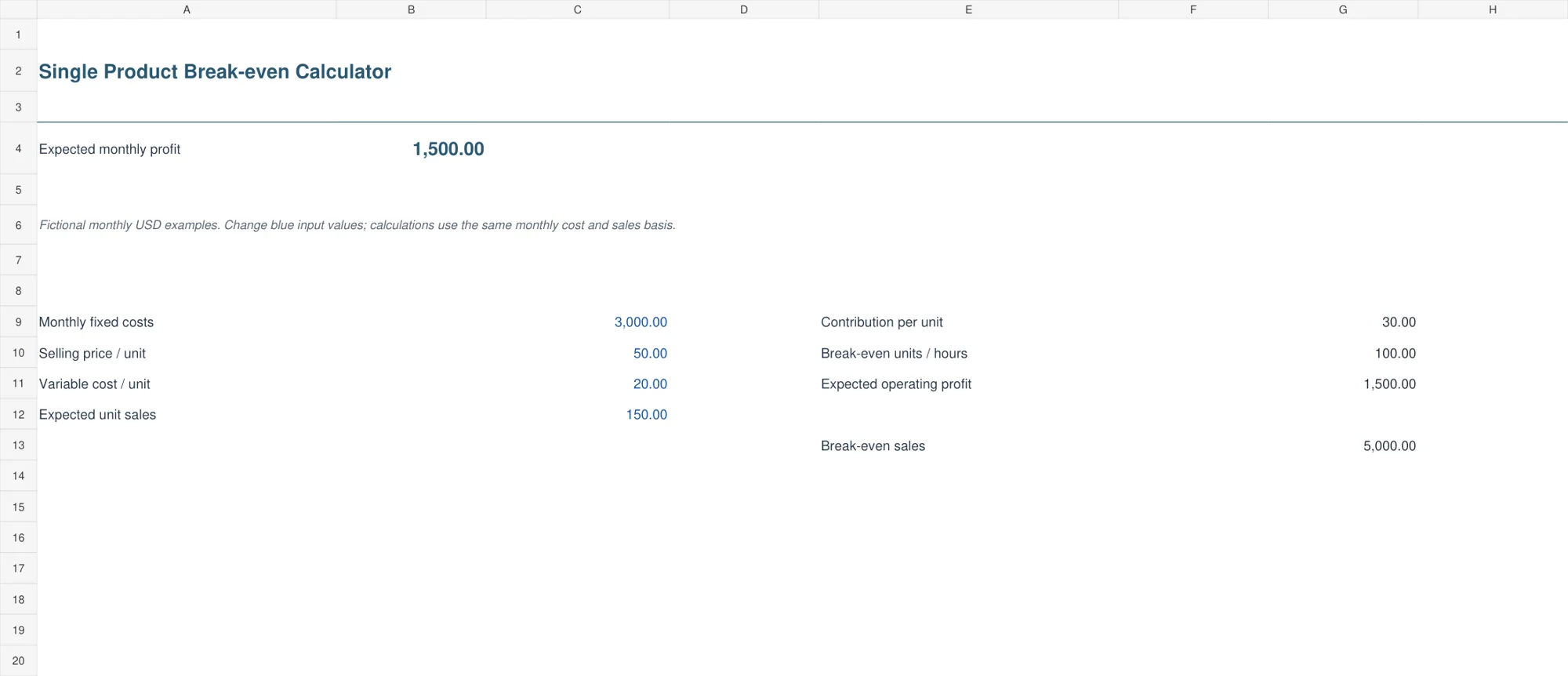
The blue single-product calculator keeps fixed costs, price, variable cost, and expected sales volume in one compact input area. It calculates contribution, rounded-up break-even units, break-even sales at that rounded volume, and expected operating profit.
Choose it when one unit describes the business clearly enough for a first review. The example requires one hundred units at a 30 contribution to cover 3,000 fixed costs. Change the price or cost and observe the required volume. Round-up logic is useful for indivisible units, but the rounded break-even revenue can be slightly above the exact theoretical threshold.
2. Service Hours Break-even Calculator
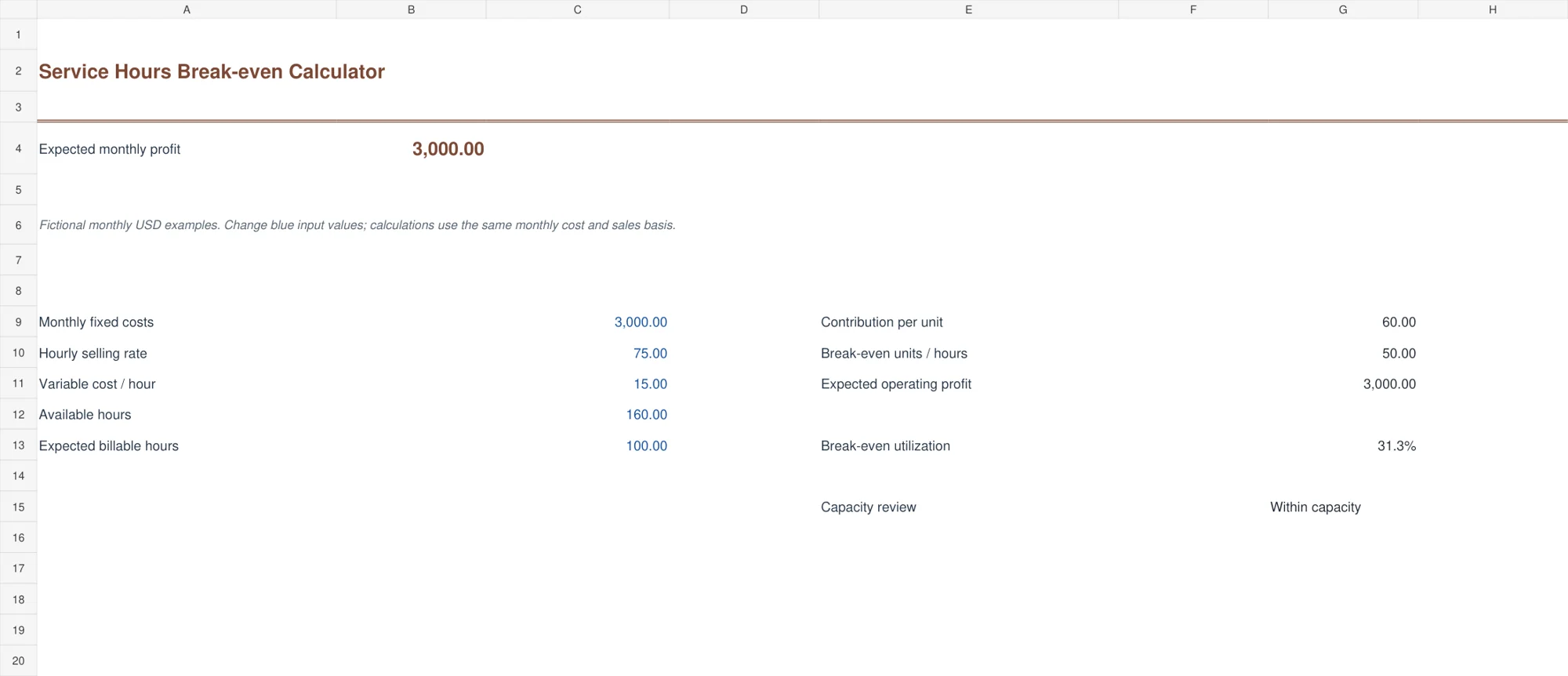
The clay service calculator expresses the threshold in billable hours. Enter fixed costs, hourly selling rate, variable cost per billed hour, available billable capacity, and expected billable hours. It calculates the required hours and compares the rounded threshold with the entered capacity.
This suits a consultancy, studio, repair service, or other hourly model with a sensible shared rate basis. Available hours should mean realistic billable capacity after other commitments, not every hour on the calendar. A threshold within capacity does not guarantee enough client demand. A threshold beyond capacity signals that the current assumptions need a closer look.
3. Product Mix Break-even Worksheet
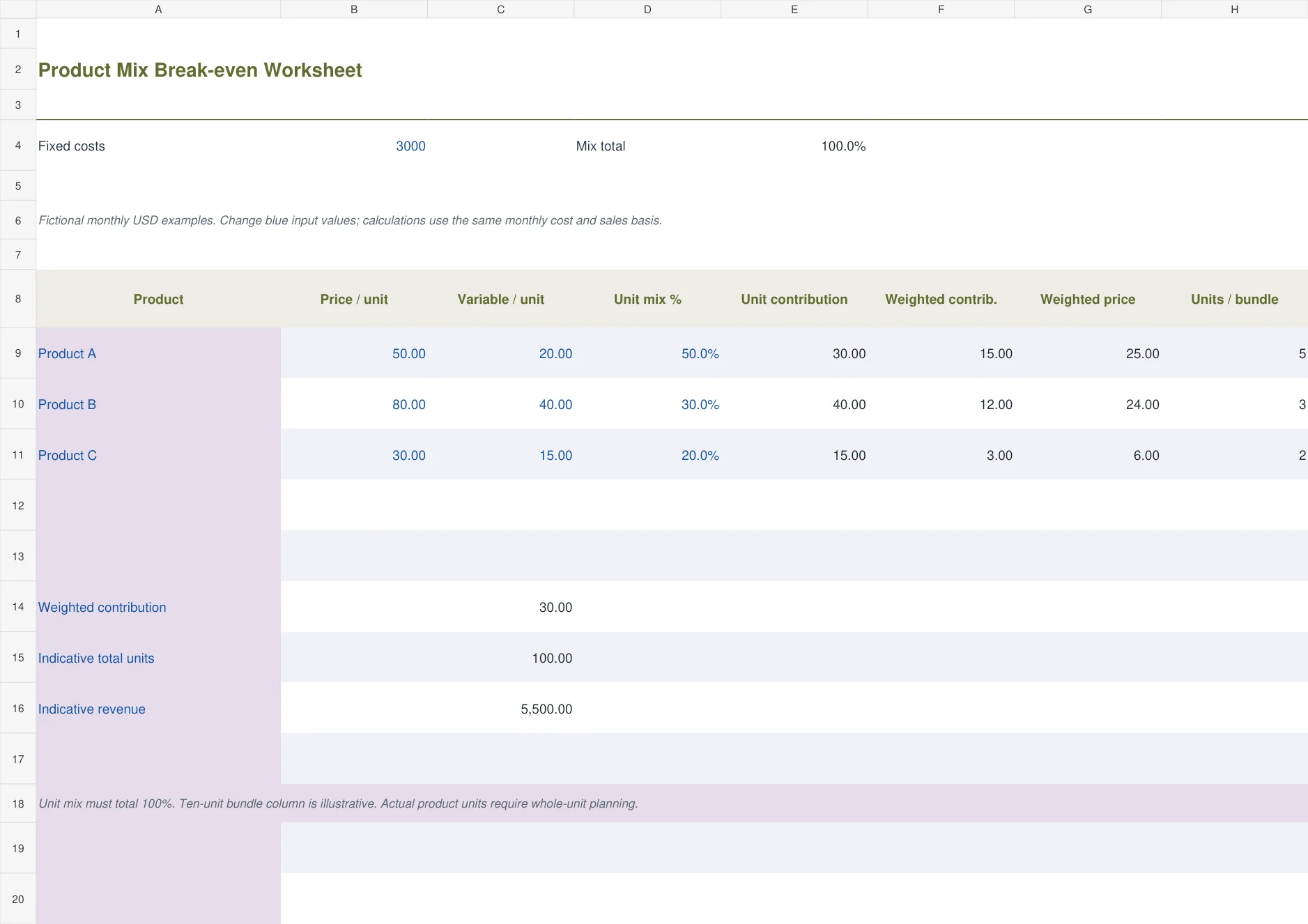
The olive product-mix worksheet uses three products with separate prices, variable costs, and unit-mix percentages. It calculates a weighted contribution and an indicative total unit threshold when the mix totals one hundred percent. A ten-unit bundle column makes the example mix easier to understand.
Use this only when the assumed sales mix is reasonably meaningful. Fifty percent, thirty percent, and twenty percent are unit shares, not revenue shares. The indicative units may imply fractional quantities for individual products. Plan feasible whole-product quantities and recalculate the contribution before treating the result as an order or production target.
4. Price Comparison Break-even Table
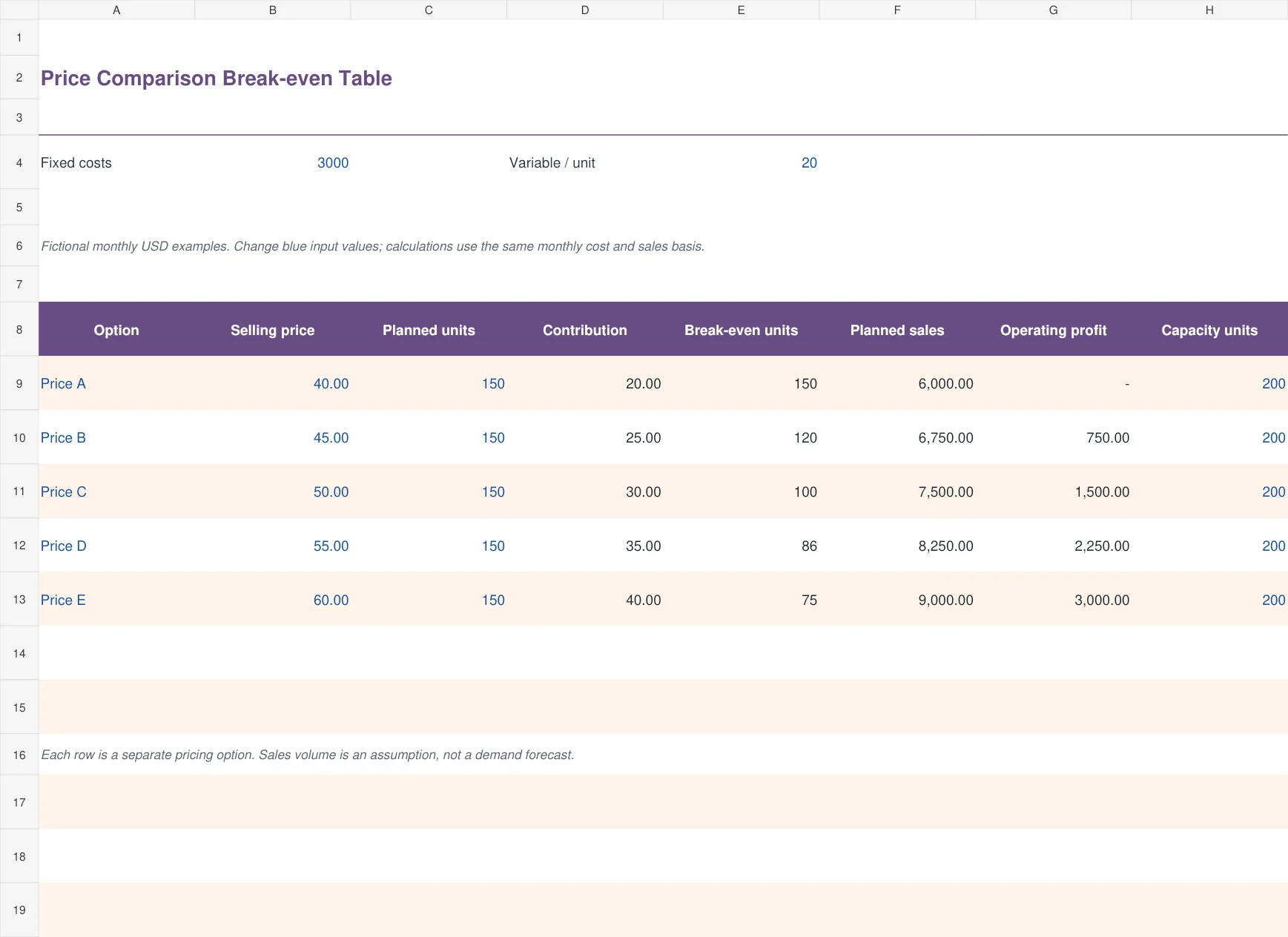
The purple price-comparison table puts five explicit options beside one another. Each has a selling price, planned volume, contribution, rounded break-even volume, planned sales, operating profit, and capacity. The options share the entered fixed cost and variable cost per unit.
Use it to discuss price assumptions without repeatedly overwriting a single input and trying to remember the previous result. The planned sales quantity is an assumption for each row. A higher price may reduce demand, so keeping the same volume across all options is a comparison choice, not evidence that every price will sell equally well.
5. Target Profit and Safety Margin
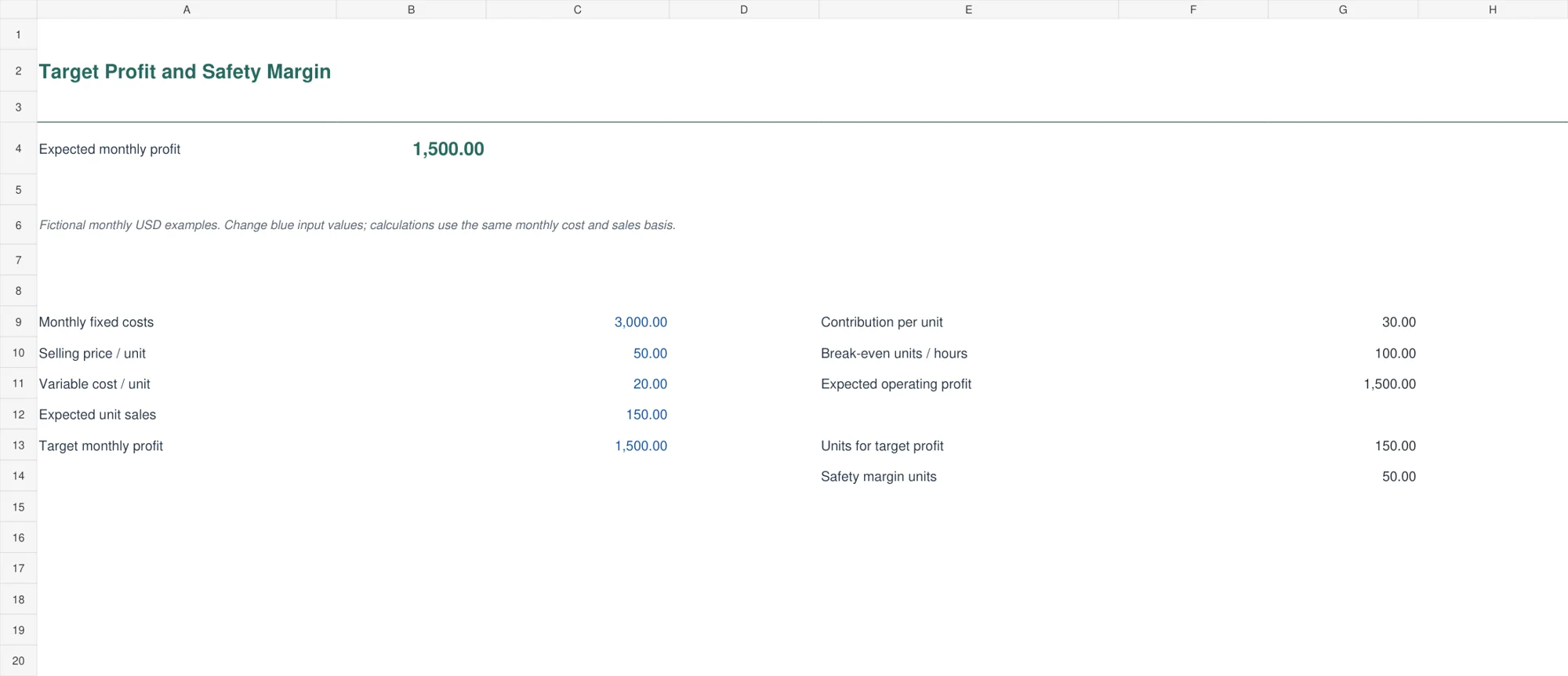
The green target-profit calculator adds a desired monthly profit to the basic fixed-cost requirement. It calculates the units needed for that target and the difference between expected sales and rounded break-even units. This makes the sales cushion visible in units.
For 3,000 fixed costs, a 1,500 target, and contribution of 30, the target requires one hundred and fifty units. Expected volume of one hundred and fifty is fifty units above the simple break-even threshold. A cushion can shrink quickly when cost, price, or sales mix changes, so review those assumptions rather than relying on the percentage or unit count alone.
A worked review: what changes when price falls?
Return to the single-product example. At a price of 50 and variable cost of 20, contribution is 30 and the break-even point is one hundred units. Reduce price to 45 while leaving variable cost unchanged, and contribution becomes 25. The same 3,000 fixed cost now needs one hundred and twenty units.
At an unchanged planned volume of one hundred and fifty, operating profit falls from 1,500 to 750. That does not establish whether the lower price is good or bad. The lower price might change demand, and the model has not supplied that demand assumption for you.
Use a pricing worksheet to record the commercial reason for each option. Explain the customer, product, or service conditions behind the chosen volume. Comparing explicit assumptions is more informative than selecting the option with the largest calculated profit while assuming nothing else changes.
If higher volume requires an extra employee, another machine, or additional premises, fixed costs may step upward. Update the relevant cost assumption before using the original threshold for the expanded operation. Break-even relationships apply within the operating range you have modeled.
Separate profit, cash, and capacity
Break-even analysis is commonly a simplified operating-profit view. A profitable month can still have a cash problem if customers pay later, stock must be purchased earlier, or debt repayments consume cash. Add a separate cash-flow view rather than forcing all those timings into the unit contribution.
Use a financial plan to place the threshold alongside the broader assumptions for the business. A budget worksheet can help check the fixed-cost inputs and identify a cost that has been omitted or counted twice.
Compare actual results with a profit and loss worksheet on a consistent period and cost basis. Differences can explain whether the original price, volume, or cost assumption was unrealistic. They can also reveal that the model left out an expense that belongs in the operating result.
For services, test capacity as well as profitability. A requirement of fifty billable hours against one hundred and sixty available hours is about 31.3 percent using the rounded hours in the example. If actual available capacity is lower, change that input. Nonbillable administration and travel should not vanish simply because the sales target looks achievable.
Read the limits before using a result as a target
The calculations assume the entered price and variable cost remain meaningful over the modeled volume. Discounts, waste, payment processing fees, returns, or changes in staffing can alter that relationship. Include the material factors relevant to the decision and keep the assumptions visible.
The product-mix workbook assumes unit shares stay stable. If customers buy more of the lower-contribution product, the weighted result changes even when total units remain the same. Review the mix from actual sales rather than treating the original percentages as permanent.
Save a dated copy before changing an important input for a decision. The price-comparison sheet has five prepared options and the product-mix sheet has three prepared products. Adding another row requires extending the related formulas and mix totals. The other files are compact calculators rather than transaction registers.
Keep currency and units consistent. Changing the displayed symbol does not convert currency, and changing a heading from item to hour does not automatically make the cost assumptions appropriate for a service. Test a simple example manually before applying a redesigned version.
Frequently asked questions
What is the basic break-even formula?
For a simple single-product model, divide fixed costs by selling price per unit minus variable cost per unit. The denominator is contribution per unit and must be positive for a feasible positive-cost result.
Why does the template round the unit result upward?
Many products cannot be sold in fractions. Rounding upward shows the whole-unit quantity required to cover the modeled fixed cost. Rounded sales revenue can exceed the exact theoretical threshold slightly.
Can I use the files for an hourly service?
Yes. Use the service-hours calculator and enter a realistic hourly rate, variable hourly cost, fixed costs, and available billable capacity for the same period.
Does a calculated break-even point prove there is demand?
No. Demand and sales volume are separate assumptions. The calculation shows the threshold required by the entered costs and price, not the number of customers you will obtain.
Can I combine products with different margins?
Use the three-product mix workbook with unit shares totaling one hundred percent. Review whether the assumed mix is realistic and plan feasible whole-product quantities before acting on the indicative result.

You must be logged in to post a comment.