
The accounts show that the business bought six laptops. The storeroom has two, three are assigned to employees, and nobody is sure where the sixth one went. A useful fixed asset register connects those facts before the next purchase, handover, or year-end review.
These five free fixed asset register Excel templates cover the master record, straight-line depreciation, equipment custody, physical verification, and disposal. Each is an editable .xlsx workbook with a distinct color theme and working calculations. The preview under each description shows the actual file, and the download button provides it directly without registration.
The templates are designed for identifiable equipment, furniture, computers, and similar business assets. They are not interchangeable with a stock-sales ledger. Use a stable asset ID to connect the acquisition record with where the item is, who holds it, and what happened when it left service.
One asset ID should survive every handover
An asset ID belongs to the item, not to its current location or employee. If laptop FA-001 moves from the office to a remote worker, keep FA-001. Create a handover record rather than changing the identifier and losing its connection to the original purchase.
Keep the asset ID distinct from the supplier serial number. The serial number identifies the manufacturer’s item, while your ID supports your own records and labels. Some assets have no useful serial number. A consistent internal ID still lets the purchase, repair history, custody, and disposal record connect.
Your inventory spreadsheet may track stock quantities and movements. A fixed asset register instead follows specific items retained for use in the business. If the organization needs both records, define which one owns each type of item so equipment is not counted twice or omitted because everyone assumes another file covers it.
Build the opening register from evidence
Start with purchase invoices, existing equipment lists, physical labels, and accounting records. Reconcile what each source represents before combining them. An invoice line may contain several units, while the register may require one row for each individually tracked item. Do not assume one invoice equals one asset.
Agree how acquisition cost is recorded under the organization’s accounting policy. A purchase price, recoverable tax, freight, and installation can need different handling depending on the transaction and applicable framework. The master workbook accepts the approved cost; it does not make that classification decision for you.
Use a physical check to establish the actual location and custodian. If an item cannot be found, preserve that exception rather than assigning a convenient location to finish the list. Record the source and owner of the follow-up so the opening record can be reviewed by someone who did not compile it.
Compare the supported acquisition-cost total with the relevant general ledger records. Differences may reflect disposals, pooled items, timing, or incomplete source data. Explain them rather than forcing the asset file to agree with an unexplained balancing line.
Understand what the depreciation workbook calculates
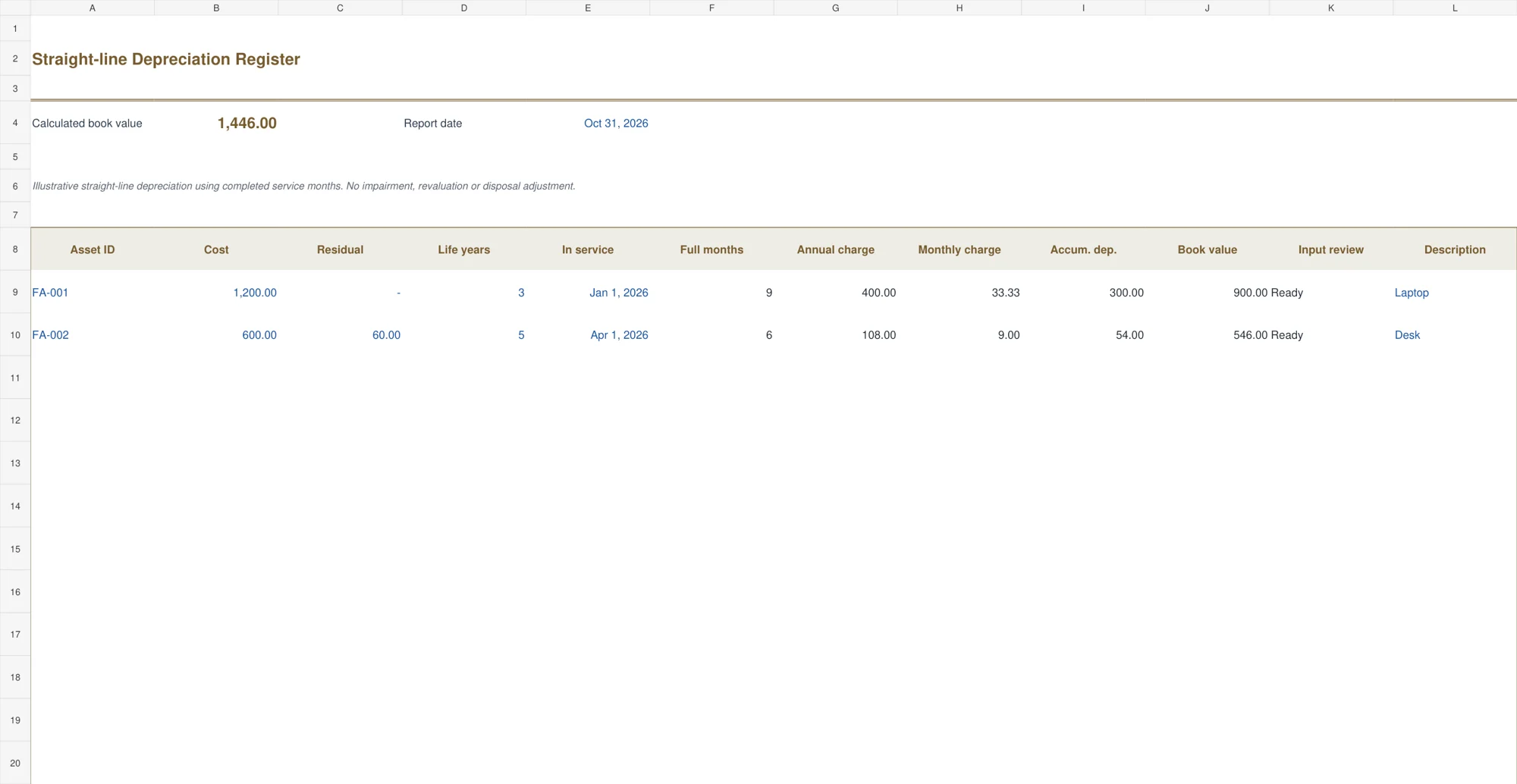
Straight-line depreciation allocates depreciable cost over the entered useful life. In the example, a 1,200 asset with no residual value and a three-year life has an annual charge of 400 and a monthly charge of 33.3333 before display rounding. The calculation retains precision even though amounts display to two decimals.
The workbook counts completed months between the in-service date and report date. For January 1 to October 31, that is nine completed months. It therefore shows accumulated depreciation of 300 and book value of 900 for that example. It does not charge a full month simply because the report falls somewhere in that month.
Different organizations may use different valid conventions. Do not assume that a daily method, half-year convention, or a tax allowance will match this completed-month illustration. The IFRS IAS 16 overview is an official starting point for that framework, but this workbook is not a full implementation of every requirement.
Review useful life and residual assumptions through the normal accounting process. If estimates change, keep the history and use an appropriate prospective calculation instead of simply overwriting old inputs and presenting the new result as though it had always applied.
Choose the record that answers the asset question
1. Fixed Asset Master Register
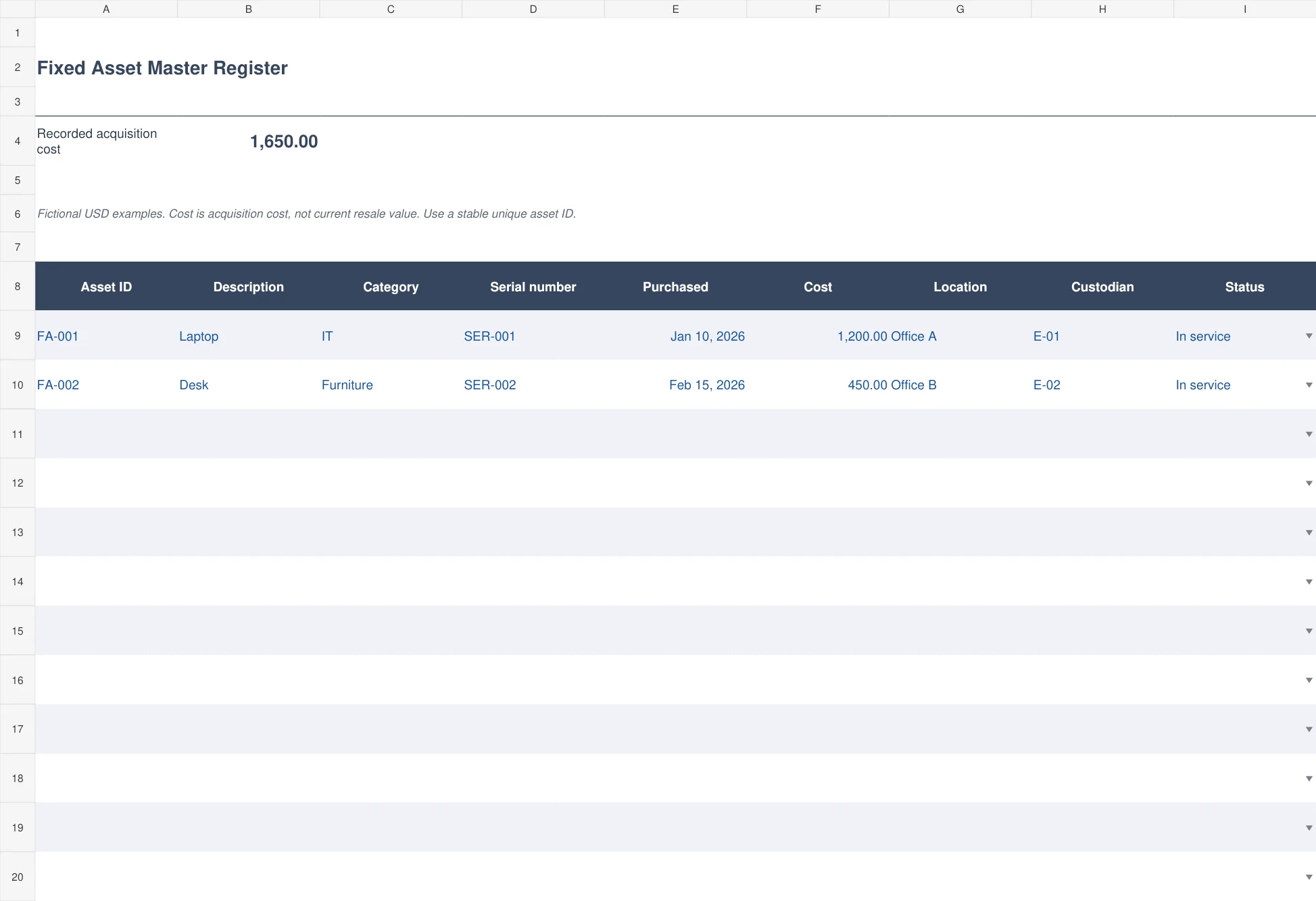
The slate master register lists asset ID, description, category, serial number, purchase date, acquisition cost, location, custodian, and status. It totals the recorded acquisition cost and provides status choices such as In service, In storage, Under repair, and Disposed.
Start here when the main problem is an incomplete equipment list. Use descriptions that distinguish similar items and retain the purchase reference in supporting records. The cost is the entered acquisition cost, not a current market valuation. A location or custodian change should be supported by an actual transfer, not a guess made during a review.
2. Straight-line Depreciation Register
The brass depreciation workbook starts with cost, residual value, useful life in years, in-service date, and report date. It calculates completed service months, annual and monthly straight-line charges, accumulated depreciation, and remaining book value. Input checks identify missing values, nonpositive life, and an invalid residual value.
This is an illustrative completed-month method. It caps accumulated depreciation at cost less residual value, but it does not handle impairment, revaluation, changes in estimates, or disposals automatically. Use it only when that simple method matches the intended record. Keep the chosen method and reporting assumptions with the accounting file.
3. Equipment Custody Register
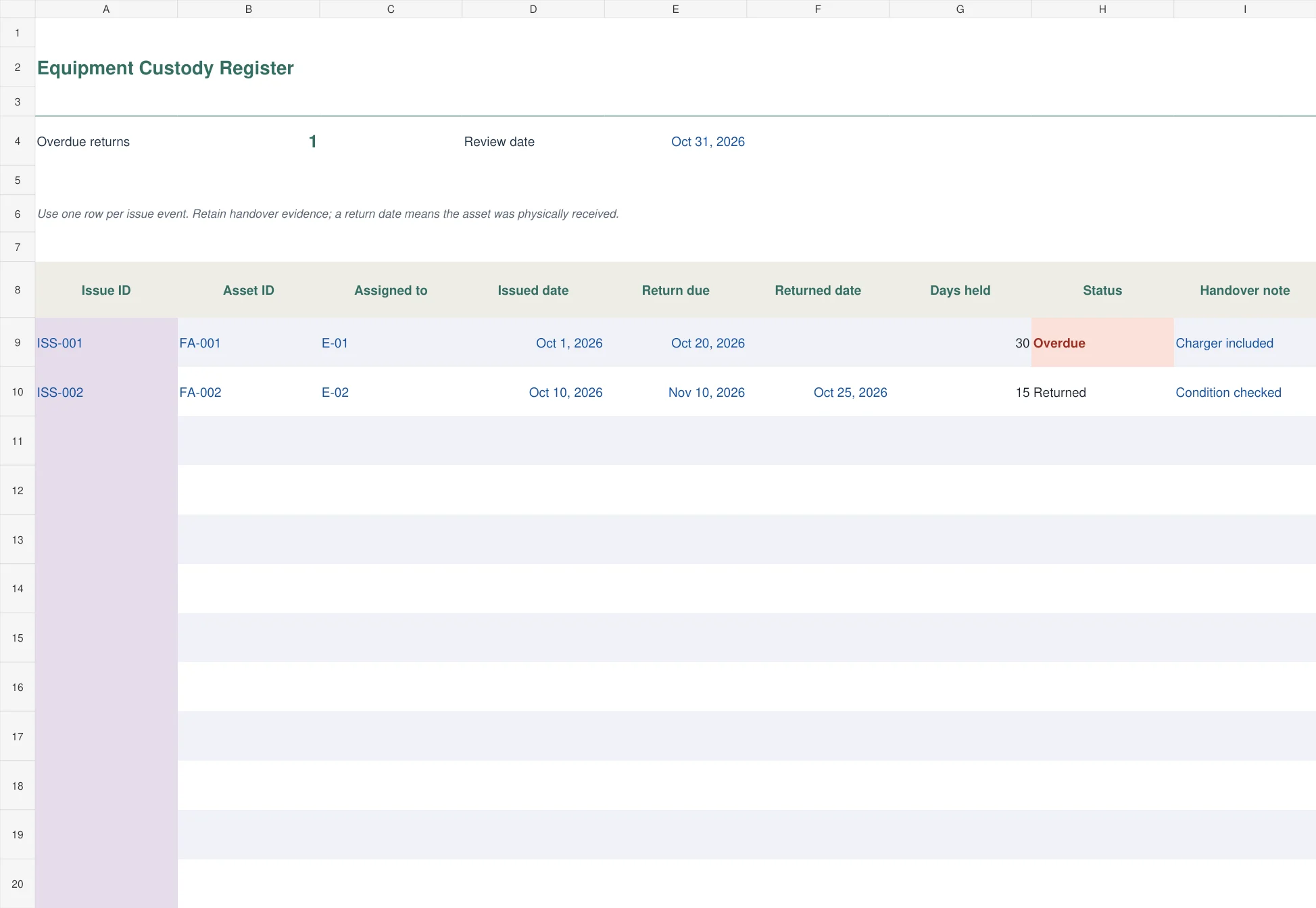
The green custody log records one issue event per row: issue ID, asset ID, assigned employee, issue date, return due date, returned date, days held, status, and handover note. The review date drives overdue-return checks for items still assigned.
Choose it for loan laptops, tools, test equipment, or other items that move between people. A returned date should mean the asset was physically received and checked. Keep condition, accessories, and handover evidence clear. Returning one item does not settle a missing charger or damage issue unless those matters have also been reviewed.
4. Physical Asset Verification
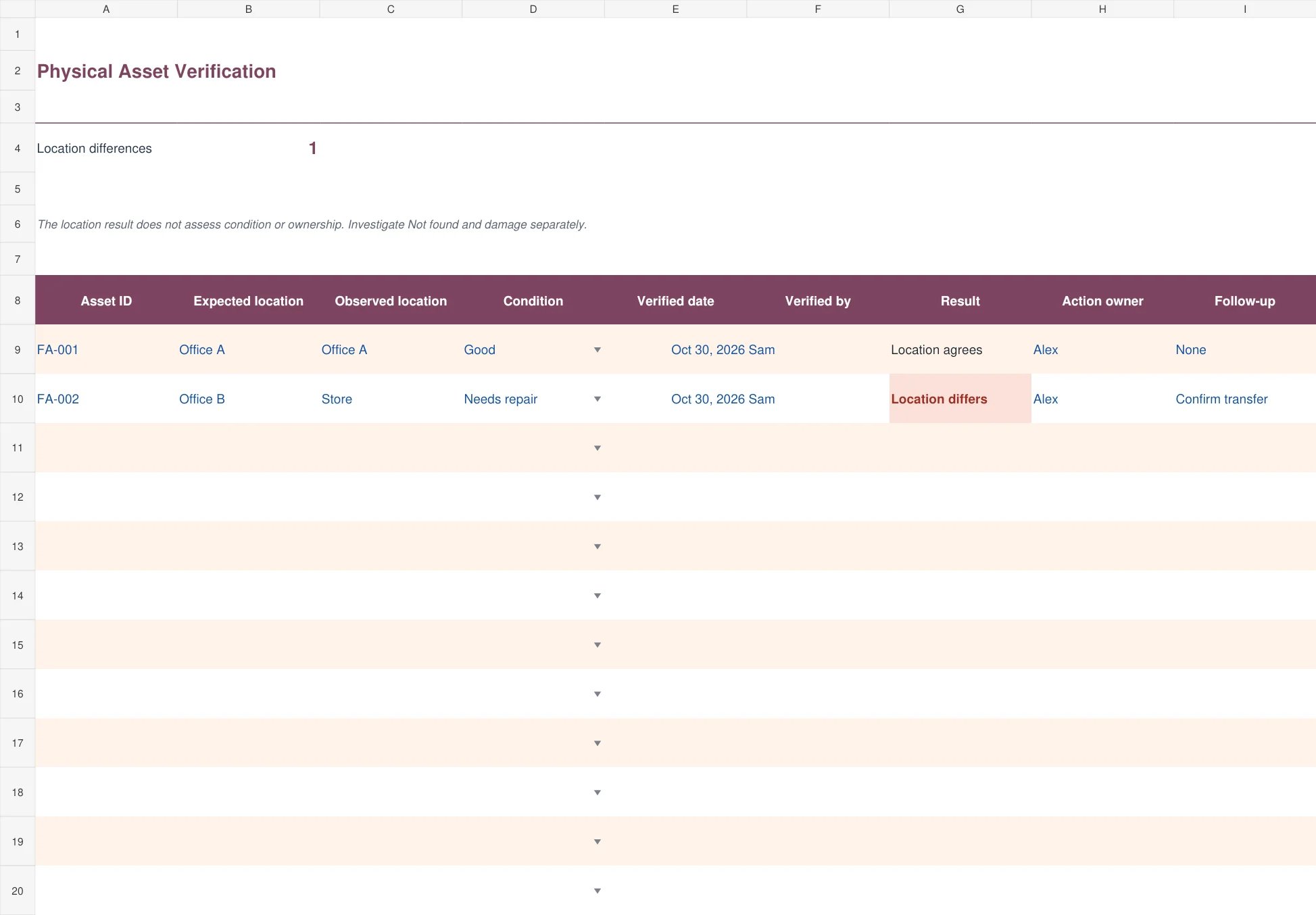
The berry physical-verification sheet compares expected and observed locations. It includes condition, verification date, verifier, a calculated location result, action owner, and follow-up. A record without the required observed location, date, or verifier remains Not verified.
Use it during a practical asset count. Location agrees means only that the two location fields match; it is not a complete assessment of condition, ownership, or value. A Not found condition needs investigation even if other fields look complete. Record what was actually observed and assign a person to resolve a difference rather than changing the expected location merely to remove the alert.
5. Asset Disposal and Gain or Loss
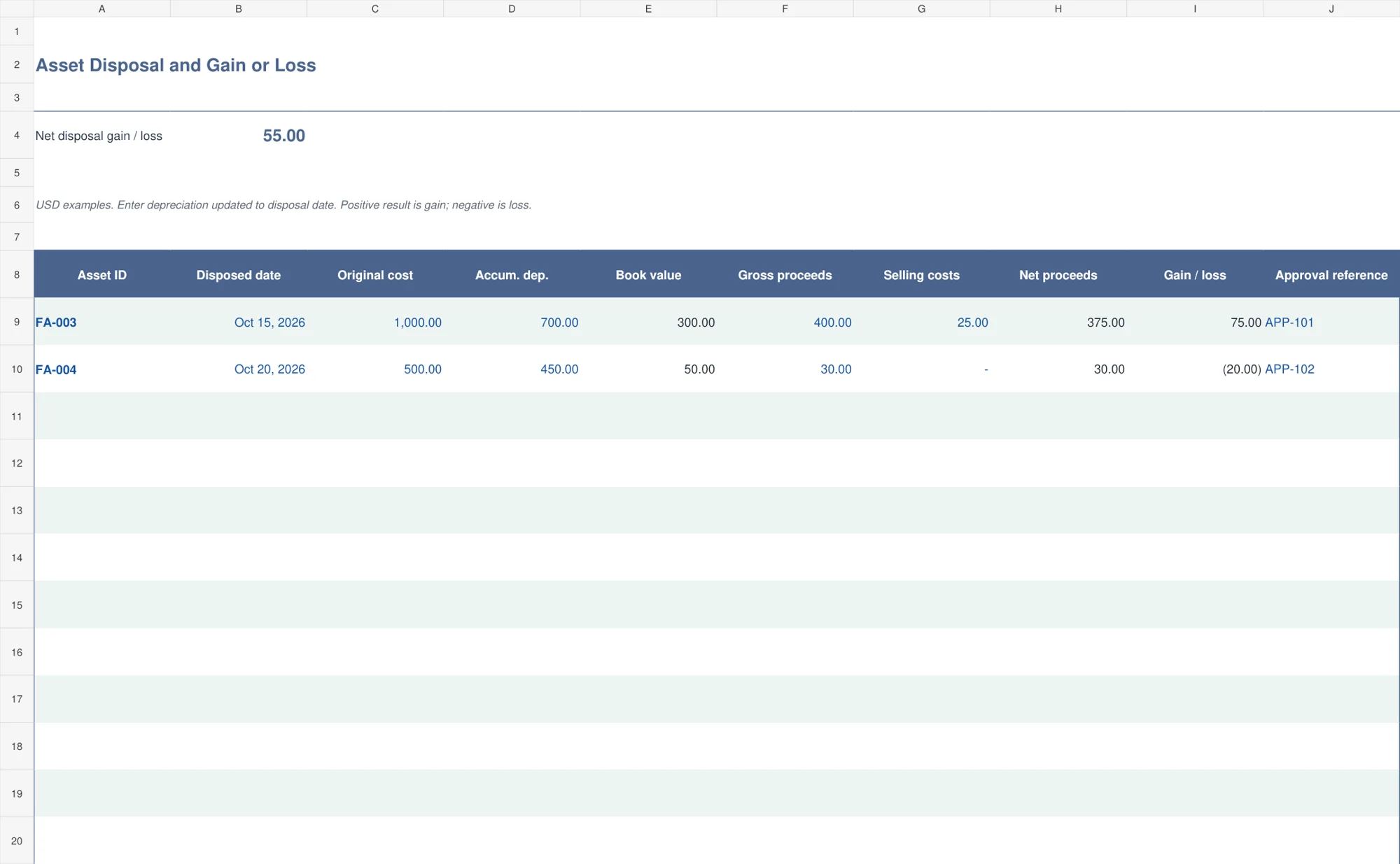
The blue disposal register compares net proceeds with recorded book value. Enter original cost, accumulated depreciation updated to the disposal date, gross proceeds, selling costs, date, and approval reference. It calculates book value, net proceeds, and gain or loss.
For an asset costing 1,000 with accumulated depreciation of 700, book value is 300. Proceeds of 400 less 25 selling costs give 375 net proceeds and a gain of 75. The result depends on the underlying depreciation being current. The file documents the calculation but does not approve disposal or post entries to the accounting system.
Use the register between year-end reviews
Record new assets when they enter the organization, not only when the annual count begins. Confirm the in-service date separately from purchase date where it matters. An item can be bought and remain in storage before becoming available for use.
Update custody when equipment is issued, transferred, or returned. Keep maintenance activity in a linked service log when an item needs a repair history. A service visit should not create a second asset unless a separately identifiable new item has actually been acquired.
For premises and shared equipment, a facility maintenance checklist can help organize recurring checks. The asset record should still hold the stable identity and current status, while the maintenance record explains the work performed.
When an asset leaves the business, retain the disposal evidence and approval reference. Mark its status appropriately in the master register and reconcile the accounting effect. Do not erase the old row simply because the item is no longer present; that history explains why the count and cost totals changed.
Editing the files safely
Create a working copy and replace the fictional IDs, dates, people, locations, and USD amounts. Keep dates numeric and amounts typed as numbers. Changing the currency number format does not convert the underlying value. Use one consistent currency basis for totals.
Each register has one hundred prepared rows. Copy formulas and extend summary ranges before adding more. In the depreciation file, pay attention to the Input review column. A summary of calculated book values excludes rows that cannot yet be calculated, so review every Check inputs prompt before treating the summary as complete.
Restrict editing of the master version to the people responsible for the records. A dated review copy makes transfers, verification differences, and disposals easier to explain later. The purpose of the file is a traceable record, not simply a clean-looking list.
Frequently asked questions
Which fixed asset template should I use first?
Start with the master register to establish identities, cost, locations, and custodians. Add the custody, verification, depreciation, or disposal workbook for the workflow you need.
Does the depreciation file calculate tax depreciation?
No. It illustrates straight-line depreciation using completed service months, the entered useful life, and residual value. It does not calculate a jurisdiction’s tax allowances.
Can an asset keep the same ID after moving?
Yes. Keep the same asset ID through transfers, repairs, and custody changes. Record the event and new location without replacing the identity.
Why is a row marked Not verified?
The physical-verification result needs an observed location, verification date, and verifier. Missing evidence remains visible instead of being treated as an agreed location.
Should I delete disposed assets?
Keep their history and disposal evidence. Update the status and use the disposal register to explain proceeds and recorded book value rather than removing the record entirely.

You must be logged in to post a comment.