
These five free bank reconciliation Excel templates help you compare bank activity with your own records and investigate differences. Choose a monthly reconciliation worksheet, an outstanding-items workbook, a transaction-matching review, a daily reconciliation sheet, or an annual register. Each editable .xlsx download has a different color theme and supports a distinct part of the reconciliation process.
A bank statement and a bookkeeping balance can differ for legitimate timing reasons, missing entries, or errors. Reconciliation identifies those reasons and documents how the balances connect. A useful worksheet shows the original balances, supported adjustments, adjusted balances, and any remaining difference instead of hiding the gap inside a typed total.
Preview each workbook below and download the one that fits your task. The files contain fictional USD examples, editable inputs, and formulas, with no macros or registration required. Use one account and one currency in each reconciliation. Keep the bank statement, cash ledger, and supporting documents alongside the completed workbook.
Which bank reconciliation template fits your process?
For a straightforward month-end close, use the monthly worksheet. If several checks or deposits remain uncleared, use the outstanding-items version so those amounts are supported by a detailed register. A transaction-matching review helps investigate individual references, but it does not replace the closing-balance reconciliation.
The daily sheet suits a small account that is checked frequently. The annual register provides a compact month-by-month record of balances, adjustments, differences, and review. Use it as a summary of completed reconciliations rather than treating twelve rows as a substitute for the evidence behind each month.
Choose and download your Excel template
1. Monthly Bank Reconciliation
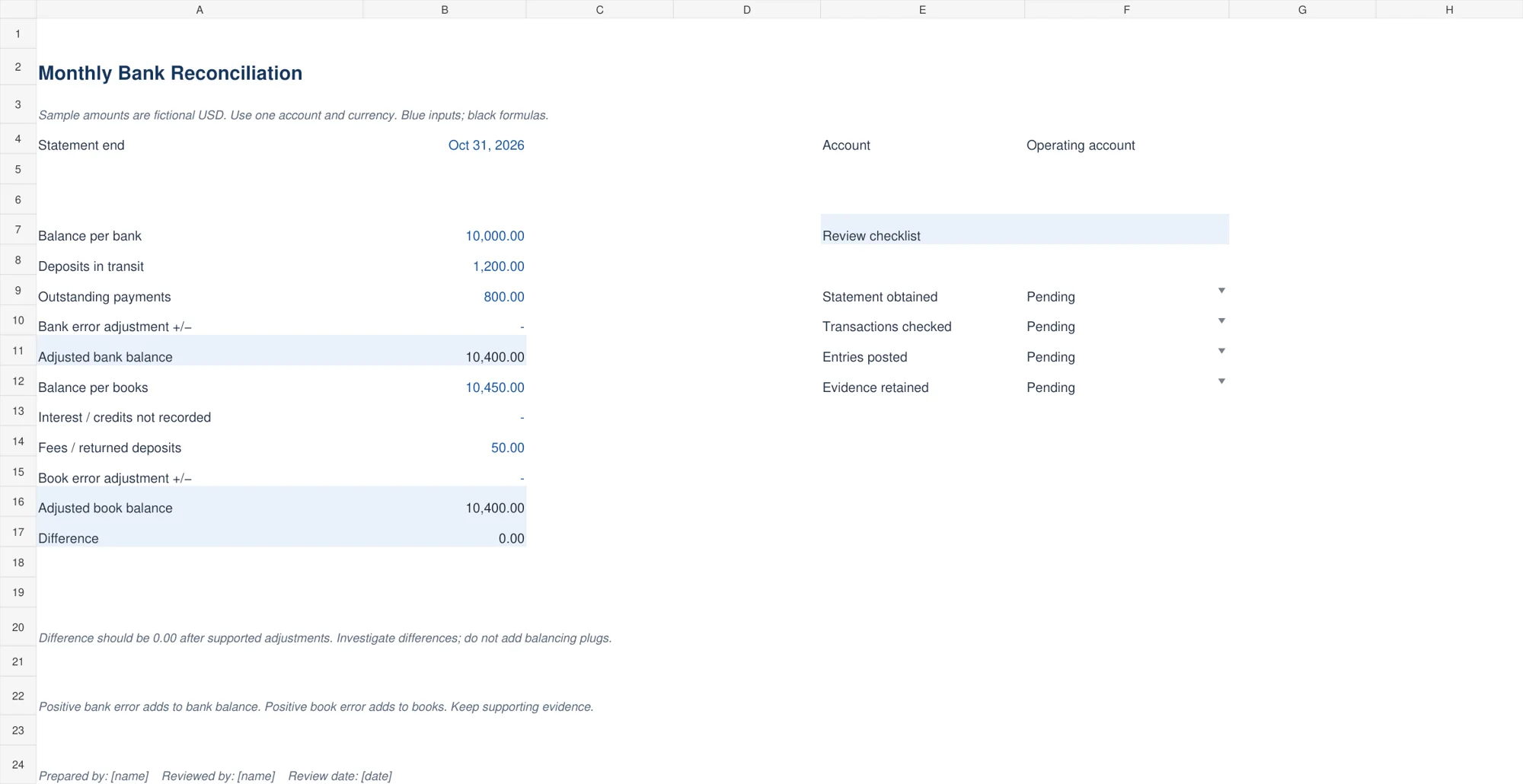
The navy monthly worksheet starts with balance per bank, deposits in transit, outstanding payments, and a signed bank-error adjustment. It calculates the adjusted bank balance. The book side records the cash-ledger balance, unrecorded interest or credits, fees or returned deposits, and a signed book-error adjustment.
The difference compares the two adjusted balances and highlights a nonzero result. Use the preparer and reviewer fields to record who completed the work. Every adjustment should be supported by a specific transaction or documented error. A zero difference is a useful control result, but it does not prove that every entry is correct.
2. Outstanding Items Reconciliation
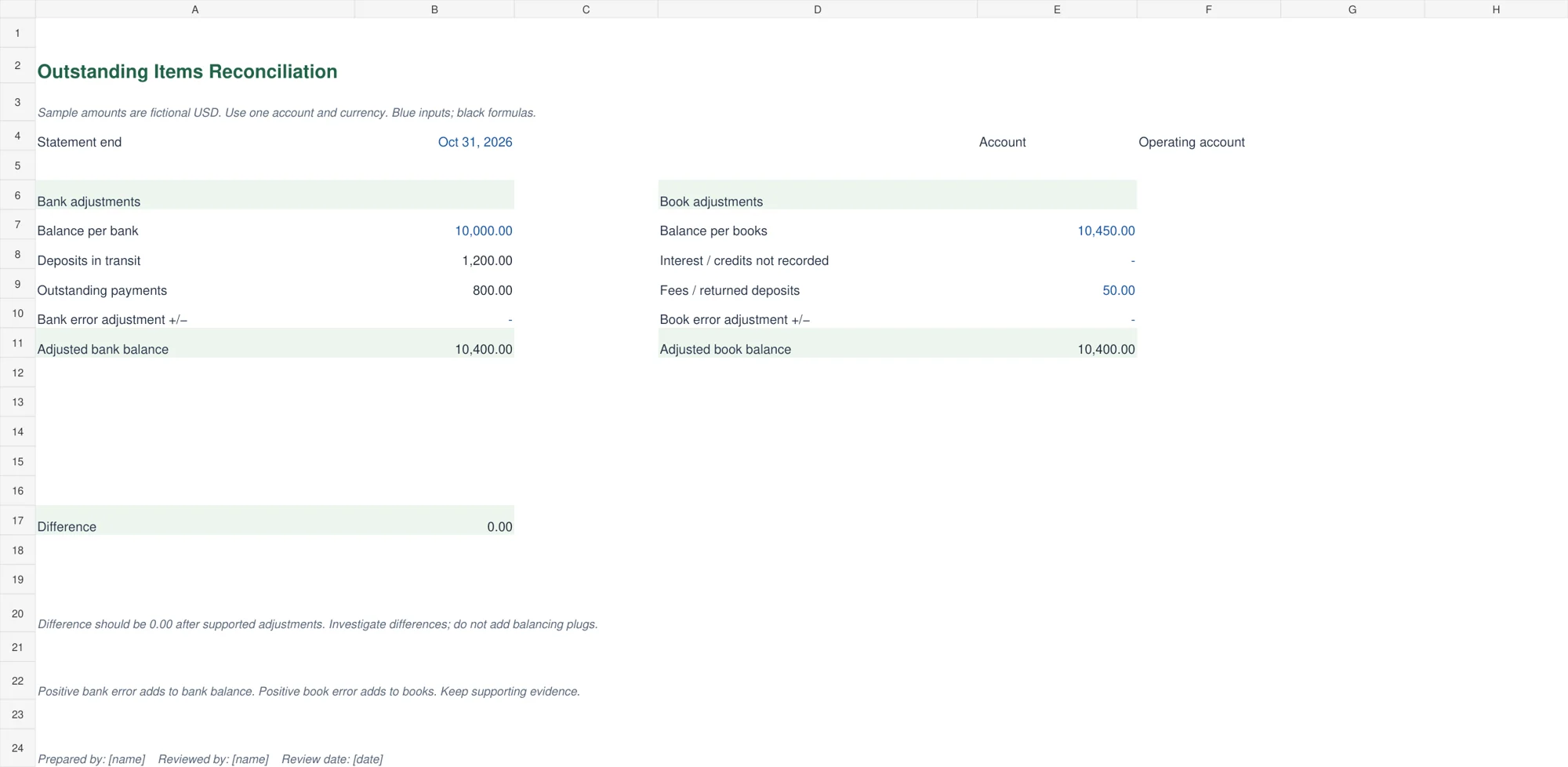
The green outstanding-items workbook adds a separate register for deposits and payments that have not cleared. Record reference, date, type, description, amount, status, and cleared date. Dropdowns provide Deposit or Payment types and Open or Cleared statuses. Open deposits and open payments feed the reconciliation automatically.
Choose this version when the supporting list is as important as the final totals. When an item clears, update its status and enter the clearing date. Check older entries before carrying them forward again. The register has fifteen prepared rows, and its lookup ranges must be extended if you add more items.
3. Bank Transaction Match Review
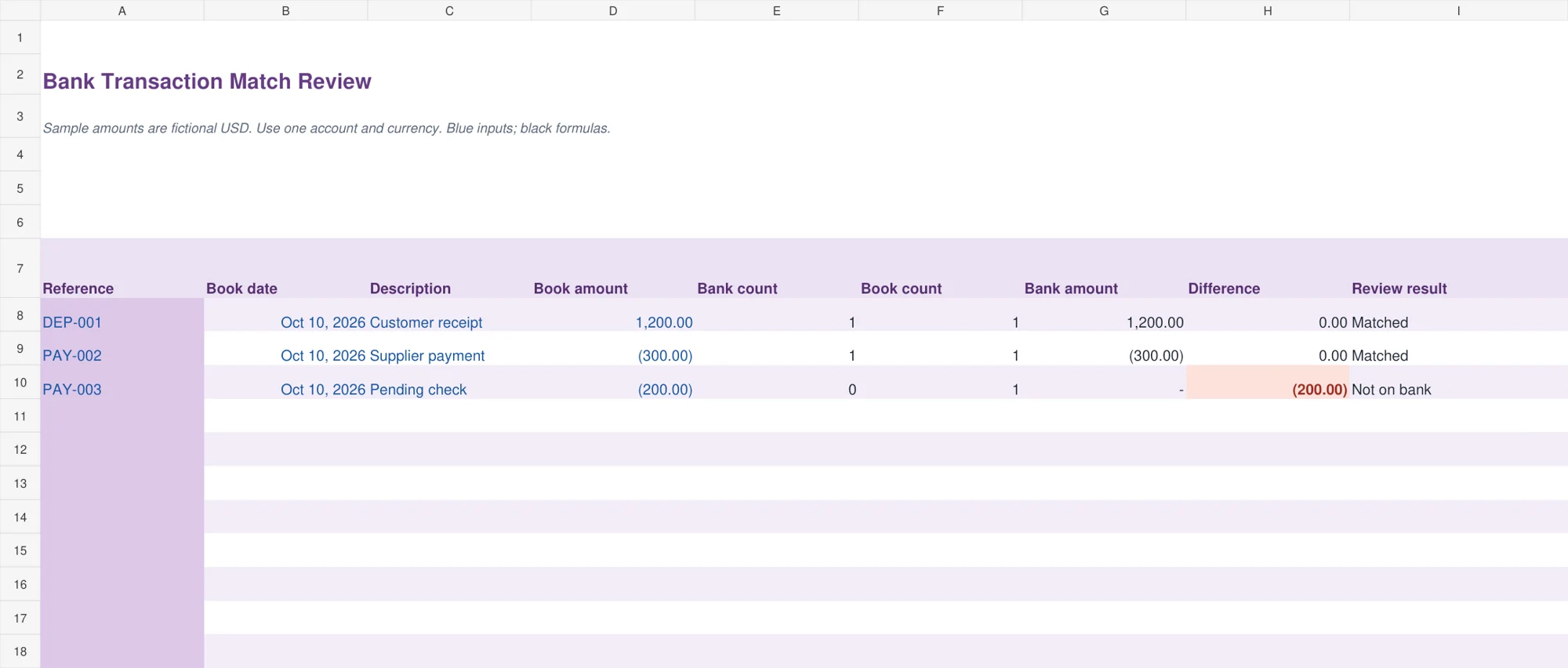
The purple transaction-match review compares a book entry with bank entries using an exact reference. It reports how many matching references appear in each list, the bank amount found, the amount difference, and a review result. Duplicate references are flagged for investigation rather than being treated as a reliable match.
Use signed amounts: receipts positive and payments negative. A unique reference and matching amount produce a Matched result. Bank-only entries still need to be reviewed separately on the Bank tab. This workbook is a matching aid, not an automatic reconciliation of closing balances, and it does not establish that a payment was authorized.
4. Daily Bank Reconciliation
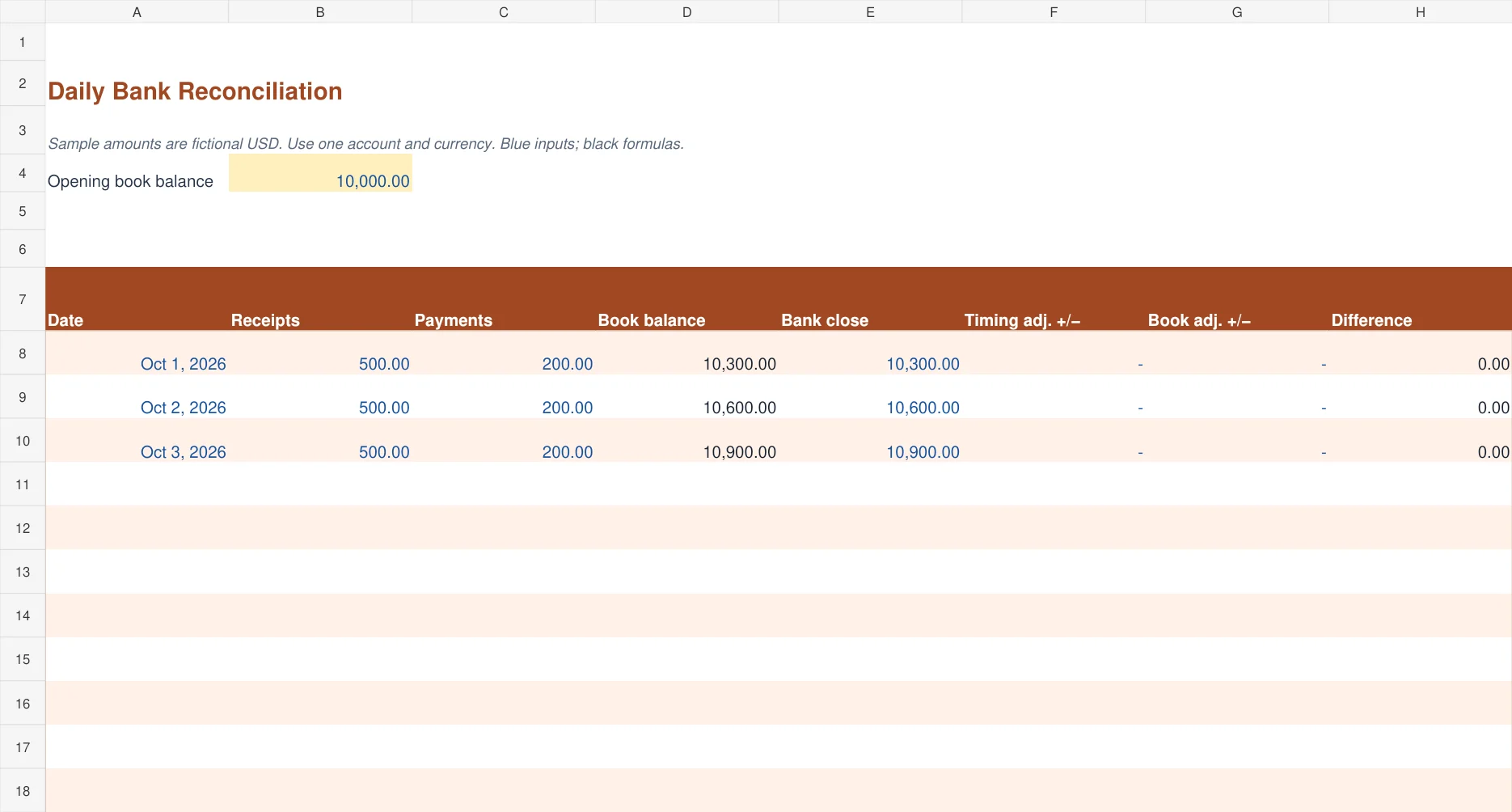
The terracotta daily bank reconciliation rolls the opening book balance forward using daily receipts and payments. For each date, enter the bank closing balance, the net bank-side timing adjustment, and any book-side adjustment for that day. It calculates the difference between the adjusted bank position and adjusted book position.
Use this for a compact daily review with fifteen prepared date rows. If you record a book adjustment today, include its effect in the next day’s source receipts or payments, or correct the underlying records before continuing. Otherwise the following day’s running balance will omit the correction. Keep that carry-forward step explicit.
5. Annual Reconciliation Register
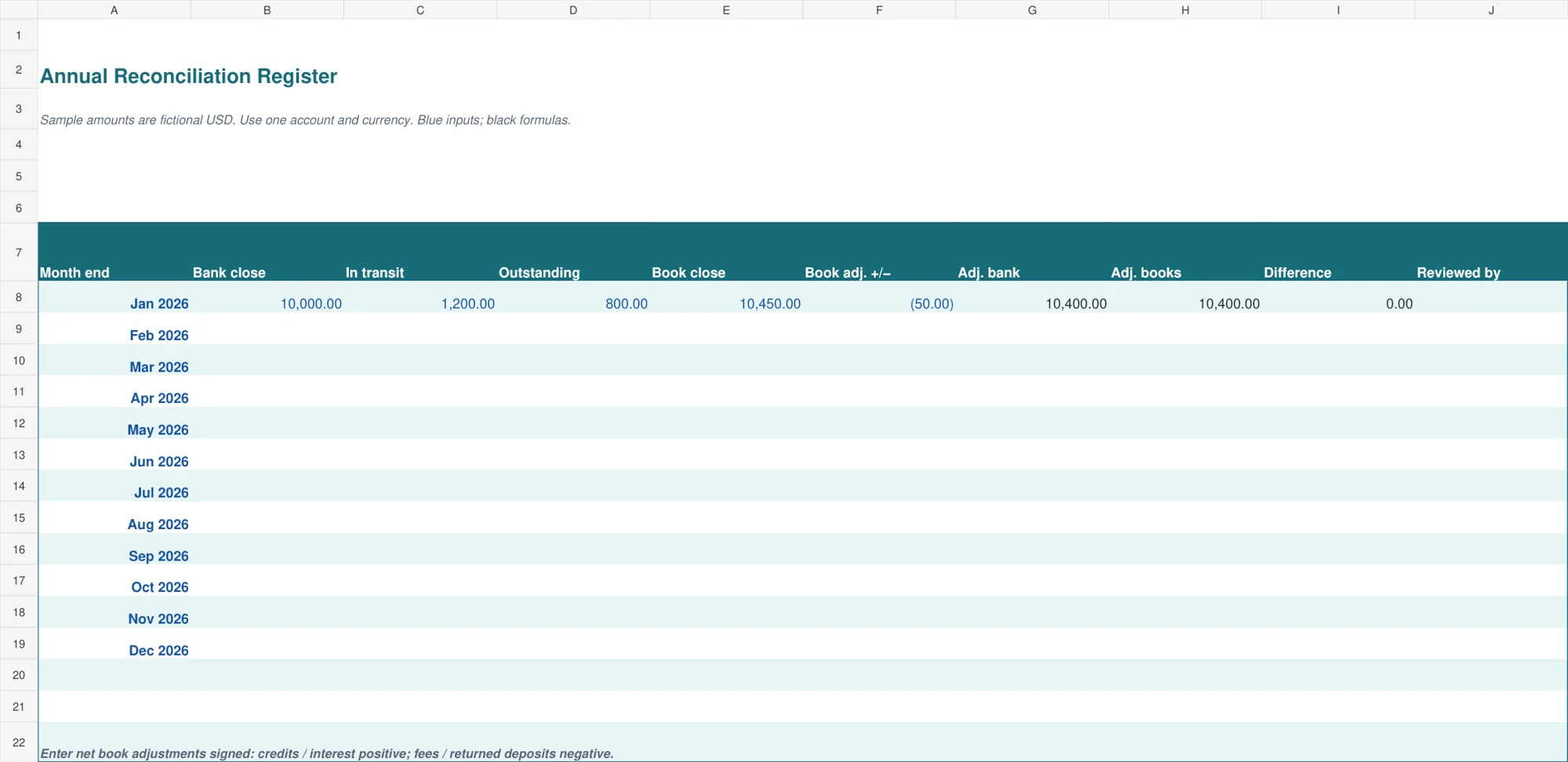
The teal annual reconciliation register provides twelve month-end rows. Enter each month’s bank closing balance, deposits in transit, outstanding payments, book closing balance, and signed net book adjustment. The workbook calculates adjusted bank balance, adjusted books, and their difference, with a reviewed-by field beside the result.
Blank months stay blank rather than appearing completed. Use the register to see which periods have figures and which differences still need attention. It supports a simple bank-side calculation without a separate bank-error column, so use the detailed monthly worksheet whenever the bank itself has made an error that needs a documented adjustment.
How bank reconciliation calculations work
For the monthly worksheet, adjusted bank balance equals the statement balance plus deposits in transit, minus outstanding payments, plus any signed bank-error correction. Deposits in transit and outstanding payments are already recorded in your books, so they explain timing differences on the bank side.
Adjusted book balance equals the cash-ledger balance plus unrecorded credits, minus unrecorded charges or returned deposits, plus any signed book-error correction. Use a positive error adjustment when the balance needs to increase and a negative value when it needs to decrease. Keep charges entered as positive amounts in the field that is explicitly subtracted.
The difference is adjusted bank minus adjusted books. The examples begin with 10,000 per bank, 1,200 deposits in transit, and 800 outstanding payments. The adjusted bank balance is 10,400. Books show 10,450 before a 50 bank fee, giving an adjusted book balance of 10,400 and a difference of 0.00.
The AccountingCoach bank reconciliation guide provides further explanation of timing differences and adjustments. Use your actual statement and ledger as the source for amounts. A template organizes the calculation; it does not determine whether an unsupported transaction should be accepted.
Prepare the records before you start
Choose one statement ending date and use the same cutoff throughout the reconciliation. Obtain the complete statement and the corresponding cash account from your bookkeeping records. Include the prior reconciliation and its uncleared items so older timing differences can be checked against the current statement.
Confirm the account identity and opening position before reviewing transactions. If the previous period did not reconcile, investigate that difference rather than carrying it into a new month without explanation. An opening error can make the current period appear wrong even when its new entries are accurate.
Your Excel checkbook register can supply a transaction list for a small account. For a fuller accounting record, compare the bank account with the relevant balance in your general ledger template. Keep one authoritative balance and document any corrections made after exporting the original records.
A practical reconciliation workflow
First, match the transactions that clearly appear in both records. Compare references, dates, descriptions, and amounts. A date difference may reflect posting timing, but two equal amounts are not enough to prove a match. In the matching workbook, use unique references and investigate duplicate-reference warnings before relying on the result.
Second, list transactions in the books that have not reached the bank. Identify whether each is a deposit in transit or an outstanding payment. Keep a reference, date, amount, and supporting document. Check subsequent bank activity when appropriate to establish whether the item cleared after the statement date.
Third, identify bank activity missing from the books. Examples may include a service charge, interest, an automatic payment, or a returned customer deposit. Prepare the appropriate entry in your actual bookkeeping records. Entering an amount in the reconciliation workbook alone does not update the ledger.
Fourth, investigate errors in either record and document the correction. Recalculate both adjusted balances. If a difference remains, trace it to its source before signing off. Do not enter an unexplained adjustment solely to make the difference zero. Record the preparer, reviewer, and review date, and save the supporting files together.
Finally, update the outstanding-items list when transactions clear in the following period. Preserve a dated copy of the completed reconciliation before changing statuses. The register shows the current status of its items; it does not automatically preserve a historical snapshot of earlier month-end totals.
Common reconciliation mistakes and how to prevent them
Avoid reversing deposits and payments. The monthly worksheet adds deposits in transit and subtracts outstanding payments from the bank balance. Reversing those signs increases the gap. The transaction matcher instead uses signed transactions, so keep its positive-receipt and negative-payment convention consistent on both tabs.
Avoid recording the same bank fee twice. If the charge is already included in your book balance, it should not also be deducted as an unrecorded fee. Compare the adjustment with the underlying entry and keep a clear record of whether the ledger has been updated.
Do not confuse a bank reconciliation with an expense summary. Reconciliation explains a cash-account balance. An expense report classifies spending, and a cash-flow report explains cash movements across activities. Use your bookkeeping templates to keep source entries organized, then use the reconciliation to verify the bank account.
Check stale outstanding items instead of copying them forward indefinitely. A lost check, duplicate deposit, or posting error may require action. Keep the original evidence and record the reason for any correction. A tidy worksheet is valuable only when its balances can be traced back to real records.
Editing and extending the workbooks
Save a clean master before entering your account data. Blue text identifies inputs and black text identifies calculated cells. Dates should remain real Excel dates and amounts should remain numeric. Changing a currency symbol affects presentation only; it does not perform currency conversion.
The matching workbook has fifteen prepared rows on each tab. The outstanding register and daily sheet also provide fifteen rows. If you need more capacity, copy formula rows and extend all related lookup or summary ranges. Test an added record at the end of the expanded range to confirm that its amount reaches the result. Review Excel’s print layout before sharing a PDF.
Frequently asked questions
Are these bank reconciliation templates free to download?
Yes. Each button downloads an editable .xlsx workbook directly. Replace the fictional examples and save the completed reconciliation with your own statement and ledger evidence.
Should the difference always be zero?
A completed reconciliation should explain the difference between the bank and book balances so the adjusted balances agree. Investigate any remaining amount. A zero result still requires a review of the underlying transactions and adjustments.
Does the transaction matcher find every missing entry?
No. It compares book entries with bank references and flags duplicate references or amount differences. Review bank-only entries on the Bank tab separately and complete a closing-balance reconciliation as well.
Should outstanding checks be entered again in the books?
An outstanding payment already recorded in the books is normally a bank-side timing item. Do not duplicate the expense or payment merely because it has not cleared. Investigate errors separately and make supported corrections where necessary.
Can I keep several bank accounts in one file?
These layouts are designed for one account and currency at a time. Use separate copies for different accounts so balances and outstanding items remain easy to trace and review.

You must be logged in to post a comment.