
A risk register becomes useful when it changes what the team does next. “Supplier delay” written in a meeting note gives little direction. A possible delivery delay tied to a work package, an owner, a response and a review date gives the team something it can manage.
These five project risk register Excel templates cover the initial assessment, residual exposure, construction work packages, supplier dependencies and action review. Each free download has a different design, editable fields and formulas for the calculations that suit its purpose. Previews show the actual workbook layout before you choose a file.
Describe the risk before assigning a score
Write the uncertain event and the consequence together. For example, a specialist component may arrive after its required date, delaying installation. The event is uncertain today, but the schedule consequence is understandable. A current problem is an issue that needs action now. Keeping that distinction clear prevents the register from becoming a general to-do list.
Give the risk a stable identifier so actions, evidence and meeting decisions can refer to it without relying on a changing description. Then identify the person responsible for coordinating the response. The owner may not perform every task, but should know who is doing what and when the assessment will next be reviewed.
Likelihood and impact scores are useful only when their meanings are agreed. Define whether impact concerns time, cost, quality or another consequence and how competing effects are assessed. A five-point number with no definition can create false confidence. Keep the scale guidance with the project’s review process and apply it consistently.
Understand the example scoring model
The standard templates calculate score as likelihood multiplied by impact. Both inputs run from one to five, giving possible scores from one to 25. The example priority labels use high at 15 or above, medium from 8 to 14 and low from 1 to 7. These are editable working conventions for the sample files, not a universal standard or a statistical measure of expected loss.
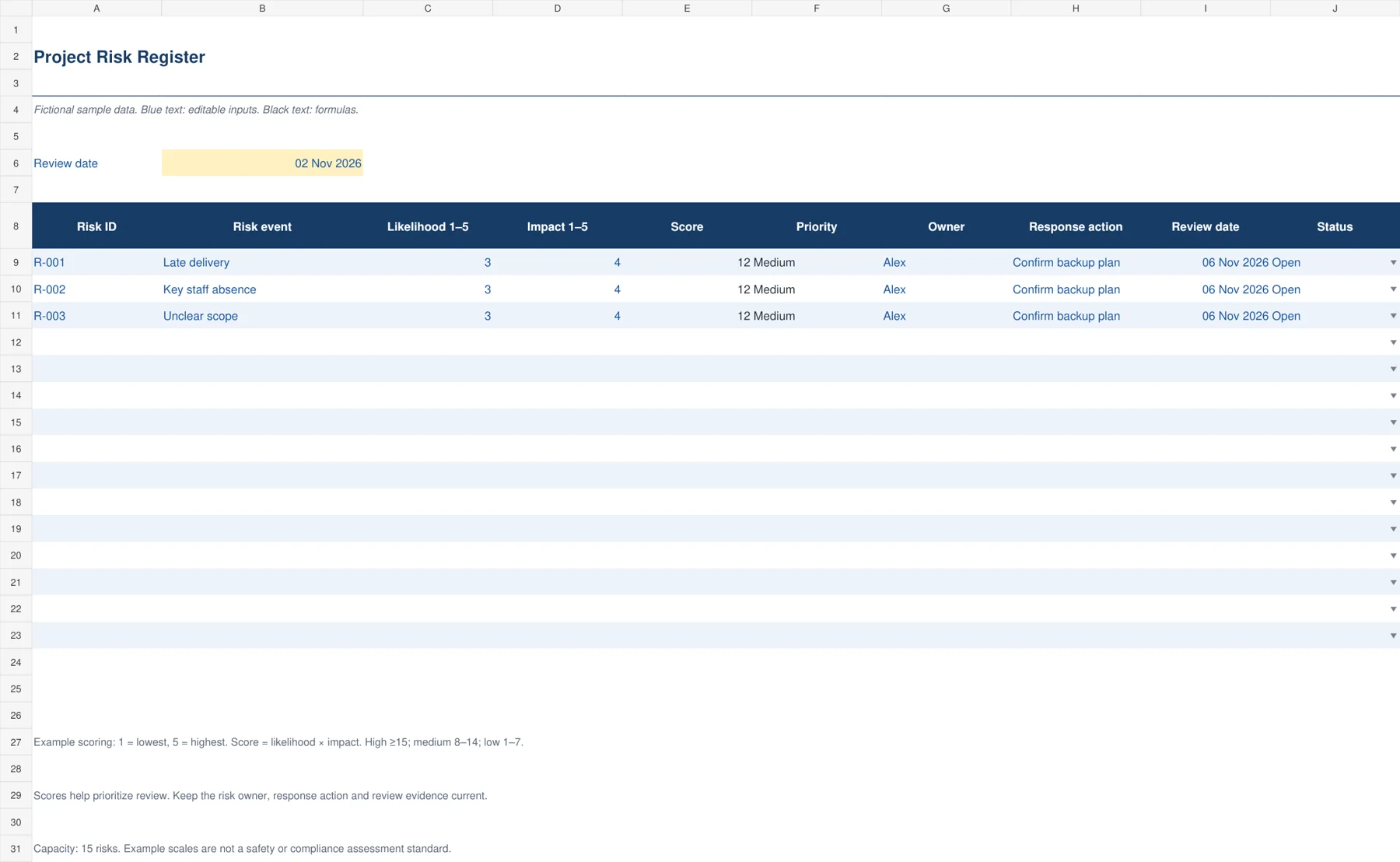
Suppose a late delivery has likelihood three and impact four. Its score is twelve, which falls in the example medium band. If likelihood increases to five while impact stays four, the score becomes twenty and the high flag appears. The change should lead to a discussion about evidence, response and escalation rather than simply a different cell color.
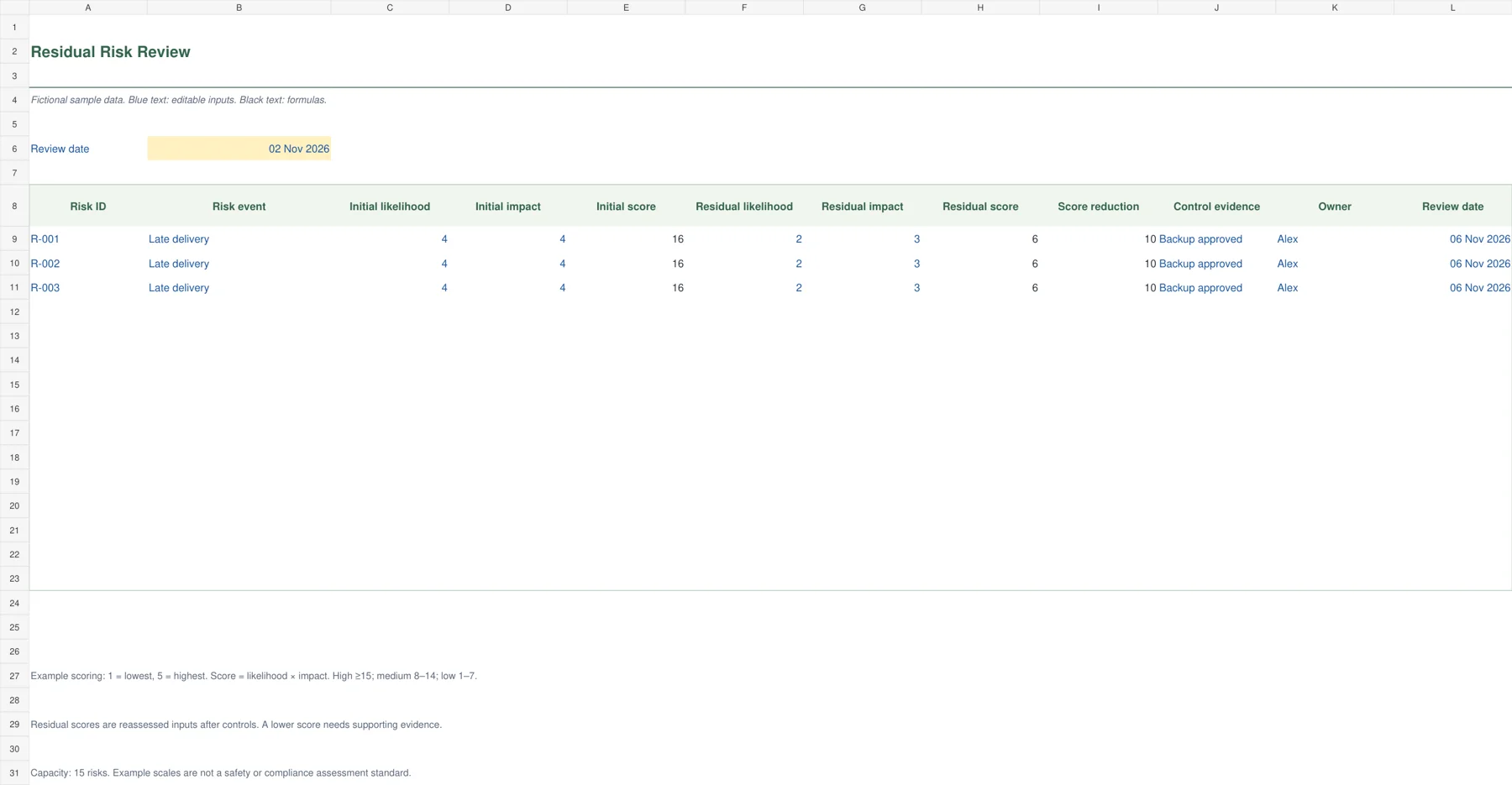
In the residual workbook, an initial likelihood of four and impact of four produces sixteen. After a verified control, reassessed likelihood two and impact three produce six. The reduction is ten score points. It should be explained by the control evidence, such as a tested alternative source and confirmed lead time. Do not lower scores solely because the team wants a more comfortable report.
Choose and download your Excel template
1. Project Risk Register
The navy standard register puts the risk event, likelihood, impact, score, priority, owner and response on one row. A review date and status complete the working record. Scores calculate from an example five-point scale and high items receive a visual flag. This is the starting file for a small project that needs one accountable list rather than several disconnected notes from planning meetings.
Write a risk as a possible event with a consequence. Enter likelihood and impact from one to five and assign an owner who can pursue the response. The example priority bands are high at 15 or more, medium from 8 to 14 and low from 1 to 7. Agree what each scale level means before comparing scores across the project.
2. Residual Risk Review
The green residual review compares initial and reassessed risk after controls. Initial likelihood and impact create one score. Separate residual inputs create another, and the difference shows the numerical reduction. A control-evidence field keeps the review connected to what has actually changed. This layout helps teams examine whether a mitigation has reduced exposure instead of merely marking an action complete.
Enter the initial assessment before the control and retain its context. Reassess residual likelihood and impact after checking the control evidence. Do not type the reduction directly: it calculates from the two scores. A reduction of ten points is a change on the example scoring scale, not a 10% probability reduction or a measured financial saving.
3. Construction Risk Register
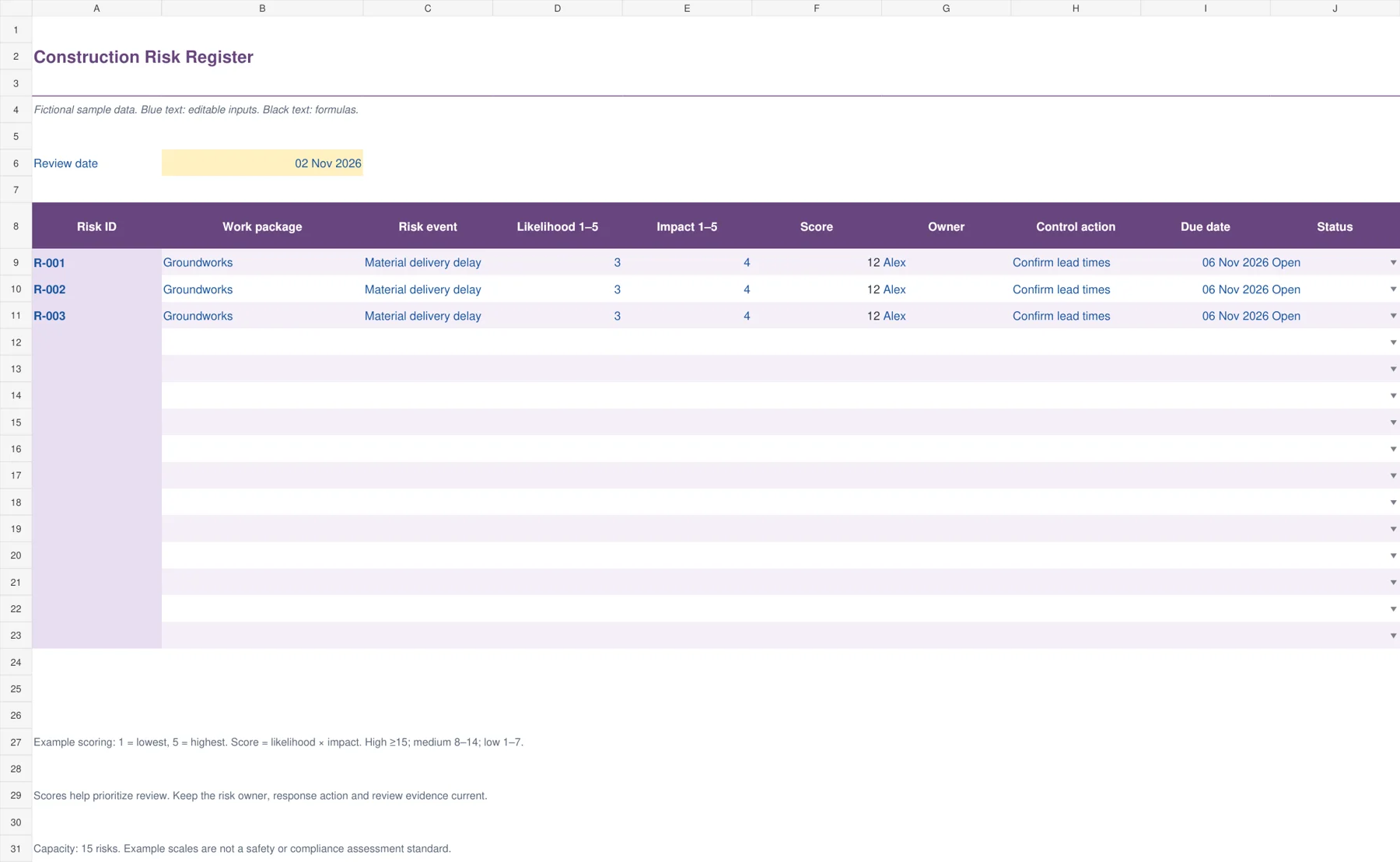
The purple construction layout adds a work package and makes the control action, owner and due date prominent. Use it to connect possible events to specific stages, such as groundworks, procurement or finishing. Calculated scoring gives a common discussion aid across those work packages, while the action column captures the response. The sheet supports coordination and should be adapted to the project’s actual review process.
Describe the event and its consequence clearly, such as a late material delivery delaying a scheduled pour. Record the response, who owns it and when the action is due. Keep formal site safety assessments and required specialist controls in their approved process. This general risk register organizes discussion and follow-up; it does not establish compliance or replace a task-specific safety assessment.
4. Supplier Risk Register
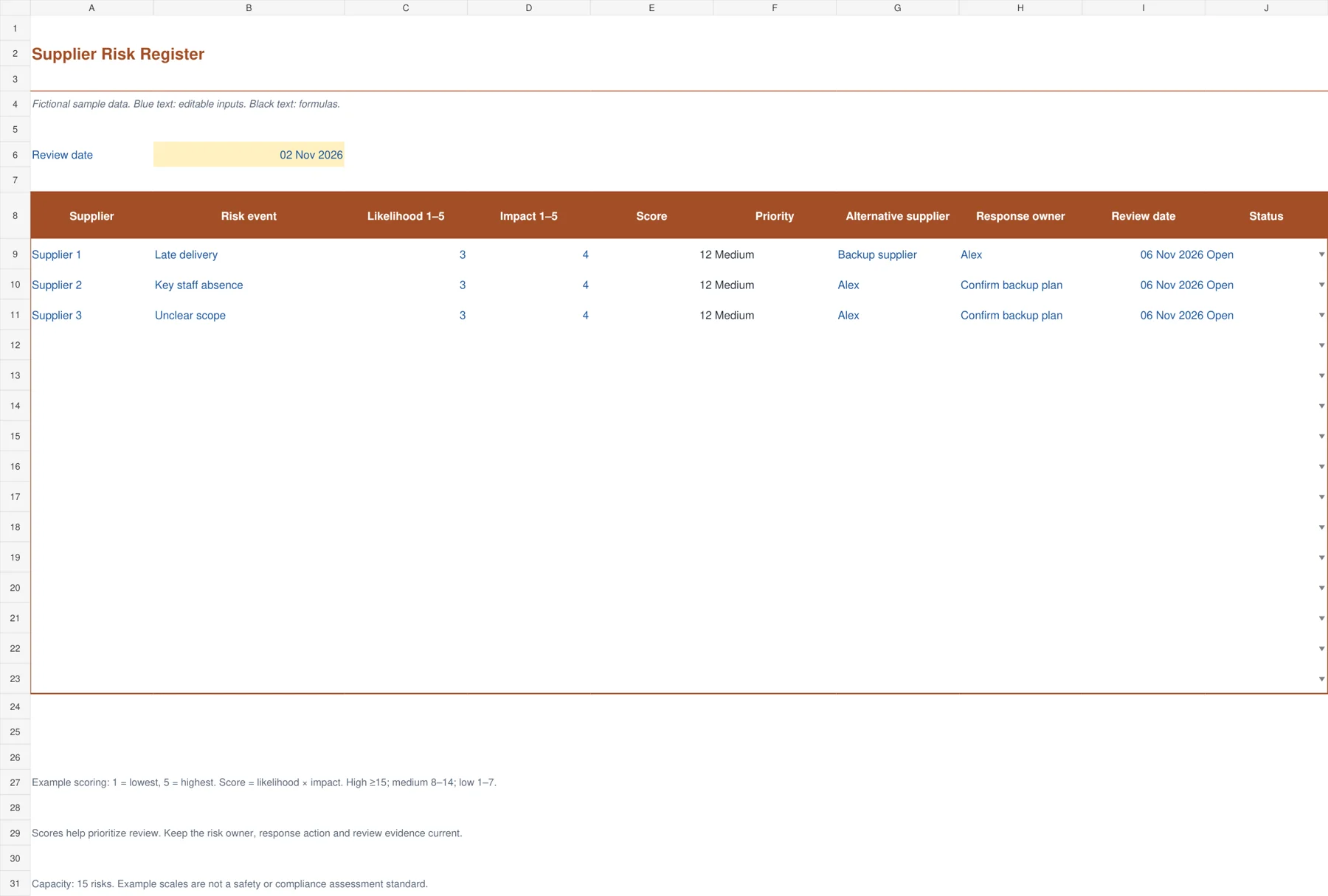
The orange supplier register focuses on exposures arising from a vendor relationship. It keeps the supplier, possible risk event, likelihood, impact, score, priority, alternative source and response owner together. The design is useful when a project depends on a long lead-time item, a specialist subcontractor or a single source. Review dates prevent a backup option from being treated as permanently available without confirmation.
Enter one supplier risk per row and explain the affected requirement. Identify an alternative supplier only when the option has been checked for fit, timing and commercial conditions. Assign someone to maintain that information. A backup name alone does not reduce the risk; the residual review worksheet is a better place to record a supported reassessment after a real control is in place.
5. Risk Action Review
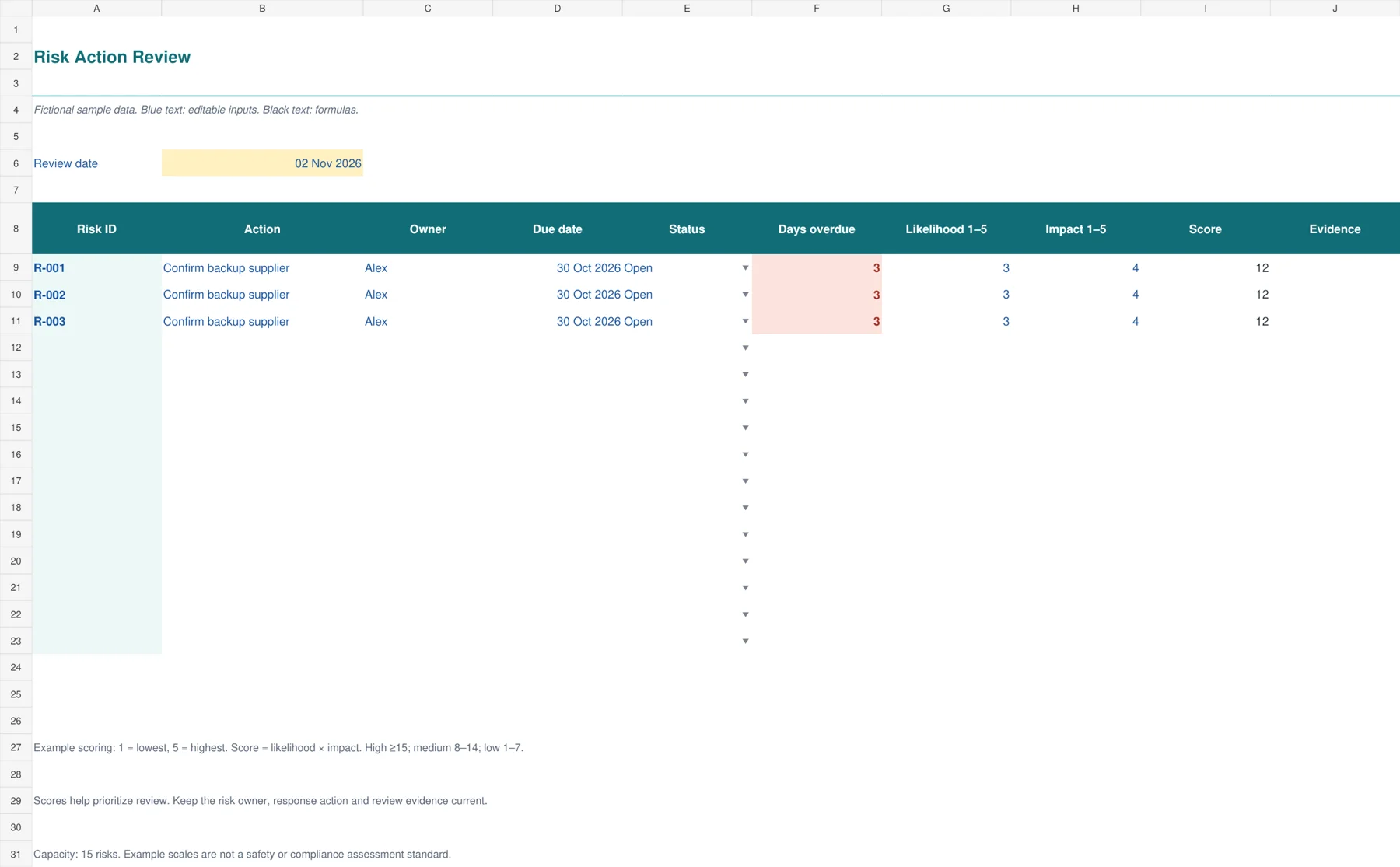
The teal action worksheet is designed for the recurring review meeting. It lists the action, owner, due date, status, overdue days, current risk score and evidence. The emphasis shifts from identifying a risk to checking that a specific response is progressing. Overdue open actions receive a visible flag. Several actions for the same risk can be entered on separate rows while retaining the same risk identifier.
Set the review date and record one action per row. An open action overdue by three days displays three; changing its status to Closed returns the overdue-days calculation to zero. Keep completion evidence before closing it. Closing an action does not automatically close the underlying risk, because the remaining exposure may still need monitoring or another response.
Choose responses that someone can carry out
A response should be specific enough to assign and review. “Monitor supplier” is incomplete unless someone knows what to check and what result requires action. “Confirm dispatch date each Tuesday and escalate if it moves past November 10” defines a practical task and trigger. Record the owner, due date and evidence that will demonstrate completion.
Some risks can be reduced, avoided, transferred through an appropriate arrangement or accepted with a clear decision. The spreadsheet does not choose the response for you. It provides the place to record what the team has agreed and the information needed to revisit the decision when conditions change.
Link timing consequences to your project timeline so a response date is meaningful. A mitigation due after the affected milestone may offer little protection. For cost-sensitive projects, compare potential responses with the approved project or event budget rather than assuming every useful action is already funded.
Supplier dependencies also benefit from accurate contact and term records. Keep the supplier risk assessment connected to your vendor list by a consistent supplier name or code. A current contact can make it much easier to verify a lead time or confirm whether an alternative is still realistic.
Review the register as a living record
Set a review frequency that matches the project. A fast-moving construction stage may require more frequent checks than a stable internal project. Begin each review with changed circumstances, overdue responses and risks approaching a trigger. Then assess whether existing controls still work and whether new risks have appeared.
The action review workbook uses an editable review date to calculate overdue days. Keeping that date fixed makes a meeting record reproducible. Update it deliberately for the next review. A live TODAY formula can be useful in some workflows, but it changes the displayed aging after the meeting and may make a saved report harder to explain later.
Do not equate an action with the risk itself. An action can be completed while exposure remains. A backup supplier may have been contacted but still lack available stock. Record the evidence, reassess the remaining likelihood and impact, and retain the risk if the team still needs to monitor it. Closure should follow an explicit review rather than a convenient status change.
Keep the workbook clear and proportionate
Each file provides fifteen working rows, numeric score validation and fictional examples. Blue input text and dark formula text help distinguish the parts you normally edit. Extend formulas and formatting before adding more records. If you change the priority bands, update both the formula and the explanation so readers see the same rules in the workbook and the project guide.
Avoid collecting details that nobody will maintain. A small register with current owners, evidence and review dates is usually more actionable than a long list of stale risks. Preserve enough history to explain significant changes and retain supporting evidence outside the workbook when documents are lengthy.
For broader field examples and register structures, see Smartsheet’s risk register resources. Select the fields that match your project and follow any assessment method your organization requires rather than assuming the sample scoring model fits every decision.
Frequently Asked Questions
What is the difference between a risk and an issue?
A risk concerns an uncertain event that may affect an objective. An issue is a problem that already exists and needs a current response. You can refer between the records, but keeping the distinction helps the team understand whether it is preventing a possible event or resolving an actual one.
Are the scoring thresholds an industry standard?
No. The five-point scales and high, medium and low thresholds are example conventions supplied with these files. Agree definitions for your project and update the formulas and explanatory text together if your organization uses different bands. Scores are a prioritization aid rather than precise probability calculations.
Does completing a mitigation close the risk?
Not automatically. Check whether the control worked and reassess the remaining exposure. The residual review workbook records separate post-control inputs and supporting evidence. A completed action may still leave a risk that needs monitoring, another response or an explicit acceptance decision.
Can I use the construction register for safety compliance?
Use it to coordinate project risks and responses alongside the approved site processes. The general scoring sheet does not replace a formal safety assessment, specialist inspection or legally required documentation. Add the references your project needs and keep the responsible reviewer involved.
